


Introduction
In today’s fast-paced software development landscape, the disconnect between architectural design and living documentation remains one of the most persistent sources of technical debt. Teams spend valuable time exporting static diagrams, managing file versions, and manually updating wikis—only to find their documentation outdated before it’s even published. This friction slows onboarding, creates ambiguity during reviews, and forces engineers to maintain parallel sources of truth.
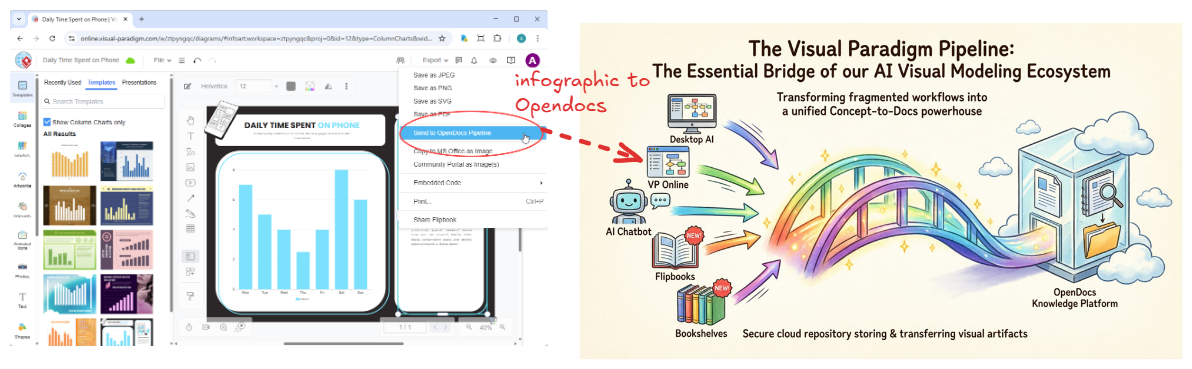
Visual Paradigm addresses this challenge through an integrated ecosystem centered on the Pipeline: a unified, cloud-based asset transit hub that bridges desktop modeling tools, browser-based editors, and AI-powered documentation platforms. This case study explores how the Pipeline serves as the connective tissue between Visual Paradigm Desktop, Visual Paradigm Online, and OpenDocs—enabling technical models, charts, and graphics to flow seamlessly into team documentation without manual file management. By treating diagrams as versioned, living artifacts rather than static exports, engineering teams can establish a sustainable workflow where documentation evolves in lockstep with system design.
1. The Core Roles in the Workflow
The Content Producers: Desktop & Online Platforms
Visual Paradigm Desktop serves as the professional modeling environment used by software architects and developers to build deep, enterprise-grade UML models, BPMN workflows, entity-relationship diagrams, and system architecture blueprints. Its rich toolset supports complex modeling scenarios, AI-assisted diagram generation, and integration with version control systems .
Visual Paradigm Online provides a zero-configuration, browser-based alternative for agile teams needing to generate cloud diagrams, AI chatbot outputs, and interactive flipbooks quickly. Its accessibility makes it ideal for collaborative design sessions, rapid prototyping, and stakeholder reviews
The Transport Hub: The Pipeline
The Pipeline functions as a central cloud registry that captures creative assets from both Desktop and Online environments. It catalogs metadata, handles secure cloud storage, and maintains strict version history for every model sent to it. Think of it as a secure, centralized repository for “artifacts”—all the assets created across the Visual Paradigm ecosystem.
Key capabilities include:
- Secure, centralized storage for diagrams, models, and documentation assets
- Version tracking with complete revision history
- Cross-tool interoperability (Desktop → Online → OpenDocs → Chatbot)
- Metadata support including comments, tags, and authorship information
The Destination: OpenDocs
OpenDocs is an AI-powered, team-based knowledge and document management platform designed specifically for technical teams. It directly accesses the Pipeline to embed living diagrams straight into user guides, API references, architecture decision records, and technical manuals . Unlike conventional documentation tools, OpenDocs integrates a robust diagram editor directly into its interface, allowing teams to insert, preview, and re-edit diagrams without leaving the document.
2. How the Relationship Functions
The Push Mechanism: From Editors to Pipeline
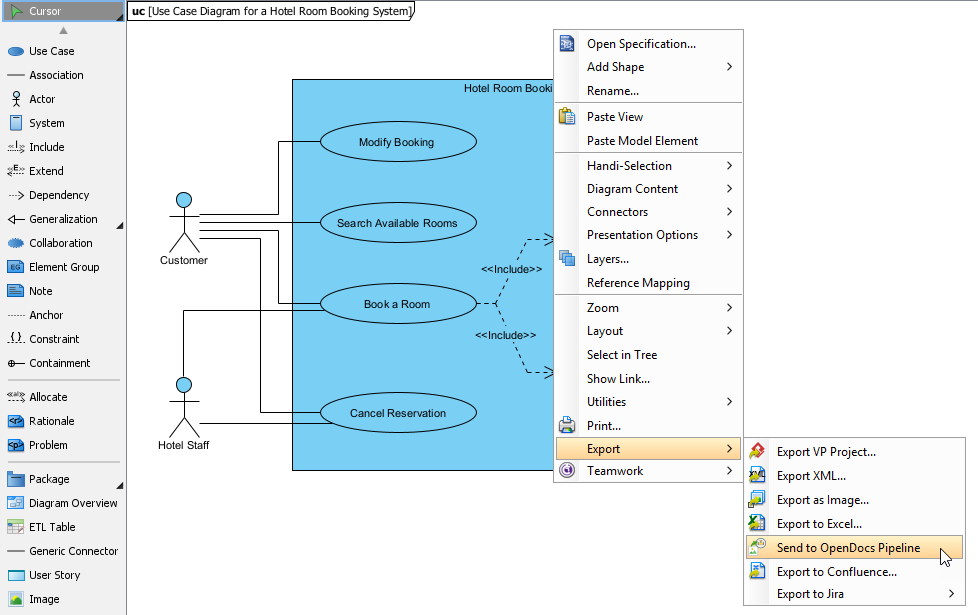
Instead of taking screenshots or exporting static PNGs to local storage, users initiate the workflow by clicking Export > Send to OpenDocs Pipeline inside either the Visual Paradigm Desktop or Visual Paradigm Online interfaces. This action securely pushes the artifact to the cloud repository with optional tracking comments to help identify the version or purpose of the asset.
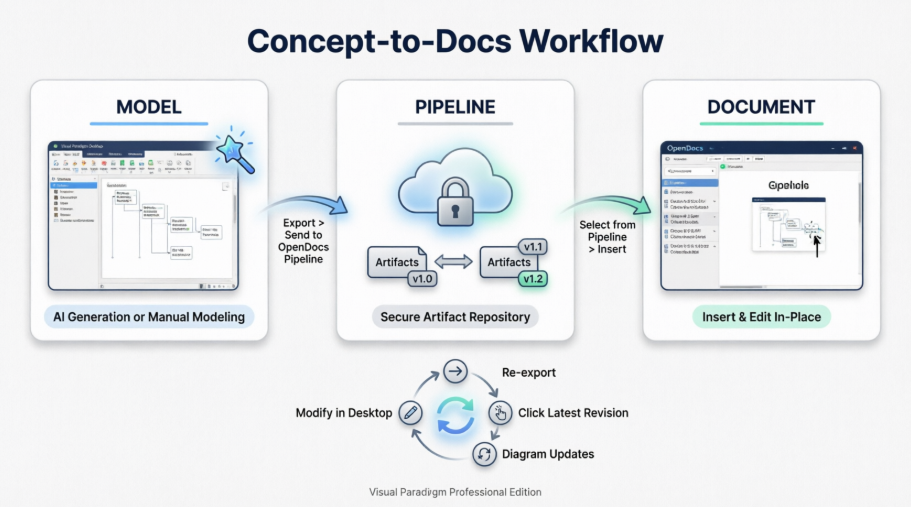
For Desktop users, subsequent project commits can automate revision updates, ensuring that the Pipeline always reflects the latest approved state of a diagram. The system preserves the diagram’s editability, meaning it can be reopened and modified in its native environment at any time.
The Pull Mechanism: From Pipeline to OpenDocs
Inside the OpenDocs text editor, technical writers and developers click Insert > Pipeline to access available artifacts. A slide-out panel immediately lists every diagram, model, or graphic pushed from Desktop or Online channels. Writers can preview assets, select the appropriate version, and instantly insert the exact asset contextually into pages.
This seamless insertion process eliminates the need to download files, manage local copies, or worry about image resolution and formatting. The embedded diagram remains linked to its source, preserving editability and version awareness.
The Version Synchronization Link
Perhaps the most powerful aspect of this integration is the continuous connection maintained between source diagrams and embedded documentation. If an architect modifies a system diagram in Visual Paradigm Desktop and pushes an update to the Pipeline, an update indicator appears next to that artifact in the OpenDocs panelment owners can click this indicator to view the revision log, compare changes, and instantly swap the embedded graphic to the newest version with a single click. This capability ensures that technical documentation never falls out of sync with the systems it describes, dramatically reducing maintenance overhead and improving accuracy.
3. Practical Implementation: A Step-by-Step Workflow
Setting Up Your Environment
Before implementing this workflow, ensure your team meets these prerequisites:
- Visual Paradigm Professional Edition license or higher
- Latest stable release of Visual Paradigm Desktop
- Active OpenDocs account with Pipeline access permissions
- Outbound HTTPS connectivity to Visual Paradigm cloud services
- Consistent authentication credentials across all tools
Exporting a Diagram from Desktop to Pipeline
- Open the diagram you wish to share in Visual Paradigm Desktop
- Right-click on the diagram canvas and select Export > Send to OpenDocs Pipeline
- Save your project when prompted
- (Optional) Add a descriptive comment to aid future identification
- Confirm the export to push the artifact to the cloud repository
Inserting the Artifact into OpenDocs Documentation
- Open or create a page in OpenDocs and enter edit mode
- Position your cursor where the diagram should appear
- Click the Insert button on the toolbar
- Select Pipeline from the sidebar to browse available artifacts
- Preview and select your diagram to embed it directly into the page
Updating Documentation When Models Change
- In OpenDocs, click the edit icon on an embedded diagram to access its source link
- Open the source model in Visual Paradigm Desktop using the provided link
- Make your design changes and re-export to the Pipeline
- Return to OpenDocs and use the revision indicator to swap to the updated version
4. Engineering Best Practices
Artifact Management Strategies
- Adopt consistent naming conventions: Use a format like
project-component-diagram-purpose-versionto improve discoverability - Leverage metadata: Always add descriptive comments during export to document intent, author, and change scope
- Organize with folders: Mirror your repository structure within the Pipeline (e.g.,
/backend/auth/,/frontend/components/) for intuitive navigation - Archive proactively: Establish a quarterly review to archive obsolete artifacts and keep the repository organized
Collaboration and Governance
- Integrate with code reviews: Link Pipeline artifact URLs in pull request descriptions to provide visual context for architectural changes
- Manage access thoughtfully: Restrict Pipeline write permissions to senior architects while granting read access to broader teams
- Use notification strategies: Leverage OpenDocs’ @mention features to alert stakeholders when critical diagrams are updated
- Document your workflow: Include Pipeline usage guidelines in your team’s onboarding documentation
Performance and Reliability Considerations
- Optimize diagram complexity: For large diagrams exceeding 500 elements, consider splitting into modular sub-diagrams to improve load times
- Plan for offline work: Desktop changes sync to the Pipeline upon reconnection—ensure stable network access during critical exports
- Maintain local backups: While Pipeline artifacts are cloud-backed, keep local
.vppproject backups per your organization’s disaster recovery policy
Security Guidelines
- Protect sensitive models: Avoid exporting diagrams containing credentials, internal infrastructure details, or proprietary algorithms to shared Pipeline spaces
- Enable audit trails: Activate Pipeline activity logging for compliance-sensitive projects
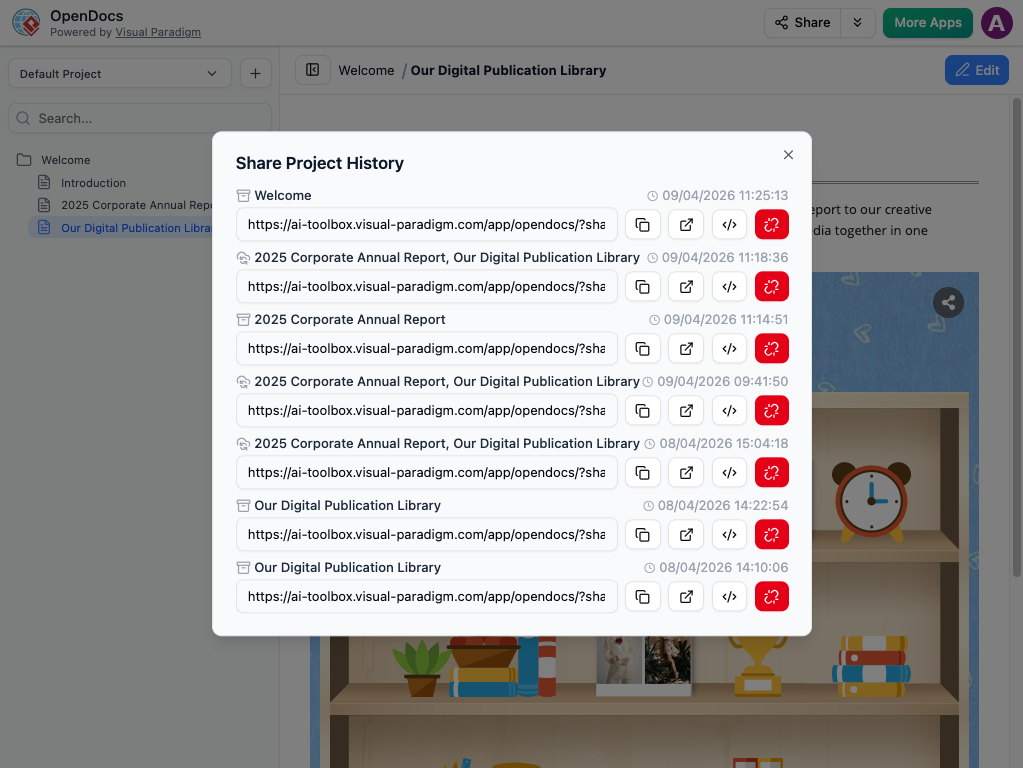
- Control external sharing: Use OpenDocs’ read-only links for external stakeholders instead of granting direct Pipeline access
5. Real-World Impact: Benefits for Engineering Teams
Adopting the Pipeline-enabled workflow delivers measurable improvements across the software development lifecycle:
Reduced Documentation Debt: By eliminating manual export/import cycles, teams spend less time maintaining documentation and more time building features. Diagrams stay current because updates propagate automatically through the version synchronization link.
Faster Onboarding: New team members access a centralized, always-current knowledge base where architecture diagrams, API references, and system documentation live together. The visual-first approach accelerates comprehension of complex systems.
Improved Alignment: When architects, developers, and technical writers work from the same artifact repository, miscommunication decreases. Everyone references the same version of truth, reducing rework and clarification meetings.
Enhanced Collaboration: The Pipeline’s cross-tool interoperability means specialists can work in their preferred environment—Desktop for deep modeling, Online for agile collaboration, OpenDocs for documentation—while staying synchronized.
Scalable Knowledge Management: As projects grow, the hierarchical organization capabilities of OpenDocs combined with the Pipeline’s artifact management allow documentation to scale without becoming unwieldy.
Conclusion
The integration between Visual Paradigm’s modeling tools and OpenDocs via the Pipeline represents a significant evolution in how engineering teams approach technical documentation. By treating diagrams as first-class, versioned artifacts rather than static exports, organizations can establish a sustainable workflow where documentation evolves naturally alongside system design.
This approach addresses the root causes of documentation decay: the friction of manual processes, the disconnect between design and writing tools, and the lack of version awareness. The Pipeline serves not just as a file transfer mechanism, but as the connective tissue that unifies the entire Visual Paradigm ecosystem—enabling seamless collaboration between architects, developers, and technical writers.
Teams adopting this workflow should start incrementally: pilot the integration on a single project, document team-specific conventions, and expand usage as confidence grows. The initial investment in setup and training pays compounding dividends through reduced onboarding time, fewer clarification cycles, and higher-quality architectural decision records.
As the Visual Paradigm ecosystem continues to evolve—with advances in AI-assisted modeling, enhanced cross-tool synchronization, and deeper collaboration features—the Pipeline foundation ensures that documentation infrastructure scales alongside engineering ambitions. In an era where software complexity continues to grow, this unified approach to concept-to-documentation workflow isn’t just convenient—it’s essential for maintaining clarity, alignment, and velocity in modern software development.
References
- Export Diagrams from Visual Paradigm Desktop to OpenDocs Pipeline: Official guide detailing the workflow for exporting diagrams from Visual Paradigm Desktop to OpenDocs via the Pipeline, including step-by-step instructions and version synchronization features.
- My Journey to Seamless Documentation: Sending Visual Paradigm Creations Directly to OpenDocs: Personal case study exploring the practical benefits and workflow improvements achieved by integrating Visual Paradigm modeling tools with OpenDocs documentation via the Pipeline.
- Visual Paradigm OpenDocs: The Complete Developer’s Guide to AI-Powered Technical Documentation: Comprehensive developer-focused guide covering diagram embedding, Pipeline integration, and best practices for maintaining living technical documentation.
- AI Diagram to OpenDocs Pipeline: Release announcement introducing the capability to send AI-generated diagrams directly from Visual Paradigm tools to OpenDocs via the Pipeline for streamlined documentation workflows.
- Export Cloud Diagrams from Visual Paradigm Online to OpenDocs: Documentation explaining how to export diagrams created in the browser-based Visual Paradigm Online directly to OpenDocs using the Pipeline integration.
- Visual Paradigm Online: Desktop Accessibility: Feature overview describing how Visual Paradigm Online provides cloud-based diagramming capabilities with optional desktop-level functionality and Pipeline integration.
- Visual Paradigm OpenDocs: The Complete Guide to AI-Powered Knowledge Management and Diagram Generation: In-depth resource covering OpenDocs’ AI capabilities, knowledge management features, and integration patterns with the broader Visual Paradigm ecosystem.
- Visual Paradigm Pipeline and OpenDocs Integration Demo: Video demonstration showcasing the end-to-end workflow of exporting diagrams from Visual Paradigm tools to OpenDocs via the Pipeline, including version synchronization.
- Visual Paradigm Online to OpenDocs Export: Technical release notes detailing the export functionality from Visual Paradigm Online to OpenDocs, including supported diagram types and metadata options.
- From Model to Manual: A Software Engineer’s Guide to Syncing Visual Paradigm Desktop Diagrams with OpenDocs: Engineering-focused tutorial providing setup checklists, step-by-step procedures, synchronization patterns, and best practices for adopting the Pipeline workflow.
- Visual Paradigm Pipeline and OpenDocs Integration Video Guide: Supplementary video resource demonstrating practical usage of the Pipeline feature for synchronizing diagrams between modeling tools and documentation platforms.
- OpenDocs Features Overview: Official product page detailing OpenDocs’ core capabilities including the integrated diagramming, AI assistance, and Pipeline integration for seamless documentation workflows.