


Introduction
In the fast-paced world of software development, documentation is often the first casualty. We’ve all been there: spending hours crafting beautiful architecture diagrams in a modeling tool, only to export them as static PNGs and paste them into a Word document or Confluence page. Two sprints later, the code has changed, the diagram is obsolete, and no one remembers where the source file is. This “documentation debt” creates confusion, slows down onboarding, and erodes trust in technical specifications.
As a product manager who has navigated this chaos for years, I recently explored Visual Paradigm OpenDocs and its companion, the Pipeline. The promise? A unified ecosystem where diagrams are not just images, but live, interactive elements linked directly to their source models. After diving into the platform, I found it to be a compelling solution for teams tired of maintaining stale documentation. This guide shares my experience with the core components, how they work together, and why this approach might just be the future of technical knowledge management.
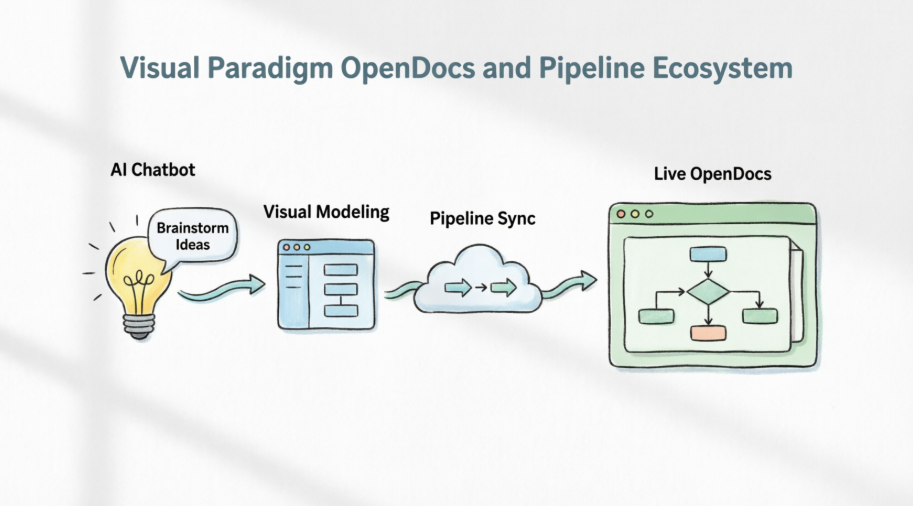
1. Understanding the Core Components
To appreciate the value of this ecosystem, you need to understand its two main pillars: OpenDocs and the Pipeline. They are designed to work in tandem, bridging the gap between visual modeling and textual documentation.
Visual Paradigm OpenDocs
Purpose:
OpenDocs is an AI-powered, web-based knowledge management platform that serves as a “Single Source of Truth.” It moves beyond traditional wikis by integrating technical documentation with live, interactive visual models.
Key Concepts:
- Diagram-Aware Text: This is the game-changer. Diagrams embedded in OpenDocs are not static screenshots. They are live vectors linked to their source models in Visual Paradigm Desktop or Online. You can zoom, pan, and even interact with them directly within the document.
- Hierarchical Structure: Information is organized using a familiar, deep tree-structured folder system, making it easy for teams to navigate complex project structures without getting lost.
- AI Integration: Built-in AI assistants are more than just chatbots; they help draft documents, summarize complex technical jargon for stakeholders, and generate initial diagram drafts from plain English prompts.
The Pipeline
Purpose:
Think of the Pipeline as the “high-speed connective tissue” of the Visual Paradigm ecosystem. It is a secure, cloud-based repository that bridges various tools (Desktop, Online, AI Chatbot) with OpenDocs.
How it Works:
The Pipeline captures artifacts—the diagrams and visual assets you create—and maintains their “live” connection to the source. It automates version control and synchronization, ensuring your documentation always reflects the latest design changes without manual intervention.
2. When and How to Use Them
The true power of this ecosystem lies in its workflow. Here is how I found it best applied across different phases of a project:
| Phase | Action |
|---|---|
| Brainstorming | Use the AI Chatbot to generate initial process flowcharts or structural views. This helps visualize ideas quickly before committing to detailed modeling. |
| Modeling | Refine diagrams in Visual Paradigm Desktop or Online for high-precision architecture. This is where you add specific details, constraints, and technical accuracy. |
| Linking | Use the Pipeline to push these diagrams to OpenDocs, embedding them directly into your documentation. This creates the live link. |
| Maintenance | When the system design changes, update the source model. The Pipeline indicator in OpenDocs notifies you, allowing one-click synchronization to keep everything up-to-date. |
3. Benefits of the Ecosystem
After using the platform for a few weeks, several key benefits stood out:
- Elimination of Documentation Debt: Manual screenshots and stale images are replaced by live, synchronized diagrams. No more hunting for the original
.vppfile when a change is needed. - Unified Workflow: Teams no longer juggle multiple tools; the “Concept-to-Docs” workflow happens within one integrated environment. This reduces context switching and improves focus.
- Enhanced Collaboration: Stakeholders can access up-to-date, interactive documentation via secure links without needing modeling software installed. This is huge for cross-functional reviews with non-technical team members.
- Reduced Administrative Overhead: The Pipeline handles background versioning, version history, and change management automatically. You spend less time managing files and more time designing.
4. Case Study: Agile Product Development
To see this in action, let’s look at a realistic scenario: a SaaS startup designing a new “Payment Gateway Integration.”
- Requirement Gathering: A Business Analyst uses the OpenDocs AI Assistant to create a document outlining the payment flow requirements. The AI helps structure the document and suggests key sections.
- Visualization: The Analyst prompts the AI Chatbot to “Create a sequence diagram for a credit card authorization process.” Within seconds, a draft diagram appears.
- Refinement: An architect takes the AI-generated diagram, refines it in Visual Paradigm Desktop to include specific API endpoints, security protocols, and error handling paths, and then pushes it to the Pipeline.
- Documentation: The architect embeds the diagram in the project’s OpenDocs page. The diagram is now live and interactive.
- Iteration: During the sprint, a developer updates the API structure to support a new payment provider. They update the source model and push the updated diagram to the Pipeline. The OpenDocs page shows an “Update Available” alert, and the team updates the visual with one click to match the new architecture.
This seamless loop ensures that the documentation never lags behind the actual implementation.
5. PlantUML Integration & Examples
For teams that prefer code-based modeling, Visual Paradigm supports PlantUML. This allows you to generate diagrams from text, which can also be managed via the Pipeline. This is particularly useful for developers who want to keep diagram definitions in version control alongside their code.
Example Case: User Login Sequence
If you define your process using PlantUML syntax, you can visualize it instantly.
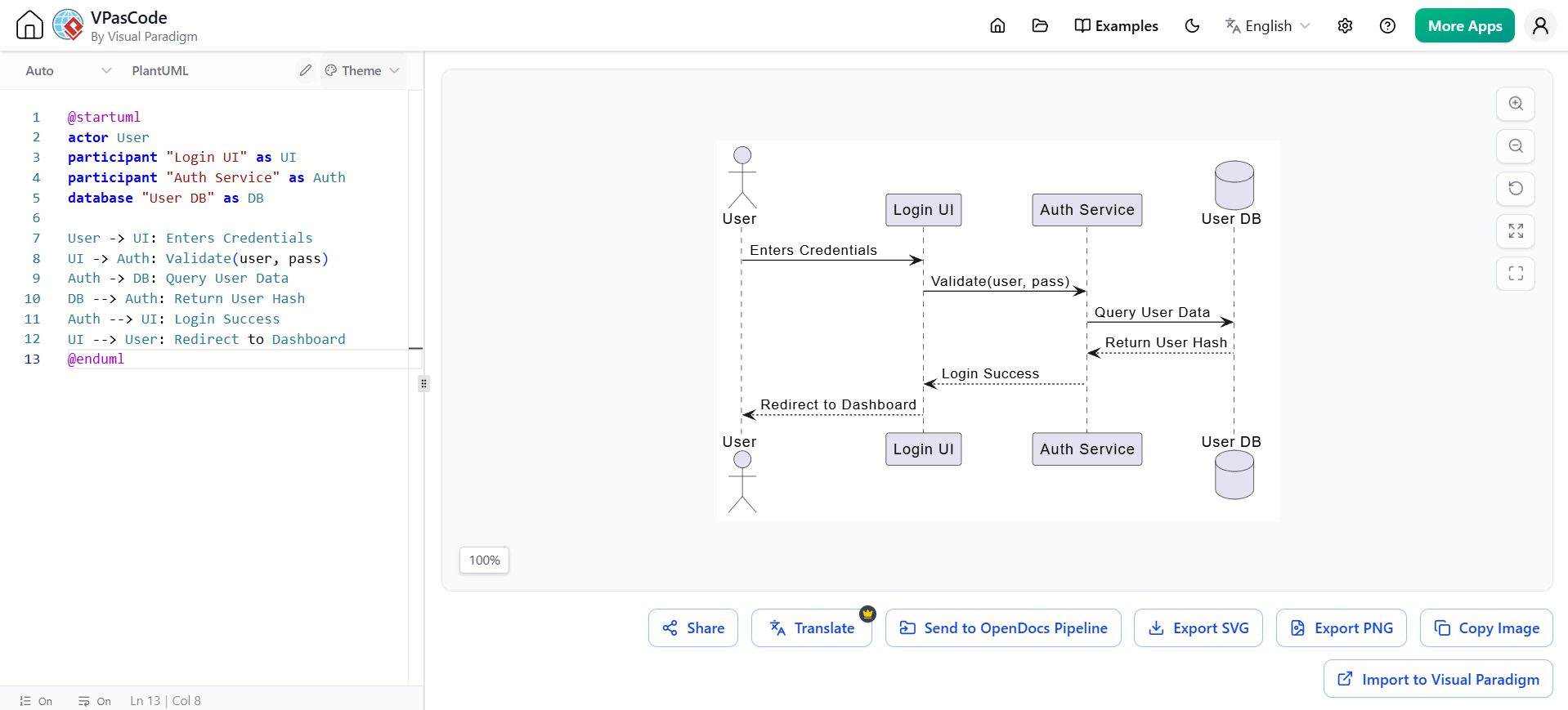
@startuml
actor User
participant "Login UI" as UI
participant "Auth Service" as Auth
database "User DB" as DB

User -> UI: Enters Credentials
UI -> Auth: Validate(user, pass)
Auth -> DB: Query User Data
DB --> Auth: Return User Hash
Auth --> UI: Login Success
UI --> User: Redirect to Dashboard
@enduml
How to leverage this:
- Generate: Use the Visual Paradigm PlantUML generator to create diagrams from forms or code snippets.
- Pipeline: Export these diagrams to the Pipeline to keep them as live assets in your documentation.
- Refine: If your process changes, edit the PlantUML code, and the diagram updates automatically in your OpenDocs page.
This integration bridges the gap between developers who think in code and architects who think in visuals, ensuring everyone stays on the same page.
Conclusion
Visual Paradigm OpenDocs and the Pipeline represent a significant shift in how we approach technical documentation. By treating diagrams as live, version-controlled assets rather than static images, they solve one of the most persistent pain points in software development: keeping documentation accurate and relevant.
For product managers, architects, and development teams, this ecosystem offers a way to reduce administrative overhead, improve collaboration, and maintain a single source of truth. While there is a learning curve to adopting any new tool, the long-term benefits of eliminating documentation debt and streamlining the concept-to-docs workflow make it a worthy investment for any team serious about maintaining high-quality technical knowledge.
If you’re tired of chasing down outdated diagrams and manually updating screenshots, it’s time to consider a living documentation approach. Visual Paradigm’s OpenDocs and Pipeline might just be the solution you’ve been looking for.
References
- A Case Study on Streamlining Knowledge Management with Visual Paradigm OpenDocs & Pipeline: Real-world examples of how teams use OpenDocs and Pipeline to improve knowledge management.
- From Concept to Knowledge Base: How the Visual Paradigm Pipeline Eliminates Documentation Debt: Insights into reducing documentation debt through automated synchronization.
- Seamlessly Connect Diagramming to Documentation: VPasCode Integrates with OpenDocs: Details on the integration between VPasCode and OpenDocs.
- From Diagram to Documentation: A Beginner’s Guide to the Visual Paradigm Pipeline: A step-by-step guide for beginners on using the Pipeline.
- From Diagram to Documentation: A Beginner’s Guide to the Visual Paradigm Pipeline: Additional resources and tips for getting started with the Pipeline.
-
Visual Paradigm OpenDocs and Pipeline Demo: A video demonstration of the OpenDocs and Pipeline features in action.