


In the fast-paced world of modern software development, the gap between architectural design and actual implementation remains one of the most persistent sources of friction. Product managers, architects, and developers often speak different languages—visual diagrams for some, code repositories for others. This disconnect frequently leads to documentation drift, where the living system no longer matches the original blueprints.
Enter the Visual Paradigm (VP) ecosystem, a suite of tools promising to bridge this divide through a concept known as “VPasCode” (Visual Paradigm as Code). As a product professional with a background in both technical architecture and user experience, I recently explored this workflow to see if it truly delivers on its promise of turning static diagrams into functional, documented, and deployed applications. What follows is a comprehensive, step-by-step review of how this pipeline works, from the initial AI-driven chatbot interaction to the final live documentation site.
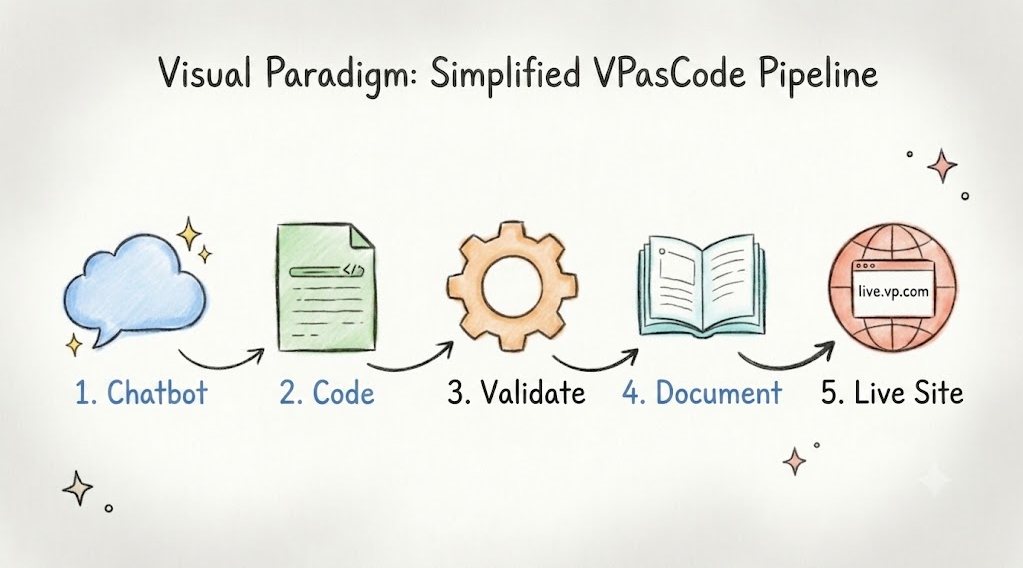
The Workflow Overview
The core value proposition of the VP ecosystem is its end-to-end automation. Instead of treating diagrams as mere artifacts for meetings, VP treats them as executable source code. The workflow follows a linear, logical progression:
[VP Chatbot] ➔ [VPasCode] ➔ [OpenDocs] ➔ [Live Doc]
This pipeline allows you to convert visual designs into functional application code, validate your architecture, and publish your documentation automatically with ease. Let’s break down each stage.
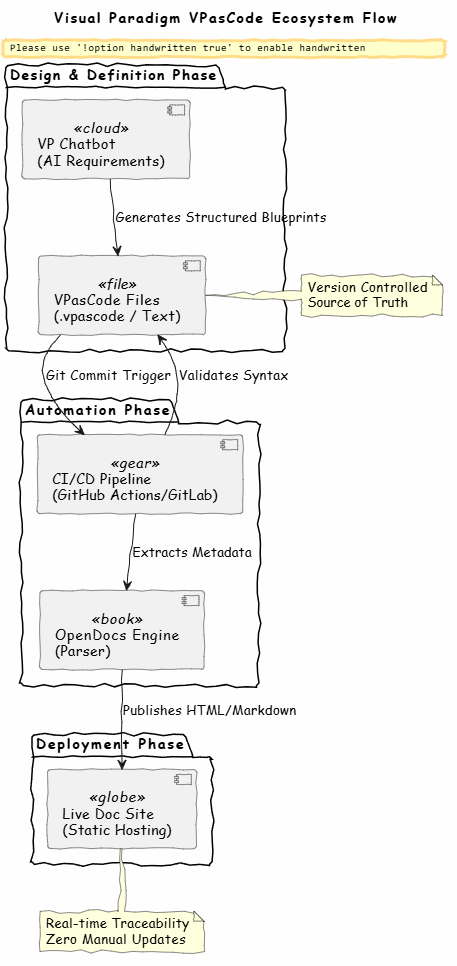
@startuml
skinparam backgroundColor #FEFEFE
skinparam handwritten true
skinparam defaultFontName "Comic Sans MS"

title Visual Paradigm VPasCode Ecosystem Flow

package "Design & Definition Phase" {
[VP Chatbot\n(AI Requirements)] as Chatbot <>
[VPasCode Files\n(.vpascode / Text)] as Code <>
}

package "Generation & Publishing Phase" {
[OpenDocs Engine\n(Parser & Publisher)] as Docs <>
}

package "Deployment Phase" {
[Live Doc Site\n(Static Hosting)] as Site <>
}

Chatbot --> Code : Generates Structured Blueprints
Code --> Docs : Directly Parses VPasCode
Docs --> Site : Publishes Live Documentation

note right of Code
Version Controlled
Source of Truth
end note

note bottom of Site
Real-time Traceability
Zero Manual Server Updates
end note

@enduml
Step 1: Interface with the VP Chatbot
The journey begins not with a blank canvas, but with conversation. The VP Chatbot serves as an AI-driven starting point for requirements gathering and initial modeling. This is particularly useful for teams that struggle to translate vague business requirements into structured technical specifications.
- Prompting: You input your user stories, business rules, or functional requirements directly into the chatbot. For example, you might describe a user registration flow or a payment processing rule.
- Refinement: The bot doesn’t just accept inputs; it helps you iterate. You can discuss design choices, define system boundaries, and clarify database relationships in natural language. This interactive refinement ensures that the foundational logic is sound before any code is written.
- Generation: Once the requirements are clear, you instruct the chatbot to output structured definitions or blueprints. These outputs are specifically formatted to be suitable for code translation, serving as the bridge between human intent and machine execution.
Step 2: Define Infrastructure with VPasCode
Once the chatbot has helped structure your requirements, the next step is to define your infrastructure using VPasCode. This is where Visual Paradigm shifts from a drawing tool to a development engine. VPasCode textually defines your visual diagrams, allowing them to be versioned, reviewed, and executed just like traditional code.
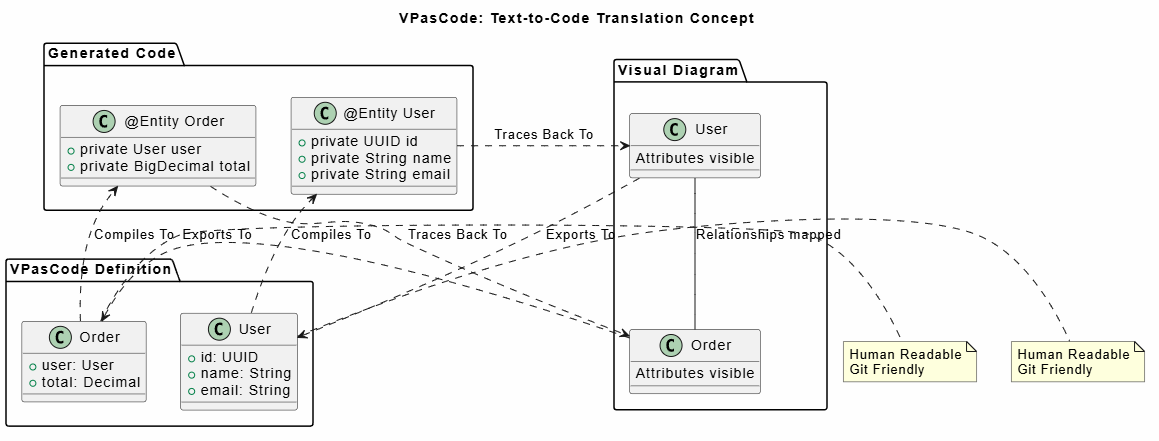
- Syntax: You can write or generate your diagrams using VP’s domain-specific textual language. This means your architecture is no longer locked in a proprietary binary file format but exists as readable, editable text.
- Source Control: These
.vpascodeor text definition files are committed into your Git repository. This is a game-changer for collaboration, as it allows for standard code review processes, branching strategies, and history tracking for your architectural decisions. - Code Generation: The VP engine compiles these text files into actual programming language templates. Whether your stack is Java, C#, Python, or TypeScript, the engine generates Data Transfer Objects (DTOs) and other boilerplate code, significantly reducing manual coding effort and ensuring consistency between design and implementation.
Step 3: Parse and Validate VPasCode
The real power of VPasCode is realized when it transitions from raw structural definitions into readable documentation. The VPasCode files are processed directly to bridge the gap between your static designs and your system documentation.
- Direct Translation: You use the internal Visual Paradigm utilities to translate your code into different languages
- Validation: Use the AI Error Fix feature to validates the syntax of your code. This early feedback loop catches errors in the architectural definition before they impact your documentation or code templates.
Step 4: Generate and Publish System Manuals via OpenDocs
Documentation is often the first casualty of agile development. OpenDocs, the documentation engine within the VP ecosystem, solves this by extracting metadata directly from your VP models to create and instantly publish developer-friendly guides.
- Extraction & Formatting: Send your diagram from VPasCode to OpenDocs, through the Pipeline.
- Instant Publishing: Once the documentation generation finishes within OpenDocs, you can publish the live documentation site directly with a single action. There is no need for secondary deployment pipelines or external static hosting configurations.
Conclusion
The Visual Paradigm VPasCode ecosystem represents a significant shift in how we approach software architecture and documentation. By treating diagrams as code, it brings the rigor of software engineering to the design phase. The integration of AI through the VP Chatbot lowers the barrier to entry, while the OpenDocs engine ensures instant publishing and accuracy throughout the development lifecycle.
For teams struggling with documentation drift or the disconnect between design and implementation, this workflow offers a compelling solution. It transforms architecture from a static artifact into a dynamic, executable asset that drives both code generation and comprehensive documentation. While there is an initial learning curve to mastering the VPasCode syntax, the long-term benefits in terms of efficiency, accuracy, and team alignment are substantial. As software systems grow in complexity, tools like VPasCode will become increasingly essential for maintaining clarity and control.
References
- Comprehensive Guide to VPasCode by Visual Paradigm: An in-depth look at how Visual Paradigm converts visual designs into executable code structures.
- Visual Paradigm Online to OpenDocs Export: Release notes and details on the integration between Visual Paradigm Online and the OpenDocs documentation engine.
- Comprehensive Guide to VPasCode by Visual Paradigm: Detailed documentation on the textual definition language used to version and execute visual diagrams.
-
From Model to Manual: A Software Engineer’s Guide to Syncing Visual Paradigm Desktop Diagrams with OpenDocs: A practical guide for engineers on keeping documentation in sync with visual models using OpenDocs.