
Introduction
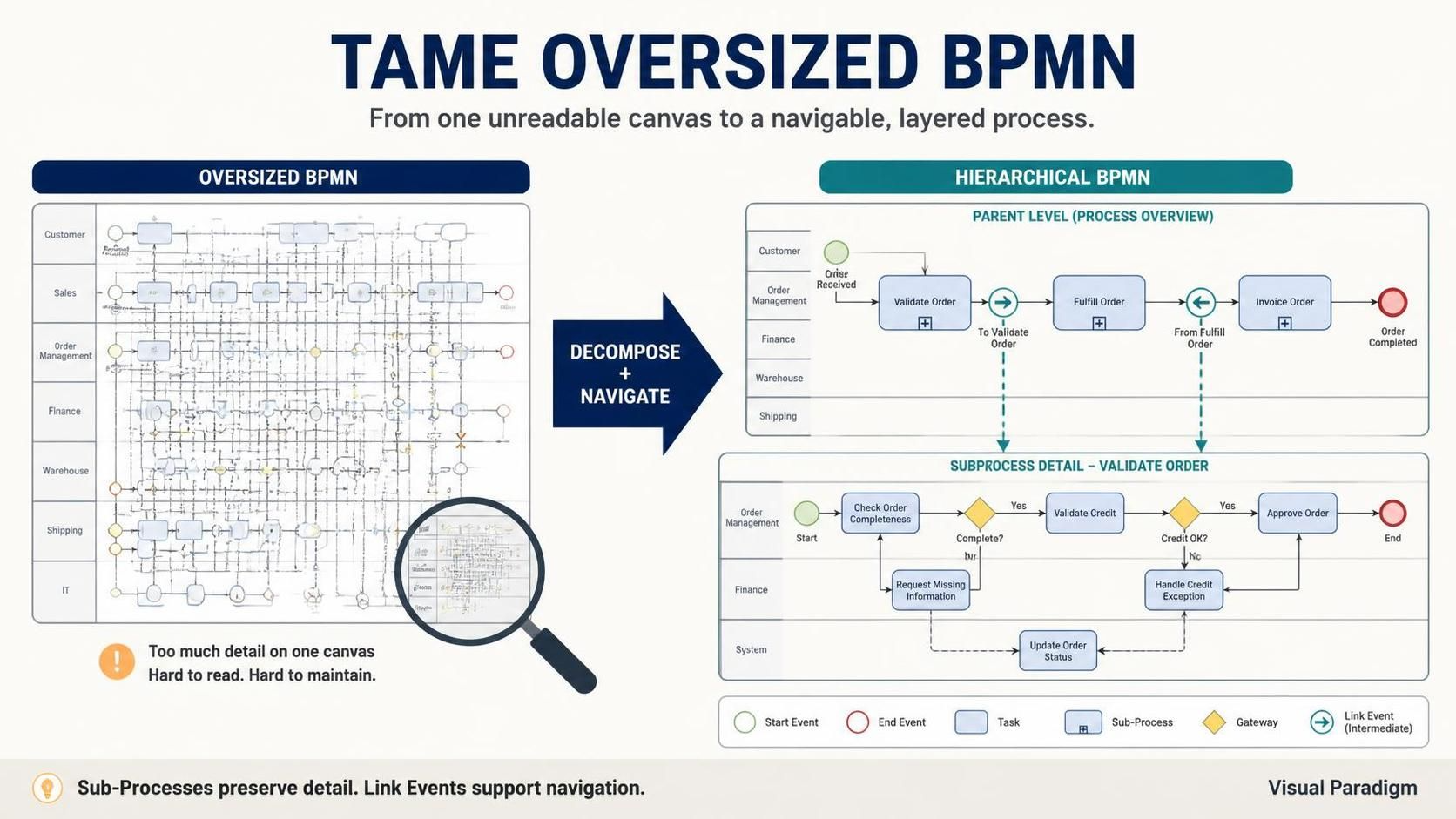
Business Process Model and Notation (BPMN) is the gold standard for visualizing complex business workflows. However, as processes grow in sophistication, so do their diagrams. Attempting to model an enterprise-level workflow on a single canvas often results in an “oversized BPMN” nightmare—a diagram so dense that zooming out renders it unreadable, while zooming in loses the critical context of the overall flow.
Drawing such large diagrams by hand is nearly impossible, and even digital tools can struggle with usability when every element competes for attention. The solution isn’t to abandon detail, but to structure it intelligently. By leveraging Sub-Processes for hierarchical decomposition and Link Intermediate Events for seamless navigation, you can transform chaotic, oversized maps into manageable, multi-layered narratives. This guide explores how to use these constructs effectively within Visual Paradigm to maintain both holistic oversight and granular detail.
Key Concepts: The Building Blocks of Manageable BPMN
Before diving into structuring techniques, it is essential to distinguish between the two primary types of activities in BPMN: Tasks and Sub-Processes. Understanding when to use each is the first step in simplifying your diagrams.
Task vs. Sub-Process
Activities represent work performed within a business process. They are depicted as rounded rectangles.
-
Task: Use a Task when modeling an atomic unit of work that cannot be further broken down, or where doing so provides no additional value to the current audience.
-
Sub-Process: Use a Sub-Process when modeling non-atomic, complex work that requires elaboration. A Sub-Process acts as a container for other tasks and sub-processes, allowing you to “drill down” into another level of detail.
The choice between the two is often dictated by the stakeholder’s perspective. For example, a customer viewing a checkout process may only need to see a “Process Payment” task. However, a finance officer needs to see the internal steps of that payment, making it a Sub-Process.


Strategy 1: The Sub-Process Approach (Hierarchical Decomposition)
The most effective way to tame an oversized BPMN is to encapsulate complexity. Instead of displaying every step of a complex operation on the main canvas, you group related activities into a Sub-Process.
How It Works
-
Create an Overview: Start with a high-level BPMN workflow that outlines the major phases of your business process.
-
Encapsulate Details: Identify complex segments and convert them into Sub-Processes.
-
Multi-Level Decomposition: If a Sub-Process is still too complex, it can be broken down further into nested Sub-Processes. Note: While possible, deep nesting is generally discouraged as it can make navigation difficult.
Benefits
-
Focus: Allows stakeholders to focus on specific areas without being overwhelmed by irrelevant details.
-
Reusability: Common Sub-Processes can be referenced across multiple diagrams.
-
Clarity: Keeps the main diagram clean and readable.

Strategy 2: Link Intermediate Events (Off-Page Connectors)
While Sub-Processes handle vertical complexity (depth), Link Intermediate Events handle horizontal complexity (breadth and page breaks). They act as “off-page connectors,” allowing sequence flows to jump from one part of a diagram to another, or from one page to another, without drawing long, crossing lines.
Understanding Link Events
Link Intermediate Events are always used in pairs: a Source and a Target. To ensure they are correctly paired, both events must share the exact same label.
-
Source Link Event: A throwing intermediate event, indicated by an arrow marker with a black-colored fill. This marks the end of a segment.
-
Target Link Event: A catching intermediate event, indicated by an arrow marker with a white-colored fill. This marks the continuation of the flow.
Practical Application
Imagine a process that extends beyond the width of a single printed page or screen view. Instead of cluttering the diagram with long connectors, you place a Source Link Event at the edge of the first segment. On the next page or section, you place the corresponding Target Link Event.

This technique is particularly useful in Visual Paradigm when managing large canvases, as it allows you to logically separate process segments while maintaining the integrity of the sequence flow.
Tooling: Implementing in Visual Paradigm
Visual Paradigm provides robust support for both strategies. When using Sub-Processes, you can easily toggle between the collapsed view (showing just the box) and the expanded view (showing the internal diagram). For Link Events, Visual Paradigm helps validate that your Source and Target pairs are correctly named and linked, preventing broken flows in complex diagrams.

By combining these two techniques, you can create a “map” that offers both a helicopter view of the entire business operation and the ability to zoom in on specific mechanical details without losing your place.
Conclusion
Managing oversized BPMN diagrams is less about drawing skills and more about information architecture. By distinguishing between atomic Tasks and complex Sub-Processes, you can create hierarchical layers that cater to different stakeholder needs. Simultaneously, using Link Intermediate Events as off-page connectors ensures that your diagrams remain visually clean and navigable, even when the process spans multiple pages or screens.
With these strategies, you no longer have to choose between the big picture and the details. You can have both, ensuring that your BPMN models remain powerful communication tools rather than confusing mazes.