
Introduction
A business process often includes both a sequence of work and decisions that determine what should happen next. When every rule, calculation, and exception is drawn directly into the process diagram, the model can become difficult to read and costly to change.
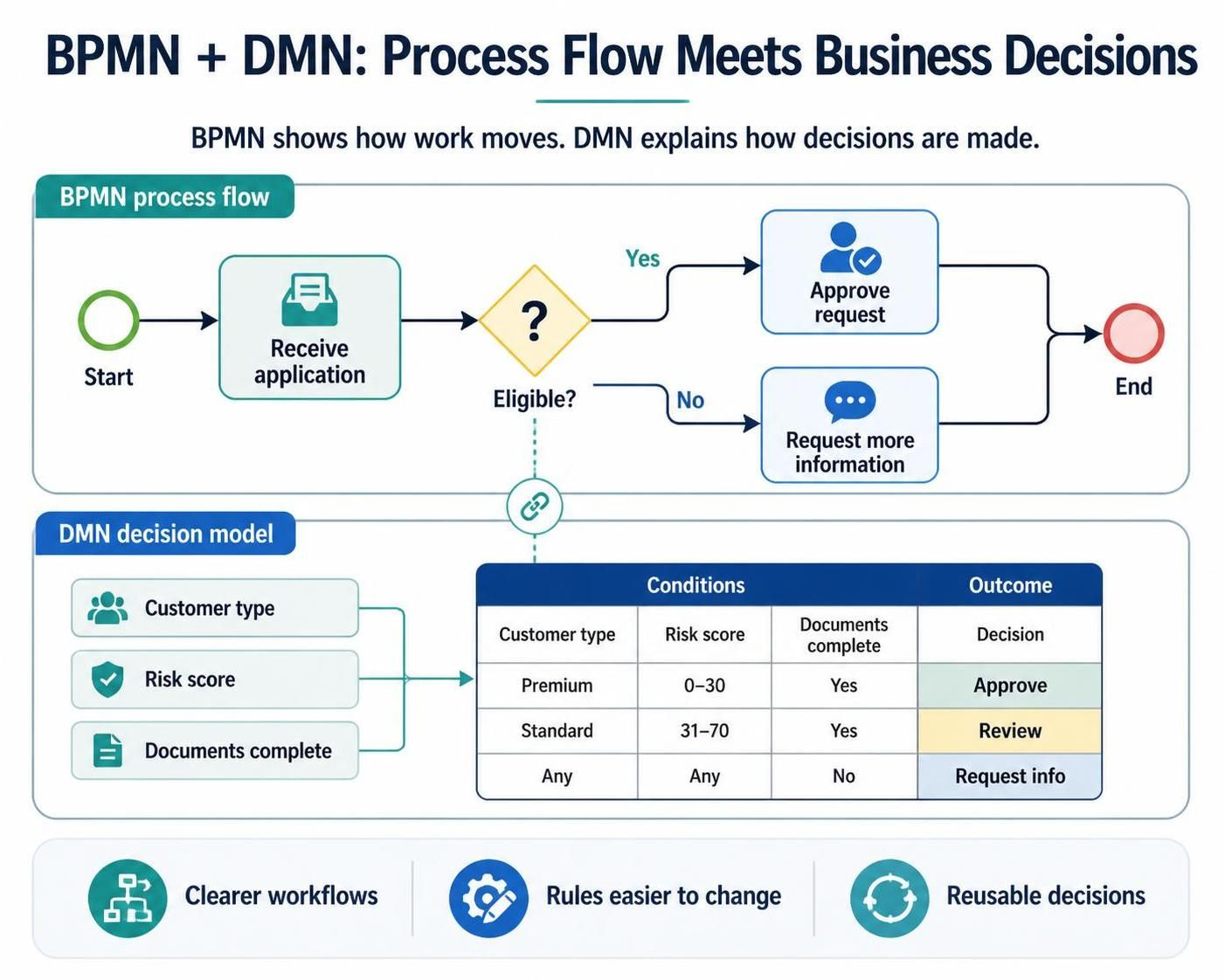
Business Process Model and Notation (BPMN) and Decision Model and Notation (DMN) address these different needs. BPMN describes how work moves through a process; DMN describes how a business decision is made. Used together, they help teams make workflows easier to understand while keeping complex, changing rules organized and reusable.
Key Concepts
BPMN: the process flow
BPMN is a visual notation for representing business processes. It shows activities, events, participants, and the paths work can take.
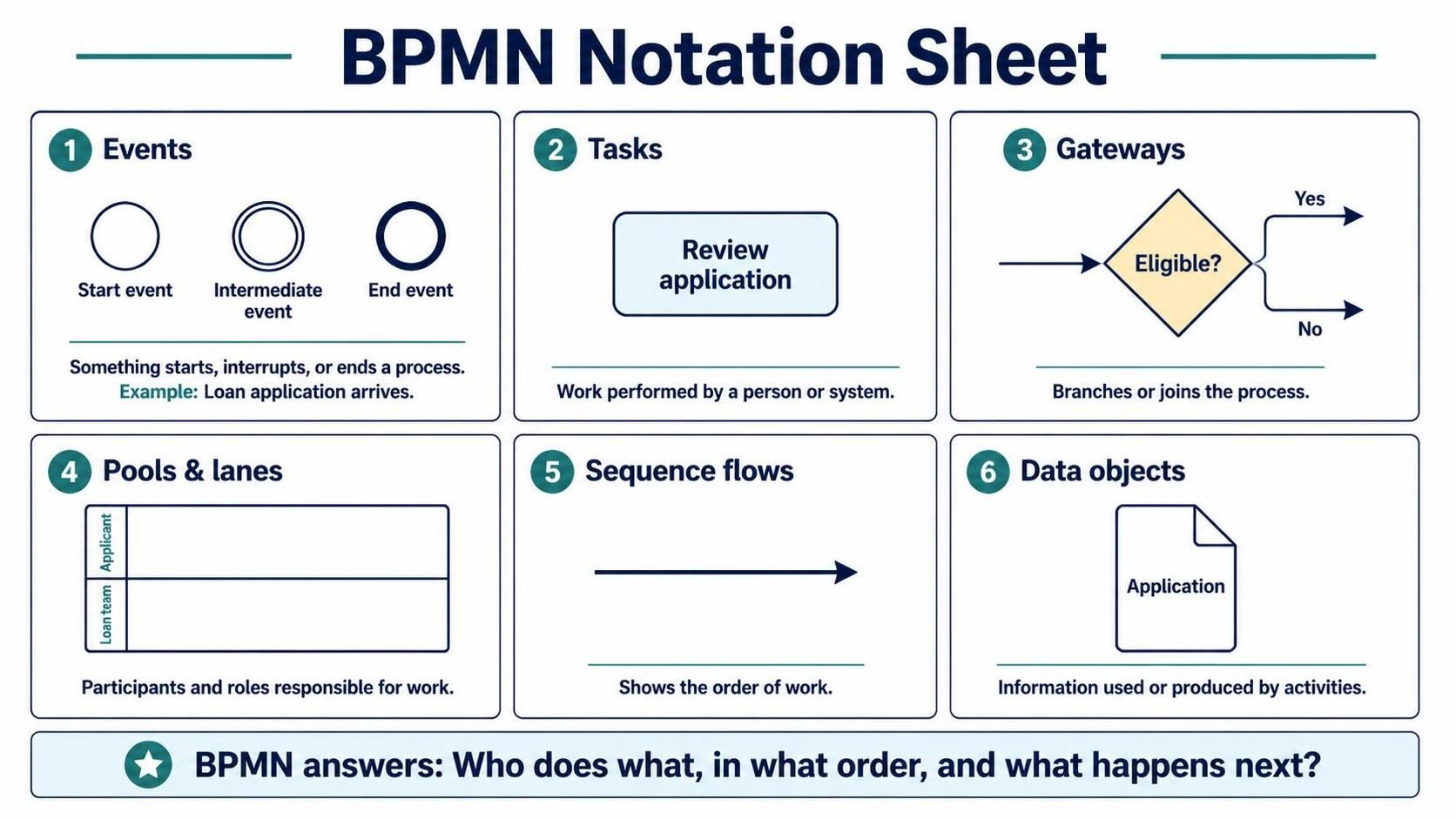
Common BPMN elements include:
-
Events: Something that starts, interrupts, or ends a process—for example, a loan application arriving.
-
Tasks: Work performed by a person or system, such as “Review application.”
-
Gateways: Points where the process branches or joins.
-
Pools and lanes: Participants and roles responsible for work.
-
Sequence flows: The order in which work proceeds.
-
Data objects: Information used or produced by activities.
BPMN answers questions such as: Who does what, in what order, and what happens next?
DMN: the decision logic
DMN is a notation for documenting business decisions and the logic behind them. It is especially useful when a decision depends on several inputs, has multiple outcomes, changes frequently, or is used in more than one process.
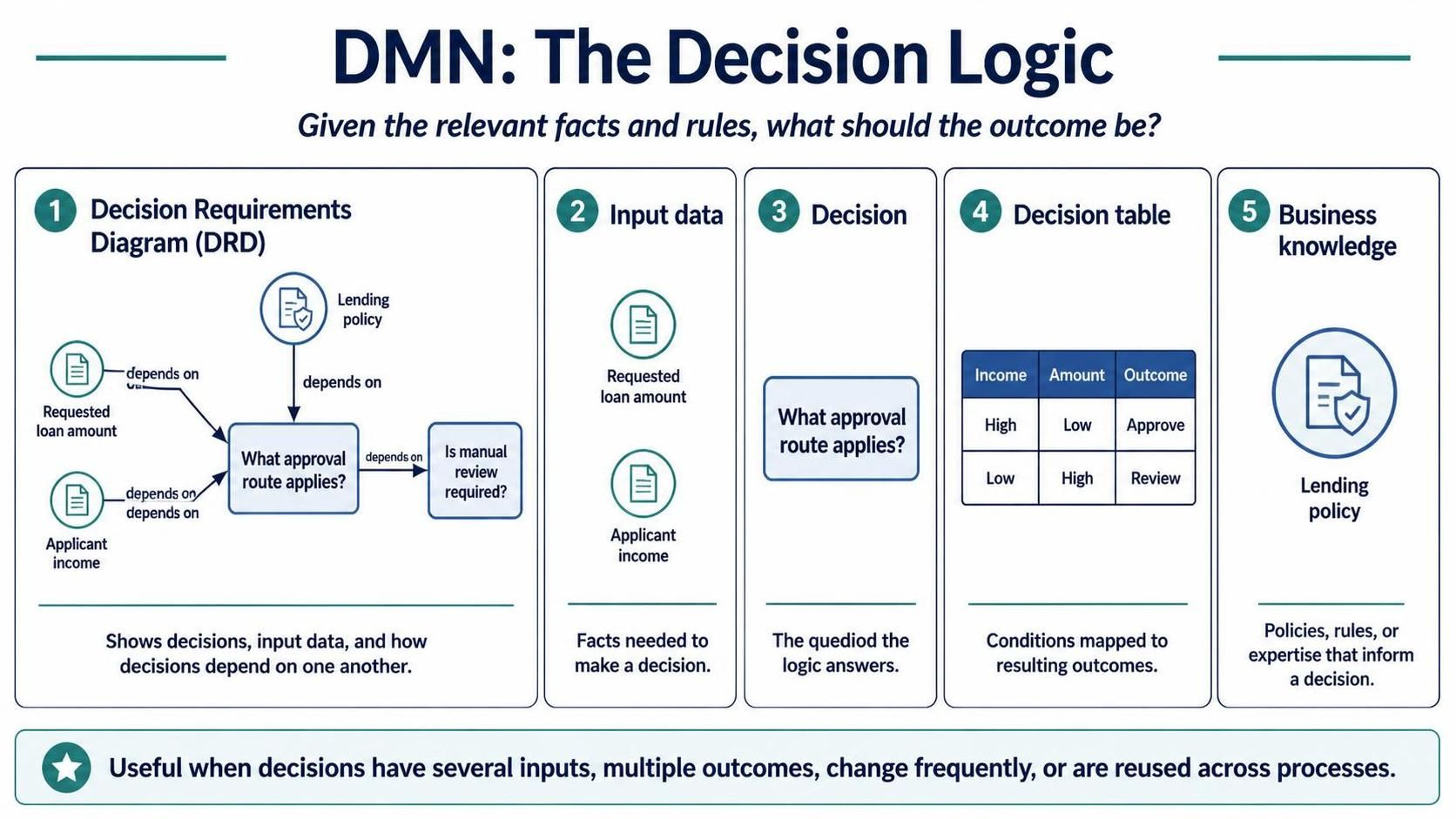
Common DMN concepts include:
-
Decision Requirements Diagram (DRD): Shows decisions, input data, and how decisions depend on one another.
-
Input data: The facts needed to make a decision, such as requested loan amount or applicant income.
-
Decision: The question the logic answers, such as “What approval route applies?”
-
Decision table: A tabular way to specify conditions and resulting outcomes.
-
Business knowledge: The policies, rules, or expertise that inform a decision.
DMN answers: Given the relevant facts and rules, what should the outcome be?
The separation of concerns
A useful division is:
-
BPMN handles orchestration: the sequence of tasks, handoffs, waits, and exceptions.
-
DMN handles decisioning: the policies, calculations, thresholds, and classifications that produce a decision.
A BPMN process can invoke a DMN decision, receive its result, and then continue along the appropriate path. In an automated environment, process data is passed to a decision service, which evaluates the DMN logic and returns an output.
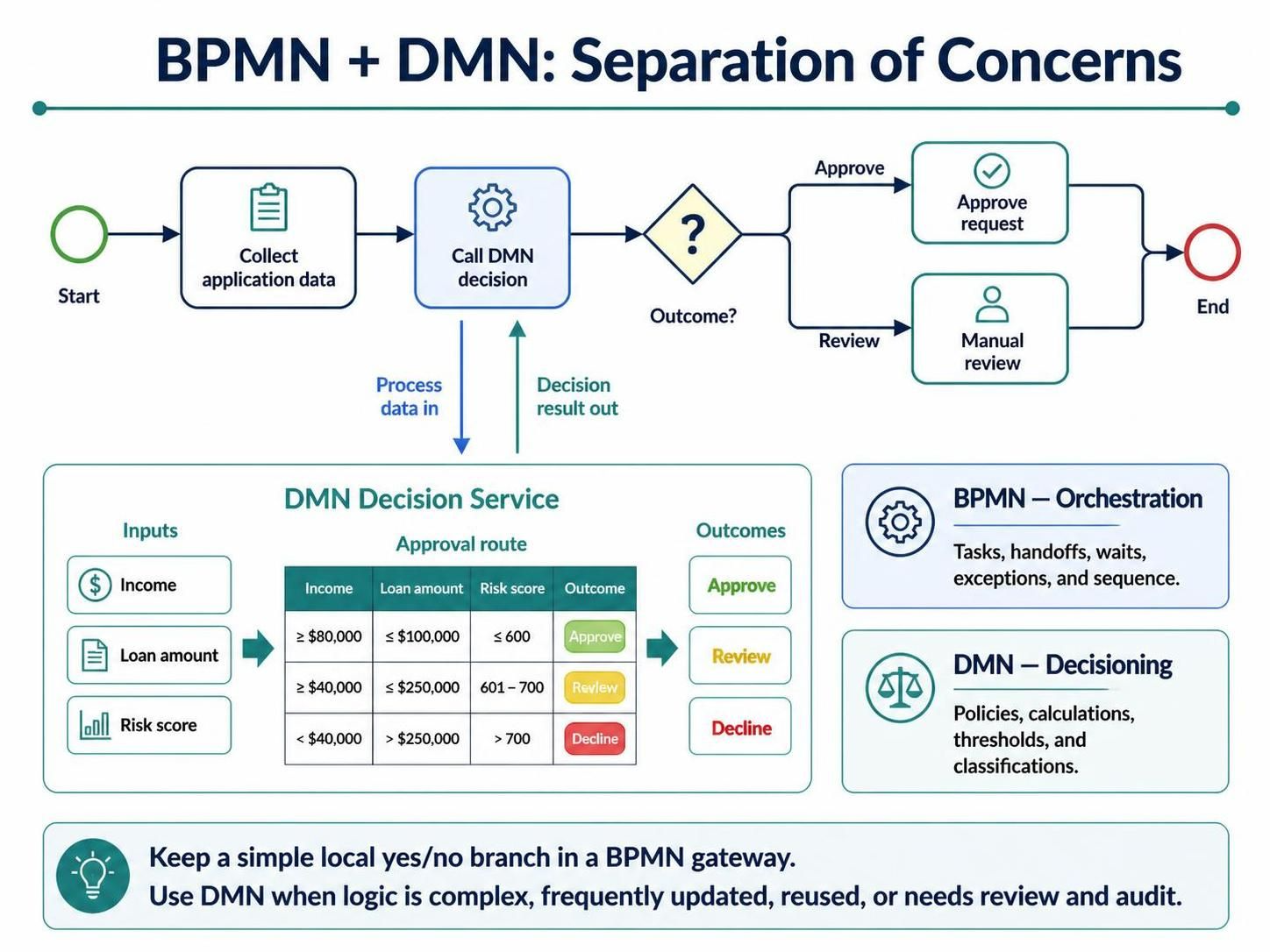
This does not mean every gateway belongs in DMN. A simple yes/no check that only controls one local branch may be clearest as a BPMN gateway. DMN is a better fit when the logic is complex, frequently updated, reused, or subject to review and audit.
Example: Loan Application Review
Imagine a process that receives a loan application, checks its completeness, evaluates it, and communicates a decision.
BPMN process
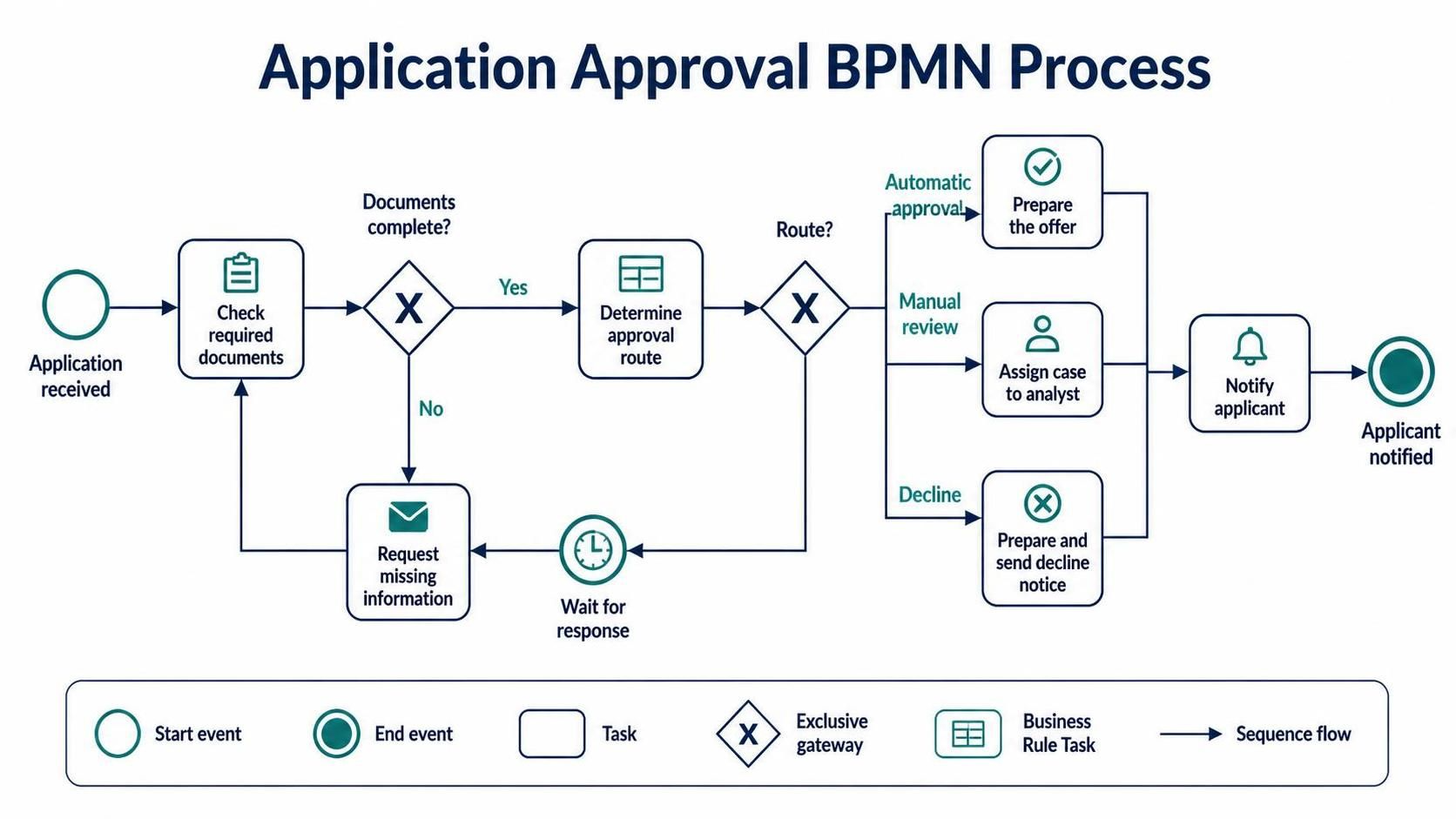
A high-level BPMN flow might be:
-
Start: Application received.
-
Task: Check that required documents are present.
-
Gateway: Are documents complete?
-
No: Request missing information, then wait for a response.
-
Yes: Continue to decisioning.
-
-
Business Rule Task: Determine approval route.
-
Gateway: Route based on the returned result.
-
Automatic approval: Prepare the offer.
-
Manual review: Assign the case to an analyst.
-
Decline: Prepare and send the decline notice.
-
-
End: Applicant notified.
The BPMN diagram emphasizes the workflow and its participants. It need not contain every scoring formula or policy threshold.
DMN decision
A DMN decision named “Determine approval route” could use inputs such as:
-
Credit score band
-
Requested amount
-
Debt-to-income band
-
Application completeness
A simplified decision table might look like this:
| Credit score band | Requested amount | Debt-to-income band | Approval route |
|---|---|---|---|
| Strong | Within limit | Low | Automatic approval |
| Strong | Above limit | Any | Manual review |
| Moderate | Within limit | Low | Manual review |
| Weak | Any | Any | Decline |
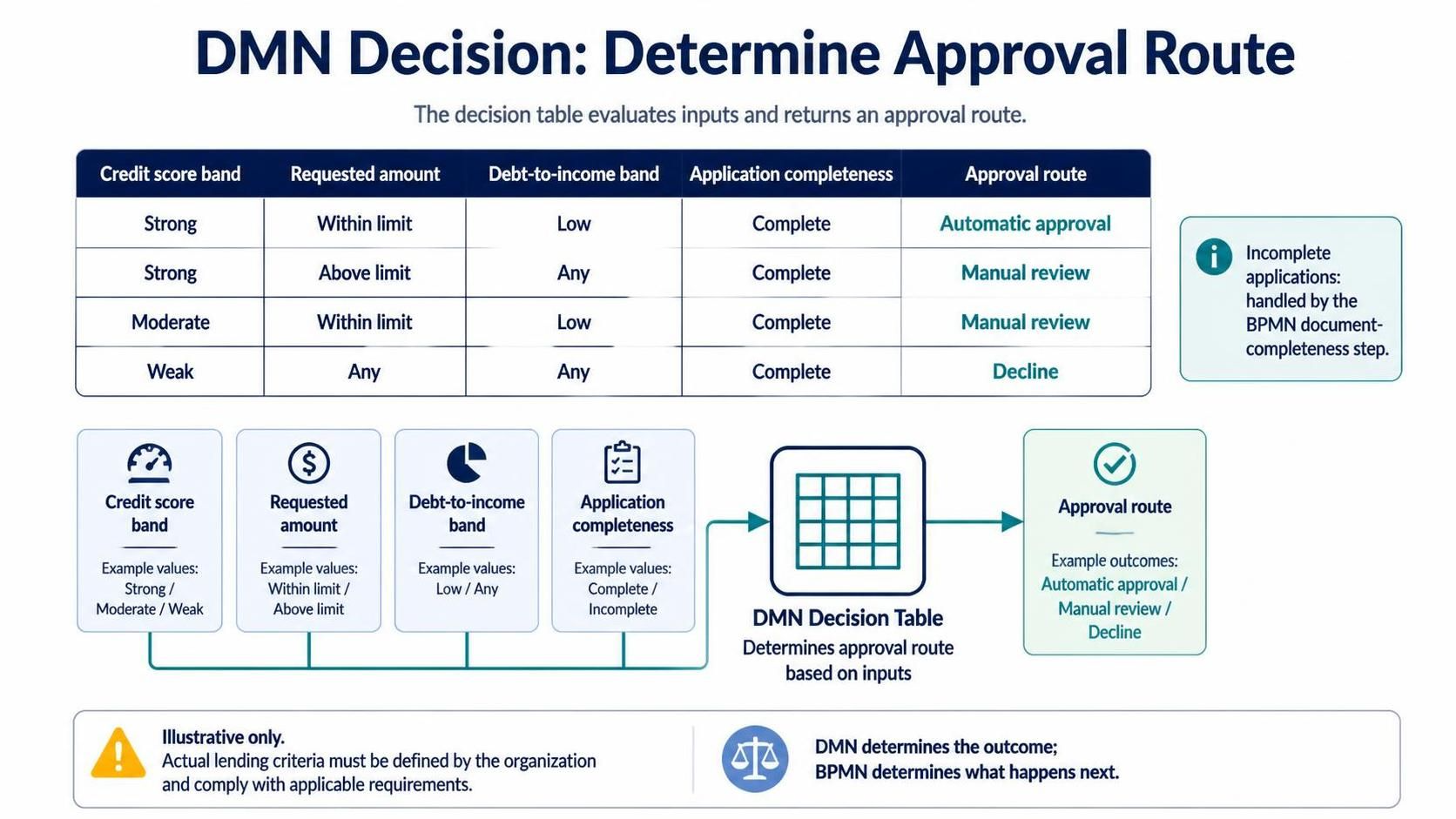
This is illustrative only; actual lending criteria must be defined by the organization and comply with applicable requirements. The important modeling point is that the rule table determines the outcome, while BPMN determines what the process does with that outcome.
How BPMN and DMN Work Together
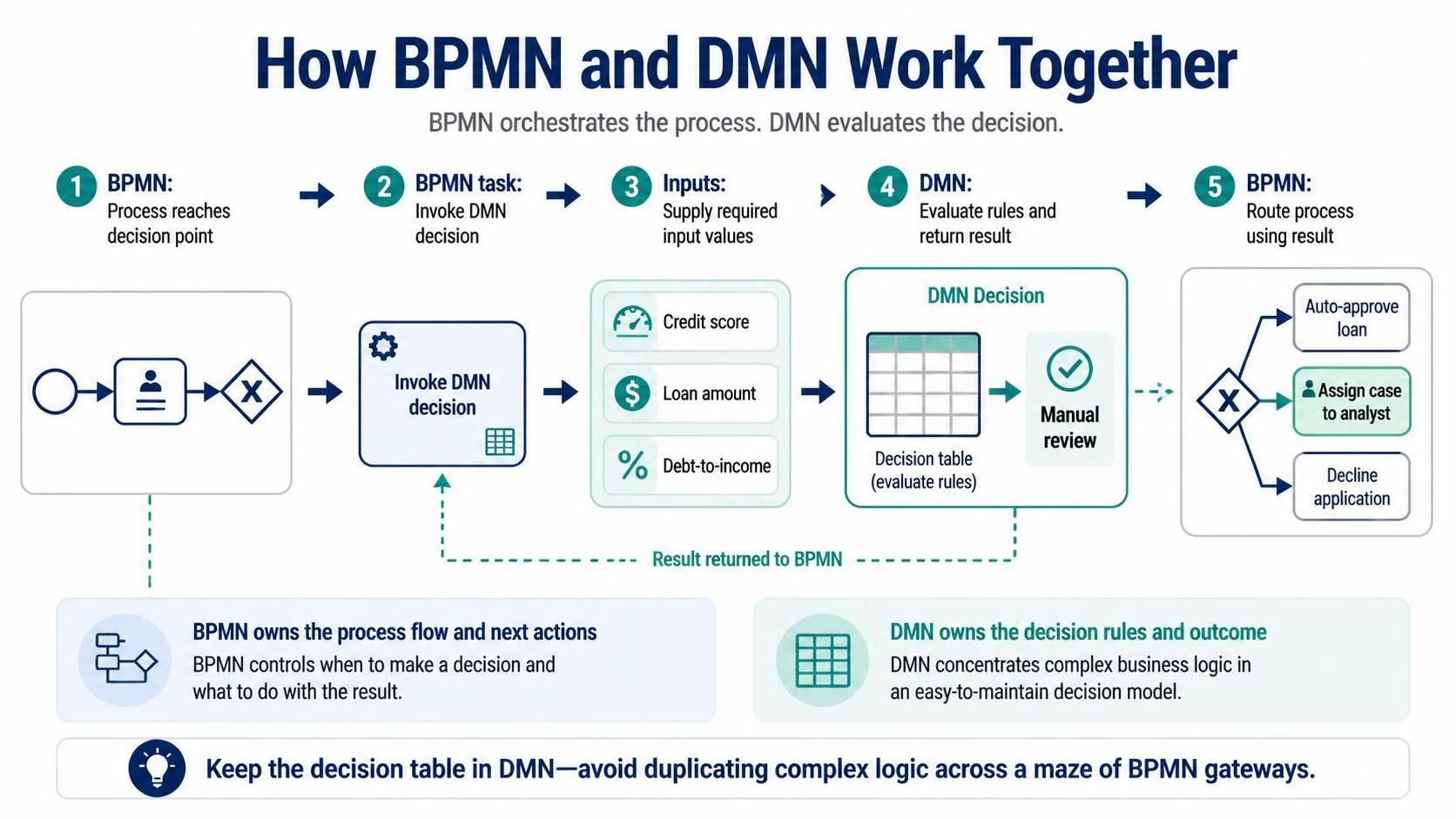
A typical integration follows this pattern:
-
The BPMN process reaches a decision point.
-
A task invokes the relevant DMN decision.
-
The process supplies the required input values.
-
The DMN logic evaluates those inputs and returns a result.
-
BPMN stores or uses that result to route the process or select the next activity.
For example, the returned value might be Manual review. BPMN then assigns the case to an analyst. The process does not need to reproduce the decision table in a maze of gateways.
Benefits of Separating Flow from Rules
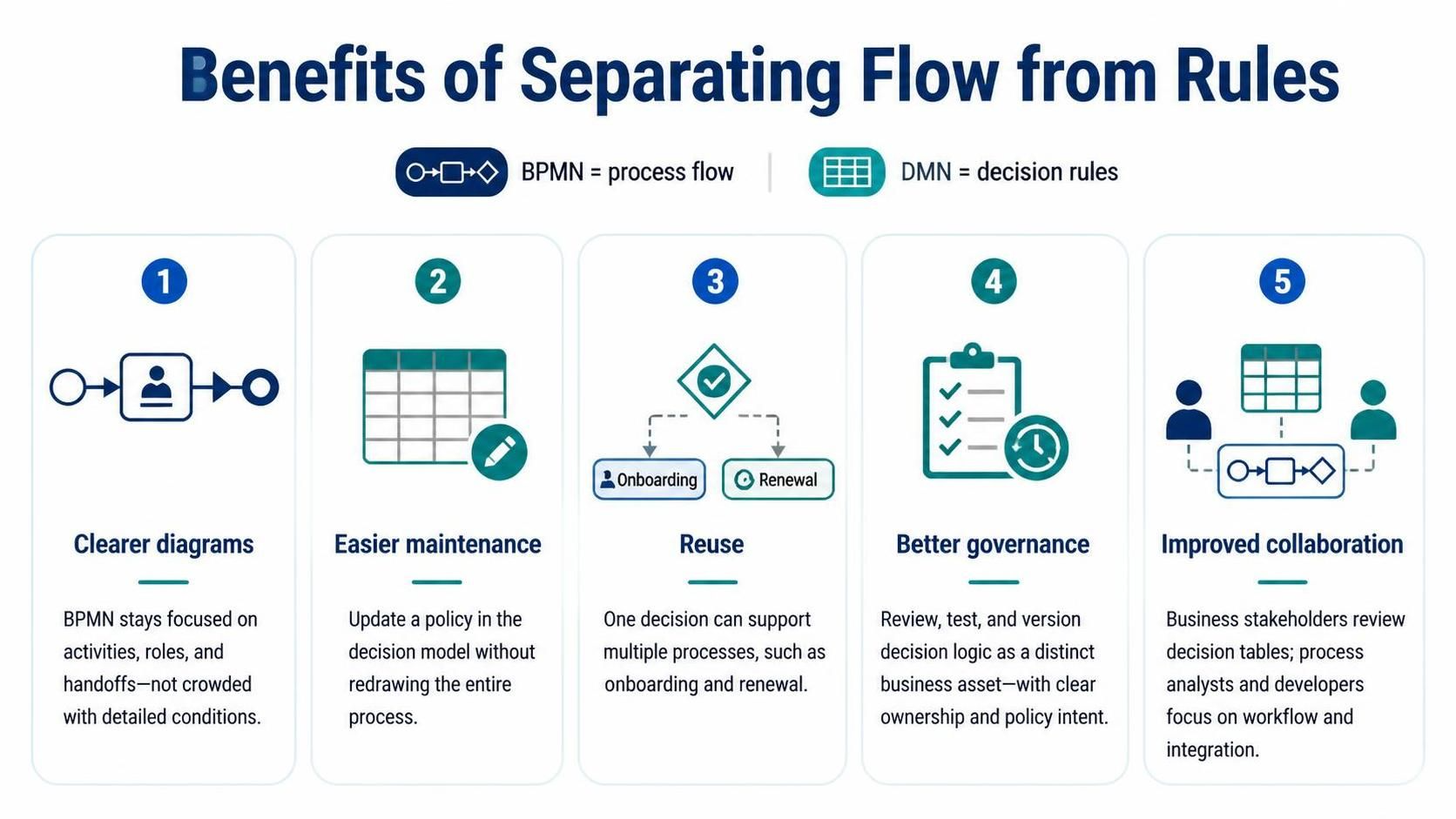
Clearer diagrams: The BPMN model stays focused on activities, roles, and handoffs rather than becoming crowded with detailed conditions.
Easier maintenance: A policy adjustment can often be made in the decision model without redrawing the entire process.
Reuse: A decision model can serve multiple processes—for example, a customer eligibility decision used in both onboarding and renewal.
Better governance: Decision logic can be reviewed, tested, and versioned as a distinct business asset. Keeping rules explicit also makes it easier to identify who owns them and what policy they implement.
Improved collaboration: Business stakeholders can review decision tables, while process analysts and developers focus on workflow behavior and integration.
Practical Modeling Guidance
-
Keep BPMN tasks action-oriented: use labels such as “Assess application” or “Send offer.”
-
Give each DMN decision a clear question or outcome, such as “Determine approval route.”
-
Define decision inputs and outputs explicitly; use consistent names and data types across both models.
-
Keep a gateway for a simple, local branch. Move substantial or reusable logic into DMN.
-
Model important process exceptions—timeouts, missing information, and failed decision-service calls—in BPMN.
-
Test DMN tables with representative cases, including boundary values and combinations that should produce no result or conflicting results.
-
Review the models with the people who own the process and the policies. A diagram can be syntactically valid yet still misrepresent how the business works.
Using Visual Paradigm
Use Visual Paradigm as the modeling workspace for organizing and communicating the BPMN and DMN artifacts. A practical workflow is:
-
Create a project or model repository for the process area.
-
Build the BPMN process first, showing participants, major activities, and key paths.
-
Mark the point where a business decision is needed.
-
Create a corresponding DMN model for decisions that are complex, reusable, or likely to change.
-
Document the DMN inputs, outputs, rules, and policy owner.
-
Connect the decision result conceptually to the BPMN flow—for example, show that “Approval route” determines which BPMN path follows.
-
Review both diagrams together with business and technical stakeholders.
-
Revise, validate, and publish the approved models using the project’s agreed naming and versioning conventions.
Visual Paradigm’s guidance describes BPMN modeling features such as diagram creation, element documentation, model navigation, validation, and publishing options; available capabilities can depend on the edition and configuration. Confirm that the specific DMN authoring, linkage, and export functions you need are available in your installed edition before planning an implementation around them.
Conclusion
BPMN and DMN work best as complementary models. BPMN explains how work progresses through people, systems, and events. DMN captures the rules and information used to reach business decisions. Keeping those responsibilities distinct makes models easier to read, change, test, and discuss.
A good starting point is to model the process at a clear, high level, then move decision logic into DMN when it becomes complex, reusable, or subject to frequent change. The result is not simply two diagrams: it is a clearer separation between how work flows and how business outcomes are determined.