


“A well-designed class diagram is not just a picture — it’s a blueprint for software architecture, capturing both structure and behavior in a shared language.”
This case study provides a comprehensive, in-depth analysis of two classic UML class diagram examples:
- The Sales Order Processing System (business domain)
- The Drawing Application GUI (UI/interactive domain)
Together, they illustrate core UML modeling principles, design patterns, and best practices used in real-world software engineering. This case study is ideal for students, developers, and architects seeking to understand how to model complex systems using UML class diagrams effectively.
🎯 Objective
To analyze and compare two representative UML class diagrams through the lens of:
- Class structure and compartment design
- Relationship types and multiplicity
- Inheritance and polymorphism
- Composition vs Aggregation
- Stereotypes and architectural patterns
- Design principles and real-world applicability
📌 Case Study : Sales Order Processing System
🔹 Domain Context
A retail e-commerce or point-of-sale (POS) system where customers place orders, which are processed with line items, payments, and inventory tracking.
This model captures business transactions, order lifecycle management, and payment polymorphism — a staple in enterprise software design.
✅ 1. Class Structure & Compartments
| Class | Attributes | Operations | Notes |
|---|---|---|---|
Customer |
name: String, address: String |
— | Simple entity, no operations (common in high-level models) |
Order |
date: Date, status: String |
calcTax(): float, calcTotal(): float, calcTotalWeight(): float |
Central business object |
OrderDetail |
quantity: int, taxStatus: String |
calcSubTotal(): float, calcWeight(): float |
Line item in an order |
Item |
description: String, shippingWeight: float |
getPriceForQuantity(quantity: int): float, inStock(): boolean |
Product catalog item |
Payment (abstract) |
amount: float |
authorize(): boolean |
Abstract base class |
Cash |
cashTendered: float |
— | Concrete payment type |
Check |
name: String, bankID: String |
authorized(): boolean |
Specialized payment |
Credit |
number: String, type: String, expDate: Date |
authorized(): boolean, getTax(): float |
Supports tax calculation |
🔹 Note: All attributes and operations are public by default in these diagrams (common in educational examples).
🔗 Key Relationships & Multiplicities
| Relationship | Type | Multiplicity | Description |
|---|---|---|---|
Customer — Order |
Association | 1 → 0..* |
One customer places zero or more orders |
Order — OrderDetail |
Aggregation (hollow diamond) | 1 → 1..* |
One order has one or more line items |
OrderDetail — Item |
Association | 1 → 0..* |
One item can appear in many order details |
Order — Payment |
Association | 1 → 1 |
Each order has exactly one payment |
Payment — Cash, Check, Credit |
Generalization (inheritance) | 1 → 1 |
Polymorphic behavior via inheritance |
✅ Multiplicity is business-rule driven:
- An order must have at least one detail (
1..*)- A payment must be associated with exactly one order
- A customer may have no orders (e.g., new user)
🧠 Design Principles Illustrated
| Principle | How It’s Applied |
|---|---|
| Polymorphism | Payment is abstract; authorize() is implemented differently in Cash, Check, Credit. |
| Abstraction | Payment abstract class hides implementation details. |
| Separation of Concerns | Order handles order logic, Item handles product data, Payment handles financial processing. |
| Encapsulation | Data and methods grouped logically within classes. |
| Reusability | Item can be reused across multiple OrderDetail instances. |
🛠️ Use Cases & Practical Applications
- E-commerce platforms (e.g., Shopify, Amazon)
- POS systems (retail, restaurants)
- Inventory and order management systems
- Financial transaction modeling
💡 Best Practice Tip: Use
OrderDetailas a join class (associative class) to store additional data likeunitPrice,taxRate, ordiscount.
📌 Case Study 2: Drawing Application GUI
🔹 Domain Context
A simplified graphics editor (like a basic Paint or CAD tool), allowing users to draw shapes, move them, and manage a canvas.
This system demonstrates GUI architecture, geometric inheritance, and composition-based design.
✅ 1. Class Structure & Compartments
| Class | Attributes | Operations | Stereotype |
|---|---|---|---|
Window |
— | open(), close(), display(), move(), handleEvent() |
<<boundary>> |
Shape (abstract) |
— | draw(), move(), erase(), resize() |
<<entity>> |
Circle |
radius: float, center: Point |
area(), circumference(), setCenter(), setRadius() |
<<entity>> |
Rectangle |
width: float, height: float, topLeft: Point |
area(), perimeter(), move() |
<<entity>> |
Polygon |
vertices: List<Point> |
area(), move(), getPerimeter() |
<<entity>> |
Point |
x: float, y: float |
translate(dx: float, dy: float) |
<<entity>> |
DrawingContext |
— | setPaint(), clearScreen(), getVerticalSize(), getHorizontalSize() |
<<control>> |
Frame |
— | — | <<entity>> |
ConsoleWindow, DialogBox |
— | open(), close() |
<<boundary>> |
DataController |
— | save(), load(), validate() |
<<control>> |
🔹 Stereotypes are used to classify roles:
<<entity>>: Data or domain objects<<boundary>>: UI elements (windows, dialogs)<<control>>: Business logic or coordination layers
🔗 Key Relationships & Multiplicities
| Relationship | Type | Multiplicity | Description |
|---|---|---|---|
Window — Shape |
Aggregation (hollow diamond) | 1 → 0..* |
Window contains multiple shapes |
Shape — Point |
Composition (filled diamond) | 1 → 1..* |
Shape owns its points (e.g., center, vertices) |
Window — Event |
Dependency (dashed line) | 1 → 1 |
Window reacts to events (e.g., mouse clicks) |
Frame — Window |
Dependency (dashed) | 1 → 1 |
Frame is the main window container |
DrawingContext — Window |
Dependency | 1 → 1 |
Drawing context used by window for rendering |
✅ Composition vs Aggregation:
- Composition (filled diamond): If a
Circleis deleted, itsPoint(center) is also destroyed.- Aggregation (hollow diamond): If a
Windowcloses, itsShapeobjects are removed, but they can exist independently.
🧠 Design Principles Illustrated
| Principle | How It’s Applied |
|---|---|
| Inheritance & Polymorphism | All Shape subclasses implement draw() differently. |
| Composition over Inheritance | Circle owns a Point via composition — strong ownership. |
| ECB Pattern (Entity-Control-Boundary) | Clear separation of concerns: |
<<entity>>:Shape,Point<<control>>:DrawingContext,DataController<<boundary>>:Window,DialogBox|
| Dependency Inversion |Windowdepends onEvent, but doesn’t own it — loose coupling. |
| Single Responsibility | Each class has one clear purpose (e.g.,DrawingContextmanages rendering). |
🛠️ Use Cases & Practical Applications
- Graphics editors (e.g., Microsoft Paint, Adobe Illustrator)
- CAD software
- Game development (2D shape rendering)
- UI frameworks (e.g., JavaFX, Qt, React Canvas)
- Educational tools for teaching OOP and geometry
💡 Best Practice Tip: Use
List<Shape>inWindowto support dynamic addition/removal of shapes. UseIterator<Shape>to traverse and render.
🔍 Comparative Analysis: Order System vs Drawing Application
| Feature | Order Processing System | Drawing Application |
|---|---|---|
| Primary Domain | Business / Transactional | GUI / Interactive |
| Main Pattern | Line-item order model + Polymorphic Payments | Shape hierarchy + Composition |
| Key Relationships | Aggregation, Association, Generalization | Composition, Aggregation, Dependency |
| Abstraction Level | High-level business logic | Low-level geometric & UI logic |
| Stereotypes Used | Minimal | Heavy (<<entity>>, <<boundary>>, <<control>>) |
| Multiplicity Focus | 0.., 1.., 1 | 1..*, composition lifetime |
| Inheritance Use | Payment → Cash, Check, Credit |
Shape → Circle, Rectangle, Polygon |
| Lifecycles | Order → Payment → Item | Window → Shape → Point (composition) |
| Best Practice Highlight | Join class (OrderDetail) |
ECB pattern, composition, dependency |
| Typical Use Case | ERP, e-commerce, POS systems | Graphics tools, UI design, game engines |
🏁 Key Takeaways & Best Practices
| Principle | Summary |
|---|---|
| Use Three-Compartment Classes | Always show: Name, Attributes, Operations for clarity. |
| Be Precise with Multiplicity | Use 0..*, 1..*, 1 to reflect real-world constraints. |
| Choose Aggregation vs Composition Wisely | Use filled diamond for strong ownership (composition), hollow diamond for loose “has-a” (aggregation). |
| Leverage Inheritance for Polymorphism | Use abstract classes (Payment, Shape) to define common behavior. |
| Apply Stereotypes for Architecture | <<entity>>, <<boundary>>, <<control>> help visualize layered architecture. |
| Use Dependency for “Uses” | Dashed line indicates weaker coupling — e.g., Window depends on Event, but doesn’t own it. |
| Model Real-World Concepts | Let the domain guide your design — don’t overcomplicate. |
| Keep Diagrams Readable | Avoid clutter; group related classes; use layout tools (e.g., PlantUML, StarUML, Lucidchart). |
🧩 Bonus: Textual Representation (PlantUML)
📦 Order Processing System (PlantUML)
@startuml
class Customer {
  - name: String
  - address: String
}

class Order {
  - date: Date
  - status: String
  + calcTax(): float
  + calcTotal(): float
  + calcTotalWeight(): float
}

class OrderDetail {
  - quantity: int
  - taxStatus: String
  + calcSubTotal(): float
  + calcWeight(): float
}

class Item {
  - description: String
  - shippingWeight: float
  + getPriceForQuantity(int): float
  + inStock(): boolean
}

class Payment {
  - amount: float
  + authorize(): boolean
}

class Cash {
  - cashTendered: float
}

class Check {
  - name: String
  - bankID: String
  + authorized(): boolean
}

class Credit {
  - number: String
  - type: String
  - expDate: Date
  + authorized(): boolean
  + getTax(): float
}

Customer "1" -- "0..*" Order
Order "1" -- "1..*" OrderDetail
OrderDetail "1" -- "1" Item
Order "1" -- "1" Payment
Payment "1" <|-- "1" Cash
Payment "1" <|-- "1" Check
Payment "1" <|-- "1" Credit

@enduml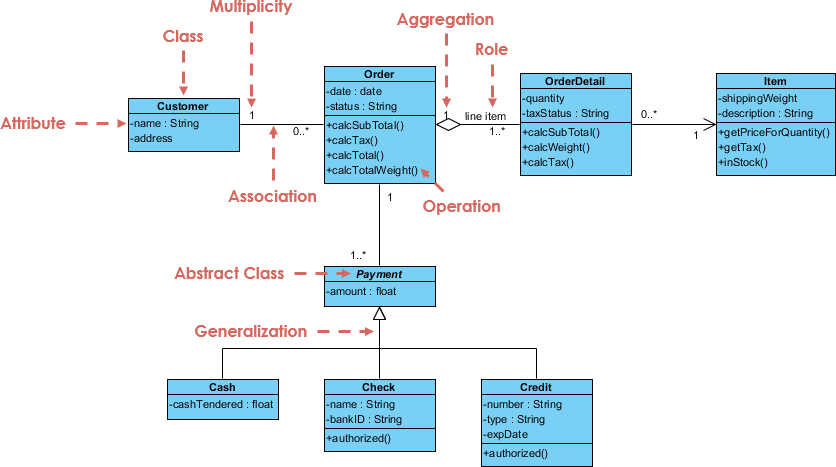
🛠️ Key Benefits of AI Visual Modeling in Visual Paradigm
🧩 Pro Tips for Best Results
- Be specific in your prompts:
❌ “Make a diagram for a store.”
✅ “Create a UML class diagram for a retail system with Customer, Order, OrderDetail, Item, and Payment. Use generalization for payment types: Credit, Check, Cash.” - Use domain-specific terms:
Words like “owns”, “depends on”, “inherits”, “contains”, “represents” trigger correct UML interpretation. - Combine AI with manual editing:
AI gives you a solid starting point — then refine layout, add notes, or adjust multiplicities. - Use AI for prototyping:
Quickly explore multiple design alternatives (e.g., “What if OrderDetail is a separate class?” → AI generates it instantly).
🔄 AI + Human Expertise = Optimal Design
Visual Paradigm’s AI doesn’t replace design thinking — it amplifies it.
- AI handles the mechanics: syntax, structure, relationships.
- You provide the vision: business rules, architectural decisions, domain logic.
✅ Think of it as a co-pilot for software architects and designers — not a replacement for judgment, but a powerful force multiplier.
📌 Final Verdict: Why This Changes Everything
💡 This is not just a convenience — it’s a paradigm shift in how we design software.
📬 Ready to Try It?
👉 Get started with Visual Paradigm AI Visual Modeling:
- https://www.visual-paradigm.com
- Free tier available (includes AI features)
- Works in browser or desktop (Windows/Mac/Linux)
✅ Perfect for students, developers, architects, and teams building real-world systems.
🏁 Conclusion: The Future of UML is AI-Powered
The two classic UML diagrams — Sales Order System and Drawing Application — are no longer just static textbook examples.
With Visual Paradigm’s AI Visual Modeling, they become:
- Dynamic prototypes
- Collaborative blueprints
- Code-ready designs
🚀 From idea to diagram in seconds. From diagram to code in minutes.
📚 Final Thought:
“In the age of AI, the best software design isn’t just about writing code — it’s about describing your system clearly, and letting AI do the rest.”
✅ You’re now equipped not only to understand UML class diagrams — but to create them faster, smarter, and more accurately than ever before.
🛠️ Next Step: Try the AI feature with one of the prompts above — and see the magic happen!
🎯 Your next diagram is one sentence away.
📘 Case Study Updated | Powered by Visual Paradigm AI Visual Modeling
✨ Transforming ideas into UML — Instantly. Accurately. Intelligently.
- AI-Powered UML Class Diagram Generator by Visual Paradigm: This page details an advanced AI-assisted tool that automatically generates UML class diagrams from natural language descriptions. It is designed to significantly streamline the software design and modeling process.
- Real-Life Case Study: Generating UML Class Diagrams with Visual Paradigm AI: A detailed case study demonstrating how an AI assistant successfully transformed textual requirements into accurate UML class diagrams for a real-world project.
- Comprehensive Tutorial: Generate UML Class Diagrams with Visual Paradigm’s AI Assistant: This resource provides a step-by-step guide on using the online AI assistant to create precise UML class diagrams directly from plain text input.
- Creating a UML Class Diagram for a Library System Using AI and Visual Paradigm: A practical blog post that walks through the specific process of building a class diagram for a library management system using AI modeling tools.
- Interactive AI Chat for UML Class Diagram Generation: This interactive conversational interface allows users to generate and refine UML class diagrams through real-time natural language interaction in a browser.
- Building a Hotel Reservation System Class Diagram with Visual Paradigm AI: A hands-on tutorial that guides users through creating a comprehensive hotel system model leveraging integrated AI capabilities.
- Case Study: AI-Powered Textual Analysis for UML Class Diagram Generation: This study explores how AI-driven textual analysis enables the accurate and efficient generation of diagrams from unstructured requirements.
- How AI Enhances Class Diagram Creation in Visual Paradigm: An exploration of how Visual Paradigm leverages AI to automate and improve the creation of class diagrams for faster software design.
- Streamlining Class Diagrams with Visual Paradigm’s AI: This article explains how AI-powered tools reduce the complexity and time required to create accurate models for software projects.
-
From Problem Description to Class Diagram: AI-Powered Textual Analysis: A guide focused on exploring how AI converts natural language problem descriptions into structured class diagrams for software modeling.