


Introduction: Why I Decided to Test-Drive an AI Modeling Platform
As a systems analyst who has spent over a decade wrestling with requirements documents, whiteboard sketches, and endless diagram revisions, I was skeptical when I first heard about AI-powered visual modeling. Too many “smart” tools promise the world but deliver static images you can’t edit, or hallucinate business logic that doesn’t align with reality.
But in early 2026, colleagues kept mentioning Visual Paradigm—not as a flashy demo tool, but as a platform they were actually using for production architecture work. Intrigued, I signed up for a trial to put its AI ecosystem through its paces on a real project: designing a telehealth appointment system for a regional healthcare provider. What follows is my honest, third-party review of the experience—from first prompt to final deliverable.
First Impressions: A Hybrid Ecosystem Built for Real Workflows
Unlike single-purpose AI diagram generators, Visual Paradigm presents itself as a cohesive modeling environment where AI assists rather than replaces human judgment. The platform offers four complementary entry points: a direct text-to-diagram generator, a conversational AI chatbot, guided AI “Studios” for specific modeling tasks, and deep integration within both cloud and desktop applications.
What stood out immediately was the emphasis on editability. Every AI-generated output wasn’t a flat image—it was a fully interactive, standards-compliant model I could refine, connect to requirements, or export to code. This addressed my biggest concern: that AI automation might sacrifice the precision and traceability required for enterprise work.
Core AI Features: How They Actually Feel to Use
🎯 AI Use Case Modeling Studio: From Goal Statement to Full Specification
I started with a simple prompt: “Patients search for specialists, book virtual consultations, and submit insurance claims.” Within seconds, the Use Case Modeling Studio extracted primary actors (Patient, Doctor, InsurancePortal), defined system boundaries, and populated detailed event flows—including edge cases like handling expired credentials or failed payment retries.
The output wasn’t just a diagram; it was a structured use case specification with preconditions, postconditions, and alternative flows, all editable in-place. This eliminated hours of manual documentation and ensured consistency between textual requirements and visual models .
⚡ Instant Diagram Generation: One Prompt, Multiple Views
With the use case logic defined, I clicked “Generate Related Diagrams.” The platform produced a synchronized set: a UML Use Case Diagram, a Sequence Diagram showing message flows between patient app and insurance gateway, and even a preliminary Class Diagram with domain entities.
What impressed me was the semantic accuracy: relationships were correctly typed (associations, dependencies, generalizations), and layout suggestions followed modeling conventions. I could then tweak any element using standard UML tools—no “AI lock-in”.
💬 Intelligent Chat-Based Editing: Refining Models Through Conversation
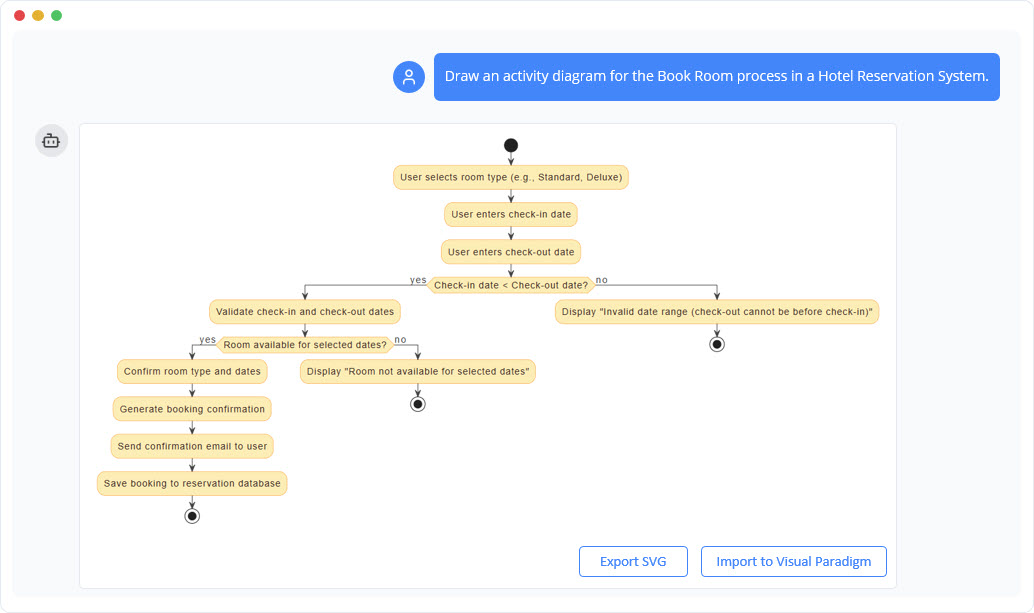
Mid-review, I realized the Appointment entity needed a notification mechanism. Instead of manually dragging connectors, I typed into the chat panel: “Add an include relationship from Schedule Appointment to Send Confirmation Notification.” The AI instantly updated the diagram, added the new use case, and even suggested a corresponding activity flow.
This conversational refinement felt natural and dramatically accelerated iteration cycles—especially valuable when exploring design alternatives with stakeholders who aren’t modeling experts.
🔍 AI Textual Analysis: Mining Legacy Documents for Structure
For the insurance integration piece, I pasted excerpts from the provider’s existing API documentation. The AI Textual Analysis feature parsed the text, identified candidate classes (Claim, Policy, CoverageRule), extracted attributes and operations, and proposed a normalized ERD. This turned a tedious reverse-engineering task into a guided discovery process.
☁️ AI Cloud Architecture Studio: From English to Infrastructure Topology
When designing the deployment view, I described: “Host the patient portal on AWS with auto-scaling, use Azure Active Directory for identity, and store records in a HIPAA-compliant Google Cloud SQL instance.” The Cloud Architecture Studio generated a layered topology diagram with correct service icons, network boundaries, and security annotations—ready for infrastructure-as-code export .
❓ “Ask Your Diagram”: Turning Models into Actionable Insights
Once the model stabilized, I used the “Ask Your Diagram” feature to query: “Generate a test matrix for the appointment booking flow.” The system analyzed the use case scenarios and produced a structured test plan with preconditions, steps, and expected results. I could then export this directly to Jira or as a PDF for QA handoff.
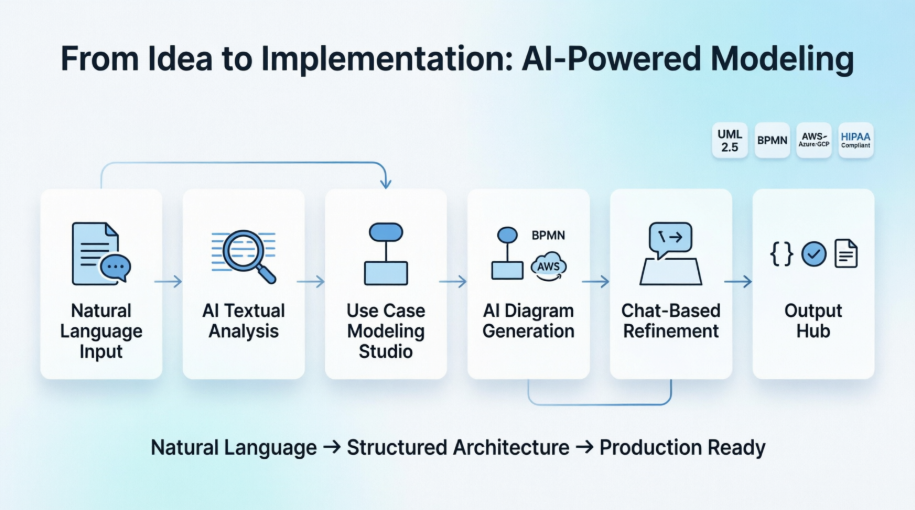
The Integrated Pipeline: How Features Connect in Practice
The true power emerged when I used features in sequence. My workflow looked like this:
-
Textual Analysis extracted domain concepts from requirements docs
-
Use Case Studio structured those into formal interactions and boundaries
-
Diagram Engine rendered synchronized UML/Cloud views
-
Chat Editor allowed conversational refinement with stakeholders
-
Knowledge Hub generated test cases, documentation, and code skeletons
This pipeline transformed abstract ideas into implementation-ready artifacts without context-switching between tools. Crucially, changes propagated across views—updating a use case automatically reflected in related sequence diagrams, maintaining model integrit.
Real-World Test: Building the Medical Booking System
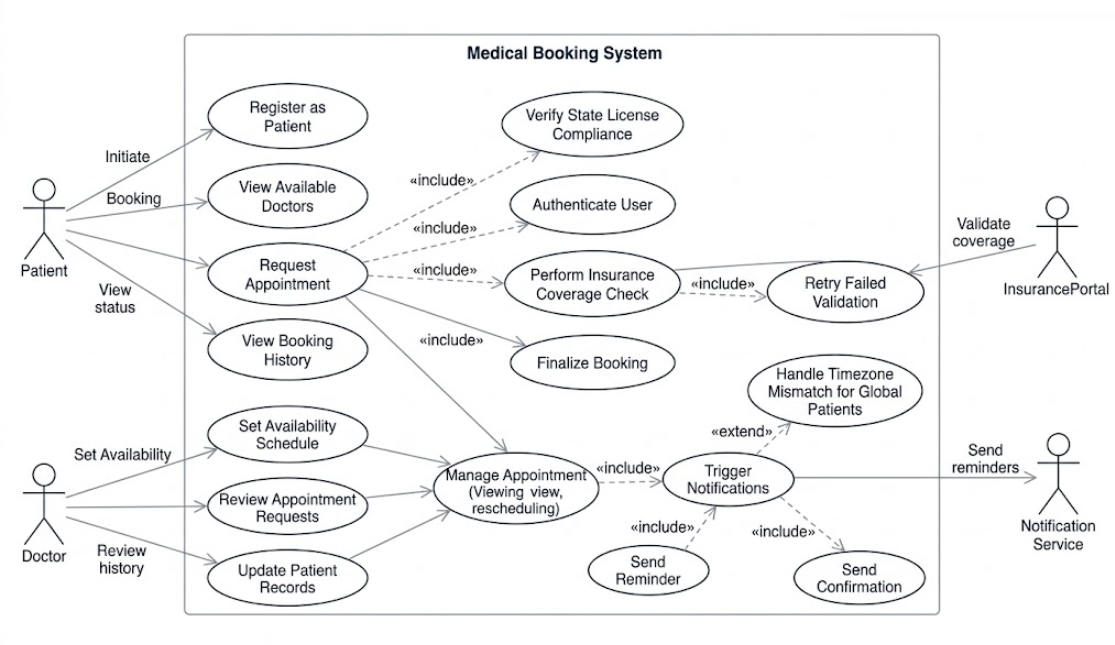
Step 1: Requirements Capture via Natural Language
I described the core flow in plain English. The AI identified entities (Patient, Doctor, Appointment, InsurancePortal) and logged key behaviors like “verify coverage” and “send reminder.” No UML knowledge required—just clear problem statements.
Step 2: Use Case Structuring with Edge Cases
The Use Case Studio expanded my description into a formal matrix, automatically adding critical scenarios I’d initially overlooked: “Handle timezone mismatches for global patients” and “Retry failed insurance validation.” This proactive suggestion elevated the specification’s robustness.
Step 3: Multi-View Diagram Generation
With one click, I received a cohesive diagram set: Use Case, Sequence, and Class diagrams, all semantically linked. The Sequence Diagram correctly showed asynchronous messaging for insurance checks, while the Class Diagram included multiplicities and visibility modifiers.
Step 4: Collaborative Refinement via Chat
Sharing the draft with a clinical stakeholder, we used the chat interface to iterate: “Add a pre-condition that doctor must be licensed in patient’s state.” The AI updated all relevant diagrams instantly, maintaining consistency—a huge win for cross-functional alignment.
Step 5: Downstream Artifact Generation
Finally, I requested: “Generate Java service skeletons and JUnit test templates for the booking workflow.” The platform produced well-structured code frameworks with placeholder logic, accelerating developer onboarding and reducing boilerplate effort.
Honest Assessment: Strengths and Considerations
✅ What Worked Exceptionally Well
-
Eliminated Blank-Canvas Paralysis: Generating accurate first drafts in seconds jumpstarted design sessions and reduced meeting time spent on whiteboarding.
-
Maintained Model Consistency: Changes in one diagram automatically propagated to related views, preventing the drift that plagues manual modeling.
-
Democratized Technical Design: Non-technical stakeholders could contribute meaningfully via natural language, improving requirement quality without requiring UML training.
-
Enterprise-Ready Output: Generated models were standards-compliant (UML 2.5, ArchiMate 3.1), traceable to requirements, and exportable to code—suitable for audit and implementation .
⚠️ Areas Requiring Human Oversight
-
Prompt Clarity Matters: Vague inputs occasionally led to over-generalized models. Success required specific, scoped prompts (e.g., “for a HIPAA-compliant US telehealth system”).
-
Architectural Judgment Still Essential: The AI suggested valid patterns, but critical decisions—like choosing between event-driven vs. request-response for insurance checks—required senior engineer review.
-
Licensing and Connectivity: Advanced AI features require cloud synchronization and appropriate edition licensing (Professional/Enterprise), which may impact offline or budget-constrained team.
Who Should Consider This Platform?
Based on my experience, Visual Paradigm’s AI ecosystem is particularly valuable for:
-
Product teams building complex, regulated systems (healthcare, finance) where traceability is non-negotiable
-
Enterprise architects needing to rapidly prototype and socialize architecture decisions across stakeholders
-
Business analysts who want to bridge the gap between requirements and technical design without becoming UML experts
-
Agile teams seeking to accelerate sprint planning with AI-generated user story maps and acceptance criteria
-
Global organizations requiring multi-language modeling support and consistent documentation standards
Conclusion: A Mature Co-Pilot for Serious Modeling Work
After four weeks of hands-on use, I can confidently say Visual Paradigm’s AI-powered modeling ecosystem delivers on its promise: it transforms natural language into structured, editable, and implementation-ready models—without sacrificing the rigor required for professional software engineering.
This isn’t a tool that replaces architects or analysts; it’s a force multiplier that handles the mechanical heavy lifting so humans can focus on strategic decisions, edge-case reasoning, and stakeholder collaboration. The hybrid cloud/desktop workflow ensures flexibility, while the emphasis on standards compliance and traceability makes outputs suitable for regulated industries.
If you’re tired of starting from scratch on every diagram, or frustrated by the disconnect between requirements docs and technical models, Visual Paradigm’s AI features deserve a serious look. Start with a free trial, test it on a small but real project, and experience how AI can accelerate—not automate—your design thinking.
References
- AI-Powered Use Case Modeling Tool: Official announcement detailing the AI-Powered Use Case Modeling Studio, featuring automated generation of use case descriptions, diagrams, and test cases from natural language prompts.
- Harnessing Visual Paradigm’s AI for Diagram Generation: Comprehensive 2026 guide exploring Visual Paradigm’s evolution into a mature AI-powered modeling platform with iterative refinement, traceability, and multi-method diagram generation.
- AI-Powered Use Case Modeling Tool: Release notes covering core features including AI-powered generation, text-to-diagram conversion, test case creation, and project dashboard capabilities.
- Visual Paradigm AI: Advanced Software & Intelligent Apps: Official portal for Visual Paradigm’s AI tools, showcasing the hybrid architecture combining domain-specific models with conversational interfaces for visual modeling.
- Use Case Modeling Studio: Feature page detailing how the AI Use Case Modeling Studio converts goal statements into formal scopes, actors, and interaction flows with pre/postconditions.
- AI Chatbot: Overview of the conversational AI assistant that enables natural language editing, element addition, relationship establishment, and style changes via chat commands.
- AI Diagram Generation: Documentation on transforming text descriptions into production-ready UML, BPMN, SysML, ArchiMate, and C4 diagrams with full editability.
- AI Textual Analysis: Feature description of parsing legacy documents or user narratives to extract domain classes, operations, attributes, and multiplicities automatically.
- AI Cloud Architecture Studio Demo: Video demonstration of generating structured cloud infrastructure topologies for AWS, Azure, and Google Cloud from English text descriptions.
- Canvas Tool – Visual Paradigm: Information on querying existing diagrams as active databases to generate project summaries, pitch templates, or technical specifications.
- Guide to Powered UML Diagram Generation: Tutorial on using the “Ask Your Diagram” feature for knowledge extraction and downstream artifact generation.
- Visual Paradigm’s AI Diagram Generation Features: Third-party review highlighting automation capabilities, standards compliance, accessibility, and practical considerations for AI diagram generation.
- AI-Powered Use Case Modeling Studio Release: Official release documentation covering the integrated workflow from textual analysis through use case modeling to diagram generation and refinement.
- Use Case Modeling Workflow Demo: Video walkthrough demonstrating the step-by-step process of building a medical booking system using Visual Paradigm’s AI features.
- AI-Powered Use Case Modeling Studio Release Notes: Technical details on generating unified UML Use Case and Sequence Diagrams with real-time message routing visualization.
- Diagram Generation Best Practices: Tutorial on leveraging AI diagram generation for complex system blueprints with proper structural relationships and layout conventions.
- AI Use Case Diagram Refinement Tool: Feature page describing chat-based editing capabilities for adding connectors, relationships, and elements via natural language commands.