


Introduction
In the fast-paced world of modern product development, Agile methodologies have become the gold standard for delivering value quickly and adapting to change. However, a persistent paradox plagues many Agile teams: while their development processes are highly iterative and flexible, their tooling ecosystems remain rigid, fragmented, and siloed. Product Managers, Scrum Masters, and system architects frequently find themselves context-switching between heavy desktop modeling tools, cloud-based sprint boards, and disconnected documentation software. This friction directly contradicts the Agile manifesto’s core principle of maximizing the amount of work not done.
Enter the Visual Paradigm Unified Platform, unveiled in June 2026 as a transformative solution to this exact problem. By seamlessly bridging the gap between robust desktop visual modeling and accessible cloud-based productivity, Visual Paradigm has created a single, cohesive ecosystem. Supercharged by deep, native integrations with generative AI, this platform does more than just organize files—it fundamentally accelerates the Agile lifecycle. This comprehensive guide explores how the Unified Platform integrates core components, leverages AI to drive agility, and provides the ultimate workspace for modern, cross-functional teams.
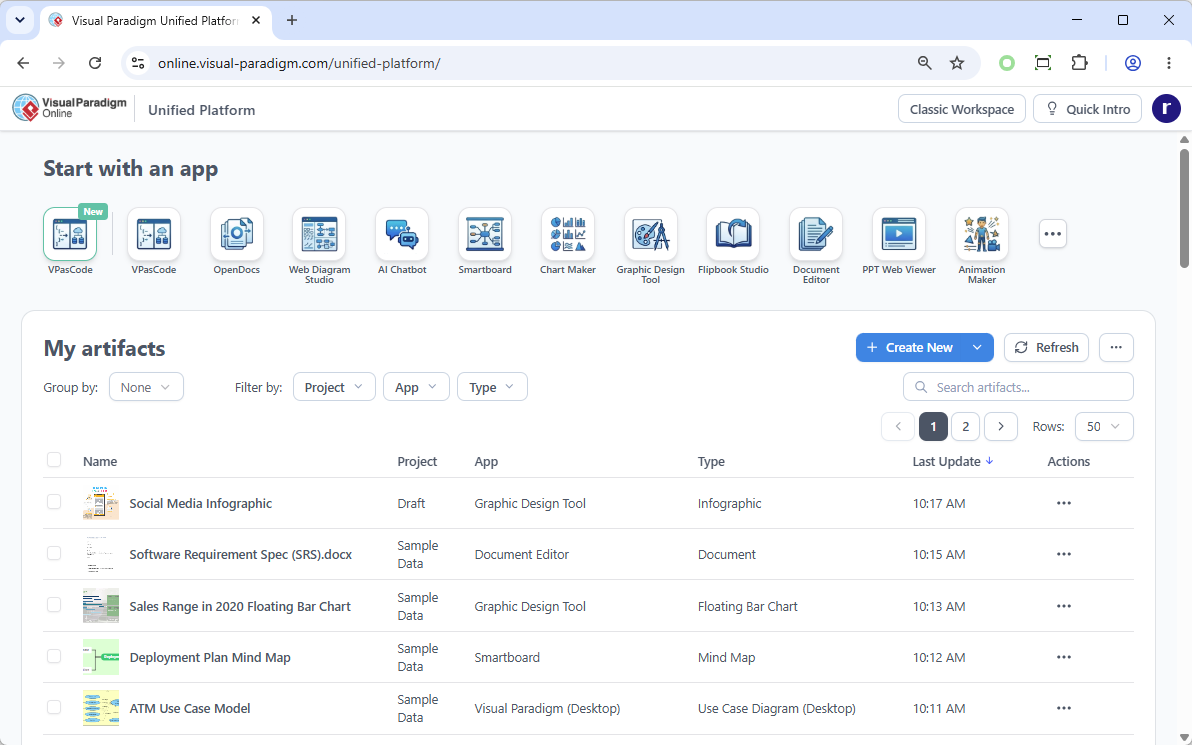
Bridging Core Components: A Truly Unified Ecosystem
The foundational brilliance of the Unified Platform lies in its ability to dissolve the historical boundaries between Visual Paradigm’s core products. For years, teams had to choose between the heavy-duty, offline capabilities of Visual Paradigm Desktop and the collaborative, accessible nature of Visual Paradigm Online. The Unified Platform eliminates this compromise, merging them into a singular, fluid experience.

Desktop and Web Synergy
Visual Paradigm Desktop users can now open the Unified Platform directly inside an embedded browser within their desktop environment. This means your complex, enterprise-grade system models (like UML, SysML, or BPMN) live in the exact same visual workspace as your cloud-native Agile artifacts. You retain full offline capabilities and deep system integration while gaining instant access to cloud collaboration.
The Unified Drive
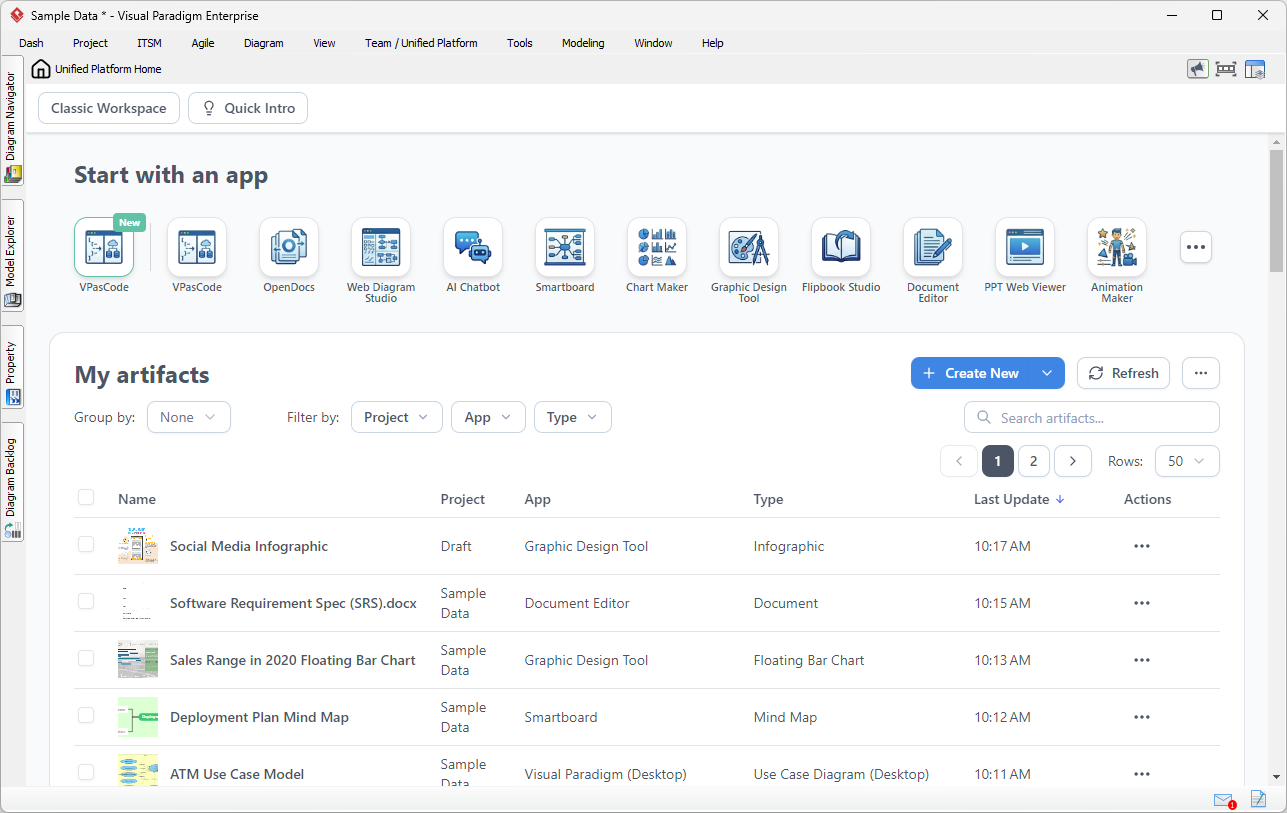
At the heart of this integration is the Unified Drive, a centralized, drive-like environment that acts as a universal file system for your visual work.
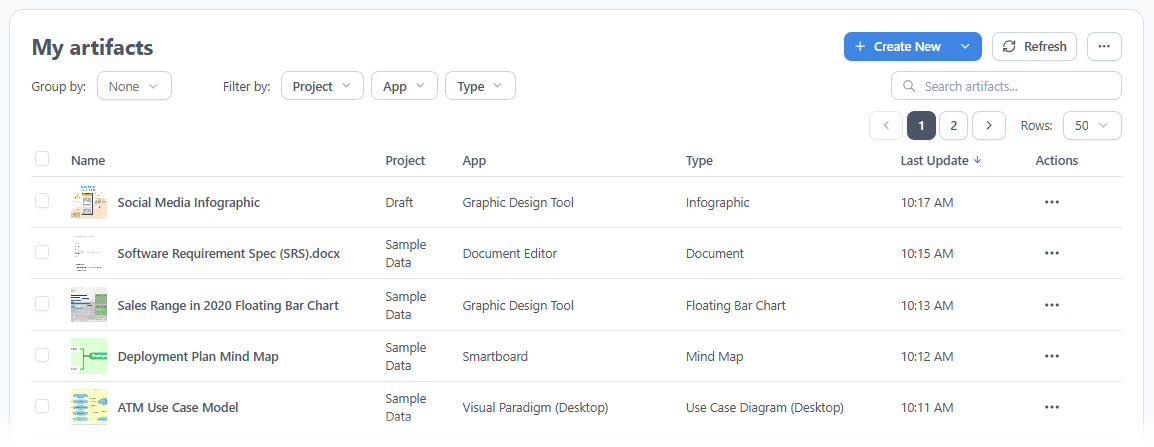
Every diagram, document, or project created across the entire suite of apps is automatically organized, indexed, and visible here. Say goodbye to hunting through local folders or remembering which specific application a file was created in.
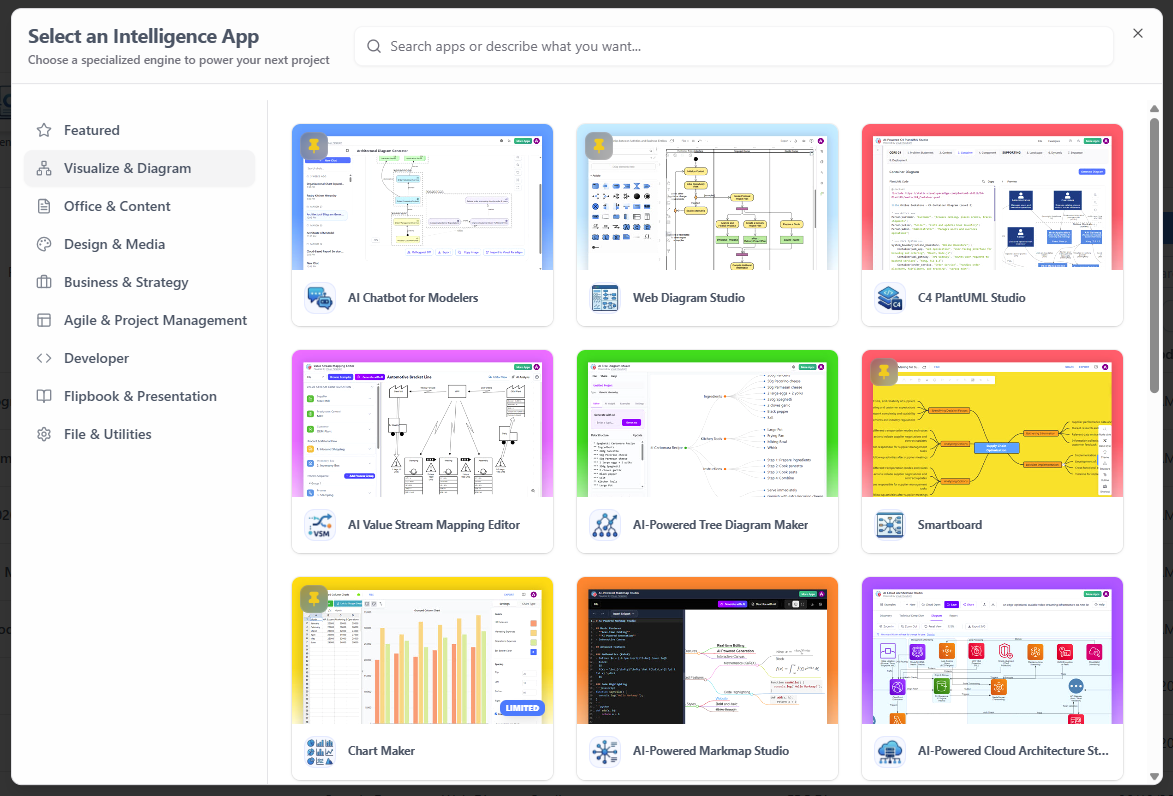
A Central Hub for 100+ Specialized Apps
The platform provides a categorized dashboard hosting over 100 specialized apps. Whether your team needs advanced system modeling, Agile sprint planning, business infographics, or strategic management tools, everything is accessible from one entrance.
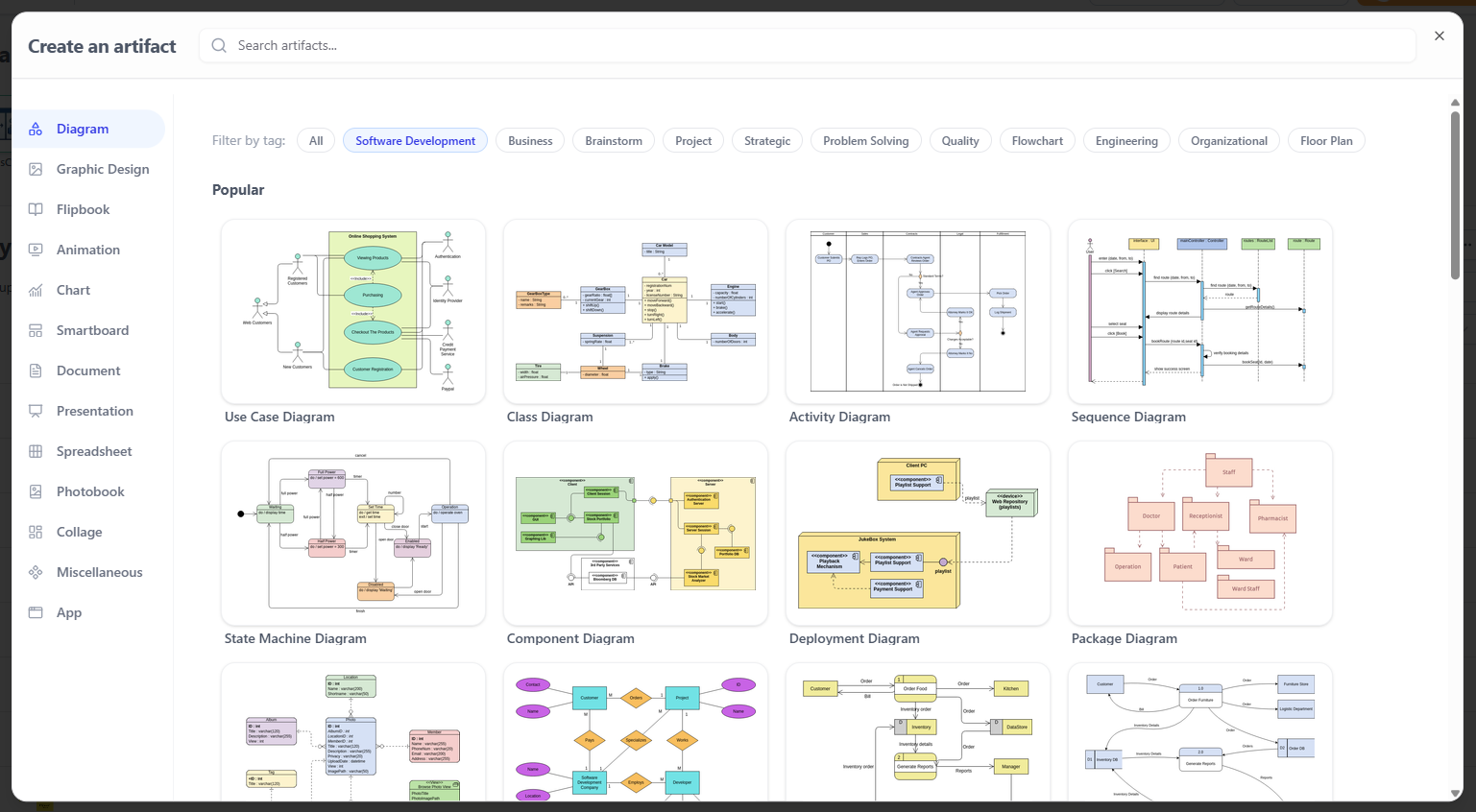
Frictionless Creation Workflow
Starting a new task no longer requires navigating deep sub-menus or launching standalone applications. A centralized “Create” menu allows you to instantly spin up any diagram, wireframe, or visual artifact from a single, intuitive interface.
The Agile Advantage: Why AI Makes it the Perfect Platform for Agile Teams
Agile is built on the principles of iterative development, rapid feedback loops, and welcoming changing requirements, even late in development. However, traditional documentation and diagramming tools create a “cost of change” that makes teams resist pivoting. If it takes four hours to manually redraw an architecture diagram, a team will avoid updating it.
This is where the Unified Platform’s AI-powered ecosystem transforms the Agile experience. By embedding generative AI directly into the workflow, Visual Paradigm drastically lowers the cost of change, making true agility possible.
Key AI-Powered Features for Agile Workflows
-
VPasCode (Text-to-Diagram): Describe your system architecture, user flow, or process map in plain natural language, and the AI instantly generates the corresponding visual diagram.
-
AI Presentation Studio: Transform raw sprint review notes, bullet points, and data into polished, stakeholder-ready presentations in seconds.
-
AI App Studio: Rapidly prototype and build functional application wireframes or mockups directly from textual descriptions or rough sketches.
Why AI Makes it “Agile”
-
Accelerated Time-to-Value: Agile teams thrive on delivering working increments quickly. AI tools eliminate the hours spent formatting diagrams and documents, allowing teams to move from concept to visual deliverable in minutes.
-
Embracing Change Over Following a Plan: When user stories change mid-sprint, AI allows teams to regenerate and update their visual artifacts instantly. The fear of “rework” is eliminated because the AI handles the heavy lifting of visual formatting.
-
Democratizing Visual Communication: In Agile, collaboration between technical and non-technical stakeholders (like Product Owners and developers) is critical. AI allows anyone to visualize complex ideas using natural language, ensuring everyone shares the same mental model without needing specialized training.
-
Continuous Documentation: Agile values “working software over comprehensive documentation,” but documentation is still necessary. AI automates the generation of manuals, PRDs, and sprint reports directly from your models, ensuring documentation stays in sync with the product without slowing down the development cycle.
Real-World Scenarios: Transforming Cross-Functional Workflows
By embedding the Unified Platform directly into your workflow, context-switching is eliminated. Here is how cross-functional teams can leverage this synergy:
Scenario 1: Connecting System Modeling with Product Requirements
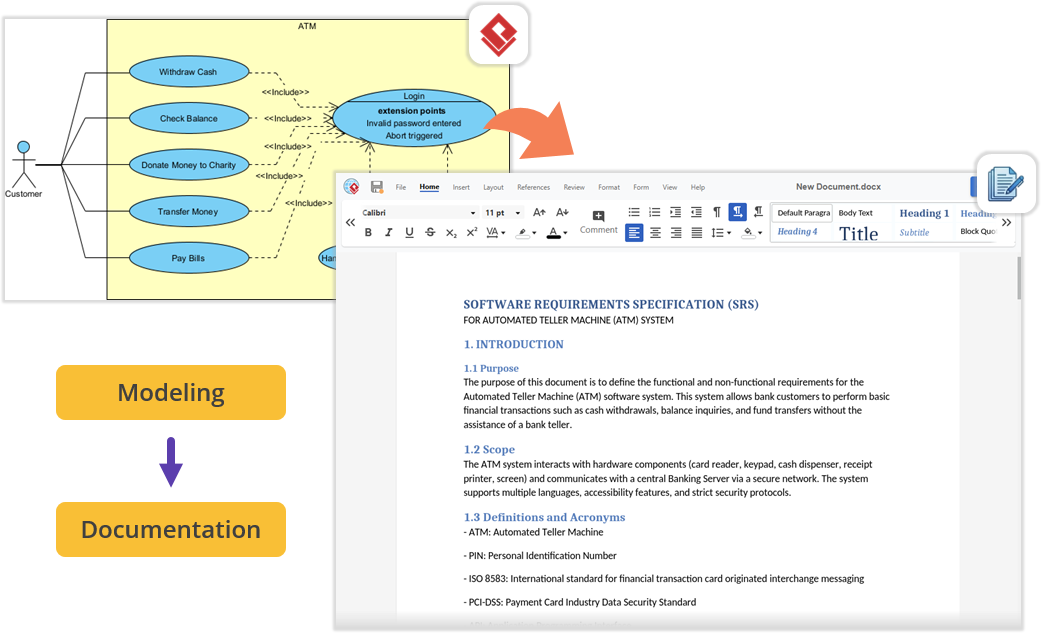
Imagine your engineering team is architecting a new software module using UML inside Visual Paradigm Desktop. Once the technical models are complete, the Product Manager needs to write the Product Requirement Specification (PRD). Instead of exporting images and switching to a local word processor, you simply open the embedded Unified Platform and launch the Document Editor app. Your requirements documentation is written right next to your active modeling environment, keeping everything perfectly organized under a single project space.
Scenario 2: Effortless Documentation via Pipeline and OpenDocs
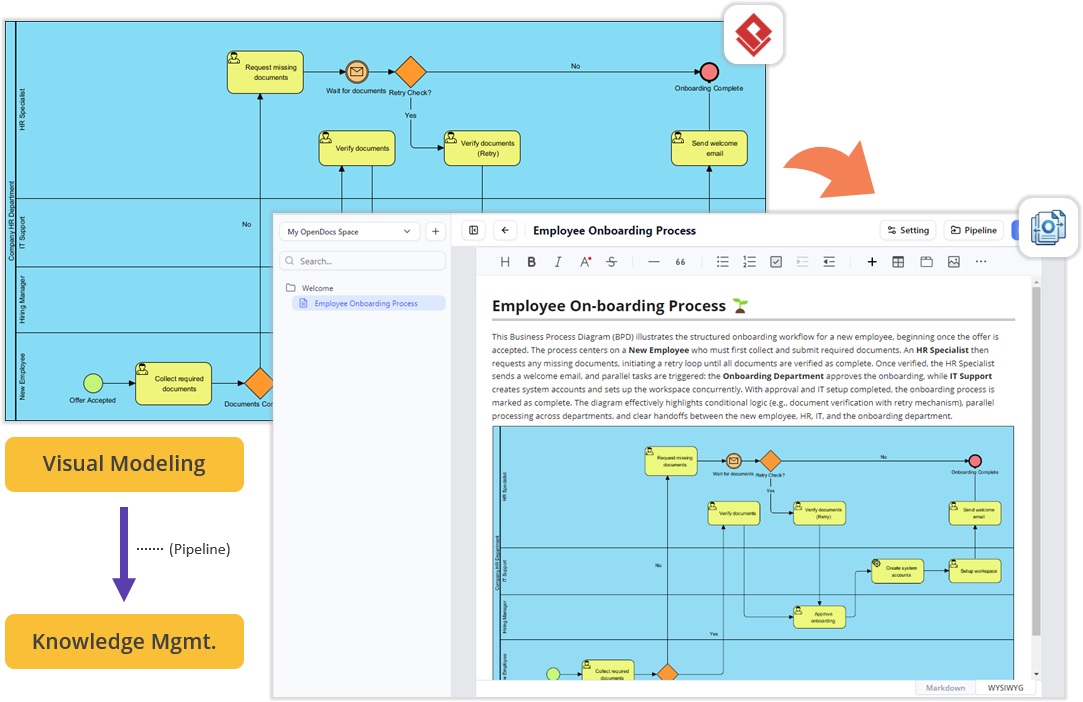
For teams looking to streamline technical documentation, the flow between your desktop workspace and cloud features is now frictionless. Build your diagrams locally in VP Desktop and send them to the cloud-based Pipeline. Switch over to the OpenDocs app within the Unified Platform panel. In the OpenDocs editor, your Pipeline pane is waiting. You can write your project guides and simply drag-and-drop your desktop-generated diagrams directly into the document canvas. No broken image links, no manual exports, and zero context-switching.
Scenario 3: Supercharge Projects with Agile and Management Tools
Software development requires more than just architectural diagrams; it requires strict alignment and scheduling. Within the same interface where you manage your codebase models, you can instantly jump into dedicated apps for Stakeholder Management, generate Development Plans, build interactive Gantt Charts, map out a RACI Matrix, or even design a prototype site using the Website Builder. It perfectly bridges the gap between high-level engineering design and day-to-day Agile project execution.
How to Access the Unified Platform
Getting started with the new ecosystem is incredibly straightforward, whether you prefer working in a browser or inside the desktop software.
For Visual Paradigm Online Users
You can access the platform from any device via your web browser:
-
Log into your VP Online account at the official login portal.
-
Upon successful login, you will automatically be redirected to the new Unified Platform dashboard.
-
You can also bookmark and visit the platform directly via the unified-platform URL on the Visual Paradigm Online domain.
For Visual Paradigm Desktop Users
To view your synchronized diagrams and access the 100+ embedded apps right inside your desktop client:
-
Ensure you are logged in: To see the Unified Platform menu, connect your desktop application to your cloud repository. Go to the main menu and select Team / Unified Platform > Select Repository and enter your VP Online credentials.
-
Open the Platform: Once logged in, navigate to Team / Unified Platform > Unified Platform in the main menu.

-
An embedded browser will open directly inside your workspace, revealing the centralized cloud drive and your entire app ecosystem.
Conclusion
The Visual Paradigm Unified Platform represents a monumental leap forward in how professionals, and specifically Agile teams, approach visual work and project execution. By dismantling the artificial boundaries between desktop and cloud environments, and between specialized modeling tools and everyday productivity apps, Visual Paradigm has created an ecosystem that respects the natural, fluid way modern teams actually work.
For Agile practitioners, the integration of generative AI is a game-changer. It directly addresses the historical friction of documentation and planning, allowing teams to embrace change, iterate rapidly, and focus entirely on delivering customer value rather than managing tools. Whether you are a Product Owner mapping out a dynamic roadmap, a software architect designing complex systems, or a Scrum Master facilitating sprint planning, the Unified Platform offers a compelling, frictionless vision of what integrated, AI-driven productivity can achieve. As the platform continues to evolve with advanced cross-source data utilization and unified project permissions, it stands poised to become the indispensable central nervous system for the world’s most agile organizations.
References
-
Visual Paradigm Unified Platform: Project Management UI Enhancements: Details on project management interface improvements.
-
Introducing Visual Paradigm 18.1: A New Era of Unified Ecosystems and AI-Driven Innovation: Overview of version 18.1’s unified ecosystem and AI capabilities.
-
Visual Paradigm Official Website: The main hub for Visual Paradigm products and resources.
-
Visual Paradigm Online: Unified Platform: The cloud-based entry point for the Unified Platform.
-
Visual Paradigm Unified Platform: Quick Introduction: A beginner-friendly guide to getting started.
-
Announcing the All-New Visual Paradigm Unified Platform: The official launch announcement for the platform.
-
Visual Paradigm Desktop Product Updates: Latest updates for the desktop application.
-
Visual Paradigm Updates Hub: The central repository for all release notes and product updates.