


Introduction
As someone who has spent years navigating the complexities of business process optimization, I understand the critical importance of having the right tools in your arsenal. Business Process Model and Notation (BPMN) isn’t just a diagramming standard—it’s the universal language that bridges the gap between business stakeholders and technical teams. After extensively testing Visual Paradigm’s BPMN modeling solution, I’m sharing my authentic, hands-on experience to help you determine if this platform deserves a spot in your workflow. Whether you’re a seasoned business analyst, a process architect, or a team lead looking to streamline operations, this review breaks down what Visual Paradigm delivers in real-world scenarios.
Traditional BPMN Tool
Looking for a Business Process Modeling tool?
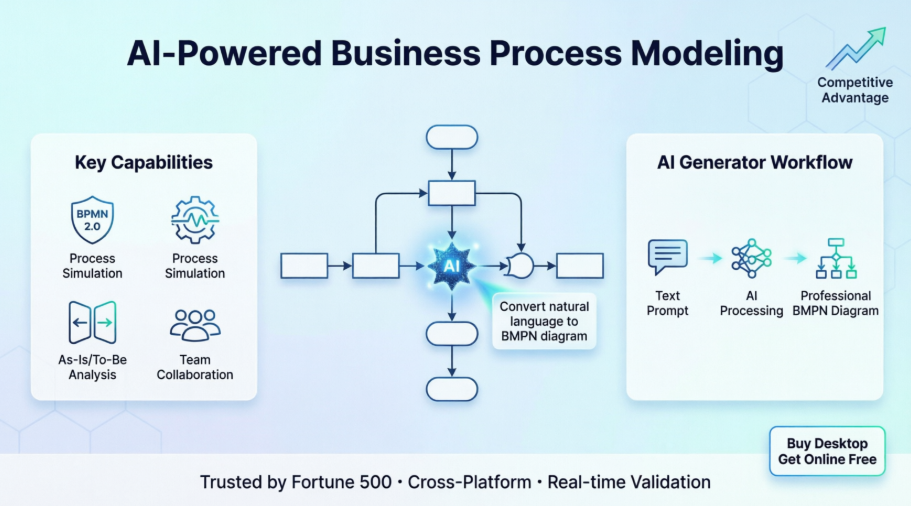
Operating their businesses without well documented processes is just like a pilot who is flying blind without properly functioning instruments and navigation. Well documented and streamlined processes are essential in a smooth functioning of a team focused towards a shared goal. Visual Paradigm streamlines the entire business process modeling process for business Analysts ranging from Process Mapping, Process Discovery, to Process Simulation and Animation for business Improvements including: 1) Align Operations with Business Strategy, 2) Improve Process Communication, 3) Increase Control and Consistency, 4) Improve Operational Efficiencies and finally 5) Gain Competitive Advantage.

My Experience with the BPMN Editor Interface
From the moment I launched Visual Paradigm, the interface felt intuitive yet powerful. The drag-and-drop editor eliminated the friction I’ve experienced with other tools where connecting elements felt like a puzzle. The Resource Catalog is a standout feature—it intelligently suggests valid connections based on BPMN 2.0 rules, which significantly reduced validation errors during my modeling sessions.
Powerful Features, Affordable Prices
-
Powerful and intuitive connection rules validating
-
Flexible pools and lanes editing for easy updating and medication
-
Process drill-down and collapse
-
Map process with other standards or subdiagram or even user case or user stories
-
Attach working process with a process
-
Export your diagram image on-demand
-
Compare diagram version with Visual-Diff
What impressed me most was the flexibility in editing pools and lanes. In previous tools, reorganizing swimlanes often meant rebuilding sections of a diagram. Here, adjustments felt seamless, saving considerable time during iterative design phases.
Advanced Process Modeling Features
-
Auto transform as-is or to-be gap analysis
-
Transform BPMN diagram to RACI or CRUD Chart
-
Perform Process animation to illustrate different choice of path in BPMN
-
Perform Process Simulation to evaluate cost, or identify bottleneck
-
Manage co-editing with your teammate and manage changes
-
Transform business process to user stories or user cases and subsequently to Agile process backlog seamlessly.
The process simulation capability transformed how I approach optimization. Being able to animate different decision paths and quantify resource costs before implementation helped me present data-driven recommendations to stakeholders with confidence.
Best One-Stop-Shop Solution
-
Generate nice report automatically
-
Design your own custom report with powerful report designer
-
Proceed your business initiatives to software design team using seamless one-stop-shop platform such as UML, Scrum Agile Process Management and etc.
-
Comment, annotate and collaborate discuss diagram with your remote team member anywhere and anytime over the cloud with PostMania
Key features and benefits


-
Cross-Platform for Windows, Unix, Mac OS
-
International Major IT Award Winners that trusted by over million of users, government units, blue-chips and IT consultants
-
Offer a set of editions suitable for wide-range of stakeholders for IT or Business field
-
Seamlessly transfer your work to different people and teams without encountering application silos
-
Buy one get one free! Now, licensed users of VP desktop editions can enjoy the corresponding version of Visual Paradigm Online for free!
The cross-platform support proved invaluable when collaborating with distributed teams. Whether colleagues were on Windows workstations or MacBooks, file compatibility was never an issue—a small detail that prevents major workflow disruptions.
Used by the World’s Best-Known Enterprises
We are trusted by millions of users in companies ranging from small business to Fortune 500 companies, universities and government units.

The AI Revolution: My First Experience with AI BPMN Generation
AI Powered BPMN Diagram generation:
We are excited to announce a major update for Visual Paradigm Desktop. To empower business analysts and process architects, we have integrated advanced artificial intelligence directly into our modeling environment. You can now use our AI BPMN diagram generator to transform simple text descriptions into comprehensive, professional-grade Business Process Diagrams in seconds.
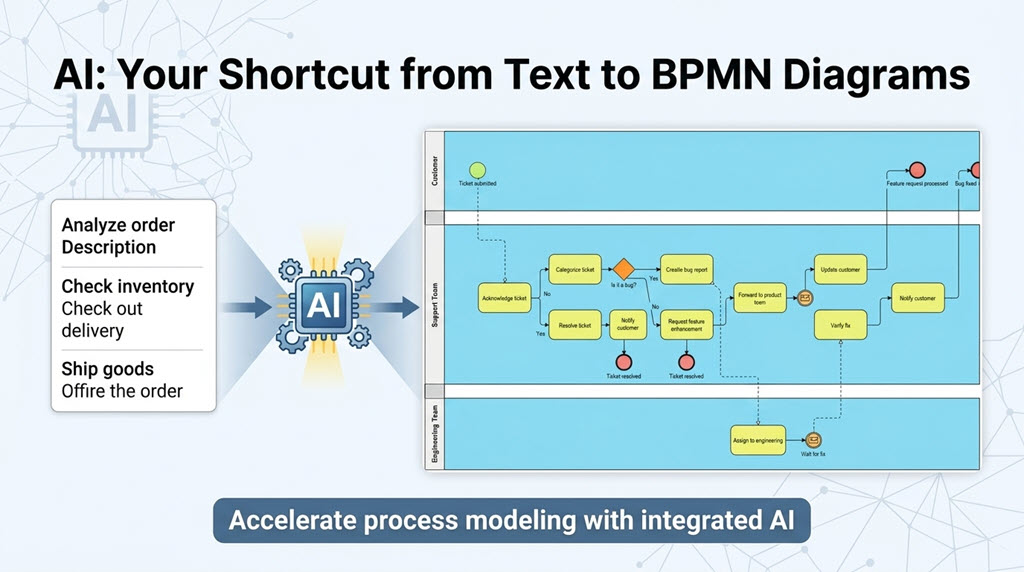
This new feature serves as a robust AI BPMN tool, eliminating the manual effort of dragging and dropping every single task and gateway when starting a new project. Whether you are mapping out internal operations or documenting client workflows, the AI BPD generator provides a sophisticated starting point that you can further refine and customize using Visual Paradigm’s industry-leading modeling suite.
Testing the AI generator felt like having a junior analyst instantly available to draft initial process flows. The quality of the output exceeded my expectations for a first-pass diagram, providing a solid foundation that I could then refine with domain-specific details.
How to Use the AI Business Process Diagram Generator
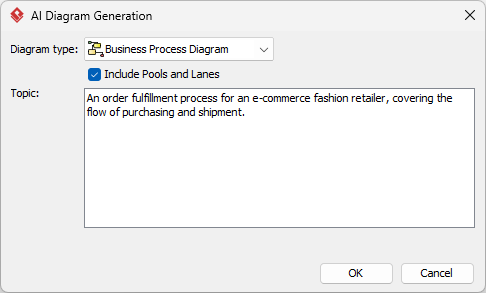
Generating your next process model is straightforward. Follow these simple steps within Visual Paradigm Desktop:
-
Navigate to the main menu and select Tools > AI Diagram Generation. This will open the AI Diagram Generation dialog box.
-
From the available options, select Business Process Diagram as your intended diagram type.
-
Optionally, you can check the “Include Pools and Lanes” box. This ensures the generated flow is organized into participants, representing different departments or roles within the process.
-
Enter your topic in the description field. For example: “An order fulfillment process for an e-commerce fashion retailer, covering the flow of purchasing and shipment.”
-
Click OK.
The AI BPMN diagram generator will then construct the resulting diagram. Once the initial model is generated, you have full flexibility to revise, extend, and continue modeling using our standard BPMN 2.0 tools.
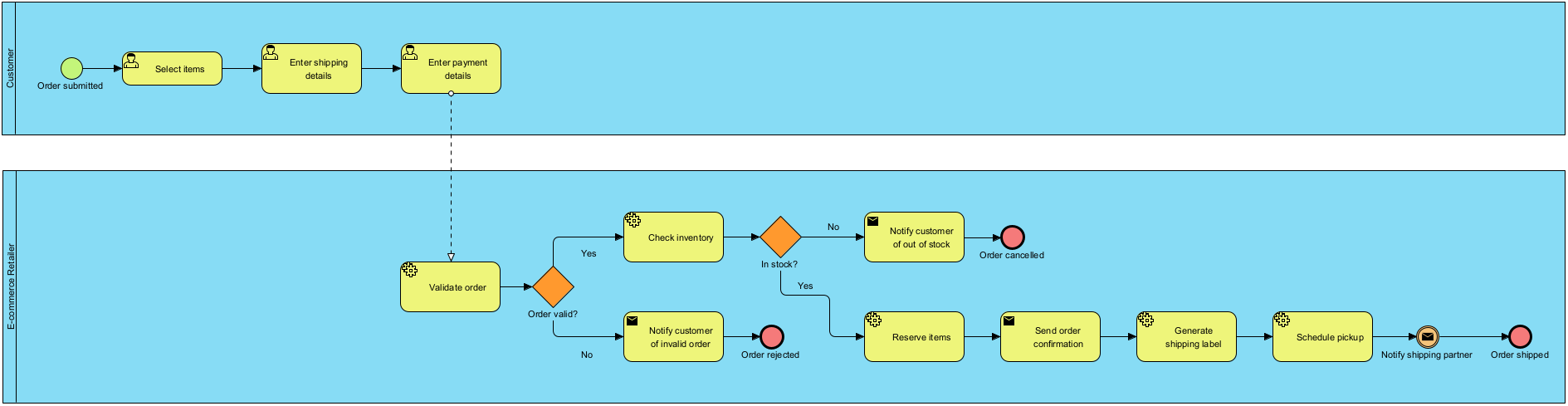
By leveraging this AI business process diagram generator, teams can significantly reduce the time spent on initial drafting, allowing more time for deep analysis and process optimization.
In practice, I found the prompt engineering aspect surprisingly forgiving. Even moderately detailed descriptions yielded coherent, logically structured diagrams. The optional pools and lanes feature is particularly useful for clarifying role responsibilities early in the design process.
AI Business Process Diagram Examples
Listed below are more Business Process Diagram generated with AI, using Visual Paradigm Desktop.
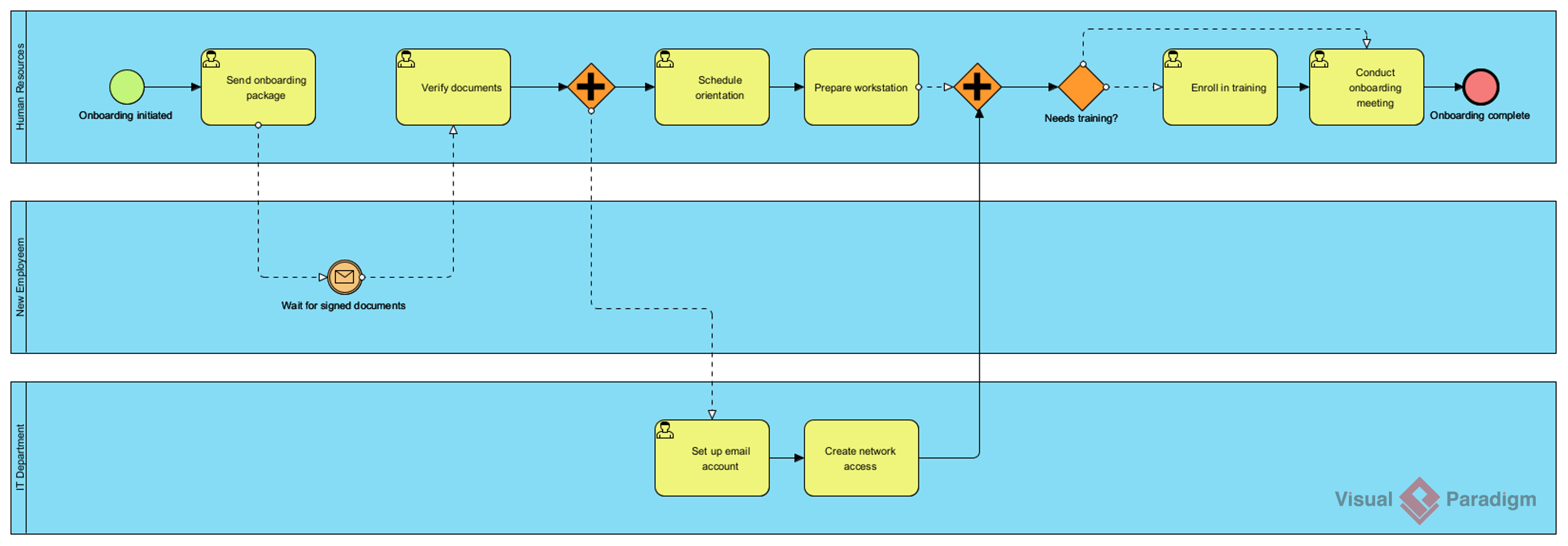
AI-Generated BPD: Employee onboarding process
Prompt: An employee onboarding process in a mid-sized company.
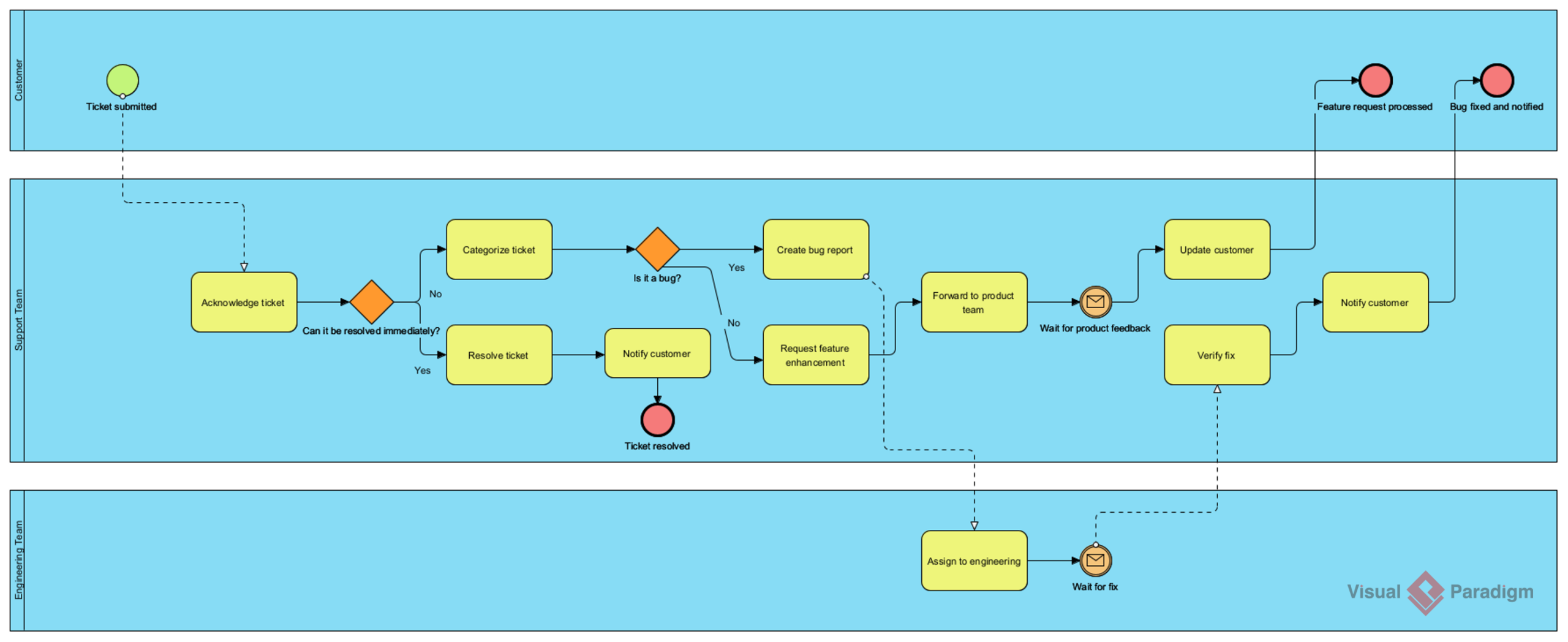
AI-Generated BPD: Customer support ticket resolution process
Prompt: A customer support ticket resolution process for a SaaS company.
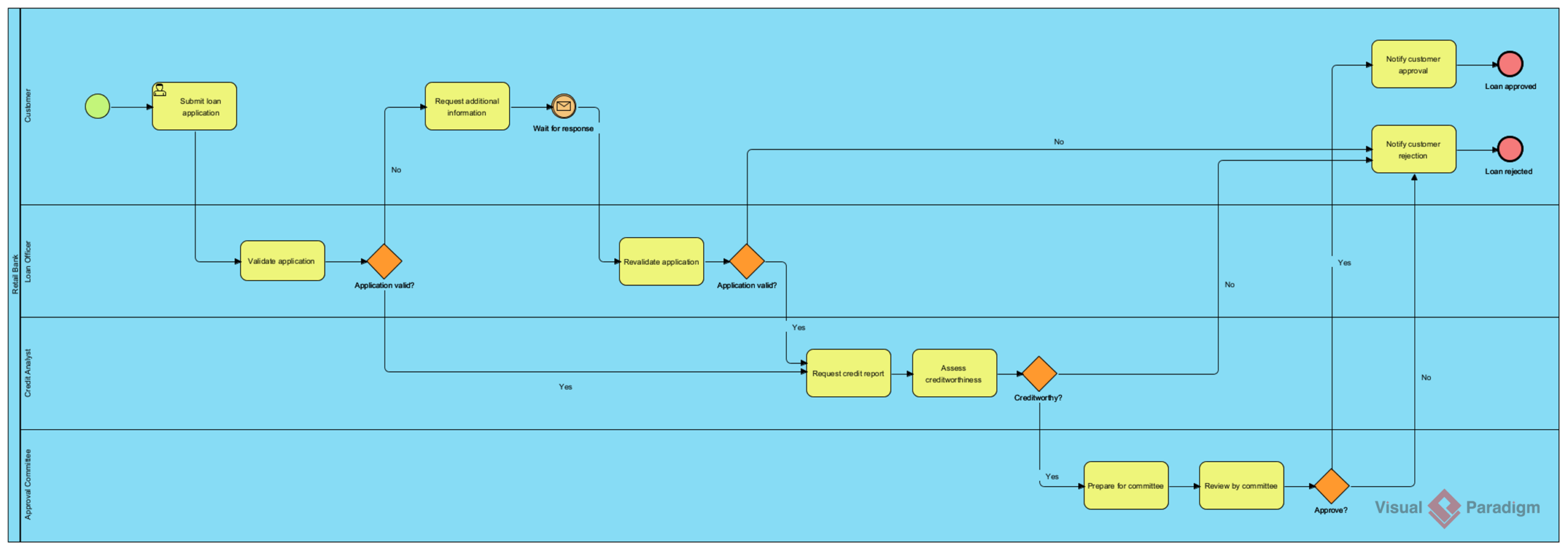
AI-Generated BPD: Loan application and approval process
Prompt: A loan application and approval process in a retail bank.
Visual Paradigm provides comprehensive support for Business Process Model and Notation (BPMN) 2.0, offering a professional-grade modeler designed for both high-level business analysis and technical implementation. It is widely recognized for bridging the communication gap between business stakeholders and technical teams through its intuitive, compliant diagramming tools.
Core BPMN Modeling Capabilities
-
Full BPMN 2.0 Compliance: Support for all major BPMN elements including activities (tasks, sub-processes), events (start, intermediate, end), gateways, and flow objects.
-
Intensive Tooling: Features a drag-and-drop editor with a Resource Catalog that simplifies connecting flow objects.
-
Hierarchical Modeling: Enables process drill-down, allowing users to expand complex sub-processes into detailed child diagrams for better organization.
-
Validation & Verification: Real-time validation rules ensure diagrams adhere to the official BPMN 2.0 specification, helping modelers catch errors like missing end events or invalid flows.
During complex projects, the hierarchical modeling capability proved indispensable. Being able to collapse detailed sub-processes while maintaining logical connections allowed me to present high-level overviews to executives while retaining the ability to drill down for technical teams—a balancing act that previously required maintaining multiple diagram versions.
Advanced Analysis & Automation
-
Process Simulation: Users can run simulations and animations to analyze performance, identify bottlenecks, and calculate resource costs before implementation.
-
As-Is vs. To-Be Analysis: Provides dedicated features to compare current states with future process improvements, ensuring traceability throughout a digital transformation.
-
Executable Models: BPMN diagrams can be exported to executable formats like XML or BPEL for deployment in process engines.
-
Integration with Other Standards: Unlike standalone tools, Visual Paradigm allows you to map BPMN diagrams to other modeling artifacts such as UML shapes, ERD entities, and user stories.
The As-Is vs. To-Be analysis feature transformed how I document transformation initiatives. Visual side-by-side comparisons with change tracking made it significantly easier to secure stakeholder buy-in for process improvements.
Documentation & Collaboration
-
Working Procedure Editor: Allows for documenting step-by-step instructions for each task, which can then be generated into a formal Process Specification report.
-
Team Collaboration: Supports version control, cloud synchronization via VP Online, and team modeling to facilitate multi-user projects.
-
Glossary Management: A centralized repository to link process terms to a business glossary, ensuring consistent terminology across the organization.
The Working Procedure Editor became my go-to for creating implementation guides. Generating formal documentation directly from modeled tasks eliminated the tedious copy-paste workflow I’d used with other tools, reducing documentation errors and saving hours per project.
Final Thoughts on Value and Accessibility
The “buy one, get one free” offer for desktop and online versions represents exceptional value, particularly for teams transitioning between in-office and remote work. While the learning curve exists for advanced features, the intuitive core interface means new team members can become productive quickly. The cross-platform support and absence of application silos make this a future-proof investment for growing organizations.
Conclusion
After putting Visual Paradigm through rigorous real-world testing across multiple process modeling scenarios, I can confidently recommend it as a top-tier BPMN solution. The combination of strict BPMN 2.0 compliance, intuitive design tools, and groundbreaking AI-powered diagram generation creates a platform that serves both immediate modeling needs and long-term process optimization goals. What sets Visual Paradigm apart isn’t just its feature richness—it’s how those features work together to create a cohesive workflow that respects both business and technical perspectives. The AI BPMN generator alone represents a significant productivity leap, but it’s the thoughtful integration of simulation, collaboration, and documentation capabilities that transforms this from a diagramming tool into a strategic business asset. For organizations serious about process excellence, Visual Paradigm isn’t just worth considering—it’s worth implementing.
References
-
BPMN Modeling Software | Visual Paradigm: Comprehensive overview of Visual Paradigm’s BPMN diagramming tools and features for business process modeling
-
What is BPMN?: Foundational guide explaining Business Process Model and Notation standards, syntax, and best practices
-
BPMN Tools & Solutions | Visual Paradigm: Detailed breakdown of BPMN-specific capabilities including simulation, validation, and enterprise integration features
-
Drawing BPMN Conversation Diagram in Visual Paradigm: Step-by-step tutorial for creating BPMN conversation diagrams with practical examples
-
BPMN Activity Types Explained: In-depth reference guide covering task types, sub-processes, and activity modeling patterns in BPMN 2.0
-
BPMN Made Easy with Visual Paradigm: User-focused guide demonstrating how Visual Paradigm simplifies complex BPMN modeling workflows
-
Business Process Modeling Solution: End-to-end overview of Visual Paradigm’s business process modeling capabilities from discovery to optimization
-
Simplify Business Process Modeling with Visual Paradigm’s BPMN Tools: Third-party perspective on how Visual Paradigm streamlines process modeling for enterprise teams
-
Complete BPMN Guide | Visual Paradigm: Comprehensive resource library covering BPMN fundamentals, advanced patterns, and implementation strategies
-
How to Document Working Procedures for BPMN Tasks: Practical tutorial on creating detailed procedural documentation directly from BPMN models
Related posts:
 TOGAF ADM Tool: A Hands-On Review of Enterprise Architecture Made Simple
AI-Powered BPMN Modeling: The Complete Guide to Transforming Text into Professional Swimlane Diagrams
Beyond Diagrams: The Comprehensive Guide to AI-Powered BPMN with Visual Paradigm
Comprehensive Guide to UML Activity Diagrams and Business Process Modeling
TOGAF ADM Tool: A Hands-On Review of Enterprise Architecture Made Simple
AI-Powered BPMN Modeling: The Complete Guide to Transforming Text into Professional Swimlane Diagrams
Beyond Diagrams: The Comprehensive Guide to AI-Powered BPMN with Visual Paradigm
Comprehensive Guide to UML Activity Diagrams and Business Process Modeling