


Introduction
If you’ve ever found yourself constantly tab-switching between a word processor, a diagramming tool, a project management app, and a cloud storage folder just to document a single project feature, you’re not alone. For years, I’ve navigated this fragmented workflow, watching precious hours evaporate in the process of simply keeping information organized and accessible. That’s why, when I first heard about OpenDocs by Visual Paradigm—an AI-powered platform promising to merge text editing with professional diagramming in a single, unified interface—I was cautiously optimistic but genuinely curious.
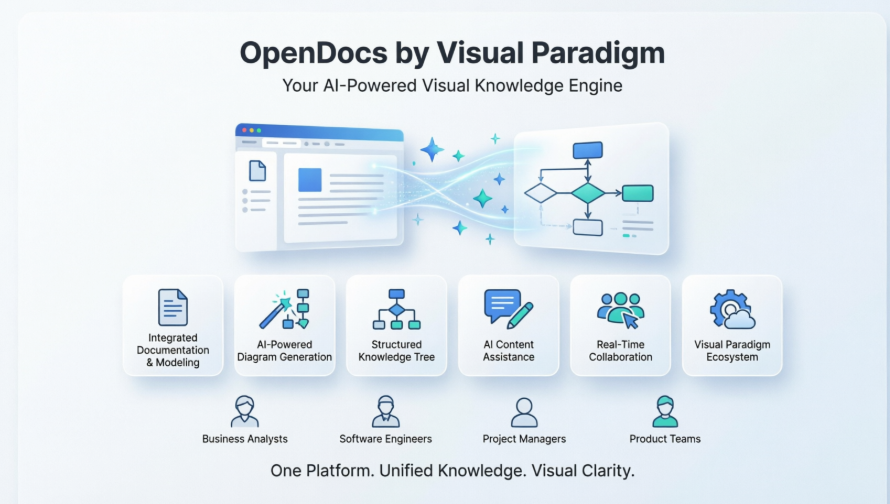
Over the past several weeks, I’ve put OpenDocs through its paces across multiple real-world projects: documenting a software architecture overhaul, mapping out business processes for a client workshop, and building a personal knowledge base for ongoing research. What follows is my comprehensive, third-party review of the platform—covering its standout features, practical workflows, limitations, and whether it truly delivers on its promise to be the “visual knowledge engine” teams have been waiting for.
First Impressions: A Unified Workspace That Actually Works
Upon launching OpenDocs, the interface immediately feels familiar yet refreshingly streamlined. The left sidebar presents a clean, hierarchical “Knowledge Tree”—a folder structure that lets you organize documents and diagrams intuitively, much like your computer’s file explorer but purpose-built for collaborative knowledge work. The main editing pane is a rich editor, while a dedicated diagramming panel sits ready to be summoned without ever leaving the page.
What strikes you first isn’t just the aesthetics—it’s the philosophy. OpenDocs doesn’t ask you to choose between writing and visualizing. Instead, it invites you to do both, simultaneously, in the same space. This isn’t a minor convenience; it’s a fundamental shift in how documentation can be created and consumed.
Core Features: Where OpenDocs Shines
🔄 Integrated Documentation and Modeling
Gone are the days of exporting a flowchart from one tool, saving it, uploading it to another, and hoping the resolution holds. With OpenDocs, the diagram editor lives inside your document. Need to illustrate a user journey? Click the diagram button, sketch a flowchart using drag-and-drop shapes, and embed it right where your narrative describes it. The context stays intact, the workflow stays fluid, and your readers never lose the thread.
🤖 AI-Powered Diagram Generation
This is where OpenDocs feels genuinely magical. Instead of manually placing every shape and connector, you can simply type: “Create a mind map for our Q3 product launch strategy” or “Generate a sequence diagram showing the user login process with error handling.” Within seconds, the AI produces a professionally structured diagram that you can then refine using the built-in editor. For brainstorming sessions or rapid prototyping, this capability dramatically accelerates the ideation-to-visualization pipeline.
🌳 Structured Knowledge Organization
The hierarchical “Knowledge Tree” isn’t just decorative—it’s foundational. You can create nested folders for projects, sub-projects, phases, and deliverables, then drag-and-drop pages and diagrams to reorganize as your work evolves. This structure scales beautifully, whether you’re managing a personal reference library or a multi-team enterprise documentation suite. Navigation remains intuitive even as content grows.
✍️ AI Content Assistance
Beyond diagrams, OpenDocs includes an AI assistant that helps with the writing itself. Stuck on a technical explanation? Ask the AI to simplify complex topics for a non-technical audience. Need to draft meeting notes from bullet points? The AI can expand them into coherent paragraphs. It also offers summarization features to condense lengthy documents into executive briefs—ideal for stakeholder updates.
👥 Seamless Real-Time Collaboration
Sharing a document in OpenDocs is as simple as generating a secure link. Team members can view or edit in real time, with changes reflected instantly. For distributed teams, this eliminates the version-control headaches of emailing attachments or wrestling with merge conflicts. The platform maintains a clean, single source of truth that everyone accesses simultaneously.
🔗 Visual Paradigm Ecosystem Integration
If your organization already uses Visual Paradigm’s desktop or online modeling tools, OpenDocs acts as a natural extension. You can import existing diagrams, continue editing them within documents, and leverage the same shape libraries and styling conventions. This interoperability reduces onboarding friction and maximizes the value of your existing Visual Paradigm investment.
Practical Workflows: How I Used OpenDocs in Real Projects
Project 1: Software Architecture Documentation
For a recent microservices migration, I used OpenDocs to create a living architecture guide. I started with a high-level system context diagram generated via AI prompt, then embedded detailed component diagrams for each service. The rich text editor let me write clear explanations alongside each visual, while the Knowledge Tree kept everything organized by service domain. When requirements shifted, updating a diagram in one place automatically reflected everywhere it was embedded—no manual re-uploading required.
Project 2: Business Process Mapping Workshop
Facilitating a process-improvement session with a client, I used OpenDocs to capture discussions in real time. As stakeholders described workflows, I typed prompts like “Create a BPMN diagram for the customer onboarding process with approval gates” and projected the AI-generated visuals for immediate feedback. The collaborative editing feature allowed remote participants to add comments directly on the diagrams, creating a shared artifact that evolved with the conversation.
Project 3: Personal Research Knowledge Base
For ongoing industry research, I built a personal Knowledge Tree with folders for topics, sources, and insights. The AI summarization feature helped me distill lengthy reports into key takeaways, while mind maps organized connections between concepts. The ability to search across all content—text and diagrams alike—made retrieving related information effortless.
Strengths Worth Highlighting
✅ True All-in-One Experience: The seamless integration of writing and diagramming eliminates context-switching fatigue and keeps ideas flowing.
✅ AI That Feels Helpful, Not Gimmicky: Diagram and content generation are practical accelerators, not novelty features. The AI understands technical contexts and produces usable outputs.
✅ Intuitive Organization: The Knowledge Tree structure mirrors how humans naturally categorize information, making large documentation sets navigable.
✅ Professional-Quality Outputs: Diagrams aren’t just functional—they’re visually polished and suitable for client-facing deliverables.
✅ Accessible Anywhere: As a web-based platform, OpenDocs works on any device with a browser, supporting remote and hybrid workstyles.
Considerations and Limitations
⚠️ Subscription Tiers: Advanced AI features and Pipeline integration require Visual Paradigm Professional or Online Combo editions. Teams on basic plans may find functionality limited.
⚠️ Learning Curve for Advanced Features: While basic editing is intuitive, mastering AI prompting, diagram refinement, and ecosystem integrations takes dedicated exploration.
⚠️ Export Options: Currently, sharing relies on secure links rather than direct file exports (PDF, Word, etc.), which may not suit all distribution workflows.
⚠️ Offline Access: As a cloud-first platform, OpenDocs requires an internet connection. Offline editing capabilities are limited.
Who Benefits Most from OpenDocs?
Based on my experience, OpenDocs delivers exceptional value for:
- Business Analysts documenting processes, requirements, and stakeholder communications
- Software Engineers creating architecture diagrams, API documentation, and technical specs
- Project Managers building project plans, PERT charts, and status reports with visual clarity
- Product Teams aligning on roadmaps, user journeys, and feature specifications
- Consultants and Trainers developing client deliverables and educational materials with professional polish
If your work involves translating complex ideas into clear, visual documentation—and you value efficiency without sacrificing quality—OpenDocs is worth serious consideration.
Conclusion: A Genuine Step Forward in Knowledge Work
After weeks of hands-on use, I can confidently say that Visual Paradigm OpenDocs isn’t just another documentation tool—it’s a thoughtful reimagining of how knowledge can be created, organized, and shared. By erasing the artificial boundary between text and visuals, and by harnessing AI as a practical co-pilot rather than a flashy add-on, OpenDocs addresses real pain points that professionals face daily.
The platform won’t solve every documentation challenge overnight. Teams will still need to invest time in structuring their Knowledge Trees, refining AI prompts, and establishing collaboration norms. But for those willing to embrace its workflow, OpenDocs offers a compelling return: less time managing tools, more time creating value.
In a landscape crowded with point solutions, OpenDocs stands out by doing one thing exceptionally well: making complex knowledge simple to capture, visualize, and share. If you’re tired of juggling tabs and wrestling with version control, it’s time to explore what a unified, AI-powered knowledge hub can do for your team.
References
- OpenDocs – AI-Powered Knowledge Platform: Official feature overview of Visual Paradigm’s OpenDocs, detailing its integrated documentation and diagramming capabilities, rich editor, and AI-powered tools.
- Visual Paradigm OpenDocs Demo Video: Video demonstration showcasing OpenDocs’ user interface, workflow integration, and key features in action.
- Visual Paradigm OpenDocs: The Complete Guide to AI-Powered Knowledge Management: Comprehensive third-party guide exploring OpenDocs’ architecture, AI capabilities, diagram generation, and practical implementation strategies.
- Beyond Notes and Diagrams: A Hands-On Review of Visual Paradigm OpenDocs: Independent review examining OpenDocs’ user experience, workflow benefits, and value proposition for knowledge workers.
- OpenDocs AI Tool Documentation: Official technical documentation for OpenDocs’ AI features, including diagram generation, content assistance, and integration options.
- Sync AI Diagram to OpenDocs Pipeline Guide: Release notes and tutorial for integrating AI-generated diagrams from Visual Paradigm’s chatbot directly into OpenDocs documents.
- OpenDocs Real-Time Collaboration Update: Announcement detailing OpenDocs’ real-time editing capabilities, sharing features, and team collaboration enhancements.
- OpenDocs: AI-Powered Knowledge Platform Launch: Official launch announcement introducing OpenDocs as Visual Paradigm’s centralized, AI-native knowledge management solution.
Related posts:
 My Journey to Seamless Documentation: Sending Visual Paradigm Online Creations Directly to OpenDocs
 Complete Guide: Send Your Visual Paradigm Online Creations Directly to OpenDocs
 OpenDocs Uncovered: A Third-Party User’s Comprehensive Review of Visual Paradigm’s AI Knowledge Platform
A Hands-On Review of Visual Paradigm’s Automated Documentation Pipeline
OpenDocs Uncovered: A Third-Party User’s Comprehensive Review of Visual Paradigm’s AI Knowledge Platform
A Hands-On Review of Visual Paradigm’s Automated Documentation Pipeline