


Introduction to Enterprise Architecture
Enterprise Architecture (EA) is a strategic discipline that aligns business strategy, processes, information, and technology to achieve organizational goals. It provides a holistic view of an organization’s structure, operations, and capabilities, enabling better decision-making, improved efficiency, and successful digital transformation.
Why Enterprise Architecture Matters
-
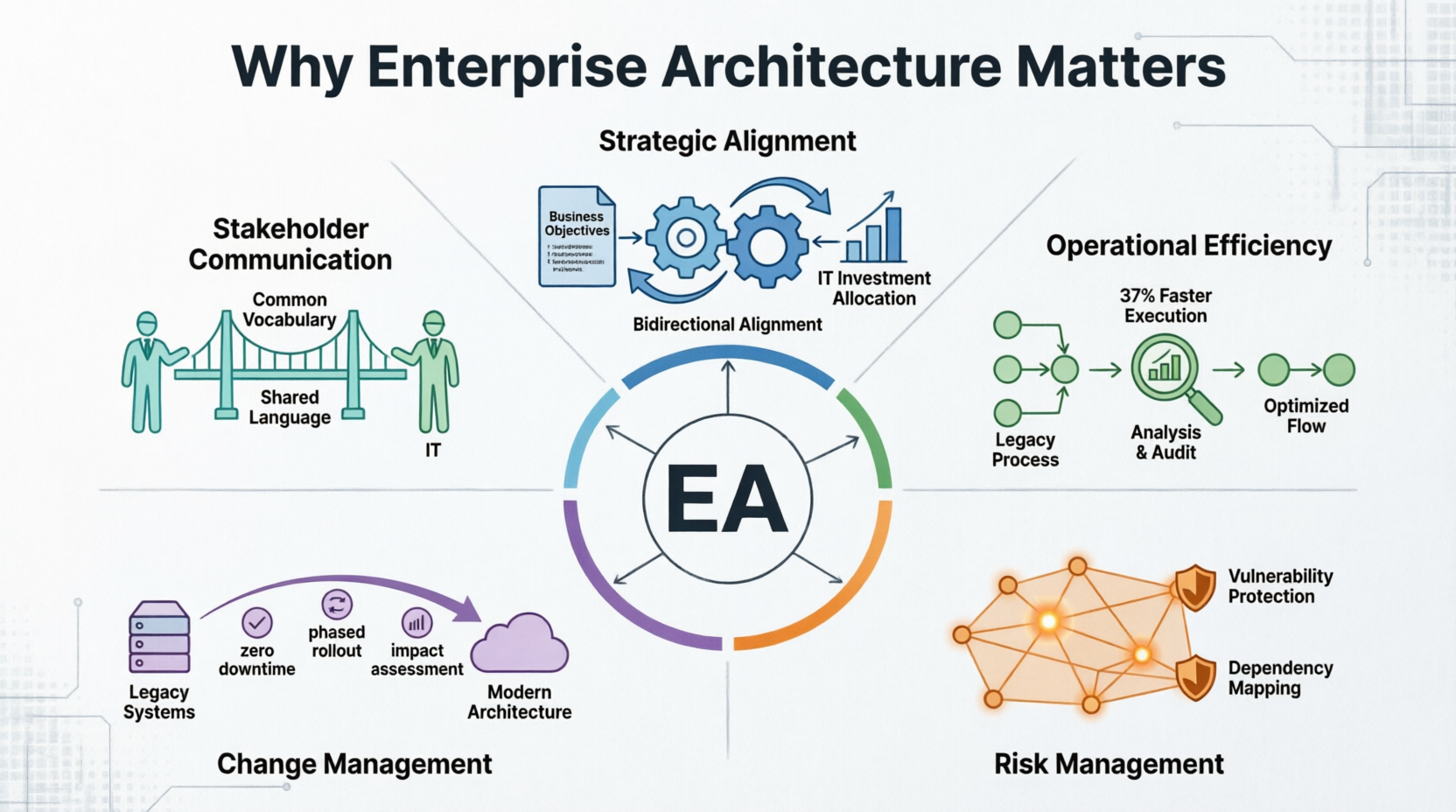
Strategic Alignment: Ensures IT investments support business objectives
-
Operational Efficiency: Identifies redundancies and optimizes processes
-
Risk Management: Provides visibility into dependencies and vulnerabilities
-
Change Management: Facilitates smooth transitions during transformation initiatives
-
Stakeholder Communication: Creates common language across business and IT
Key Concepts in Enterprise Architecture
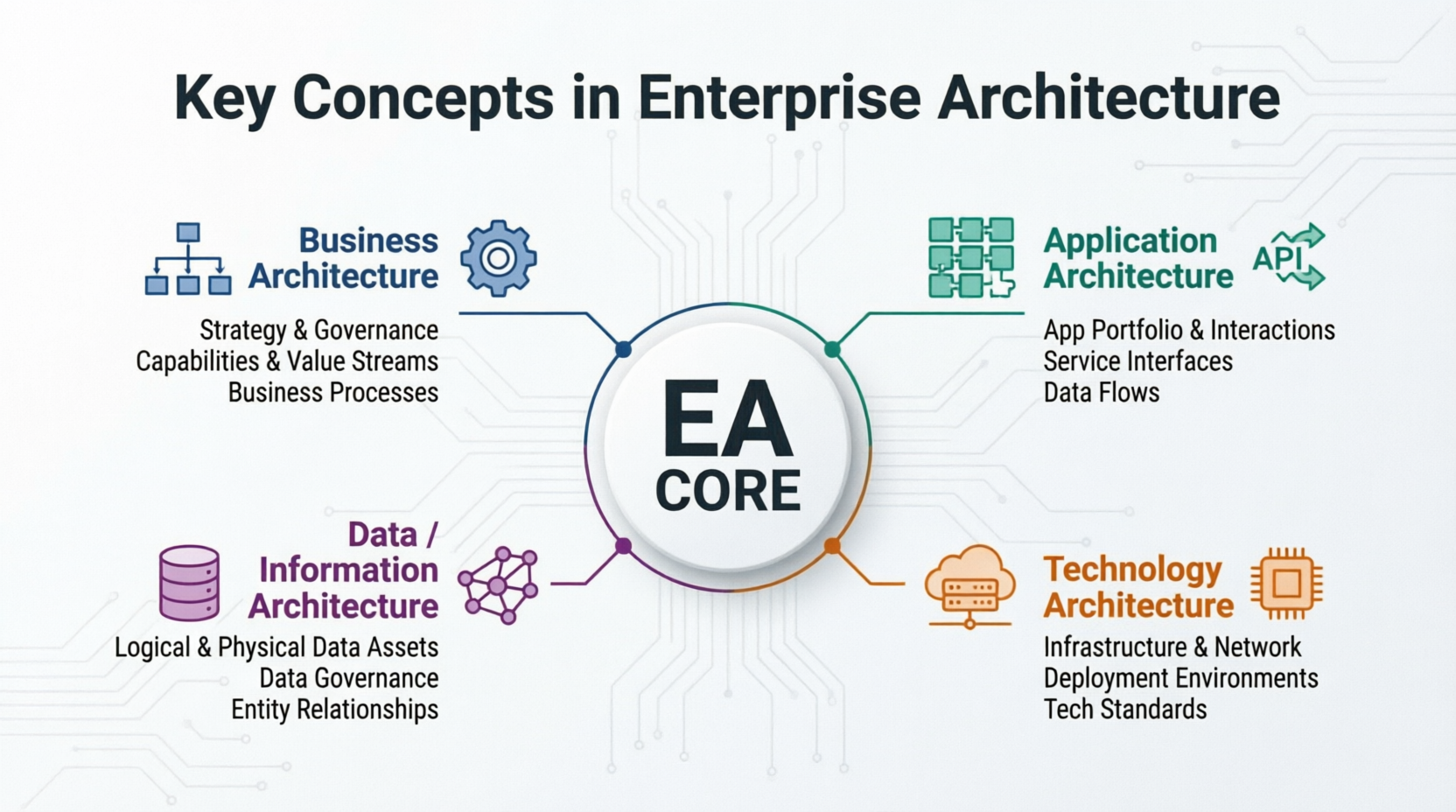
1. The Four Architecture Domains
Business Architecture
Defines the business strategy, governance, organization, and key business processes.
Key Elements:
-
Organizational structure
-
Business capabilities
-
Value streams
-
Business processes
-
Stakeholders and roles
Example: A retail company maps its customer journey from awareness to purchase, identifying touchpoints, departments involved, and supporting systems at each stage.
Application Architecture
Describes the structure and interaction of applications as groups of capabilities that provide key business functions and manage data.
Key Elements:
-
Application portfolio
-
Application interactions
-
Service interfaces
-
Data flows between applications
Example: An e-commerce platform showing how the shopping cart application integrates with inventory management, payment processing, and customer relationship management systems.
Data/Information Architecture
Organizes logical and physical data assets and data management resources.
Key Elements:
-
Data entities and relationships
-
Data flows
-
Data storage and repositories
-
Data governance policies
Example: A healthcare organization mapping patient records, treatment histories, billing information, and how these data elements flow between clinical systems, administrative databases, and reporting tools.
Technology Architecture
Describes the hardware, software, and network infrastructure needed to support core applications and their interactions.
Key Elements:
-
Infrastructure components
-
Network topology
-
Deployment environments
-
Technology standards
Example: A cloud migration project documenting on-premises servers, cloud services (AWS/Azure), load balancers, firewalls, and connectivity between different environments.
2. Architecture Frameworks
TOGAF (The Open Group Architecture Framework)
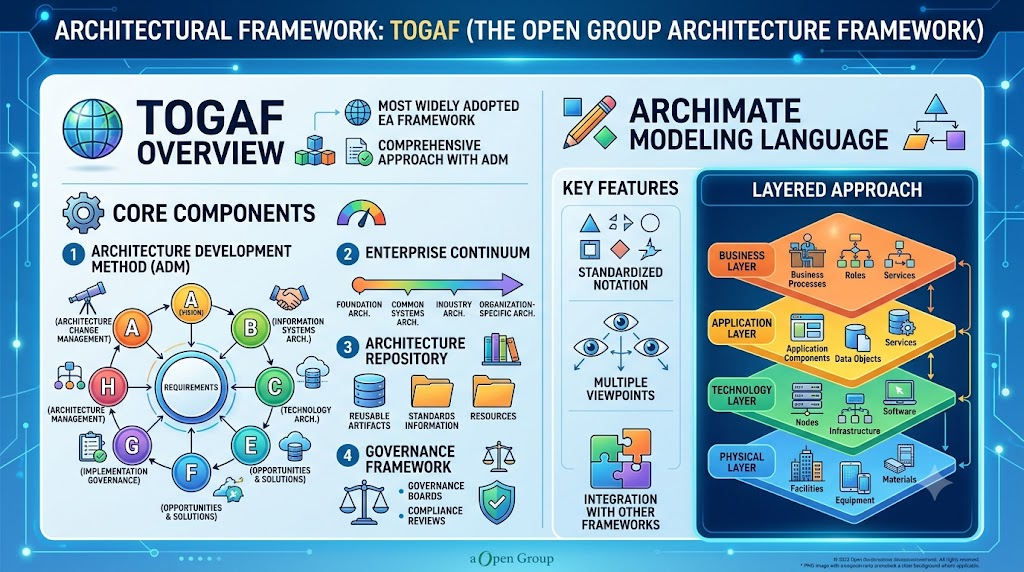
The most widely adopted EA framework, providing a comprehensive approach with the Architecture Development Method (ADM).
Core Components:
-
Architecture Development Method (ADM)
-
Enterprise Continuum
-
Architecture Repository
-
Governance framework
ArchiMate
An open modeling language for enterprise architecture, maintained by The Open Group.
Key Features:
-
Standardized notation
-
Multiple viewpoints
-
Layered approach (Business, Application, Technology, Physical)
-
Integration with other frameworks
3. Stakeholders and Viewpoints
Different stakeholders require different perspectives:
| Stakeholder | Primary Concerns | Relevant Viewpoints |
|---|---|---|
| C-Suite Executives | Strategic alignment, ROI | Strategy map, Capability map |
| Business Managers | Process efficiency, capabilities | Business process diagrams, Value streams |
| IT Architects | System integration, standards | Application landscape, Technology stack |
| Developers | Implementation details | Component diagrams, APIs |
| Operations | Infrastructure, deployment | Deployment diagrams, Network topology |
TOGAF Architecture Development Method (ADM)
The TOGAF ADM is an iterative, cyclic process for developing enterprise architecture.
Phase A: Architecture Vision
Purpose: Define the scope, identify stakeholders, and establish the architecture vision.
Key Activities:
-
Identify stakeholders and concerns
-
Define architecture principles
-
Create high-level vision statement
-
Obtain approval to proceed
Visual Paradigm Support:
-
Initial capability models
Phase B: Business Architecture
Purpose: Develop the target business architecture.
Key Activities:
-
Model current state business architecture
-
Define target business architecture
-
Perform gap analysis
-
Identify candidate roadmap components
Visual Paradigm Support:
-
Business process modeling (BPMN)
-
Organization charts
-
Capability maps
-
Value stream diagrams
Phase C: Information Systems Architectures
Purpose: Develop application and data architectures.
Sub-phases:
-
C1: Application Architecture – Define application portfolio and interactions
-
C2: Data Architecture – Define data entities, flows, and governance
Visual Paradigm Support:
-
Application component diagrams
-
Data entity-relationship diagrams
-
Service-oriented architecture models
-
API specifications
Phase D: Technology Architecture
Purpose: Define the technology infrastructure.
Key Activities:
-
Model current technology landscape
-
Define target technology architecture
-
Identify gaps and opportunities
-
Select technology standards
Visual Paradigm Support:
-
Deployment diagrams
-
Network topology maps
-
Infrastructure component models
-
Cloud architecture diagrams
Phase E: Opportunities and Solutions
Purpose: Identify delivery vehicles and create initial implementation plan.
Key Activities:
-
Consolidate gaps from previous phases
-
Identify work packages
-
Define transition architectures
-
Create implementation roadmap
Visual Paradigm Support:
-
Gap analysis reports
-
Roadmap timelines
-
Project portfolio views
-
Dependency matrices
Phase F: Migration Planning
Purpose: Prioritize projects and create detailed implementation plan.
Key Activities:
-
Prioritize work packages
-
Estimate costs and benefits
-
Confirm resource availability
-
Create detailed migration plan
Visual Paradigm Support:
-
Gantt charts
-
Resource allocation views
-
Cost-benefit analysis templates
-
Risk assessment matrices
Phase G: Implementation Governance
Purpose: Ensure implementation conforms to architecture.
Key Activities:
-
Monitor implementation progress
-
Manage architecture contracts
-
Address deviations
-
Update architecture as needed
Visual Paradigm Support:
-
Compliance dashboards
-
Change request tracking
-
Architecture review workflows
-
Version control
Phase H: Architecture Change Management
Purpose: Manage changes to the architecture.
Key Activities:
-
Monitor technology trends
-
Assess impact of changes
-
Update architecture repository
-
Trigger new ADM cycle if needed
Visual Paradigm Support:
-
Impact analysis tools
-
Change history tracking
-
Trend monitoring dashboards
-
Automated notifications
ArchiMate Modeling Language
ArchiMate provides a standardized way to describe, analyze, and visualize enterprise architectures.
Core Concepts
Layers
-
Strategy Layer – Resources, capabilities, courses of action
-
Business Layer – Business processes, functions, services, actors
-
Application Layer – Applications, components, services, interfaces
-
Technology Layer – Nodes, devices, system software, networks
-
Physical Layer – Equipment, materials, facilities
Element Types
Active Structure Elements (things that perform behavior):
-
Business Actor, Role, Collaboration
-
Application Component, Interface
-
Node, Device, System Software
Behavior Elements (activities performed):
-
Business Process, Function, Service
-
Application Process, Function, Service
-
Technology Process, Function, Service
Passive Structure Elements (objects acted upon):
-
Business Object
-
Data Object
-
Artifact
Relationship Types
-
Structural Relationships: Composition, Aggregation, Assignment
-
Dependency Relationships: Association, Realization, Serving
-
Dynamic Relationships: Flow, Triggering
Practical Example: E-Commerce Platform
Let’s model a simplified e-commerce platform using ArchiMate concepts:
Business Layer:
-
Actors: Customer, Sales Manager, Warehouse Staff
-
Processes: Browse Products, Place Order, Fulfill Order
-
Services: Product Catalog Service, Order Processing Service
Application Layer:
-
Components: Web Storefront, Shopping Cart, Payment Gateway, Inventory System
-
Interfaces: REST APIs, Message Queues
Technology Layer:
-
Nodes: Web Servers, Database Servers, Cloud Platform
-
System Software: Operating Systems, Database Management Systems
Relationships:
-
Customer triggers Browse Products process
-
Browse Products uses Product Catalog Service
-
Product Catalog Service realizes through Web Storefront component
-
Web Storefront runs on Web Server node
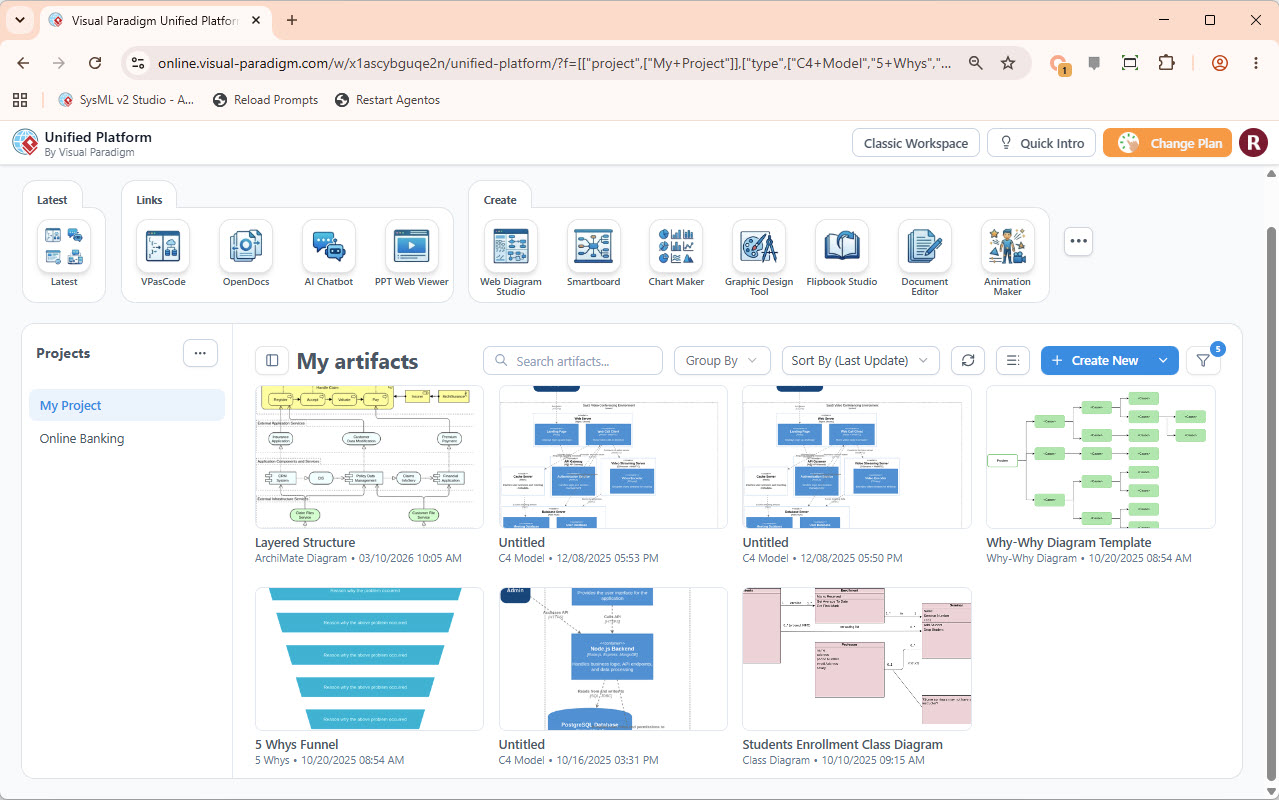
Visual Paradigm Unified Platform
Visual Paradigm offers an integrated platform that combines multiple modeling capabilities into a single environment.
Key Features
1. Multi-Model Integration
-
Seamlessly connect business, application, and technology models
-
Maintain traceability across layers
-
Automatic synchronization of related elements
2. Collaborative Environment
-
Real-time team collaboration
-
Role-based access control
-
Comment and review workflows
-
Version control integration
3. Repository Management
-
Centralized architecture repository
-
Reusable patterns and templates
-
Metadata management
-
Search and discovery capabilities
4. Reporting and Documentation
-
Automated report generation
-
Customizable templates
-
Export to various formats (PDF, Word, HTML)
-
Interactive dashboards
5. Integration Capabilities
-
Import/export from other tools
-
API access for automation
-
Integration with ALM tools (Jira, Azure DevOps)
-
Database connectivity
Unified Platform Benefits
For Architects:
-
Single source of truth
-
Reduced tool sprawl
-
Consistent modeling approach
-
Better stakeholder engagement
For Organizations:
-
Lower total cost of ownership
-
Faster time-to-value
-
Improved compliance
-
Enhanced knowledge retention
AI-Assisted Enterprise Architecture
Visual Paradigm incorporates AI capabilities to enhance productivity and quality.
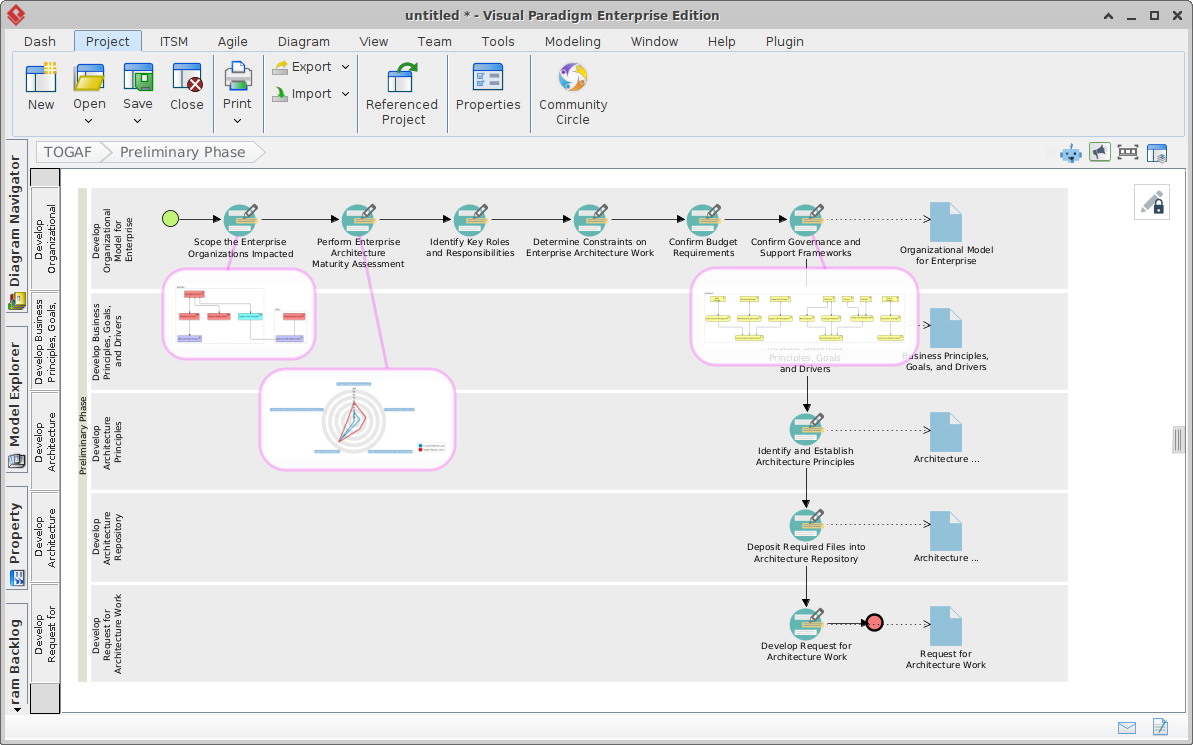
AI-Powered Features
1. Intelligent Diagram Generation
-
Natural Language to Diagram: Describe what you want to model, and AI generates initial diagrams
-
Template Recommendations: AI suggests appropriate diagram types based on context
-
Auto-Layout: Smart positioning of elements for optimal readability
Example: Type “Create a business process for customer onboarding including verification, account setup, and welcome email” → AI generates BPMN diagram with suggested activities and flows.
2. Pattern Recognition and Suggestions
-
Best Practice Patterns: AI identifies common architecture patterns and suggests improvements
-
Anti-Pattern Detection: Flags potential design issues or violations
-
Completeness Checks: Identifies missing elements or relationships
Example: When modeling microservices, AI suggests adding service discovery, API gateway, and circuit breaker patterns.
3. Impact Analysis
-
Change Prediction: AI analyzes proposed changes and predicts downstream impacts
-
Risk Assessment: Identifies potential risks associated with architectural decisions
-
Dependency Mapping: Automatically discovers and visualizes hidden dependencies
Example: Before decommissioning a legacy system, AI shows all dependent applications, data flows, and business processes affected.
4. Natural Language Queries
-
Ask Questions: Query your architecture repository using natural language
-
Generate Reports: Request specific analyses without manual filtering
-
Find Elements: Locate specific components, processes, or relationships
Example: Ask “Show me all applications that process customer payment data” → Returns relevant application components with connections to payment-related data objects.
5. Documentation Assistance
-
Auto-Documentation: Generate descriptions for diagram elements
-
Consistency Checking: Ensure terminology and naming conventions are consistent
-
Gap Identification: Highlight areas lacking documentation
6. Learning and Adaptation
-
Context Awareness: AI learns from your modeling patterns and preferences
-
Personalized Suggestions: Tailors recommendations based on your organization’s standards
-
Continuous Improvement: Gets smarter with usag
AI Use Cases in EA Practice
Use Case 1: Rapid Prototyping
-
Scenario: New digital transformation initiative
-
AI Role: Generate initial architecture sketches from business requirements
-
Benefit: Reduce time from weeks to hours for first drafts
Use Case 2: Legacy Modernization
-
Scenario: Migrating monolithic application to microservices
-
AI Role: Analyze existing codebase and suggest decomposition boundaries
-
Benefit: Data-driven decisions on service boundaries
Use Case 3: Compliance Monitoring
-
Scenario: Ensuring GDPR compliance across systems
-
AI Role: Scan architecture models for personal data flows and flag non-compliant patterns
-
Benefit: Proactive compliance rather than reactive audits
Use Case 4: Architecture Review
-
Scenario: Quarterly architecture review board meeting
-
AI Role: Prepare summary reports highlighting changes, risks, and recommendations
-
Benefit: More focused discussions and faster decision-making
Practical Implementation Guide
Getting Started with Visual Paradigm for EA
Step 1: Define Your Scope
-
Identify key business drivers
-
Determine which architecture domains to focus on initially
-
Select pilot project or business unit
Step 2: Set Up Your Repository
-
Configure architecture repository structure
-
Define taxonomy and naming conventions
-
Establish governance processes
-
Set up user roles and permissions
Step 3: Model Current State
-
Document existing business processes
-
Map application landscape
-
Capture technology infrastructure
-
Identify pain points and opportunities
Tip: Don’t aim for perfection. Start with high-level models and refine iteratively.
Step 4: Design Target Architecture
-
Define vision and principles
-
Create target state models for each domain
-
Perform gap analysis
-
Validate with stakeholders
Step 5: Create Roadmap
-
Prioritize initiatives
-
Define work packages
-
Estimate effort and resources
-
Create phased implementation plan
Step 6: Implement and Govern
-
Execute projects according to roadmap
-
Monitor compliance with architecture
-
Update models as implementation progresses
-
Capture lessons learned
Best Practices
Modeling Best Practices
-
Start Simple: Begin with high-level views, then drill down
-
Maintain Consistency: Use standard notation and naming conventions
-
Focus on Value: Model what matters to stakeholders
-
Keep It Current: Regularly update models to reflect reality
-
Enable Traceability: Link elements across layers and diagrams
Collaboration Best Practices
-
Engage Stakeholders Early: Involve business and IT throughout
-
Communicate Effectively: Use appropriate viewpoints for different audiences
-
Iterate Frequently: Get feedback early and often
-
Document Decisions: Capture rationale for architectural choices
-
Build Community: Create center of excellence for EA practices
Tool Adoption Best Practices
-
Provide Training: Invest in user education
-
Start Small: Pilot with motivated team before scaling
-
Leverage Templates: Use pre-built templates to accelerate adoption
-
Integrate with Workflow: Embed EA practices into existing processes
-
Measure Success: Track metrics like model reuse, stakeholder satisfaction, decision velocity
Real-World Examples
Example 1: Financial Services Digital Transformation
Challenge: Traditional bank struggling with legacy systems and slow time-to-market
Approach:
-
Modeled current state: 200+ applications, siloed data, manual processes
-
Defined target: API-first architecture, cloud-native, automated workflows
-
Created 3-year roadmap with quarterly releases
Results:
-
40% reduction in time-to-market for new products
-
30% decrease in operational costs
-
Improved regulatory compliance visibility
Visual Paradigm Usage:
-
Business capability maps aligned to strategic objectives
-
Application portfolio rationalization analysis
-
API specification and documentation
-
Cloud migration planning with dependency tracking
Example 2: Healthcare Provider Integration
Challenge: Merging three healthcare organizations with disparate systems
Approach:
-
Created unified business process models
-
Mapped data flows across organizations
-
Designed integration architecture
-
Planned phased consolidation
Results:
-
Successful merger with minimal disruption
-
Unified patient record system
-
Streamlined billing and claims processing
Visual Paradigm Usage:
-
Cross-organizational process modeling
-
Data lineage tracking for patient information
-
Integration pattern library
-
Compliance reporting for HIPAA requirements
Example 3: Manufacturing IoT Implementation
Challenge: Industrial manufacturer wanting to implement predictive maintenance
Approach:
-
Modeled current manufacturing processes
-
Designed IoT sensor network architecture
-
Integrated with ERP and maintenance systems
-
Created analytics pipeline
Results:
-
25% reduction in unplanned downtime
-
Optimized maintenance schedules
-
Real-time production visibility
Visual Paradigm Usage:
-
Physical layer modeling for sensors and equipment
-
Application integration diagrams
-
Data flow models for analytics
-
Technology architecture for edge computing
Advanced Topics
Architecture Governance
Establishing effective governance ensures architecture delivers value:
Governance Structure:
-
Architecture Review Board (ARB)
-
Domain architects
-
Solution architects
-
Business architects
Governance Processes:
-
Architecture compliance reviews
-
Exception management
-
Standards definition and enforcement
-
Metrics and KPIs
Visual Paradigm Support:
-
Workflow automation for reviews
-
Compliance dashboards
-
Audit trails
-
Policy templates
Enterprise Continuum
TOGAF’s Enterprise Continuum provides a framework for organizing architecture artifacts:
Levels:
-
Foundation Architecture: Generic building blocks
-
Common Systems Architecture: Industry-specific patterns
-
Industry Architecture: Sector-specific solutions
-
Organization-Specific Architecture: Custom implementations
Benefits:
-
Reusability
-
Consistency
-
Faster development
-
Knowledge accumulation
Measuring EA Value
Track these metrics to demonstrate EA value:
Efficiency Metrics:
-
Time saved in solution design
-
Reduction in redundant systems
-
Decrease in integration complexity
Effectiveness Metrics:
-
Alignment of IT investments with business strategy
-
Stakeholder satisfaction scores
-
Decision-making speed
Quality Metrics:
-
Architecture compliance rate
-
Number of exceptions granted
-
Model accuracy and currency
Conclusion
Enterprise Architecture is no longer optional—it’s essential for organizations navigating digital transformation, managing complexity, and achieving strategic objectives. Visual Paradigm’s unified platform, combining TOGAF ADM methodology, ArchiMate modeling, and AI-assisted capabilities, provides a comprehensive solution for modern EA practice.
Key Takeaways
-
Holistic Approach: EA connects business strategy to technology implementation across all architecture domains
-
Structured Method: TOGAF ADM provides proven, iterative process for developing and governing architecture
-
Standard Notation: ArchiMate enables clear communication and interoperability across tools and teams
-
Unified Platform: Visual Paradigm integrates modeling, collaboration, repository management, and reporting
-
AI Enhancement: Artificial intelligence accelerates modeling, improves quality, and provides intelligent insights
-
Practical Application: Start small, focus on value, iterate frequently, and scale gradually
Next Steps
-
Assess Current State: Evaluate your organization’s EA maturity
-
Define Vision: Clarify what EA should achieve for your organization
-
Select Pilot: Choose initial use case with high visibility and achievable scope
-
Build Team: Identify champions and secure executive sponsorship
-
Implement Tooling: Deploy Visual Paradigm and configure for your needs
-
Execute and Learn: Run pilot, gather feedback, refine approach, and scale
Enterprise Architecture is a journey, not a destination. With the right methodology, tools, and mindset, organizations can harness EA to drive innovation, reduce risk, and achieve sustainable competitive advantage.
This guide provides a comprehensive overview of Enterprise Architecture concepts, TOGAF ADM, ArchiMate modeling, and Visual Paradigm’s capabilities. For hands-on learning, explore Visual Paradigm’s tutorials, templates, and community resources.