


Introduction
In the fast-paced world of software development, documentation often becomes the bottleneck. Engineers and product managers spend hours dragging and dropping boxes in GUI-based modeling tools, only to have those diagrams become outdated the moment the code changes. As someone who has spent years bridging the gap between technical requirements and visual communication, I’ve always looked for a way to make diagramming as agile as coding.
Recently, I explored a workflow that promises to solve this exact problem: an automated pipeline that takes natural language prompts from an AI chatbot, converts them into Visual Paradigm as Code (VPasCode), validates the syntax, and publishes live diagrams directly to your documentation site. This isn’t just about saving time; it’s about treating your architecture diagrams as version-controlled, testable assets. Here is my deep dive into how this workflow operates, why it matters, and how you can implement it today.
The Workflow: Breaking Down the Automation
The core of this system is a seamless chain of events that removes manual intervention from the diagramming process. Instead of opening a heavy desktop application, you interact with a lightweight text-based interface.
The High-Level Flow:
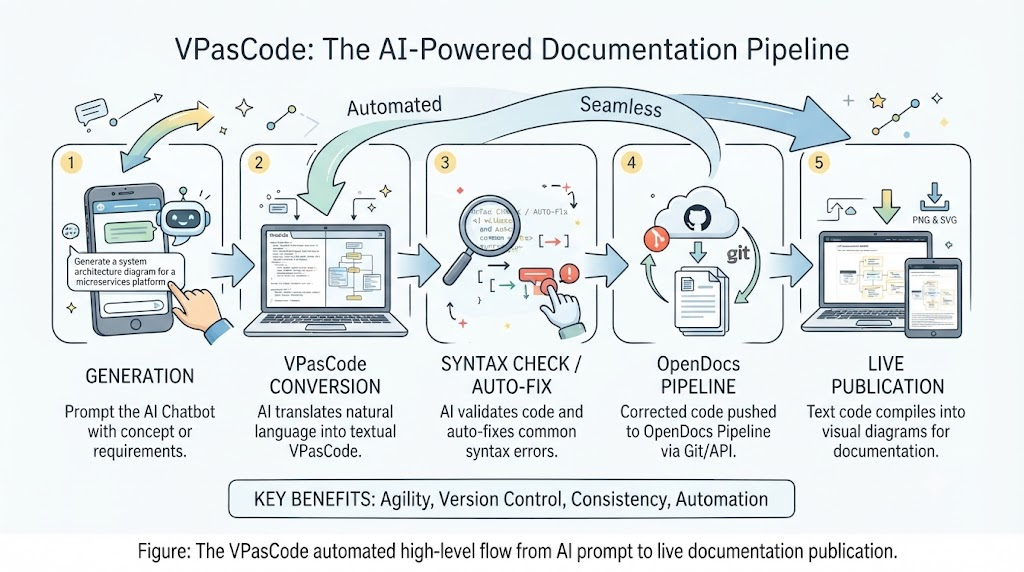
Here is how each stage functions in practice:
- Generation: You start by prompting an AI Chatbot with a concept, architecture overview, or specific software requirement. This leverages the LLM’s ability to understand context and structure.
- Translation: The AI translates your natural language prompt into VPasCode. This is a domain-specific, textual language used to define Visual Paradigm diagrams (such as UML, SysML, or ERDs) using text instead of a drag-and-drop GUI.
- Validation: Before the code ever reaches your repository, a validation script or compiler checks the VPasCode for syntax errors. Crucially, this step includes Auto-Fixing, where AI or regex-based rules patch common LLM mistakes, such as unclosed brackets, missing aliases, or incorrect arrow directions.
- Ingestion: The corrected code is pushed into the OpenDocs Pipeline, typically via Git or an API trigger. This ensures that your diagram source code lives alongside your application code.
- Deployment: The pipeline compiles the text-based code into visual diagrams (PNG or SVG) and embeds them into documentation websites or PDFs automatically.
Key Concepts Explained
To fully appreciate this workflow, it helps to understand the underlying technologies that make it possible.
Visual Paradigm as Code (VPasCode)
VPasCode is the engine behind this transformation. It allows you to define complex diagrams using a strict, human-readable syntax. By moving away from binary file formats or proprietary GUI states, you gain the ability to diff, merge, and review diagram changes just like you would with standard source code.
Syntax Validation and Auto-Fixing
One of the biggest hurdles in AI-generated code is reliability. LLMs are great at logic but can struggle with strict grammatical rules. The validation layer acts as a safety net. It parses the output to ensure all arrows, shapes, relationships, and blocks match the strict grammar rules of the modeling engine. If the AI makes a minor typo—like forgetting a colon or misaligning a participant—the auto-fix layer repairs it instantly, ensuring the pipeline never breaks due to trivial formatting errors.
Step-by-Step Example: Building a Login Sequence Diagram
Let’s walk through a real-world scenario to see how this feels in practice. Suppose I need to document the authentication flow for a new web application.
1. AI Chatbot Input
I open my preferred AI chat interface and type a simple, natural language request:
“Create a sequence diagram where a User logs into a Web App, and the Web App authenticates the user via an Auth API.”
2. VPasCode Generation & Syntax Check
The AI processes the request and generates the text-based model. In a traditional setup, I might have to copy-paste this into a tool and manually fix errors. Here, the Auto-Fix layer handles any minor issues behind the scenes.
Valid VPasCode Output:
@startuml

participant User
participant WebApp as "Web Application"
participant AuthAPI as "Authentication API"

User -> WebApp: Enter credentials (username, password)
WebApp -> AuthAPI: ValidateCredentials(username, hash)
AuthAPI --> WebApp: Token (Success 200 OK)
WebApp --> User: Redirect to Dashboard

@enduml
Note: If the AI had forgotten the closing @end_diagram tag or misspelled Participant, the validation script would have caught and corrected it before proceeding.
3. OpenDocs Pipeline Processing
Once the code is validated, the file (e.g., login_flow.vpas) is pushed to the documentation repository. The automated pipeline then kicks in:
- Renders Graphics: The engine translates the text into a clean, high-resolution SVG sequence diagram.
- Builds Site: Finally, the static site generator (whether you’re using MkDocs, Docusaurus, or Sphinx) rebuilds the site and deploys it to your hosting platform.
The result? A live, up-to-date diagram on your internal wiki or public docs, generated entirely from a text prompt.
Conclusion
Adopting a VPasCode-driven workflow represents a significant shift in how we approach technical documentation. By treating diagrams as code, we unlock the benefits of version control, automated testing, and continuous deployment for our visual assets. For product managers and engineers alike, this means less time fighting with GUI tools and more time focusing on the logic and architecture itself.
While there is a learning curve associated with mastering the VPasCode syntax, the integration of AI generation and auto-fixing lowers the barrier to entry significantly. If you are looking to streamline your documentation pipeline and ensure your diagrams never fall out of date, this automated approach is well worth exploring.
References
- Introducing VPasCode: The Ultimate Unified Text-to-Diagram Platform: Official release announcement detailing the launch and core capabilities of the VPasCode platform.
- Comprehensive Guide to VPasCode by Visual Paradigm: In-depth documentation covering syntax, usage examples, and best practices for creating diagrams using VPasCode.
-
Comprehensive Guide to VPasCode by Visual Paradigm: Additional resources and tutorials for mastering text-based diagramming within the Visual Paradigm ecosystem.