


As a product manager who has spent years juggling between complex system architectures, stakeholder presentations, and living documentation, I know the pain of “documentation debt” all too well. We’ve all been there: you spend hours perfecting a UML diagram in your modeling tool, only to export it as a static PNG, upload it to your wiki, and then realize three days later that the architecture has changed. Now you’re stuck manually replacing images, chasing down version numbers, and hoping no one is reading the outdated manual.
Recently, I had the opportunity to dive deep into the Visual Paradigm Pipeline, and frankly, it feels less like a new feature and more like the missing link in modern technical knowledge management. If you are tired of the disconnect between your dynamic visual models and your static documentation, this guide is for you. Here is my comprehensive review and walkthrough of how this ecosystem bridges the gap between creation and publication.
What Exactly Is the Pipeline?
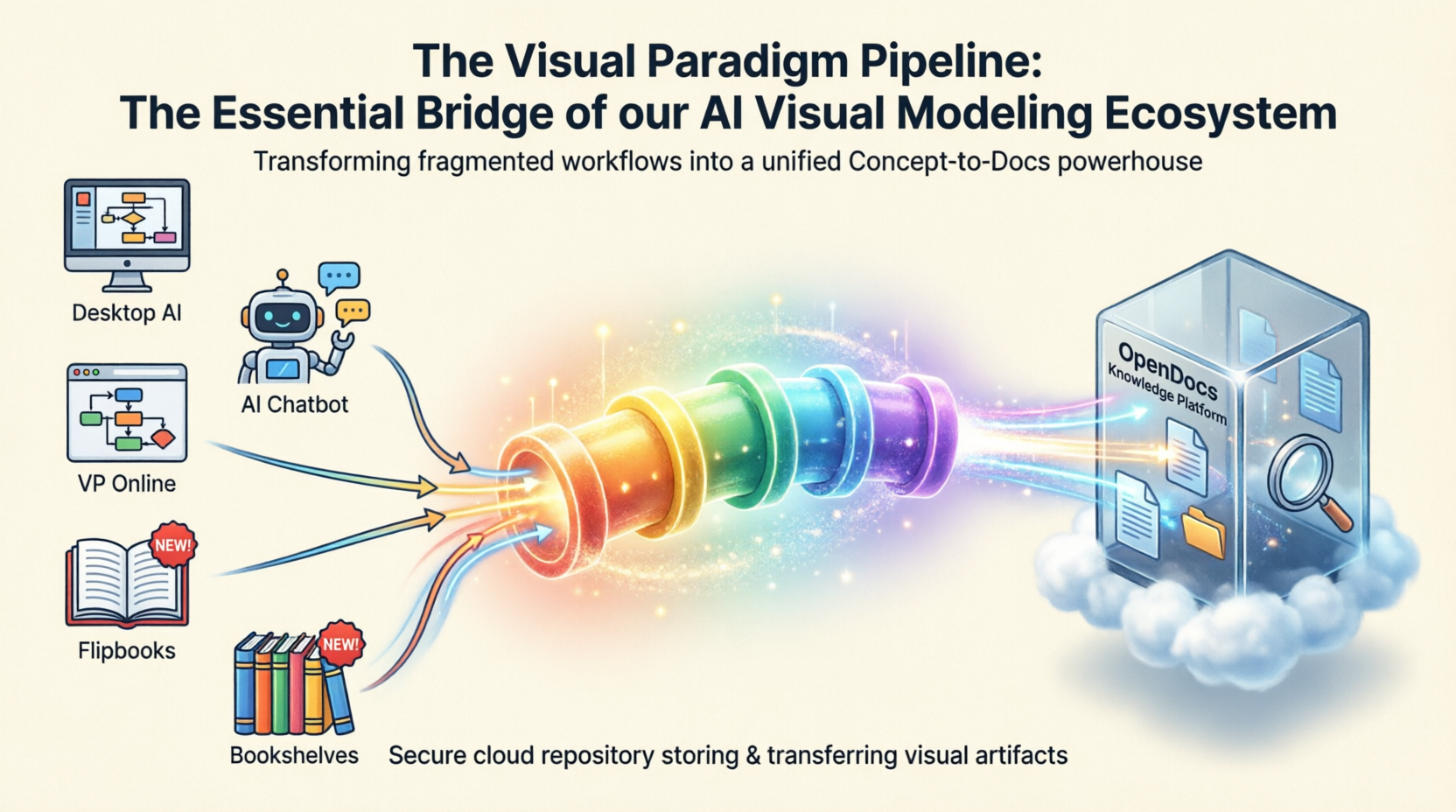
At its core, the Visual Paradigm Pipeline is a secure, cloud-based asset transit hub. Think of it as the “connective tissue” that binds together the various tools in the Visual Paradigm ecosystem. Instead of treating diagrams as isolated files that need to be manually moved around, the Pipeline treats them as living artifacts.
It eliminates the traditional friction of taking screenshots, downloading files, or dealing with manual image uploads by automating the handoff of visual assets across different applications. It acts as a central nervous system connecting three distinct layers:
-
The Generation Tier: Where raw diagrams, software architectures, or charts are built—whether manually in Visual Paradigm Desktop/Online or via AI prompts in VPasCode or the AI Chatbot.
-
The Pipeline (Transit Tier): The central, secure repository that accepts these artifacts, logs user comments, and automates revision histories.
-
The Documentation Tier (OpenDocs): The AI-powered workspace where teams build comprehensive manuals, embedding live visual assets straight from the Pipeline.
Why This Matters: The Strategic Benefits
Before jumping into the “how-to,” it’s important to understand why this shift is significant. The Pipeline isn’t just about convenience; it’s about accuracy and efficiency.
-
Single Source of Truth: By centralizing visual models, engineering, architecture, and business teams work from identical, accurate data. No more guessing which version of the flowchart is the correct one.
-
Elimination of Documentation Debt: Static, outdated images are replaced with dynamic visual embeddings that can be updated in real-time.
-
Automated Version Tracking: When a diagram is modified and saved at the source tier, the Pipeline automatically handles version control and generates a new revision history. You don’t need to manually save “v2_final_revised.png.”
-
Bidirectional Sync & Update Indicators: If a diagram changes, OpenDocs flags a visual indicator. This allows technical writers to update the embedded graphic to the latest version or roll back to a specific revision with a single click.
-
Cross-Tool Interoperability: Outputs from one environment (like an AI-generated text script from VPasCode or a UML diagram from the AI Chatbot) immediately flow into the pipeline to become accessible documentation inputs elsewhere.
The Gateway to OpenDocs: Your Publication Powerhouse
While the Pipeline is the vehicle, Visual Paradigm OpenDocs is the destination. OpenDocs is engineered to be “diagram-aware.” By utilizing the Pipeline, you can move work from any Visual Paradigm feature directly into a professional document, technical manual, or knowledge base.
This “Work-to-Publish” workflow allows you to model with precision using high-end desktop tools, generate with speed using AI, and publish with authority by seamlessly embedding those visuals into OpenDocs to create living documentation that evolves alongside your project.
The 5 Core Connections: A Practical Walkthrough
We are constantly encircling our apps with deeper connectivity. Here are the five critical ways you can currently leverage the Pipeline to streamline your workflow, based on my hands-on experience.
1. Visual Paradigm Desktop to OpenDocs
For the power user. Create intricate UML, BPMN, or SysML models in our professional desktop modeling software and export to OpenDocs via the pipeline. This moves your local modeling expertise into a global, accessible knowledge base.
How to send a diagram from Visual Paradigm Desktop to OpenDocs:
-
In Visual Paradigm Desktop, open the diagram you wish to send.
-
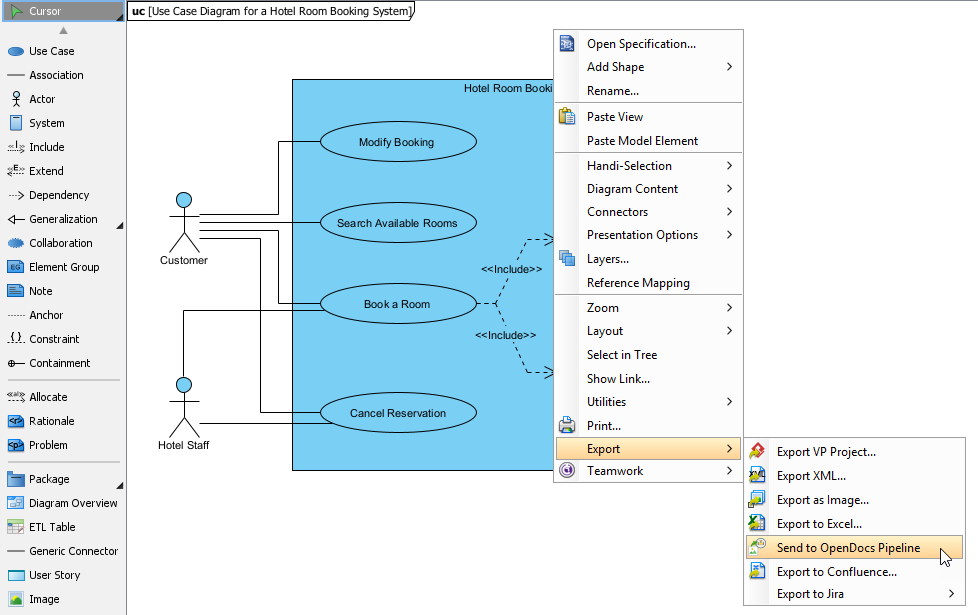
Right-click on the diagram and select Export > Send to OpenDocs Pipeline.
-
When prompted, save your project by clicking OK.
-
(Optional) Enter a comment. This will be visible in the Pipeline pane within OpenDocs to help you identify the version or purpose of the artifact.
-
Confirm the export to output your diagram to the cloud.
-
Once your diagram is in the Pipeline, you can place it anywhere in your knowledge base: Open any document page in OpenDocs and click Edit. Click on the page where you want to insert the diagram. On the toolbar, click Insert. In the Insert window, select Pipeline from the left-hand sidebar. Your sent diagrams will appear here.
2. Visual Paradigm Online to OpenDocs
The 100% cloud workflow. Whether you are designing a technical flowchart or a high-impact marketing graphic in your browser, the Pipeline passes your work directly to your documentation in OpenDocs without a single local download.
How to send a diagram from Visual Paradigm Online to OpenDocs:
-
Open your diagram or graphic in Visual Paradigm Online.
-
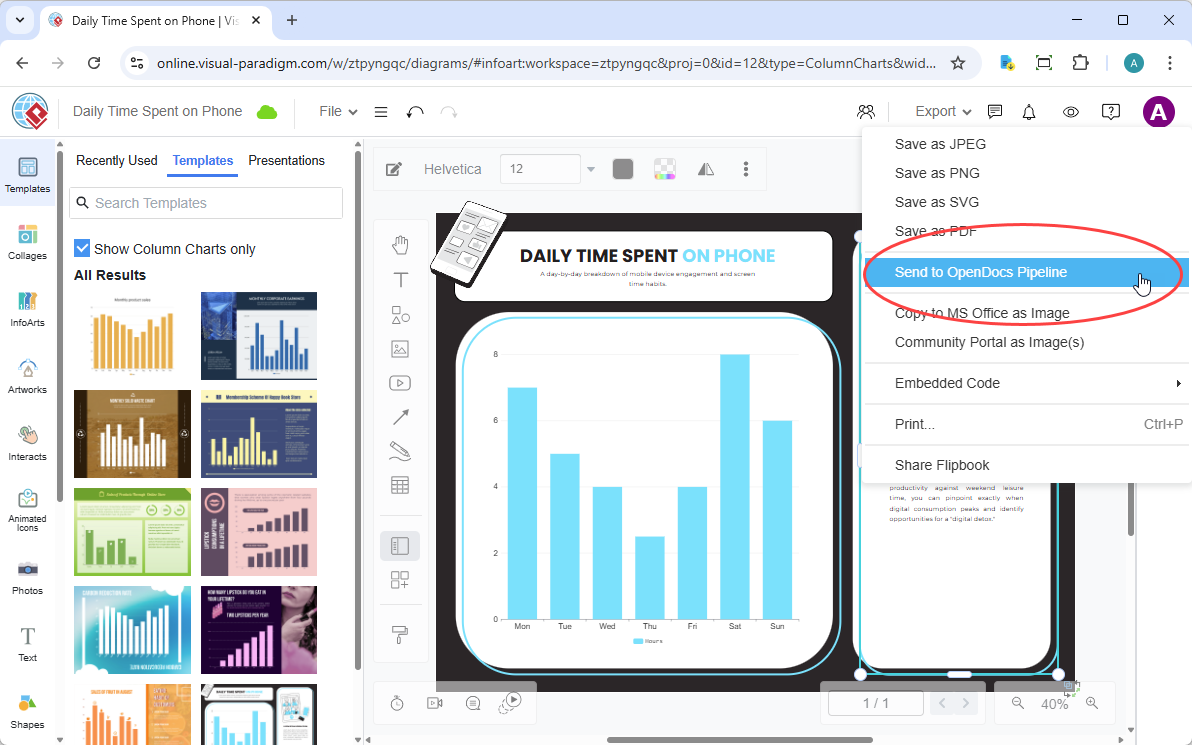
In the top menu, select Export > Send to OpenDocs Pipeline.
-
(Optional) Add a comment to describe the artifact. This makes it easier to find later in the Pipeline pane.
-
Confirm the export. Your visual is now securely stored in the Pipeline.
-
Once your diagram is in the Pipeline, you can place it anywhere in your knowledge base: Open any document page in OpenDocs and click Edit. Click on the page where you want to insert the diagram. On the toolbar, click Insert. In the Insert window, select Pipeline from the left-hand sidebar. Your sent diagrams will appear here.
3. AI Chatbot to OpenDocs
Conversational documentation. Ask our AI Chatbot to generate a system architecture or a business process diagram. With one click, that AI-generated artifact is ready to be inserted into your OpenDocs pages.
How to send a diagram from Visual Paradigm AI Chatbot to OpenDocs:
-
Generate Your Diagram: Create or refine your diagram (UML, flowchart, architecture, BPMN, etc.) in the AI Chatbot.
-
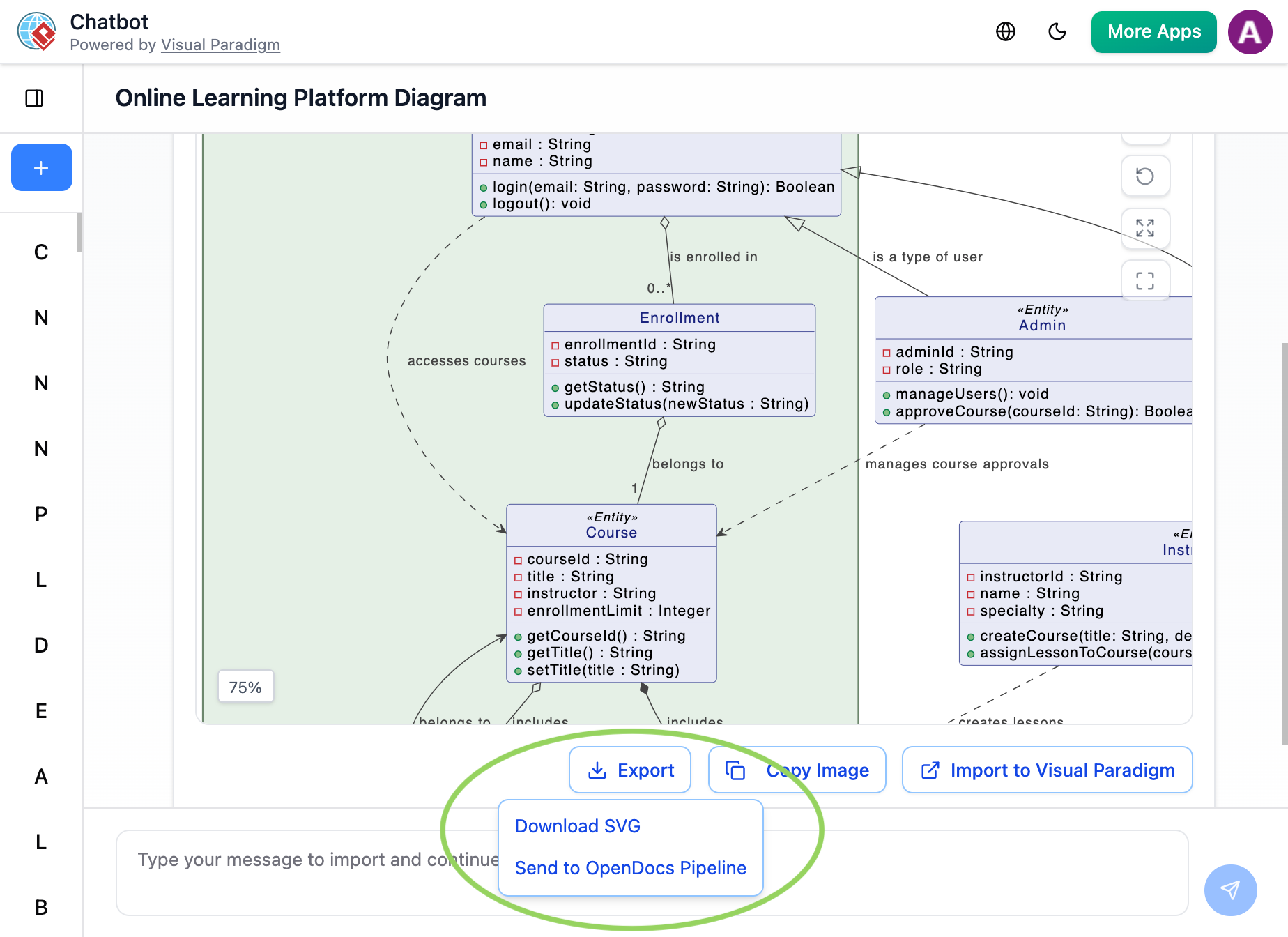
Once the AI has produced the visual you need, click Export and select Send to OpenDocs Pipeline.
-
Go to your desired document page in OpenDocs and enter the editor. Click Insert on the toolbar and select Pipeline. Your AI-generated diagram will be waiting for you in the asset list.
4. Flipbooks to OpenDocs (New!)
Bring interactive media into your knowledge management. You can now send your digital Flipbooks through the Pipeline, allowing you to embed rich, flippable catalogs or brochures directly within your OpenDocs pages. This is a game-changer for product marketing teams who need to keep sales collateral up-to-date within internal wikis.
5. Bookshelves to OpenDocs (New!)
Organize and publish at scale. Send entire Bookshelves to OpenDocs to create a centralized library of resources within your documentation workspace, making it easier than ever to manage large volumes of information.
Traditional vs. Pipeline Workflow: A Comparison
To visualize the impact, consider the difference in daily operations:
| Traditional Workflow | The Pipeline Workflow |
|---|---|
| Manual Export (PNG/JPG) | Instant “Send to Pipeline” |
| Manual Re-uploading on changes | “Update to Latest Revision” in one click |
| Disconnected, static images | Deep-linked, editable artifacts |
| Scattered files on local drives | Centralized cloud repository |
Conclusion: The Future is Connected
The Visual Paradigm Pipeline is more than just a file transfer tool; it is a critical component of a seamless AI Visual Modeling experience. By removing the friction between creation and documentation, it allows teams to focus on what matters: building great products and maintaining accurate, living knowledge bases.
As the ecosystem continues to expand, the Pipeline will only grow stronger, encircling more apps and providing even more ways to bridge the gap between creative modeling and professional publication. For anyone struggling with outdated docs and scattered assets, adopting this workflow isn’t just an upgrade—it’s a necessity for modern technical communication.
Reference
- From Concept to Knowledge Base: How the Visual Paradigm Pipeline Eliminates Documentation Debt: An overview of how the Pipeline serves as a secure, cloud-based asset transit hub to bridge the gap between dynamic visual modeling and living documentation.
- New Feature Alert: Send Diagrams from Visual Paradigm AI Chatbot Directly to OpenDocs!: Details on integrating AI-generated diagrams from the Chatbot directly into the OpenDocs knowledge management platform.
- Bridging Design and Documentation: How Visual Paradigm’s Pipeline Transforms Technical Knowledge Management: An analysis of the three-tier ecosystem and how the Pipeline acts as the central nervous system for visual assets.
- Seamlessly Connect Diagramming to Documentation: VPasCode Integrates with OpenDocs: Information on cross-tool interoperability and how AI-generated scripts flow into the pipeline.
- Mastering the Pipeline in Visual Paradigm OpenDocs: A Complete Guide to Streamlined Knowledge Management: A comprehensive guide on using the Pipeline to manage artifacts and automate revision histories.
- Mastering the Pipeline in Visual Paradigm OpenDocs: A Complete Guide to Streamlined Knowledge Management: Further insights into managing large volumes of information and organizing resources within the documentation workspace.
- Bridging Design and Documentation: How Visual Paradigm’s Pipeline Transforms Technical Knowledge Management: Additional perspectives on eliminating documentation friction and maintaining a single source of truth.
- From Model to Manual: A Software Engineer’s Guide to Syncing Visual Paradigm Desktop Diagrams with OpenDocs: A practical guide for engineers on exporting intricate models from Desktop to OpenDocs.
- A Case Study on Streamlining Knowledge Management with Visual Paradigm OpenDocs Pipeline: Real-world examples of how teams replace static images with dynamic visual embeddings.
- Sync AI Diagram to OpenDocs Pipeline Guide: A video tutorial demonstrating the bidirectional sync and update indicators within the OpenDocs interface.
Related posts:
 From Text to Blueprint: A Hands-On Review of Visual Paradigm’s VPasCode
From Text to Visuals: A Hands-On Review of VPasCode and the Visual Paradigm AI Chatbot
A Hands-On Review of Visual Paradigm’s Automated Documentation Pipeline
From Text to Blueprint: A Hands-On Review of Visual Paradigm’s VPasCode
From Text to Visuals: A Hands-On Review of VPasCode and the Visual Paradigm AI Chatbot
A Hands-On Review of Visual Paradigm’s Automated Documentation Pipeline
 From Frustration to Flow: Mastering UML Timing Diagrams with Visual Paradigm