Designing complex software systems requires more than just writing code. It demands a clear understanding of how different components interact, where boundaries lie, and how to maintain flexibility over time. One of the most effective tools for visualizing this structure is the UML package diagram. In this guide, we will walk through a detailed case study of modeling a library system. We will explore how to identify logical groupings, manage dependencies, and create a scalable architecture without relying on specific tools or technologies. 🏗️
🧠 Understanding Package Diagrams in Software Architecture
A package diagram represents the organization of system elements into groups or packages. It is a structural diagram that focuses on the high-level organization of code rather than the details of individual classes. Think of a package as a folder that contains related functionality, ensuring that code remains organized and maintainable.
Why is this important? When systems grow, the number of classes, interfaces, and modules increases exponentially. Without a clear structure, the codebase becomes a tangled mess known as “spaghetti code.” A package diagram helps architects and developers see the forest before looking at the trees. It answers critical questions:
- Which parts of the system depend on others?
- Where are the stable boundaries?
- How can we isolate changes to specific areas?
- What interfaces exist between modules?
In the context of a library system, which handles transactions, user data, and catalog management, these questions are vital. A poorly structured package hierarchy can lead to tight coupling, where a change in the book catalog forces changes in the user login module. Proper modeling prevents this fragility.
📖 Defining the Scope: The Library Ecosystem
To create an accurate model, we must first define the functional scope of the system. A modern library system is not just a card catalog; it is a digital ecosystem. It needs to handle member registration, book inventory, borrowing transactions, fines, and reporting. Let us break down the primary functional areas that will form the basis of our packages.
Consider the following core functionalities:
- Member Management: Registration, profile updates, and authentication.
- Inventory Control: Adding, updating, and searching for books and media.
- Transaction Processing: Checking out items, returning items, and reserving items.
- Financials: Calculating fines and managing payments.
- Reporting: Generating statistics on circulation and popularity.
Each of these areas represents a potential package. However, grouping them solely by feature can sometimes lead to fragmentation. We must also consider the technical layers. A robust architecture often separates concerns into layers such as Data Access, Business Logic, and Presentation. For this case study, we will focus on a hybrid approach that combines functional and logical concerns to create cohesive packages.
🔍 Identifying Logical Packages
The first step in modeling is identifying the packages. We want to group elements that are frequently changed together (cohesion) while minimizing dependencies between unrelated groups (coupling). Let us propose a set of packages for our library system.
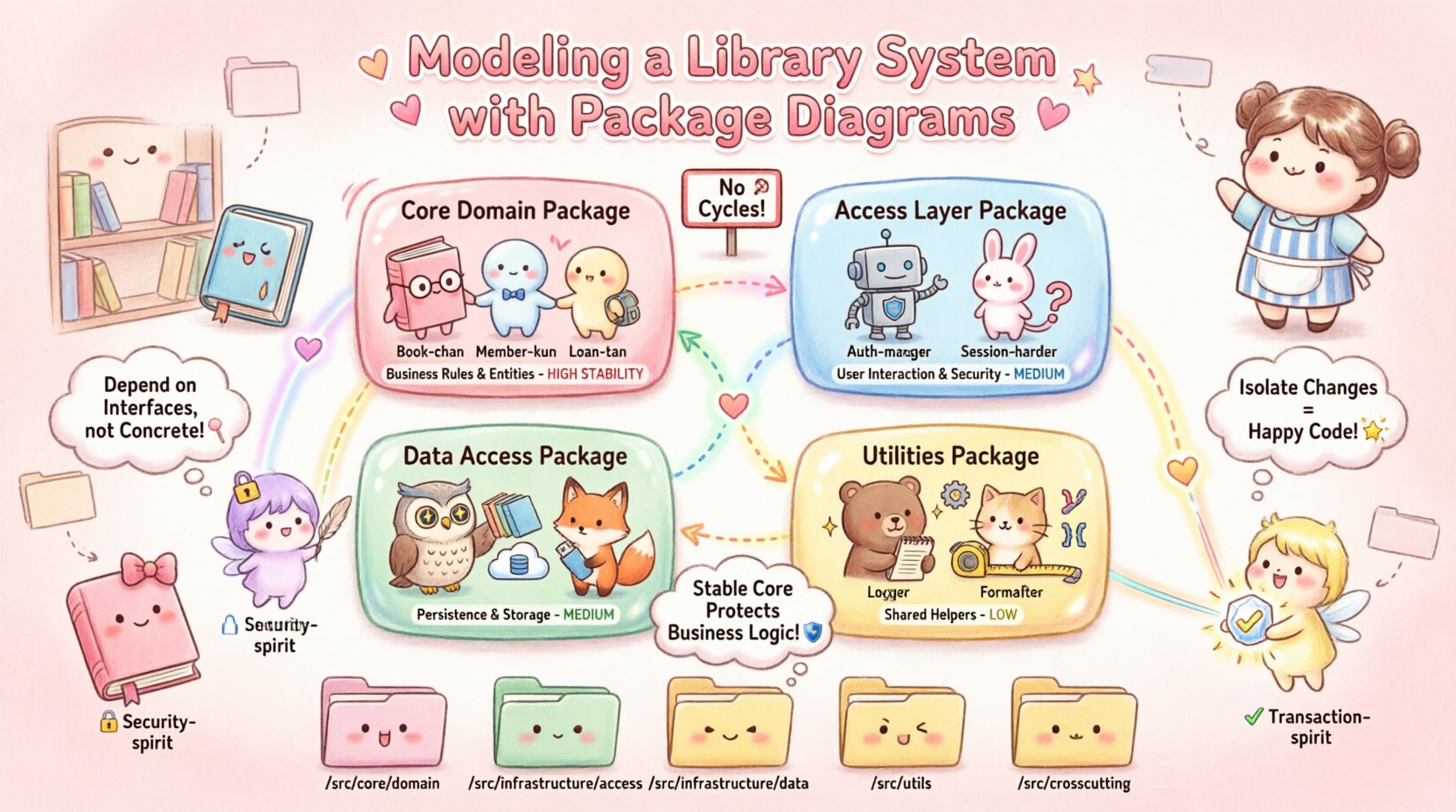
1. Core Domain Package
This package contains the fundamental business entities. It represents the “truth” of the system. In a library context, this includes the Book, Member, Loan, and Item classes. This package should be the most stable part of the system. Other packages should rely on it, but it should not rely on other packages to function.
2. Access Layer Package
This package handles the interface with the outside world. It manages user sessions, authentication tokens, and input validation. It acts as the gateway. It does not contain business rules; it merely passes data to the Core Domain.
3. Data Access Package
This package is responsible for persistence. It knows how to save a Book to a database or retrieve a list of loans. It interacts directly with storage mechanisms. By isolating this, we can swap out the underlying storage technology without affecting the business logic.
4. Utilities and Support Package
This package holds shared services that do not fit into specific domains. Examples include date formatting, currency calculation helpers, and logging mechanisms. Keeping these separate prevents them from cluttering the business logic packages.
| Package Name | Responsibility | Key Classes | Stability |
|---|---|---|---|
| Core Domain | Business rules and entities | Book, Member, Loan | High |
| Access Layer | User interaction and security | AuthManager, SessionHandler | Medium |
| Data Access | Persistence and storage | Repository, DatabaseConnector | Medium |
| Utilities | Shared helper functions | Formatter, Logger | Low |
As shown in the table, the Core Domain is the most stable. This is a critical architectural principle. If the Core Domain changes frequently, the entire system is unstable. By keeping it isolated, we protect the core business logic from volatile external factors like user interface changes.
🔗 Managing Dependencies and Interfaces
Once packages are defined, the next challenge is defining how they communicate. In a package diagram, dependencies are represented by arrows. The direction of the arrow indicates the direction of the dependency. If Package A depends on Package B, it means Package A uses functionality from Package B.
Dependency Rules
To maintain a clean architecture, we should adhere to specific dependency rules:
- Dependency Rule: Source code dependencies should only point to stable code. The Core Domain should not depend on the Access Layer.
- No Cycles: Circular dependencies between packages create a situation where two packages wait on each other, making the system difficult to compile or run.
- Interface Segregation: Packages should depend on interfaces, not concrete implementations. This allows the implementation to change without breaking the consumer.
Visualizing the Flow
Imagine the flow of data in a borrowing scenario. The Access Layer receives a request from a user. It validates the input. It then calls a method in the Core Domain to process the loan. The Core Domain calculates the due date. It then calls the Data Access Package to save the transaction. The flow is unidirectional: Access → Core → Data.
This structure ensures that the business rules (Core) remain pure. They do not know about HTTP requests or database drivers. This separation is crucial for testing. You can test the Core Domain logic without needing to start a database or simulate a network request.
🖼️ Visualizing the Structure
When creating the visual representation of these packages, clarity is key. A diagram should not be cluttered. It should convey the relationships at a glance. Here is how we structure the visual elements.
- Package Boxes: Use distinct boxes for each package. Label them clearly.
- Dependencies: Use dashed lines with open arrowheads to indicate dependencies.
- Interfaces: Use a lollipop notation or a specific icon to denote exported interfaces.
- Groups: If there are sub-packages, nest them visually to show hierarchy.
Consider the relationship between the Reporting package and the Core Domain. The Reporting package needs data to generate statistics. It should depend on the Core Domain. However, it should not modify the data. This is a read-only dependency. In the diagram, this is a standard dependency arrow, but the semantic meaning is different from a transactional dependency.
Another critical visualization aspect is the boundary. The boundary between the Data Access package and the rest of the system is significant. It is the point where the system interacts with the physical world. In the diagram, this boundary should be distinct, perhaps marked with a specific color or border style, to remind developers that changes here affect performance and persistence.
💻 Implementation Strategy
How does this diagram translate to actual code organization? The package diagram is a blueprint for the file system structure. While different programming languages handle packages and namespaces differently, the logical grouping remains the same.
For a library system, the directory structure might look like this:
/src/core/domain– ContainsBook.java,Member.java/src/core/service– ContainsLoanService.java/src/infrastructure/access– ContainsApiGateway.java/src/infrastructure/data– ContainsBookRepository.java/src/infrastructure/util– ContainsDateUtils.java
Notice the mapping. The core package in the directory structure matches the Core Domain package in the diagram. The infrastructure folder contains the technical details. This alignment between the diagram and the file system is vital. It ensures that developers do not accidentally create dependencies that violate the architectural rules. If a developer tries to import a class from infrastructure into core, the build system or code analysis tool should flag it.
⚙️ Handling Cross-Cutting Concerns
Not every concern fits neatly into a single package. Some concerns cut across the entire system. These are known as cross-cutting concerns. Examples include logging, security, and transaction management.
In a package diagram, these are often represented as separate packages or included as stereotypes on existing packages. For example, the Security concern might apply to the Access Layer and the Core Domain equally. If we create a Security package, it provides interfaces that other packages can use to verify permissions.
However, care must be taken. If the Security package becomes too large, it becomes a dependency for everything. This is known as a “God Package.” To avoid this, split security concerns. Keep authentication logic separate from authorization logic. Authentication is about identity (who are you?). Authorization is about permission (what can you do?). In the library system, checking a username and password belongs to Authentication. Checking if a member can borrow a specific book belongs to Authorization.
| Concern Type | Example | Package Location |
|---|---|---|
| Authentication | Login verification | Access Layer |
| Authorization | Permission checks | Core Domain |
| Logging | Audit trails | Utilities |
| Transaction | Data consistency | Data Access |
By distributing these concerns, we prevent a single point of failure. If the logging mechanism changes, it should not break the authentication flow. The Utilities package should provide a standard interface for logging that other packages implement.
🔄 Refactoring and Evolution
Software is never finished; it evolves. The package diagram is a living document. As the library system grows, new requirements will emerge. Perhaps the library wants to integrate with an external digital archive. This requires a new package or a modification of existing ones.
When refactoring, the package diagram serves as a map. If you need to move a class from one package to another, you must update the diagram first. This prevents accidental dependencies. For instance, if you move the Member class from Core Domain to Access Layer, you risk breaking the business logic that relies on it. The diagram helps you trace these impacts.
Refactoring also involves removing packages. If a feature is deprecated, the corresponding package should be removed. However, dependencies must be handled first. If the Reporting package is no longer needed, ensure that no other package depends on it before deletion.
⚠️ Common Modeling Mistakes
Even experienced architects make mistakes when creating package diagrams. Recognizing these pitfalls helps in creating a more robust design.
- Over-Abstraction: Creating too many packages for a small system. If you have only 10 classes, do not create 10 packages. Group them logically.
- Under-Abstraction: Putting everything into one giant package. This leads to the spaghetti code problem mentioned earlier.
- Ignoring Layering: Mixing data access code with business logic in the same package. This makes testing difficult.
- Static Coupling: Relying on static imports or singletons that make the dependencies implicit rather than explicit.
- Missing Interfaces: Directly depending on concrete classes. This makes the system rigid. Always depend on abstractions.
For the library system, a common mistake is putting the Loan logic directly inside the Member package. While they are related, Loan is a transaction between a member and an item. It belongs in a Transaction or Core Domain package, not solely within the member’s context.
📈 Summary of Value
Modeling a library system with package diagrams provides a clear roadmap for development. It establishes boundaries, defines relationships, and ensures that the system can grow without collapsing under its own complexity. By separating concerns into logical packages like Core, Access, and Data, we create a system that is easier to understand, test, and maintain.
The process requires discipline. Developers must resist the urge to add functionality to the wrong package. They must adhere to the dependency rules established in the design phase. When these rules are followed, the result is a system that is resilient to change. New features can be added without rewriting the core logic. The architecture supports the business needs rather than hindering them.
Ultimately, the goal is not just to draw a diagram. The goal is to communicate the structure of the system to everyone involved. From the project managers to the junior developers, the package diagram serves as a common language. It reduces ambiguity and aligns the team on how the system works. In a complex environment like a library system, where data integrity and user experience are paramount, this alignment is not optional. It is a necessity for success.