Software architecture is a balancing act between abstraction and detail. When designing complex systems, the choice of diagram type can dictate how effectively a team understands the structure. Two of the most common UML artifacts are the Class Diagram and the Package Diagram. While they often appear together, they serve distinct purposes. Confusing them can lead to architectural drift, where the code diverges from the design intent.
This guide dissects the differences, use cases, and integration strategies for both. Whether you are defining a microservices boundary or mapping out a single module, understanding when to apply each view is critical for maintainability.
🏗️ The Class Diagram: Granular Structure
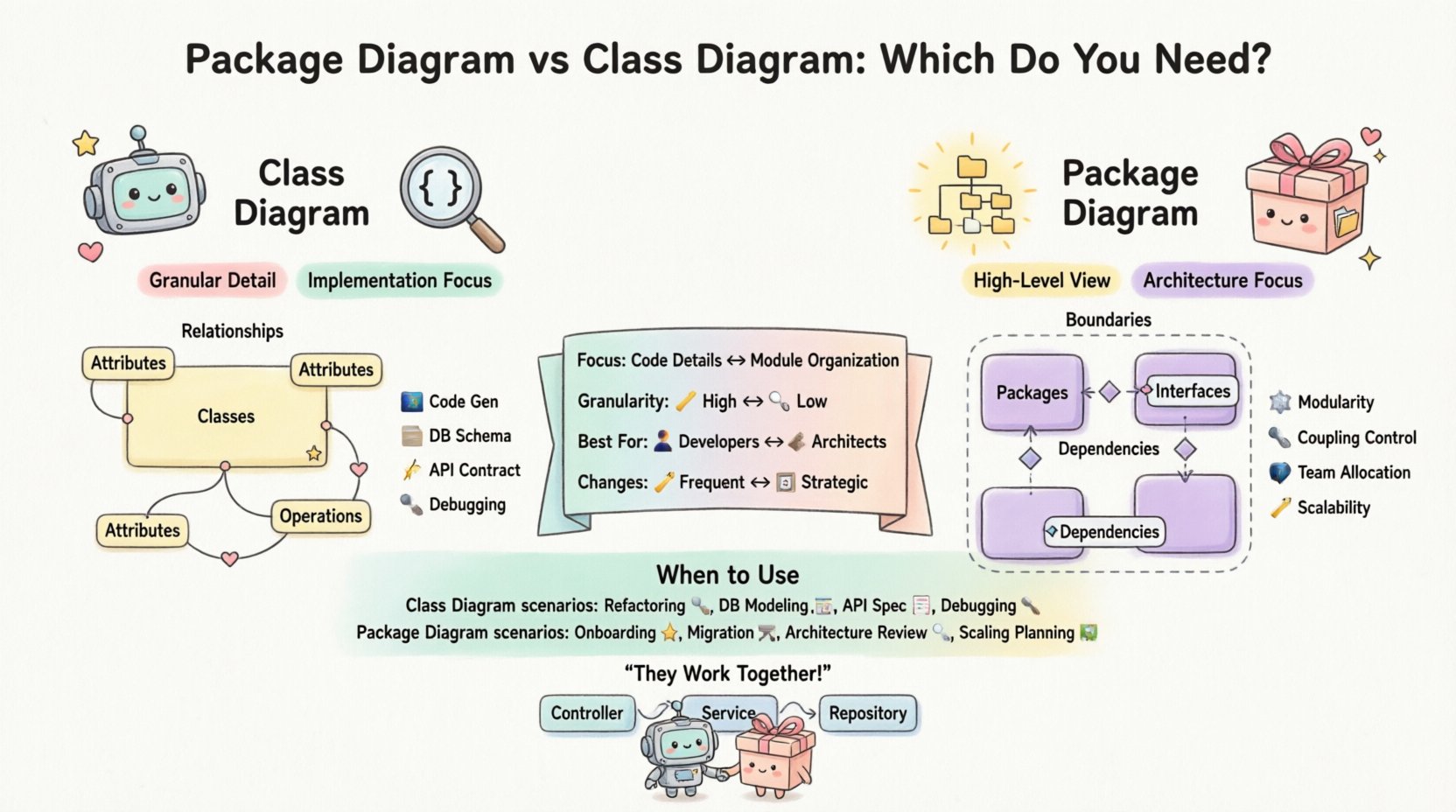
The Class Diagram is the backbone of object-oriented design. It focuses on the implementation details of the system. It shows the building blocks and how they connect at a logical level. This diagram is essential when you need to define the contract of a specific component.
Key Components
- Classes: Representations of objects with defined attributes and operations.
- Attributes: The data fields held within a class (e.g.,
userName,id). - Operations: The methods or functions available to interact with the class.
- Relationships: The links connecting classes, defining how they interact.
Types of Relationships
Class diagrams are rich in relationship types. Understanding these is vital for data modeling:
- Association: A structural relationship where objects are connected (e.g., a
Userhas aOrder). - Inheritance: A generalization/specialization relationship (e.g.,
CarextendsVehicle). - Aggregation: A “whole-part” relationship where parts can exist independently (e.g., a
LibraryhasBooks). - Composition: A stronger form of aggregation where parts cannot exist without the whole (e.g., a
HousehasRooms). - Dependency: A usage relationship where one class relies on another (e.g.,
ReportGeneratorusesDataParser).
When to Use Class Diagrams
Use this diagram when the focus is on:
- Code Generation: Defining the skeleton for implementation.
- Database Schema Design: Mapping entities to tables.
- Complex Logic: Visualizing algorithms or state changes within a specific object.
- API Contract Definition: Clarifying input and output structures for interfaces.
📦 The Package Diagram: Logical Organization
The Package Diagram shifts the perspective from individual objects to groups of related elements. It provides a high-level view of the system’s structure, focusing on namespaces, modules, and boundaries. It answers the question: “How is the code organized?” rather than “What does this specific function do?”.
Key Components
- Packages: Containers that group classes, interfaces, and other packages to manage complexity.
- Dependencies: Arrows showing how one package relies on another. This is the primary metric for coupling.
- Interfaces: Abstract definitions that packages might expose to the outside world.
- Imports/Exports: Indicators of what is accessible from within a package boundary.
Benefits of Package Diagrams
This view helps manage complexity in large systems:
- Modularity: It defines clear boundaries between features.
- Coupling Management: It highlights circular dependencies that can cause build failures or runtime errors.
- Team Allocation: It helps assign ownership of specific directories or namespaces to different development squads.
- Scalability: It allows for the replacement of one package with another without affecting the rest of the system.
🆚 Comparison: Side-by-Side Analysis
Choosing the right tool requires understanding the scope of your problem. The table below summarizes the operational differences.
| Feature | Class Diagram | Package Diagram |
|---|---|---|
| Focus | Implementation details, attributes, methods | Logical grouping, namespaces, boundaries |
| Granularity | High (Specific entities) | Low (Modules, layers) |
| Primary Goal | Define data structure and behavior | Define architecture and dependencies |
| Best For | Developers writing code | Architects managing structure |
| Complexity | Can become cluttered quickly | Remains abstract and manageable |
| Change Frequency | Changes often during feature development | Changes less frequently, strategic only |
🧩 Integration: How They Work Together
These diagrams are not mutually exclusive. In fact, a robust system design utilizes both. The Package Diagram acts as the skeleton, and the Class Diagram fills in the muscle.
Layered Architecture Example
Consider a standard three-tier application:
- Package Level: You define packages like
com.app.controller,com.app.service, andcom.app.repository. - Class Level: Inside
com.app.service, you draw a Class Diagram for theUserServiceclass to show theloginmethod.
This separation prevents the architecture from becoming a “spaghetti diagram.” The Package Diagram ensures the layers do not cross dependencies (e.g., Controller should not talk directly to Repository). The Class Diagram ensures the Service layer handles logic correctly.
🛠️ Decision Matrix: When to Use Which?
Use the following scenarios to decide which diagram takes priority in your documentation.
Use Class Diagrams When:
- Refactoring: You are cleaning up legacy code and need to understand current dependencies.
- Database Modeling: You are designing SQL schemas based on object properties.
- API Specification: You need to document request/response payloads for frontend teams.
- Debugging: You need to trace state changes across specific objects.
Use Package Diagrams When:
- Onboarding: New developers need to understand the project structure.
- Migration: You are moving code from a monolith to microservices.
- Review: You are checking for architectural violations (e.g., circular imports).
- Scalability Planning: You need to determine which modules can be deployed independently.
🚧 Common Pitfalls and Best Practices
Even experienced architects make mistakes. Here are common errors to avoid when creating these diagrams.
Pitfall 1: Over-Documenting Package Diagrams
Do not create a package for every single file. A package should represent a logical domain, not a physical folder. If you have 100 classes in a folder, do not create 100 packages unless they serve distinct functional boundaries.
Pitfall 2: Ignoring Visibility
Class diagrams often omit visibility modifiers (private, public, protected). This leads to confusion about what is internal and what is external. Always denote visibility clearly.
Pitfall 3: Static Snapshots
Diagrams become obsolete quickly. If the code changes, the diagram must change. If you treat them as “set and forget” artifacts, they will mislead developers.
Best Practice: Keep It Current
- Automate Generation: Where possible, generate diagrams from code to ensure accuracy.
- Review Cycles: Include diagram updates in the Definition of Done for pull requests.
- Focus on Flow: Ensure that the package dependencies reflect the actual runtime flow, not just import statements.
🔄 Maintenance and Evolution
Software is never static. As requirements evolve, so must your diagrams. A Package Diagram that was valid six months ago might now show circular dependencies due to feature creep.
Handling Refactoring
When moving a class from one package to another:
- Update the Package Diagram first to reflect the new boundary.
- Ensure the Class Diagrams within the new package are updated to reflect new dependencies.
- Run a dependency analysis to ensure no broken links exist.
Version Control Strategy
Store diagrams alongside the codebase. If your project uses a specific directory structure (e.g., /docs/architecture), keep the diagrams there. This ensures that when a developer clones the repository, they have access to the architectural context immediately.
🧐 Frequently Asked Questions
Can I combine them into one diagram?
Technically, yes, but it is generally not recommended. Mixing high-level packages with low-level class details creates visual noise. It is better to link them. Use the Package Diagram as a map and the Class Diagram as a street view.
Which one is more important for documentation?
It depends on the audience. Stakeholders and managers prefer Package Diagrams for high-level progress. Developers need Class Diagrams for implementation details.
How do I handle circular dependencies?
Circular dependencies between packages are often a sign of architectural debt. Use the Package Diagram to identify the cycle. Then, use the Class Diagram to see if the logic can be extracted into a shared module or if an interface needs to be introduced to break the tie.
Do I need to document every class?
No. Document classes that have complex logic or are part of the core domain. Simple data transfer objects (DTOs) or getters/setters can often be inferred from the code without a diagram.
📝 Final Thoughts
Selecting between a Package Diagram and a Class Diagram is not about choosing one over the other; it is about choosing the right lens for the current task. The Package Diagram provides the macro view, ensuring the system remains modular and maintainable. The Class Diagram provides the micro view, ensuring data integrity and behavior correctness.
By maintaining both, you create a comprehensive map of your system. This duality allows teams to scale without losing clarity. Start with the Package Diagram to set boundaries, then drill down with Class Diagrams to define behavior. This disciplined approach leads to robust, adaptable software systems.