


The Unified Modeling Language (UML) is a cornerstone of software engineering, offering a standardized way to visualize, design, and document complex systems. At its core, UML is not just a set of diagrams—it’s a framework for modeling across three interrelated spaces:
-
Model of Problem Space (MOPS) – What the system must do
-
Model of Solution Space (MOSS) – How the system will be built
-
Model of Architecture Space (MOAS) – Constraints and context of the system
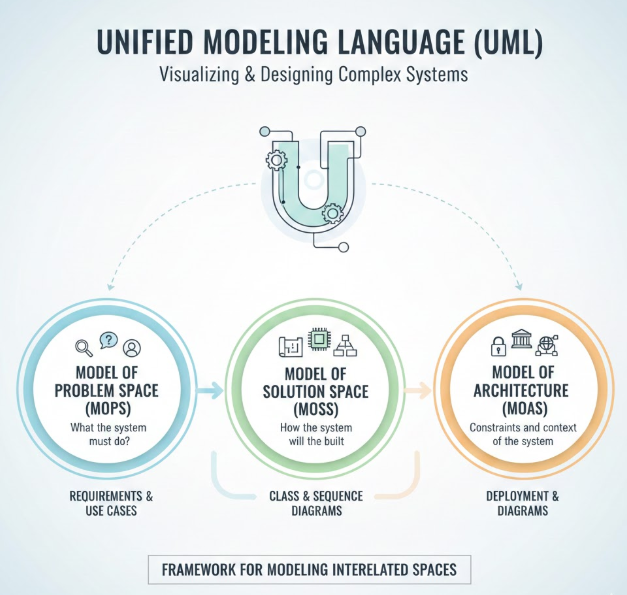
These three spaces provide a holistic, role-based approach to software development, aligning stakeholders—from business analysts to system architects—with a shared understanding of the project’s goals, implementation, and technical foundation.
🔍 1. Model of Problem Space (MOPS): Understanding the “What”
Primary Stakeholders: Business analysts, product owners, end users
Goal: Capture and model business requirements from the user’s perspective.
This space focuses on understanding the problem domain—what the system needs to achieve. It’s about requirements gathering, workflow modeling, and defining business entities.
Key UML Diagrams in MOPS:
| Diagram | Purpose |
|---|---|
| Use Case Diagram | Visualize user interactions with the system; defines functional requirements. |
| Activity Diagram | Model business processes, decision points, and workflows. |
| Class Diagram (Domain Model) | Represent key business entities (e.g., Customer, Order, Invoice) and their relationships. |
| Sequence Diagram (User-Centric) | Show how users interact with system components step-by-step. |
| State Machine Diagram | Define the lifecycle and state transitions of critical business objects. |
| Interaction Overview Diagram | High-level view of multiple interaction flows. |
✅ Why it matters: MOPS ensures that the software solves the right problem. Without it, developers may build something that works technically but fails to meet user needs.
🛠️ 2. Model of Solution Space (MOSS): Designing the “How”
Primary Stakeholders: System designers, software developers, engineers
Goal: Translate requirements into a technical blueprint for implementation.
This is where the technical implementation comes into play. MOSS focuses on how the system will be structured and how components interact during runtime.
Key UML Diagrams in MOSS:
| Diagram | Purpose |
|---|---|
| Detailed Class Diagrams | Include data types, method signatures, visibility, and constraints. |
| Sequence Diagram (Technical) | Model object interactions with precise timing and message passing. |
| Object Diagram | Show actual object instances and their relationships at runtime. |
| State Machine Diagram (Technical) | Model complex state logic with guard conditions and transitions. |
| Composite Structure Diagram | Reveal internal structure of components and collaborations. |
| Timing Diagram | Analyze behavior across time—ideal for real-time systems or performance-critical logic. |
✅ Why it matters: MOSS bridges the gap between abstract requirements and concrete code. It’s essential for developers to understand how to build the system correctly and efficiently.
🏗️ 3. Model of Architecture Space (MOAS): Envisioning the “Context”
Primary Stakeholders: System architects, DevOps engineers, project managers, enterprise IT
Goal: Define the system’s structural and environmental constraints—scalability, security, deployment, and reusability.
MOAS is often called the “background” space because it underpins both MOPS and MOSS. It defines the big picture: where the system runs, how it scales, and what standards it must follow.
Key UML Diagrams in MOAS:
| Diagram | Purpose |
|---|---|
| Component Diagram | Show how software components are organized and depend on each other. |
| Deployment Diagram | Model physical hardware, nodes, and network topology. |
| Package Diagram (High-Level) | Represent layers (e.g., UI, Service, Data) and dependencies. |
| Profile Diagram | Define custom stereotypes, constraints, and metadata (e.g., <<secure>>, <<high-performance>>). |
| Composite Structure Diagram (Architecture View) | Depict internal structure of complex components or services. |
✅ Why it matters: MOAS ensures the system is robust, scalable, secure, and maintainable—critical for enterprise-grade applications.
📊 Summary: UML Diagrams Across the Three Spaces
| UML Diagram | MOPS (Analyst) | MOSS (Designer) | MOAS (Architect) |
|---|---|---|---|
| Use Case | ⭐⭐⭐⭐⭐ | – | ⭐ |
| Activity | ⭐⭐⭐⭐⭐ | ⭐⭐ | ⭐ |
| Class | ⭐⭐⭐ | ⭐⭐⭐⭐⭐ | ⭐⭐ |
| Sequence | ⭐⭐⭐⭐ | ⭐⭐⭐⭐⭐ | ⭐ |
| Component | ⭐ | ⭐⭐⭐ | ⭐⭐⭐⭐⭐ |
| Deployment | ⭐⭐ | ⭐⭐ | ⭐⭐⭐⭐⭐ |
| Package | ⭐⭐⭐ | ⭐⭐ | ⭐⭐⭐⭐ |
🎯 Insight: The same diagram can serve multiple purposes depending on context. For example, a Class Diagram in MOPS is a domain model; in MOSS, it becomes a detailed technical class; in MOAS, it helps define component boundaries.
🤖 How Visual Paradigm Empowers UML with AI: A Game-Changer in Software Modeling
While UML provides the structure, Visual Paradigm elevates it by integrating Artificial Intelligence (AI) to accelerate and enhance every phase of the modeling lifecycle—especially across the three spaces.
✨ Key AI-Powered Features in Visual Paradigm:
1. AI-Powered Use Case & Requirement Generation
-
Problem: Writing comprehensive use cases from natural language is time-consuming.
-
Visual Paradigm AI Solution: Input a user story or free-text description (e.g., “As a customer, I want to track my order”) → AI generates a complete Use Case Diagram, Activity Flow, and Sequence Diagram in seconds.
-
Impact: Accelerates MOPS modeling—business analysts can quickly validate requirements with visual models.
2. Smart Class & Component Modeling from Text
-
Input: Describe a system feature in plain English (e.g., “The system must authenticate users via email and password, store session tokens, and validate access rights.”)
-
AI Action: Visual Paradigm auto-generates:
-
A Class Diagram with
User,Session,AuthService, etc. -
A Component Diagram showing the authentication module.
-
Sequence Diagrams for login and session validation.
-
-
Impact: Reduces manual modeling effort by up to 70%, enabling faster transition from MOPS to MOSS.
3. Automated Code Generation from UML Models
-
Once a detailed Class Diagram is created in MOSS, Visual Paradigm AI can:
-
Generate full Java, C#, Python, or TypeScript code skeletons.
-
Add annotations (e.g.,
@Entity,@PostMapping) based on the model.
-
-
Benefit: Developers can jump directly into coding with minimal boilerplate.
4. AI-Powered Architecture Recommendations
-
Visual Paradigm AI analyzes:
-
Existing component and deployment diagrams.
-
Performance, security, and scalability requirements.
-
-
Output: AI suggests:
-
Optimal deployment topology (e.g., microservices vs. monolith).
-
Recommended cloud services (AWS, Azure, GCP).
-
Security patterns (e.g., OAuth2, JWT).
-
-
Impact: Helps architects in MOAS make data-driven, best-practice decisions.
5. Natural Language to UML: The Future of Collaboration
-
Feature: “Describe in plain English, and I’ll draw it.”
-
Example: Type: “Show how a user places an order, pays via credit card, and receives a confirmation email.”
-
Result: AI generates:
-
A Use Case Diagram
-
An Activity Diagram of the order process
-
A Sequence Diagram with
User,OrderService,PaymentGateway,EmailService
-
-
Use Case: Ideal for cross-functional teams—non-technical stakeholders can contribute to modeling.
🎯 Why Visual Paradigm + AI is a Game-Changer
| Benefit | How Visual Paradigm + AI Delivers |
|---|---|
| Faster Requirements Gathering | AI turns user stories into diagrams in seconds. |
| Reduced Modeling Errors | AI validates consistency across diagrams (e.g., class names match in all models). |
| Improved Collaboration | Non-technical stakeholders can participate via natural language. |
| Seamless Transition Between Spaces | AI ensures models in MOPS, MOSS, and MOAS are aligned. |
| Scalable for Enterprise | AI supports large models, automated documentation, and audit trails. |
🏁 Conclusion: From Vision to Reality—Powered by UML and AI
The three modeling spaces (MOPS, MOSS, MOAS) offer a structured, role-based approach to software design—ensuring alignment from business needs to technical implementation and enterprise architecture.
But in today’s fast-paced development world, manual modeling is no longer sufficient.
Visual Paradigm, with its AI-powered modeling engine, transforms UML from a documentation tool into a dynamic, intelligent design platform. It empowers:
-
Business analysts to capture requirements faster,
-
Developers to implement with precision,
-
Architects to make strategic decisions with confidence.
💡 Final Thought:
“UML tells you what to build. AI tells you how to build it—faster, smarter, and better.”
With Visual Paradigm + AI, the future of software modeling isn’t just visual—it’s intelligent, collaborative, and fully automated.
📌 Try It Yourself:
Visit https://www.visual-paradigm.com and explore the AI-powered UML modeling tools. Start with a simple user story and watch the AI generate your full system model in seconds.
🧠 Pro Tip: Use the AI Assistant in Visual Paradigm to generate diagrams from plain text—perfect for agile teams, startups, and enterprise architects alike.
Empower your team. Model with clarity. Build with confidence. With Visual Paradigm and AI, the future of software design is here. 🚀
-
AI-Powered UML Class Diagram Generator by Visual Paradigm: This advanced AI-assisted tool automatically generates UML class diagrams from natural language descriptions, significantly streamlining software design and modeling.
-
AI-Powered Sequence Diagram Refinement Tool: Discover how this feature enhances software design by automatically improving and optimizing sequence diagrams with intelligent suggestions.
-
AI Textual Analysis – Transform Text into UML Models Automatically: This resource explains how to use AI to analyze text documents and automatically generate UML diagrams for faster modeling and documentation.
-
Generate Activity Diagrams from Use Cases Instantly: Learn how the AI engine enables rapid and accurate conversion of use case descriptions into professional activity diagrams with minimal effort.
-
How AI Chatbot Can Help You Learn UML Faster: This article details how users can practice UML interactively, visualize concepts instantly, and receive immediate feedback to improve their modeling skills.
-
AI-Powered MVC System Architecture Generator: A specialized tool that leverages AI to automatically generate clean, scalable MVC (Model-View-Controller) system architectures through automated modeling.
-
Major Upgrade to AI UML Component Diagram Generation: An official update detailing enhancements that make the AI assistant an indispensable tool for generating modular software structures.
-
Definitive Guide to UML State Machine Diagrams with AI: A detailed technical guide on using AI-enhanced tools to model dynamic object behavior and complex state-driven logic.
-
AI Use Case Description Generator by Visual Paradigm: An AI-powered tool that automatically generates detailed use case descriptions from user inputs, accelerating system analysis and documentation.
-
Real-Life Case Study: Generating UML Class Diagrams with AI: A detailed case study demonstrating how an AI assistant successfully transformed textual requirements into accurate UML class diagrams for a real-world project.
Related posts:
 Comprehensive UML Class Diagram Tutorial: Master Object-Oriented Design with Examples
Comprehensive UML Class Diagram Case Study: Modeling Real-World Systems with Best Practices
Comprehensive UML Class Diagram Tutorial: Master Object-Oriented Design with Examples
Comprehensive UML Class Diagram Case Study: Modeling Real-World Systems with Best Practices
 Beyond a Thousand Words: Why UML is More Expressive Than Your Favorite Programming Language
 The Evolution of the Three Amigos: How AI-Driven Tools are Revolutionizing UML 2.0 Standards