


As someone who has spent years bridging the gap between technical development teams and business operations, I’ve found that the greatest challenge isn’t usually the technology itself—it’s the communication. Finding a “universal translator” for workflows is a quest every project manager undertakes. Recently, I’ve been diving deep into Business Process Model and Notation (BPMN) using Visual Paradigm, and I wanted to share my experience and a comprehensive guide on why this standard is a game-changer for documenting organizational logic.
What is BPMN?
BPMN is more than just “flowcharts for business.” It is a standardized visual language designed to be intuitive enough for non-technical stakeholders (like managers or clients) while remaining precise enough for technical analysts to use as a blueprint for implementation.
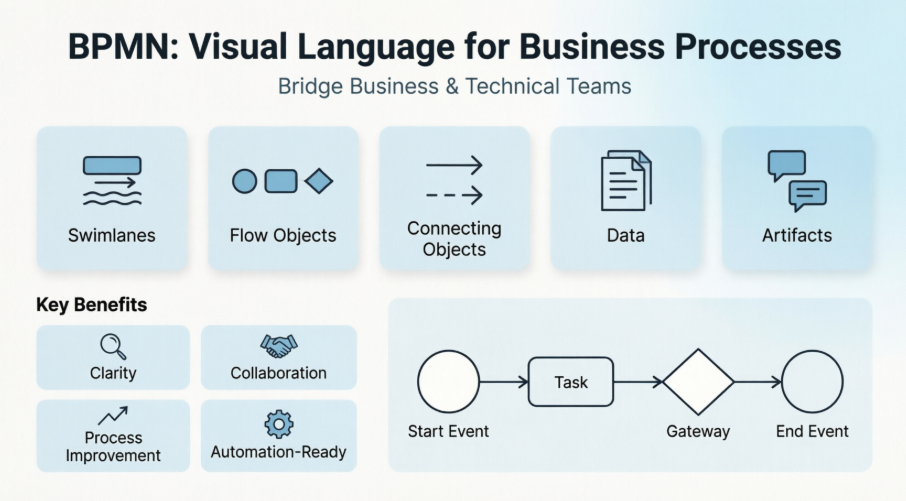
The Core Building Blocks: A Visual Paradigm Perspective
According to the Visual Paradigm guides, the beauty of BPMN lies in its categorization. When you open the software, the elements are organized into five core groups that make the modeling process feel logical rather than overwhelming.
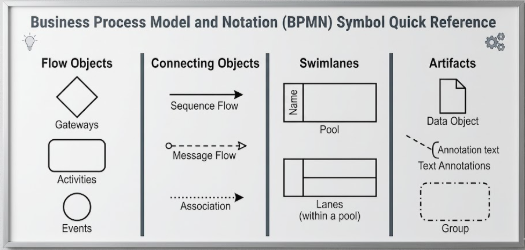
1. Swimlanes (The Participants)
Swimlanes are graphical containers that clearly define who is doing what.
-
Pools: These represent major participants or organizations (e.g., “Customer” or “Bank”).
-
Lanes: These are sub-partitions within a pool. I find these incredibly useful for organizing activities by specific roles or departments within a single company.
2. Flow Objects (The Behavior)
These are the primary elements that define the actual “story” of your process.
-
Events: Circular symbols representing something that “happens” (Start, Intermediate, or End).
-
Activities: Rounded rectangles representing work performed (e.g., “Review Application”).
-
Gateways: Diamond shapes used for decision points. Whether it’s an exclusive “Yes/No” path or a parallel process, these control the flow.
3. Connecting Objects (The Flow)
Lines link everything together, but the type of line matters:
-
Sequence Flow: Solid lines showing the order of activities within a pool.
-
Message Flow: Dashed lines showing communication between different pools (e.g., between a Customer and a Vendor).
-
Association: Dotted lines used to link artifacts or notes to flow objects.
4. Data and Artifacts (The Context)
-
Data: Represented by icons like data objects or data stores, showing what information is needed or produced.
-
Artifacts: These add extra detail without changing the logic flow. I often use Text Annotations (brackets) to leave helpful notes for my team.
Practical Applications: Real-World Examples
Seeing these concepts in action is where the value of Visual Paradigm truly shines. Here are three common workflows I’ve explored:
The Leave Application Process
In this scenario, a single Pool represents the company. Within it, three Lanes separate the Employee, Manager, and HR. The process flows from a “Submit Request” task through a gateway where the Manager either approves or rejects it, triggering different end results.
Fire Safety Inspection
This is a great example of a procedural workflow. It starts with a Start Event, moves through “Scheduling” and “Execution” tasks, and concludes with a “Record Result” task and an End Event. It’s a linear, clean way to ensure compliance is documented.
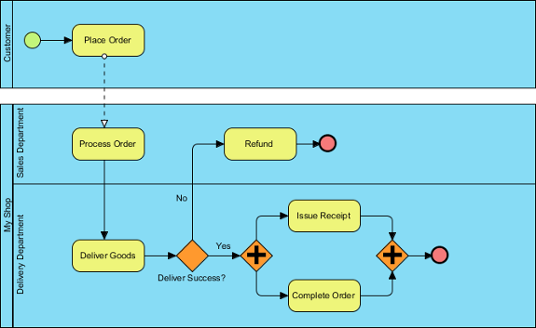
Place Order Online
This is where Message Flows become critical. It demonstrates the interaction between a “Customer” pool and a “Store” pool. You can visually see the exchange of order confirmations and payment data across organizational boundaries.
Conclusion: My Final Take
After exploring these tools, it’s clear that BPMN is an essential skill for anyone involved in process improvement. Visual Paradigm makes the learning curve significantly shallower by providing structured elements and practical templates. Whether you are documenting a simple internal task or a complex cross-organizational interaction, these visual models prevent the “lost in translation” errors that plague so many projects.
If you are just starting, I recommend beginning with a simple “as-is” process of your current daily tasks. Are you ready for a step-by-step guide on creating your first diagram, or do you want to dive into advanced topics like error handling and sub-processes?
References
-
BPMN Guide: What is BPMN?: A foundational overview of Business Process Model and Notation standards and purposes.
-
BPMN Tutorial 1: An introductory tutorial covering basic symbols and process modeling logic.
-
How to Create BPMN Diagram: A practical walkthrough on using the Visual Paradigm interface to build diagrams.
-
BPMN Tutorial PDF: A downloadable guide focusing on participants and containers in process modeling.
-
BPMN Comprehensive Guide: A detailed breakdown of flow objects, connecting objects, and data representation.
-
Comprehensive BPMN Diagram Tutorial: A blog post exploring the nuances of sequence vs. message flows.
-
BPMN Introduction Video: A visual explanation of core BPMN elements and their usage.
-
Understanding Core Elements of BPMN: An analysis of how gateways and events control process behavior.
-
Learn Project Management & BPMN: Integration of BPMN within the broader context of project management and workflow documentation.
-
BPMN Tutorial with Example: Real-world use cases including Leave Applications and Online Ordering.
-
BPMN Video Walkthrough: A video tutorial demonstrating the creation of a process model from scratch.