


1. Executive Summary
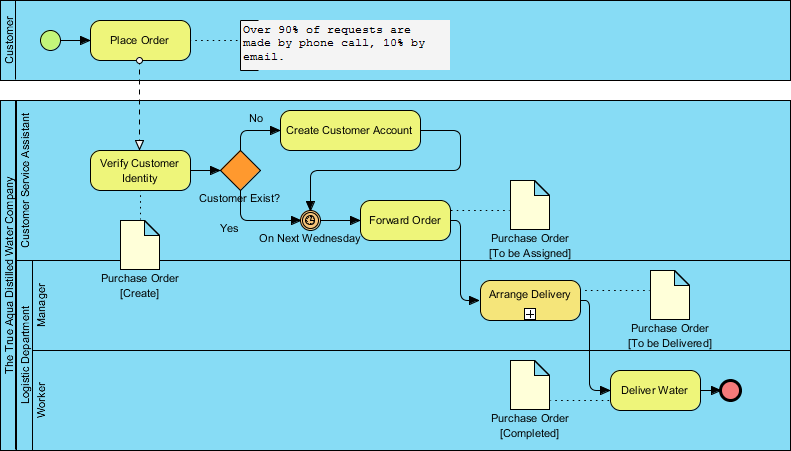
The True Aqua Distilled Water Company has implemented a standardized Business Process Model and Notation (BPMN) 2.0 workflow to manage its core operational lifecycle: the order-to-delivery process. This case study analyzes the current state of the process, identifying key stakeholders, data flow, and temporal constraints. The diagram reveals a structured approach to handling customer requests, verifying identity, and synchronizing deliveries to a specific weekly schedule (Wednesdays).
2. Process Participants and Structure
The process is modeled using a Collaboration Diagram, distinguishing between external entities and internal organizational roles.
Pools and Lanes
-
Customer (Black-Box Pool): Represents the external initiator. While their internal process is hidden, their interaction via message flows is the trigger for the entire operation.
-
The True Aqua Distilled Water Company (Main Pool): This pool contains the internal logic, divided into three functional lanes:
-
Customer Service Assistant: Responsible for the front-end interaction, identity verification, and account management.
-
Manager (Logistic Dept): Oversees the logistical planning and delegation of tasks.
-
Worker (Logistic Dept): Responsible for the physical execution of the delivery.
-
3. Detailed Process Flow Analysis
The lifecycle follows a linear “Happy Path” with specific exception handling and scheduling constraints.
Phase 1: Order Intake & Verification
-
Initiation: The process begins with a Start Event in the Customer lane, leading to the “Place Order” activity.
-
Channel Analysis: A text annotation highlights a critical business metric: 90% of requests are made by phone call, while only 10% are via email. This suggests that the Customer Service Assistant must prioritize voice communication channels.
-
Handoff: A Message Flow (dashed line) transmits the order details from the Customer to the Customer Service Assistant.
-
Verification: The Assistant performs “Verify Customer Identity.” Upon completion, a Data Object named Purchase Order [Create] is generated, marking the digital birth of the transaction.
Phase 2: Customer Validation (Gateway Logic)
-
Decision Point: An Exclusive Gateway (XOR) labeled “Customer Exist?” evaluates the customer’s status in the database.
-
Path A (No): If the customer is new, the flow diverts to “Create Customer Account.” Once the account is established, the flow merges back into the main path.
-
Path B (Yes): If the customer exists, the flow bypasses account creation.
-
-
Synchronization: Both paths converge at an Intermediate Timer Catch Event labeled “On Next Wednesday.”
-
Business Insight: This indicates a batch processing strategy. Orders are not fulfilled immediately upon receipt. Instead, they are queued and processed collectively on a specific day of the week, likely to optimize route planning and fuel efficiency for the logistics department.
-
Phase 3: Fulfillment and Delivery
-
Forwarding: Once the timer event triggers (Wednesday arrives), the process moves to “Forward Order.”
-
Logistics Management:
-
A message flow updates the document status to Purchase Order [To be Assigned].
-
The flow crosses into the Manager Lane for the activity “Arrange Delivery.”
-
Note: This activity features a plus (+) marker, indicating it is a Collapsed Sub-Process. This implies that “Arrange Delivery” involves complex underlying steps (e.g., route optimization, driver assignment, vehicle check) that are hidden to maintain diagram readability.
-
-
Execution:
-
The document status updates to Purchase Order [To be Delivered].
-
The flow moves to the Worker Lane for the final activity: “Deliver Water.”
-
Upon completion, the document status becomes Purchase Order [Completed], and the process terminates at a None End Event.
-
4. Data Object Lifecycle
The diagram effectively tracks the state of the “Purchase Order” document throughout the process, providing visibility into the transaction’s maturity:
-
[Create]: Generated after identity verification.
-
[To be Assigned]: Generated after the order is forwarded post-timer.
-
[To be Delivered]: Generated after the Manager arranges the logistics.
-
[Completed]: Final state after the Worker delivers the water.
5. Strategic Recommendations & Optimization
Based on the BPMN analysis, the following recommendations are proposed for The True Aqua Distilled Water Company:
-
Automate Account Creation: The “Create Customer Account” step is a manual task triggered by the “No” path. Integrating this with the “Verify Customer Identity” step via an automated system could reduce friction for new customers.
-
Analyze the “Wednesday” Constraint: The Timer Event creates a bottleneck. If a customer orders on a Tuesday, they wait only one day. If they order on a Thursday, they wait six days.
-
Recommendation: Consider a secondary delivery day or a “Rush Delivery” sub-process for urgent orders to improve customer satisfaction.
-
-
Expand the Sub-Process: The “Arrange Delivery” sub-process is collapsed. To ensure quality control, the Manager should document the steps inside this sub-process (e.g., checking water inventory levels before assigning a driver).
-
Channel Diversification: With 90% of orders coming via phone, there is a high dependency on human operators. Investing in a web portal or mobile app (shifting the 10% email usage to a higher percentage) could reduce the workload on the Customer Service Assistant.
6. Conclusion
The BPMN diagram for The True Aqua Distilled Water Company demonstrates a well-structured, role-based workflow. It successfully balances customer verification with logistical efficiency through the use of batch scheduling (the Wednesday Timer). By adhering to BPMN best practices—such as clear lane separation, verb-noun activity naming, and state-based data objects—the company has created a transparent model that can be easily communicated to stakeholders and used as a baseline for future process automation.
Reference
-
What is BPMN?: Comprehensive introduction to Business Process Model and Notation (BPMN), covering its history, benefits, core elements (swimlanes, flow elements, connecting objects, data), and practical examples for modeling business workflows.
-
How to Create BPMN Diagram?: Step-by-step guide for creating BPMN diagrams using Visual Paradigm, including symbol explanations, drag-and-drop techniques, and export options for sharing professional process diagrams.
-
Comprehensive BPMN Diagram Tutorial: Beginner-friendly tutorial covering BPMN fundamentals, key concepts (processes, activities, flow objects, connectors, swimlanes), and hands-on instructions for creating diagrams in Visual Paradigm Online.
-
How to Draw BPMN Diagram?: Practical walkthrough demonstrating how to build an “Order Fulfillment” BPMN diagram from scratch, including message start events, tasks, gateways, sub-processes, and intermediate events with triggers.
-
How to Create BPMN Diagram?: Introduction to BPMN purpose and notation, explaining why BPMN improves communication between stakeholders and how to get started with diagram creation using templates and the Resource Catalog.
-
Business Process Modeling Tutorial: Detailed exploration of BPMN 2.0 notation elements including events, activities, gateways, sequence/message flows, data objects, and artifacts, with examples illustrating proper usage patterns.
-
Professional Guide: Mastering BPMN with Visual Paradigm: End-to-end guide covering BPMN history, benefits, core notation, practical examples (e.g., distilled water ordering process), and advanced Visual Paradigm features like simulation, RACI charts, and process drill-down.
-
BPMN Made Easy: Overview of Visual Paradigm’s BPMN toolset highlighting intuitive modeling, process drill-down, integration with other standards (UML, ERD), working procedure editor, As-Is/To-Be modeling, RACI/CRUD chart generation, animation, and simulation capabilities.
-
BPMN Tutorial: How to Use BPMN Data Object?: Focused tutorial on creating, configuring states for, and reusing data objects in BPMN diagrams, demonstrating how to track information flow (e.g., “Inspection Order” with states like Created, Approved) across process activities.
-
How to Use Data Object in BPD: Step-by-step instructions for adding data objects to Business Process Diagrams, defining their states, and managing master/auxiliary views for reusable data elements across complex workflows.
-
BPMN Diagram and Tools: Feature showcase of Visual Paradigm’s BPMN capabilities including professional diagramming, process drill-down, cross-standard mapping, working procedure documentation, As-Is/To-Be comparison, RACI/CRUD automation, animation, and resource-based simulation.
-
How to Use Business Process Simulation?: Tutorial on configuring and running process simulations to evaluate time/cost metrics, set resource allocations, define scenarios, interpret visual feedback (pending jobs, active tasks), and identify bottlenecks using charts for queue time and resource usage.
-
Process Simulation Example: Practical case study simulating a health center’s body-check process, demonstrating how to assign durations/resources, run peak-hour scenarios, identify bottlenecks (e.g., lung function testing), and test improvements like adding staff or rooms.
-
How to Document Working Procedures for BPMN Tasks: Guide to creating BPMN 2.0 choreography diagrams with message flows, event-based gateways, multi-instance loops, and link events, using a sales/auction scenario to illustrate advanced notation techniques.
-
As-Is to To-Be Business Process: Resource on business process design featuring Visual Paradigm’s powerful BPMN software capabilities for modeling, analysis, simulation, collaboration, and integration across enterprise architecture, project management, and agile frameworks.
-
Gateway Reference: Technical documentation explaining BPMN gateway types (Exclusive/XOR, Inclusive/OR, Parallel/AND, Event-Based), their symbols, decision logic, and proper usage for controlling process flow branching and merging.