
VP AI Ecosystem: 6 Routes from Text to Visual Models
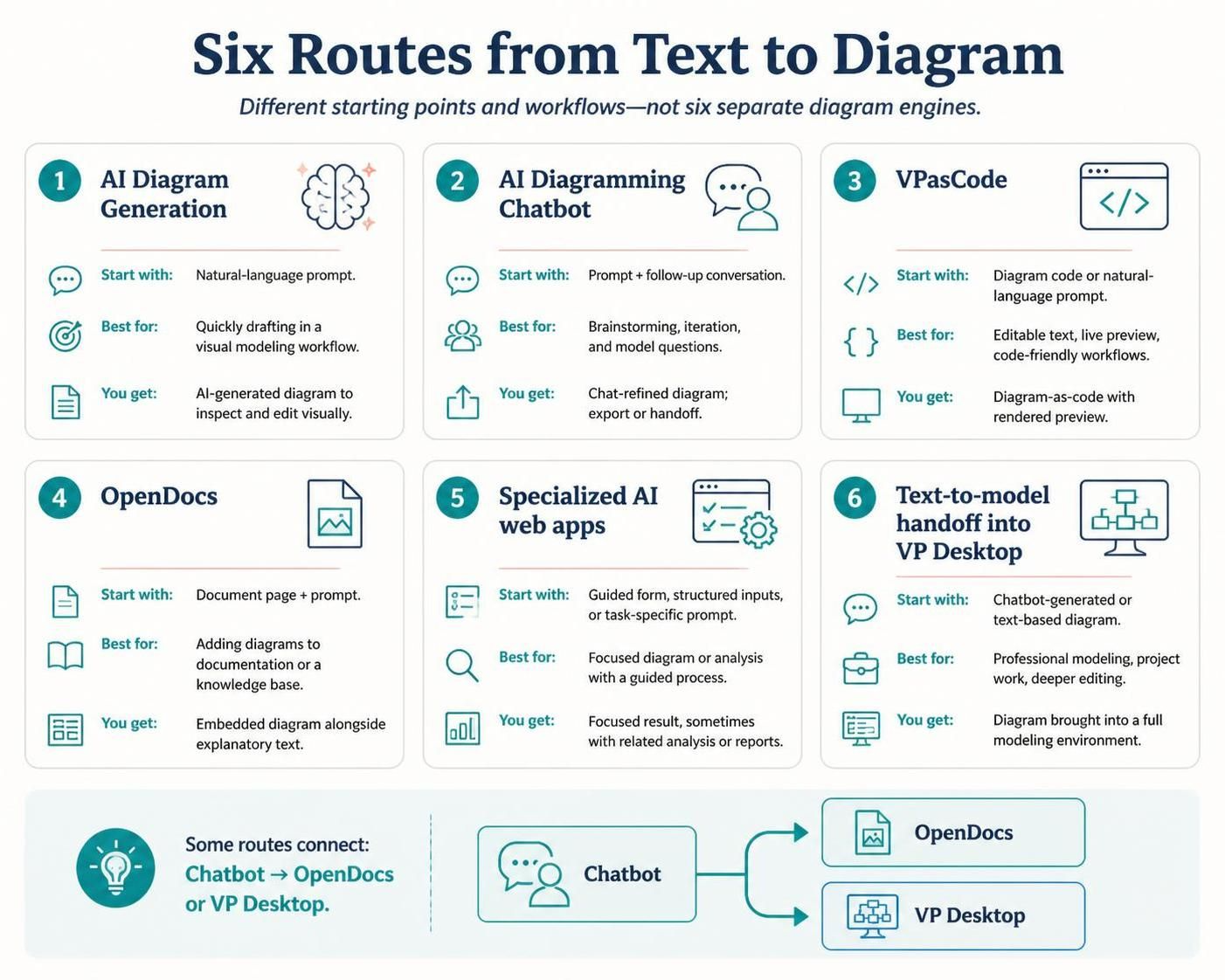
In modern software architecture and business process modeling, the gap between an abstract idea and its visual representation is often where productivity stalls. Traditionally, creating a diagram meant manually dragging shapes, connecting lines, and formatting labels—a time-consuming process that required deep familiarity with specific modeling tools. This friction often leads to “diagram fatigue,” where the documentation effort outweighs the planning value.
Visual Paradigm (VP) has bridged this gap by integrating Artificial Intelligence across its ecosystem. However, a common misconception is that there is a single “magic button” for this transformation. Instead, the platform offers six distinct routes to transform natural language or code into visual models. Each route serves different workflows, ranging from quick brainstorming sessions to rigorous enterprise documentation.
This guide explores these six pathways, helping you choose the right tool for your specific context—whether you’re a product manager sketching a user journey, a developer defining microservices, or an architect documenting complex systems.
1. The Generative Workflow: AI Diagram Generation
The most direct entry point into the ecosystem is AI Diagram Generation. This route is designed for users who want to start immediately within a visual modeling environment without a conversational interface.
How it Works
You begin with a simple natural-language prompt describing the diagram you need. For example, you might type: “Create a sequence diagram for a user logging into a banking app.” The engine processes this text and instantly drafts a diagram structure.
The Workflow
- Input: Type a high-level description into the prompt box.
- Generation: The system generates the diagram elements (actors, objects, processes) and connects them based on logical inference.
- Refinement: You receive an AI-generated diagram that you can immediately inspect and edit visually. The AI provides the skeleton; you provide the polish.
2. The Conversational Workflow: AI Diagramming Chatbot
While Generation is about drafting, the AI Diagramming Chatbot is about iteration and inquiry. This route is best for users who are brainstorming or need to understand a complex model before finalizing it.
How it Works
This workflow starts with a prompt followed by a conversation. Instead of a one-shot generation, you engage in a dialogue with the AI. You can ask follow-up questions like, “What happens if the user enters an incorrect password?” or “Change the color of the error state to red.”
The Workflow
- Brainstorming: Rapidly iterate on ideas by chatting with the AI.
- Interaction: Ask the model questions to clarify logic or suggest improvements.
- Output: You get a chat-refined diagram that can be exported or handed off to other stakeholders immediately.
3. The Developer Workflow: VPasCode
For developers who prefer text-based environments, VPasCode is the critical bridge between code and visual modeling. It allows you to define diagrams using text, which the system renders in real-time.
How it Works
You start with diagram code or a natural-language prompt that triggers code generation. This is ideal for “Infrastructure as Code” (IaC) approaches or version-controlled documentation.
The Workflow
VPasCode transforms a text file into a visual representation. The output is a diagram-as-code artifact with a rendered preview. This allows for:
- Editable Text: Modify the diagram by editing the text file directly.
- Live Preview: See changes instantly as you type.
- Code-Friendly: Perfect for developers working in Git repositories.
4. The Documentation Workflow: OpenDocs
Documentation is often fragmented. OpenDocs solves this by allowing you to put diagrams directly into the context of your knowledge base or project documentation.
How it Works
You start with a document page and a prompt. Instead of creating a standalone file, the diagram is generated as an embedded component within a rich-text document.
The Workflow
The result is an embedded diagram alongside explanatory text. This ensures that the visual model and the written requirements live in the same place, reducing the risk of documentation drift.
5. The Specialized Workflow: Specialized AI Web Apps
Not all diagrams are created equal. For specific, complex analysis tasks, Specialized AI Web Apps offer a guided process rather than a free-form prompt.
How it Works
This route starts with a guided form, structured inputs, or a task-specific prompt. The interface constrains the input to ensure the output is relevant to a specific domain (e.g., a specific SWOT analysis template or a specialized security architecture checklist).
The Workflow
The result is a focused result, sometimes accompanied by related analysis or reports. This is ideal when you need a standard output format rather than a custom creative model.
6. The Enterprise Workflow: Text-to-Model Handoff
Finally, for heavy lifting, the ecosystem supports a Text-to-model handoff into VP Desktop. This connects the lightweight web-based generation to the powerful, full-featured desktop application.
How it Works
This route starts with a chatbot-generated or text-based diagram. You can take the output from the web-based AI and transfer it seamlessly into the desktop environment.
The Workflow
This is the gateway to professional modeling, project work, or deeper editing. Once the model is in VP Desktop, you gain access to advanced features like simulation, code generation, and enterprise-level project management.
Connecting the Dots: A Unified Architecture
It is crucial to understand that these are not six separate, siloed engines. They are different interfaces into a shared modeling ecosystem. As illustrated in the architecture below, routes often connect. For instance, a Chatbot session can directly hand off its results to OpenDocs for documentation or to VP Desktop for further development.
Summary of Routes
| Route | Start With | Best For | You Get |
|---|---|---|---|
| 1. AI Diagram Generation | Natural-language prompt | Quickly drafting a diagram in a visual modeling workflow | AI-generated diagram to inspect and edit visually |
| 2. AI Diagramming Chatbot | Prompt + follow-up conversation | Brainstorming, rapid iteration, and asking questions about a model | Chat-refined diagram; export or handoff |
| 3. VPasCode | Diagram code, or a natural-language prompt for code generation | People who want editable text, live preview, or code-friendly workflows | Diagram-as-code with a rendered preview |
| 4. OpenDocs | Document page and a prompt | Putting diagrams directly into documentation or a knowledge base | An embedded diagram alongside explanatory text |
| 5. Specialized AI web apps | Guided form, structured inputs, or a task-specific prompt | A particular diagram or analysis with a more guided process | A focused result, sometimes with related analysis or reports |
| 6. Text-to-model handoff into VP Desktop | Chatbot-generated or text-based diagram | Professional modeling, project work, or deeper editing | A diagram brought into a fuller modeling environment |