
Mastering VPasCode: AI-Driven Mindmaps via Text-Based Hierarchical Modeling
In the rapidly evolving landscape of software engineering and project management, the ability to visualize complex ideas quickly is paramount. Visual Paradigm’s VPasCode tool revolutionizes this process by introducing the concept of Diagrams-as-Code. This tutorial explores how simple text structures can be transformed into professional mind maps, allowing users to focus on the logic of their ideas rather than the tedious drag-and-drop mechanics of traditional GUIs.
The Power of VPasCode and Markdown Syntax
The core philosophy behind VPasCode is simplicity and accessibility. By leveraging standard Markdown syntax, users can create rich, hierarchical diagrams directly within a text editor. This approach aligns with the “Infrastructure as Code” movement, treating diagrams as editable text artifacts that can be version-controlled, shared, and generated programmatically.
When you write a mind map in VPasCode, you are essentially defining a tree structure. The tool parses this text and renders it into a visual node-link diagram. This method is particularly effective for:
- Rapid Prototyping: Sketching out project phases without fighting with connectors.
- Documentation: Embedding diagrams directly into README files or technical wikis.
- Collaboration: Reviewing structure in plain text before visualizing the final output.
Understanding the Hierarchy: Headings and Bullets
To create a functional mind map, one must understand the specific mapping rules between the text syntax and the visual nodes. The system relies on two primary Markdown elements: Headings and Bullet points.
1. Headings define the Branches
In a mind map, the central idea is the root, and the major themes are the main branches. In Markdown, these are represented by headers (#). The hierarchy of the header determines the level of the branch.
#(H1): The Root Node (Central Topic).##(H2): The Main Branches (Level 1).###(H3): Sub-branches (Level 2).
2. Bullets define the Leaves and Children
Once a main branch (H2) is established, the specific tasks or details are added using bullet points (-). These become the child nodes of the preceding header.
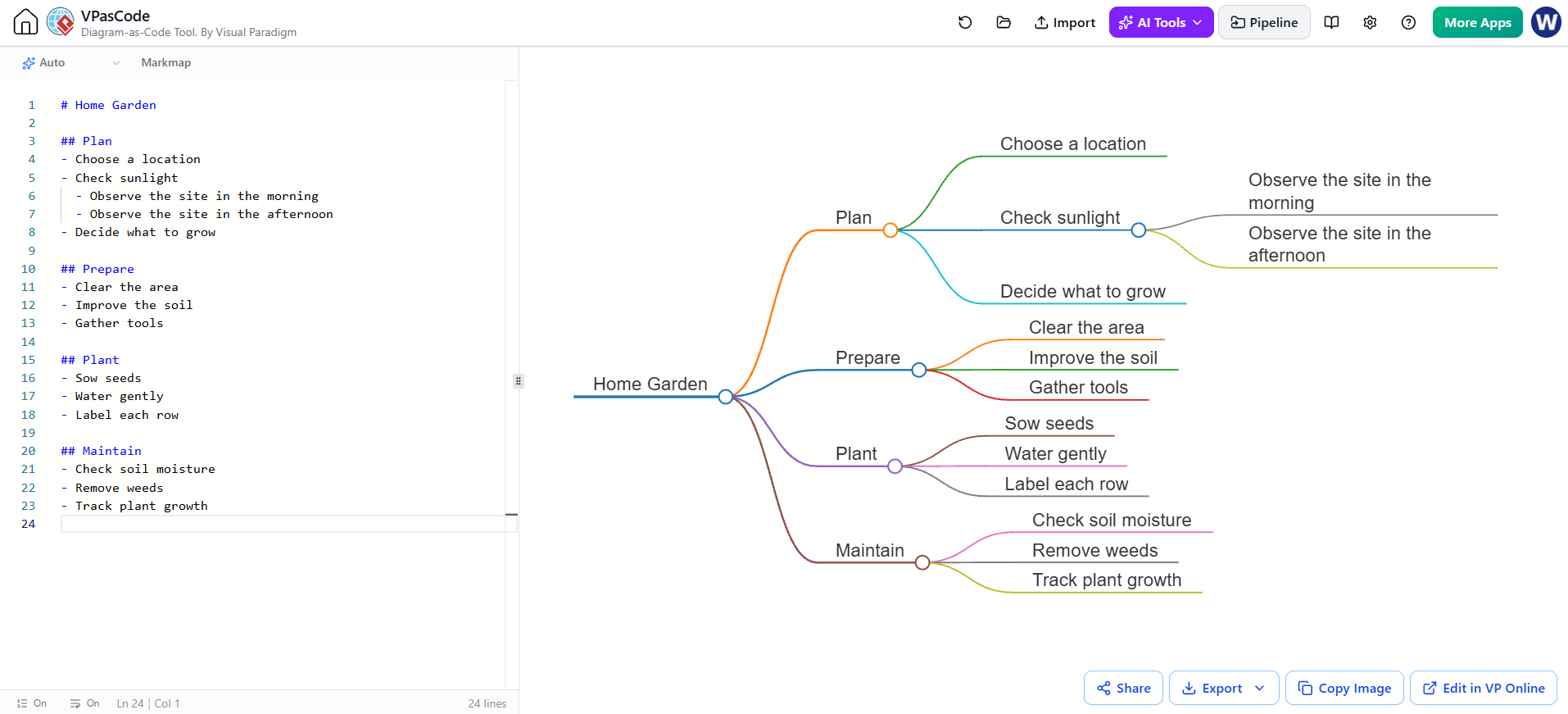
Let’s examine a practical example involving a gardening project. This text defines a “Home Garden” structure:
# Home Garden
## Plan
- Choose a location
- Check sunlight
  - Observe the site in the morning
  - Observe the site in the afternoon
- Decide what to grow
## Prepare
- Clear the area
- Improve the soil
- Gather tools
## Plant
- Sow seeds
- Water gently
- Label each row
## Maintain
- Check soil moisture
- Remove weeds
- Track plant growth
Visualizing the Logic
When the VPasCode engine processes the snippet above, it constructs the following structure:
- Root: “Home Garden” becomes the central hub.
- Level 1: “Plan”, “Prepare”, “Plant”, and “Maintain” branch out from the root. These are the H2 headers.
- Level 2: Under “Plan”, we see “Choose a location” and “Check sunlight”. These are the direct children (H2 bullets).
- Level 3 (The Nested Bullet): Notice the indentation in the example. Under “Check sunlight”, there are two more bullets indented further. The parser recognizes this indentation as a deeper nesting level, creating a sub-branch under “Check sunlight” (e.g., “Observe the site in the morning”).
Best Practices for Clean Diagrams
To ensure your VPasCode diagrams render perfectly, adhere to the following guidelines:
- Consistent Indentation: Indentation is the signal for nesting in Markdown. Use spaces (typically 2 or 4) consistently. Do not mix tabs and spaces.
- Logical Flow: Start with the broadest topic (H1) and drill down. Avoid skipping header levels (e.g., going from H1 directly to H4) unless you specifically want to skip a visual hierarchy level.
- Conciseness: Mind maps work best with short, punchy text. Keep node labels brief to prevent clutter in the rendered view.
Conclusion
By transitioning from manual diagramming to text-based modeling, you streamline your workflow. Whether you are planning a complex software architecture or organizing a community garden, VPasCode allows you to define your vision in the most natural way possible: with text. The separation of content (the text file) from presentation (the rendered diagram) gives you the flexibility to iterate quickly and maintain clarity.