
Mastering the AI Tools Menu in Visual Paradigm VPasCode: Generate, Modify, and Translate Diagrams
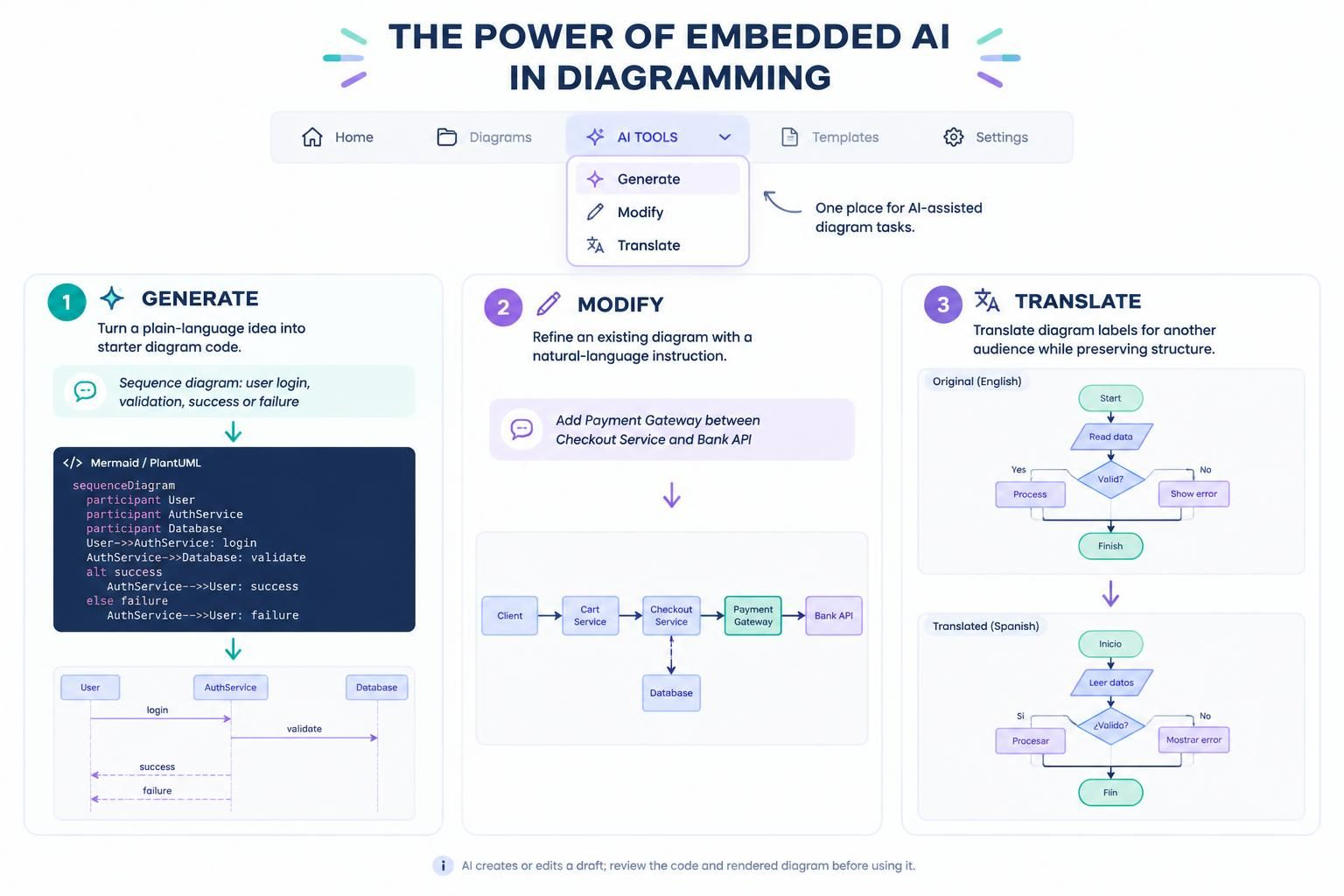
In the rapidly evolving landscape of software architecture and system design, the barrier between conceptual thinking and visual representation is constantly being lowered. Visual Paradigm’s VPasCode has long been a pioneer in this space, offering a unique solution that brings text-based diagramming into a browser-based workspace. With its latest strategic update, VPasCode elevates this efficiency by consolidating powerful AI capabilities into a single, centralized interface.
This tutorial explores the new AI Tools menu, explaining how it simplifies the diagramming workflow. We will walk through the three core pillars of this AI-enhanced ecosystem: Generation, Modification, and Translation, demonstrating how to leverage natural language to drive technical visualizations.
1. The Centralized AI Interface
The core innovation in this update is not merely the addition of AI features, but their centralization. Historically, AI assistance in modeling tools might be scattered across various menus or plugins. VPasCode has streamlined this by grouping all AI actions into one intuitive drop-down menu located in the app bar.
This design choice is critical for reducing cognitive load. By providing a single “One Place” for AI-assisted diagram tasks, users can focus on their intent rather than navigating complex menus. The menu offers three distinct capabilities:
- Generate: Transform ideas into code.
- Modify: Refine existing structures.
- Translate: Adapt content for global audiences.
2. Pillar I: AI Diagram Generation
The Generate feature represents a paradigm shift from “blank canvas” anxiety to “intent-based” creation. Traditionally, creating a sequence or architecture diagram requires a deep knowledge of syntax—whether that is PlantUML, Mermaid, or another domain-specific language (DSL). Users often struggle with remembering specific tags or structure rules.
Concept: From Natural Language to Structured Code
The Generate function allows you to describe your intent in plain English. The AI interprets this description and generates the initial diagram code, providing a solid foundation for further refinement.
Practical Example: User Authentication Flow
Imagine you need to document a user login process. Instead of manually typing out participant definitions and message arrows, you simply input the following instruction:
“Create a sequence diagram for a user logging into a system, including steps for entering credentials, server validation, and either success or failure responses.”
The AI engine processes this request and outputs the corresponding diagram code (such as Mermaid or PlantUML). It intelligently infers the actors (User, AuthService, Database) and the flow of messages (login, validate, success, failure), rendering a visual sequence diagram instantly. This allows architects to capture the “what” before worrying about the technical “how.”
3. Pillar II: AI Diagram Modification
Software systems are dynamic; they evolve, and so must their diagrams. The Modify feature addresses the tedious nature of iterative editing. In traditional coding or diagramming, refining a component diagram often involves manually searching for specific lines of text, deleting connections, and rewriting syntax to accommodate new requirements.
Concept: Natural Language Refinement
The Modify capability allows you to iteratively refine existing diagrams using natural language commands. This is particularly useful for adding new components, changing relationships, or reorganizing layout structures without breaking the underlying code syntax.
Practical Example: Expanding a Component Diagram
Consider a component diagram where a ‘Checkout Service’ currently communicates directly with a ‘Bank API’. As the system scales, you need to introduce a ‘Payment Gateway’ for security compliance.
Instead of dissecting the code to find the exact connection line, you instruct the AI:
“Add a new ‘Payment Gateway’ component between the ‘Checkout Service’ and the ‘Bank API’ in my current component diagram.”
The AI updates the underlying code to include the new component and its connections, instantly refreshing the visual diagram. This ensures that the visual representation remains perfectly synchronized with the textual definition, adhering to the “Single Source of Truth” principle.
4. Pillar III: AI Diagram Translation
Global collaboration is a hallmark of modern software development. However, diagramming often presents a language barrier. Translating technical diagrams is a unique challenge because a simple text translation can break the diagram’s structure if the tool isn’t aware of the relationship between text nodes and code logic.
Concept: Preserving Logic While Translating Labels
The Translate feature breaks language barriers by translating diagram text for global audiences. It converts labels, notes, and descriptions within the diagram into another language without altering the structural logic or the underlying code syntax.
Practical Example: International Documentation
If your team is presenting a flowchart to stakeholders in a different region, you can ensure language consistency instantly.
“Translate all labels in this flowchart from English to Spanish.”
The AI outputs the text content of the diagram nodes and edges in the target language (e.g., changing “Start” to “Inicio” or “Yes” to “Sí”), while the diagram’s structure and code remain intact. This allows for rapid localization of technical documentation without the risk of breaking the diagram’s logic.
Conclusion
The integration of AI into Visual Paradigm VPasCode marks a significant evolution in how we approach system modeling. By centralizing Generation, Modification, and Translation into a single, accessible menu, VPasCode empowers users to focus on the architecture and logic of their systems rather than the syntax required to represent them. Whether you are starting from scratch with a natural language prompt or refining an existing model for a global audience, the embedded AI tools provide a seamless, efficient workflow.