
Master Visual Paradigm OpenDocs: An Automated Documentation Assembly Line
In modern software engineering and technical writing, the gap between creating visual models and publishing actionable documentation has become a critical bottleneck. Teams often waste countless hours managing file versions, re-uploading diagrams, and chasing down the “latest” version of a system architecture. The solution lies in shifting from a manual, disjointed workflow to an automated, linear process.
This tutorial explores the Visual Paradigm OpenDocs ecosystem. It functions as a centralized “assembly line” that transforms raw project artifacts into synchronized, interactive documentation. By understanding this architecture, you can implement a frictionless “Concept-to-Docs” workflow.
The Core Architecture: A Data Flow Overview
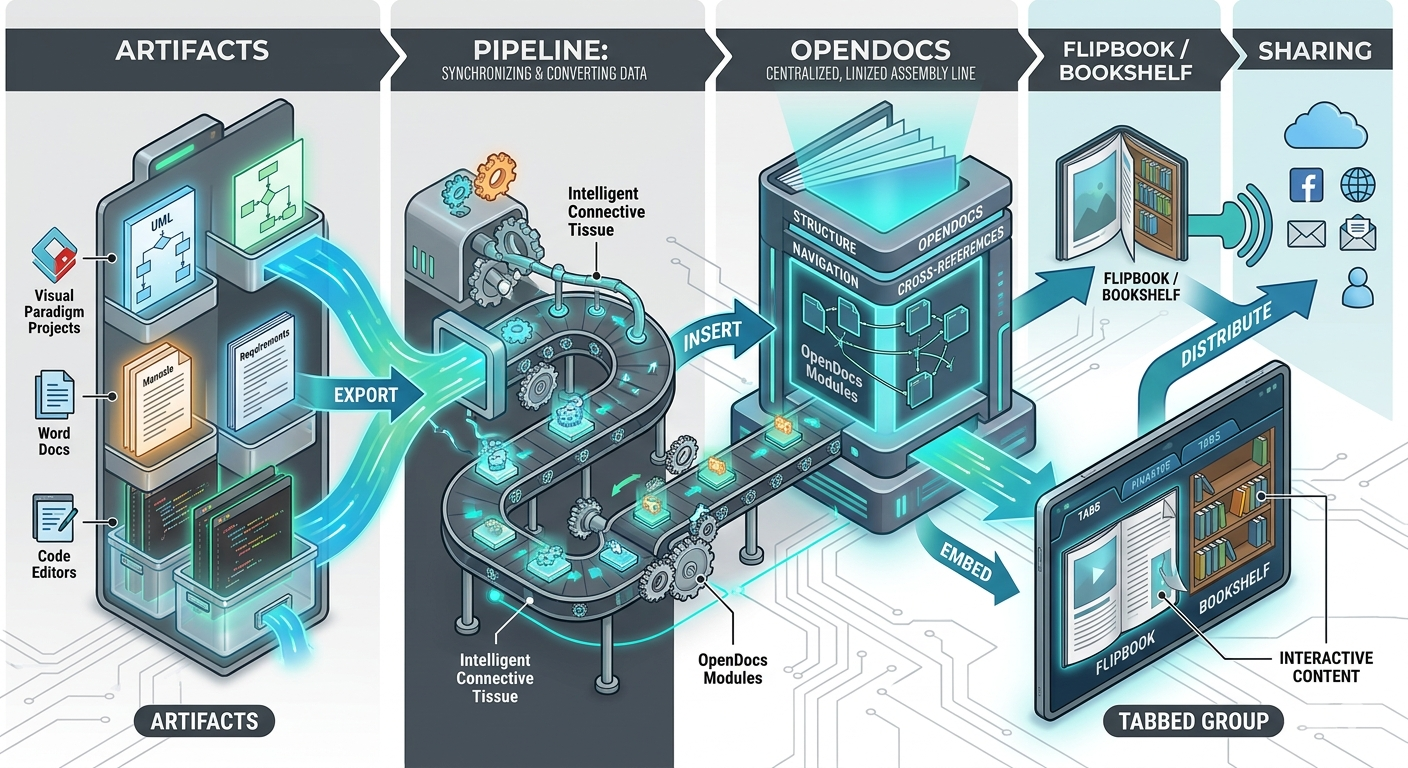
The OpenDocs workflow operates on a linear pipeline logic. It takes disparate inputs, processes them through a synchronization engine, and outputs them into a structured, interactive format. The architecture can be broken down into five distinct stages:
- Artifacts: The source of truth (Models, Docs, Code).
- Pipeline: The intelligent engine that syncs and converts data.
- OpenDocs: The centralized container for the documentation structure.
- Flipbook/Bookshelf: The presentation layer and organizational tools.
- Sharing: The distribution channel to the end-user.
Stage 1: The Artifacts (Input)
The process begins with the Artifacts. In a Visual Paradigm environment, these are not static files but living project elements. The system accepts a variety of inputs, ensuring that no information is siloed.
- Visual Paradigm Projects: UML diagrams, ER diagrams, and architectural models.
- Word Documents: Manually written specifications, requirements, and user guides.
- Code Editors: Source code snippets and logic definitions.
When these items are placed into the workflow, they are tagged as raw data ready for export. The key advantage here is that the system recognizes the relationship between these elements (e.g., a diagram referencing a specific code block).
Stage 2: The Pipeline (Synchronization)
The Pipeline acts as the “intelligent connective tissue” of the system. This is the most critical component of the architecture, responsible for the automation of the documentation process.
- Export: The pipeline ingests the artifacts. Instead of copying and pasting, it establishes a dynamic link.
- Synchronization: If you update a UML diagram in your project, the pipeline detects the change. It ensures that the content flowing into the documentation is always the “latest” version.
- Conversion: The pipeline converts the raw data into OpenDocs Modules. This standardizes the formatting and prepares the content for the display engine.
Stage 3: OpenDocs (The Assembly Line)
Once the data passes through the pipeline, it enters the OpenDocs container. This is a centralized repository where the documentation is assembled linearly. It is not just a storage bucket; it is an active workspace.
Inside the OpenDocs container, the system manages:
- Structure: The hierarchical organization of the document (Chapters, Sections).
- Navigation: Automatic generation of Table of Contents (TOC) and cross-references.
- Cross-References: Ensuring that links between text and diagrams remain valid even if the underlying data moves.
Stage 4: Flipbook and Bookshelf (Organization)
Once the content is assembled, it is organized using two primary tools: the Flipbook and the Bookshelf.
The Flipbook
The Flipbook is designed for linear consumption. It mimics the experience of reading a digital book or manual, allowing users to navigate forward and backward through the content seamlessly.
The Bookshelf
The Bookshelf is a hierarchical organizer. It allows you to group multiple Flipbooks or specific modules into a library. This is ideal for large projects where you might have a “User Manual,” a “Technical Reference,” and a “Release Notes” Flipbook all grouped together.
Stage 5: Sharing and Distribution
The final stage is the distribution of the documentation. OpenDocs supports multiple output channels:
- Embed: You can embed the Flipbook or Bookshelf directly into external web pages or intranet portals.
- Distribute: You can generate links or share directly via cloud platforms.
- Tabbed Groups: For complex applications, the system supports tabbed interfaces, allowing users to switch between different views (e.g., “Overview” vs. “Details”) without reloading the page.
Summary of the Workflow
By implementing this architecture, teams move away from the “Chore” of documentation and towards a “Natural Extension” of their creative process. The data flows logically:
[ Artifacts ] ──(Export)──> [ Pipeline ] ──(Insert)──> [ OpenDocs ]
                                                                        │
[ Sharing ] <──(Distribute)── [ Tabbed Group ] <──(Embed)── [ Flipbook / Bookshelf
This linear assembly line ensures that your visual models, text, and code are always synchronized, reducing the risk of human error and version conflicts.