
Architecting the VPasCode Pipeline: From Static Screenshots to Living Documentation
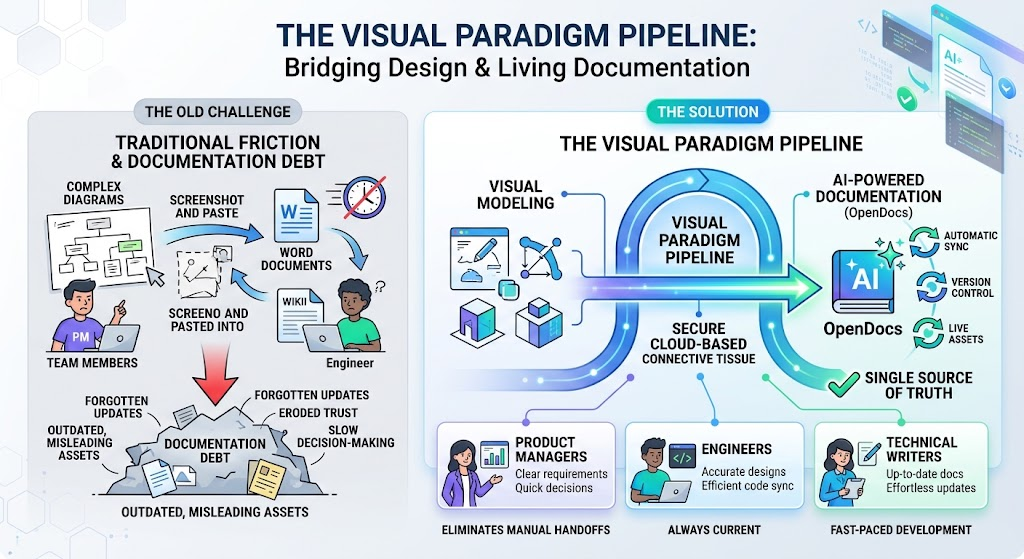
In the realm of modern software engineering, the most dangerous document is the one that looks correct but is technically obsolete. This phenomenon, often referred to as “documentation debt,” occurs when the gap between the actual system state and its visual representation widens due to manual maintenance processes. The image provided illustrates a critical architectural shift: moving from a “Screenshot and Paste” workflow to a fully integrated Visual Paradigm Pipeline.
This tutorial breaks down the architectural components, the modeling philosophy, and the automated workflows that transform static diagrams into dynamic, version-controlled assets.
1. The Architectural Bottleneck: Traditional Friction
The left side of the diagram highlights the legacy workflow that plagues many organizations. This process is characterized by high latency and data loss. Let’s analyze the failure points:
- Complex Diagrams to Static Images: Engineers and Architects often create detailed models in specialized tools (like Visio or earlier versions of modeling software). However, the output is frequently exported as a static image (PNG/JPG) rather than a structured data object.
- The “Screenshot and Paste” Cycle: To share these diagrams, team members often resort to taking screenshots or copying images directly into Word documents or Wiki pages. This breaks the link between the model and the data.
- The Update Paradox: When code changes, the diagram in the modeling tool changes. However, the screenshot in the Wiki does not. The human element—remembering to re-capture and re-upload the image—is the point of failure. This leads to “forgotten updates” and “eroded trust.”
2. The Solution: The Visual Paradigm Pipeline
The right side of the diagram introduces the Visual Paradigm Pipeline. This is not merely a software tool; it is a system architecture pattern that acts as the “connective tissue” between design and documentation. It operates on the principle of Single Source of Truth (SSOT).
Core Architecture Components
- Visual Modeling (The Source): This is where the diagram is created using tools like VPasCode or the Visual Paradigm IDE. Unlike static images, these are live models containing metadata, relationships, and logic.
- Secure Cloud-Based Connective Tissue: The pipeline resides in the cloud, ensuring that the modeling environment is accessible to Product Managers (PMs), Engineers, and Technical Writers simultaneously without version conflicts.
- AI-Powered Documentation (OpenDocs): This is the output engine. Instead of copying a picture, the pipeline reads the model’s logic and generates documentation using AI. This is where the “Living Documentation” concept is realized.
3. The Workflow: From Model to Knowledge Base
The transition from the “Old Challenge” to “The Solution” relies on three specific automation capabilities:
A. Automatic Sync
In the traditional model, updating a diagram is a manual event. In the Pipeline, updates are event-driven. When an engineer modifies a class or a sequence flow in the model, the system detects the change and triggers a synchronization process. This eliminates the “stale data” problem.
B. Version Control
Just as code is tracked in Git, the pipeline treats diagrams as version-controlled assets. This allows teams to trace the history of a design decision, rollback to previous states, and understand the evolution of the system architecture.
C. Live Assets
Because the documentation is generated from the model, the output is a “live asset.” It is not a static image but a representation of the current system state. This ensures that the documentation provided to stakeholders is always accurate.
4. Role-Based Benefits
The diagram highlights three key personas who benefit from this architecture:
- Product Managers: They gain clear requirements and can make quick decisions because the documentation reflects the current state of the product, not a snapshot from weeks ago.
- Engineers: They enjoy accurate designs and efficient code sync. The “Manual Handoffs” are eliminated, meaning they don’t have to spend time updating documentation that the system updates automatically.
- Technical Writers: They produce up-to-date docs with effortless updates. The AI-powered OpenDocs engine handles the heavy lifting of converting technical model data into readable, structured documentation.
Conclusion
The Visual Paradigm Pipeline represents a shift from documentation as a chore to documentation as a feature. By integrating visual modeling with AI-powered documentation, teams can close the gap between design and reality, ensuring that their knowledge base remains a reliable, living asset.