
Accelerating Business Logic Modeling: The AI-Assisted Visual Paradigm Workflow
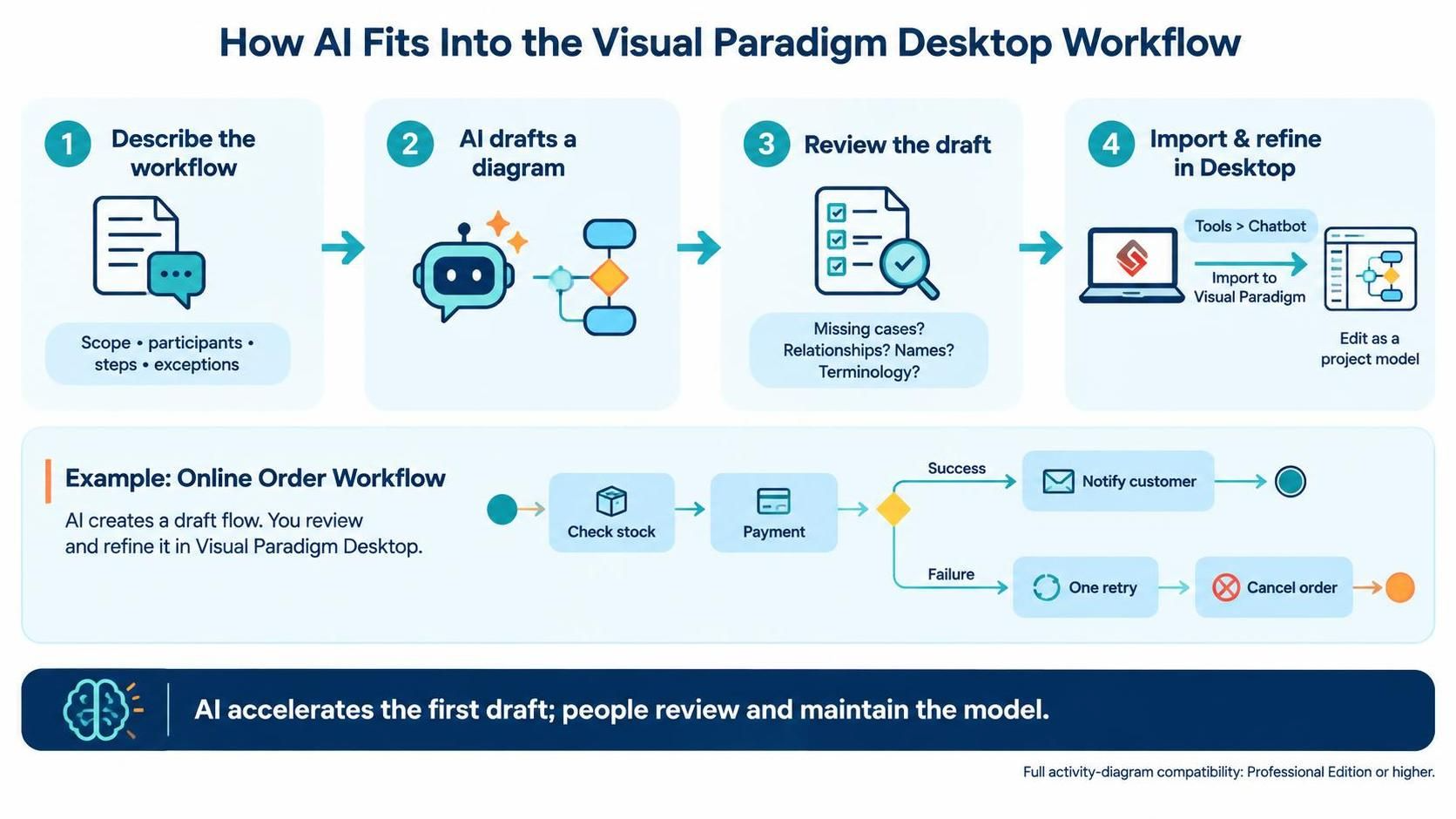
In the modern landscape of systems analysis and software architecture, the speed of iteration is often more critical than the initial creation time. Visual Paradigm has evolved to bridge the gap between rapid conceptualization and rigorous engineering through a powerful integration of AI and desktop modeling capabilities. This tutorial explores the specific workflow where AI acts as a generative engine for initial drafts, which are then refined into production-ready models using the full power of Visual Paradigm Desktop.
The core philosophy of this ecosystem is clear: AI accelerates the first draft; people review and maintain the model. By offloading the initial heavy lifting of structure creation to intelligent agents, analysts can focus their cognitive resources on validating business logic, defining exception handling, and ensuring data integrity.
The Four-Step Generative Workflow
The process of transforming a vague requirement into a structured diagram follows a logical, four-stage progression. This workflow is designed to be seamless, moving from abstract text to a concrete, editable system model.
1. Describe the Workflow
The journey begins with a text-based input. In this phase, the analyst defines the scope of the problem. Rather than immediately drawing boxes, the user outlines the narrative of the system. This involves identifying:
- Participants: Who or what is interacting with the system (e.g., Customers, Payment Gateways, Inventory Systems)?
- Steps: The sequential flow of events or actions required to achieve a goal.
- Exceptions: Potential failure points or alternative paths that must be accounted for.
2. AI Drafts a Diagram
Once the context is established, the AI engine takes over. Using the provided description, it generates a preliminary diagram. This step is about rapid visualization. The AI attempts to translate natural language requirements into standard modeling notation. It proposes the nodes, the decision diamonds, and the connecting flows that represent the logic described in step 1. At this stage, the output is a draft—a starting point rather than a finished product.
3. Review the Draft
Before importing the model into a formal project, the analyst must critically evaluate the AI’s output. This is the “human in the loop” phase. The reviewer looks for specific gaps in logic, such as:
- Missing Cases: Did the AI account for every error condition mentioned in the prompt?
- Relationships: Are the flow lines correctly ordered?
- Terminology: Does the diagram use the specific vocabulary required by the business domain?
This review ensures that the generated logic is sound before it is locked into a persistent model.
4. Import & Refine in Desktop
The final step involves moving the generated logic into the Visual Paradigm Desktop environment. This is where the diagram transitions from a “draft” to a “model.” Using the integrated tools or chatbot interface, the diagram is imported directly into the project workspace. Here, the user can:
- Refine the layout and aesthetics.
- Connect the diagram to underlying data definitions.
- Ensure strict compliance with UML or BPMN standards.
Practical Application: The Online Order Workflow
To understand the power of this workflow, consider the modeling of a standard Online Order Workflow. This is a classic example of a process that requires precise handling of success and failure states.
In a traditional workflow, an analyst might spend significant time drawing the initial flow for an order process. Using the AI-assisted approach, the analyst defines the scenario: “A customer places an order, stock is checked, payment is processed, and the customer is notified. If payment fails, a retry is attempted.” The AI generates the initial flowchart containing the start state, the stock check, the payment processing, and the decision node for success or failure.
The analyst then refines this draft in Desktop. The specific logic of the workflow is:
- Check Stock: The process begins by verifying inventory availability.
- Payment Processing: If stock is available, the system attempts to process the payment.
- Decision Point: The flow splits based on the payment outcome.
- Success Path: If the payment is successful, the system triggers a “Notify customer” action and completes the transaction.
- Failure Path: If the payment fails, the system enters a “One retry” loop.
- Cancellation: If the retry fails (or is deemed insufficient), the order is explicitly canceled.
This example demonstrates how the AI handles the branching logic (diamonds) and the distinct outcomes (success vs. failure) automatically, allowing the human to focus on the specific business rules regarding retries and cancellations.
Why This Hybrid Approach Matters
This workflow highlights the distinct but complementary roles of AI and Desktop tools. AI provides the speed of text-to-diagram generation, while Desktop provides the stability of a structured modeling project. By not assuming that every script automatically becomes a native model, the workflow emphasizes the need for governance. The result is a complete ecosystem where the “text-based” speed of AI meets the “rich, editable” depth of Visual Paradigm Desktop.