


Introduction
In the modern landscape of software development, a persistent gap often exists between high-level product strategy and the granular execution of daily development tasks. Product managers and agile teams frequently struggle to maintain traceability from the initial user journey concepts down to the specific developer tasks completed in a sprint. Traditional flat backlogs often fail to capture the holistic narrative of the user experience, while isolated sprint boards can lose sight of the broader product vision.
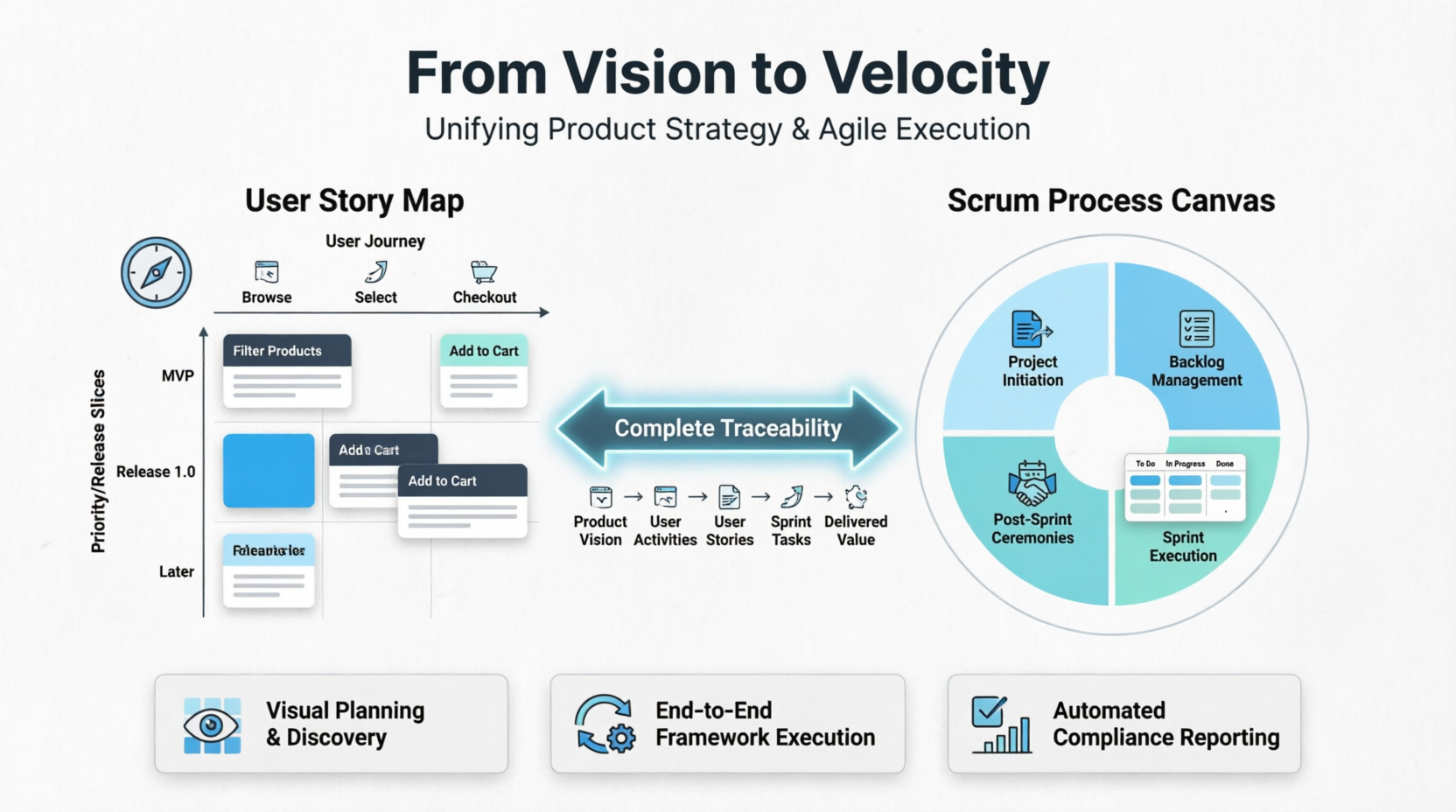
Visual Paradigm addresses this challenge by integrating two powerful modules: the User Story Map and the Scrum Process Canvas. Together, they form a unified Agile workbench that bridges the divide between discovery and delivery. The User Story Map provides a visual, two-dimensional narrative of the user’s journey, allowing teams to slice releases effectively. Meanwhile, the Scrum Process Canvas serves as the operational cockpit, enabling teams to execute, track, and refine those stories through full sprint cycles. This case study explores how leveraging these tools in tandem establishes complete traceability, enhances team collaboration, and streamlines the path from concept to compliant, shippable software.
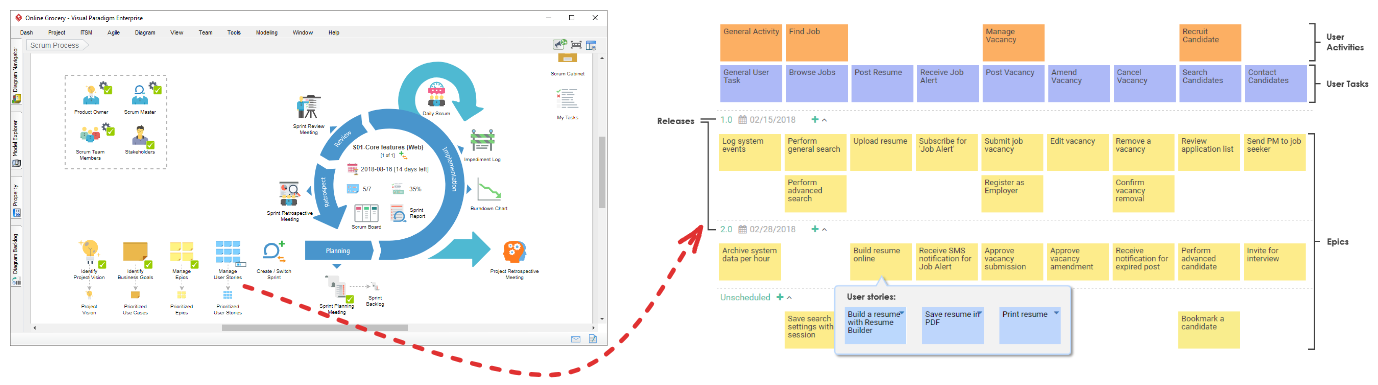
Figure 1: Overview of the Visual Paradigm Agile Workbench showing the integration between User Story Mapping and Scrum Process Canvas
1. Key Concepts
Understanding how Visual Paradigm structures these two modules is essential before using them. By recognizing the distinct roles of each component, teams can maximize their agility and clarity.
User Story Map Structure
A User Story Map arranges features into a two-dimensional visual narrative to replace standard flat backlogs. This structure helps teams visualize the “big picture” while managing detailed requirements.
-
Horizontal Axis (The Backbone): Arranged left-to-right following the user’s chronological path or workflow.
-
User Activities: High-level goals (e.g., “Manage Shopping Cart”).
-
User Tasks: Concrete steps taken to achieve that activity (e.g., “Add Item”, “Apply Coupon”).
-
-
Vertical Axis (The Flesh): Arranged top-to-bottom by priority or complexity.
-
Epics: Large feature groups containing multiple stories.
-
User Stories: Small, development-ready requirements following the 3C’s concept (Card, Conversation, Confirmation).
-
Release Slices / Swimlanes: Horizontal partitions representing delivery milestones (e.g., “MVP”, “Release 1.0”, “Later”).
-

Figure 2: Detailed view of a User Story Map showing the horizontal backbone of activities and vertical slicing for releases
Scrum Process Canvas Structure
The Scrum Canvas is a single-screen cockpit covering the standard lifecycle of an agile framework. It centralizes all necessary artifacts and ceremonies into one accessible dashboard.
-
Project Initiation: Defining the Product Vision, setting up the Scrum Team, and assigning Product Owners/Scrum Masters.
-
Backlog Management: Houses the User Story Map and the automated Affinity Table used for sizing effort vs. risk.
-
Sprint Execution: Includes automated modules for Sprint Planning, an interactive Scrum Board (To Do → In Progress → Done), Daily Stand-Up logs, Burndown Charts, and Impediment Logs.
-
Post-Sprint Ceremonies: Built-in frameworks for Sprint Reviews and Sprint Retrospectives.
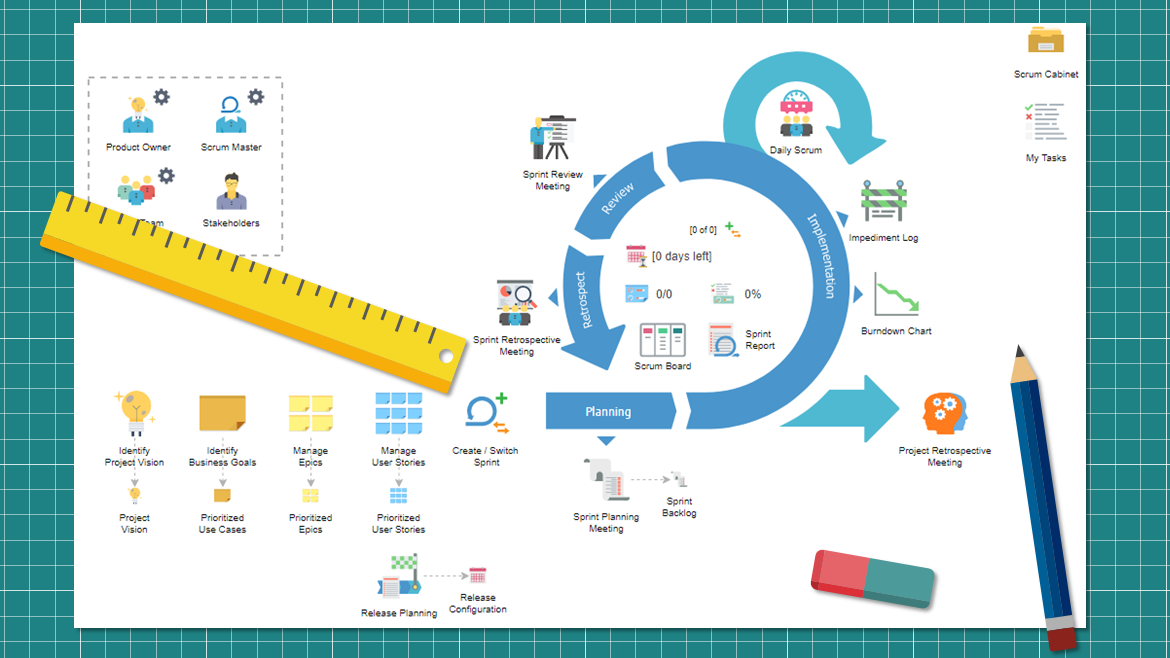
Figure 3: The Scrum Process Canvas dashboard displaying project initiation, backlog, and sprint execution modules
2. How to Use Them Together (Step-by-Step Workflow)
Integrating these tools requires a structured approach that moves from strategic definition to tactical execution.
Step 1: Initialize the Project in the Scrum Canvas
-
Navigate to the top toolbar, select Agile, and open the Scrum Canvas.
-
Click on Product Vision and define your core product objective using the built-in questionnaire.
-
Identify project roles by filling out the templates for the Product Owner, Scrum Master, and Team members.
Step 2: Build Your Backbone on the User Story Map
-
Inside the Backlog section of the Canvas, open the User Story Map.
-
Create your horizontal roadmap by mapping out User Activities and User Tasks from left to right.
-
Optional Modeling Link: If you have existing SysML, Use Cases, or BPMN business process diagrams, use Visual Paradigm’s “Send to” feature to instantly generate activities on your map from those diagrams while keeping system traceability intact.

Figure 4: How to Map BMPN with User Stories
Step 3: Flesh Out Stories and Prioritize Slices
-
Create cards vertically beneath each task to form Epics and granular User Stories.
-
Click on a User Story card to add details: write out conversation notes, assign tags, and define explicit acceptance criteria (Confirmation).
-
Create horizontal Release Slices across the map. Drag and drop stories into these lanes to distinguish what is mandatory for your MVP versus subsequent product updates.
Step 4: Perform Estimation using the Affinity Table
-
Open the Affinity Table linked to your story map.
-
Arrange user stories onto a 2D matrix comparing Development Effort vs. Risk.
-
Visual Paradigm will automatically assign Story Points and estimated hours based on where you position the cards on this matrix.
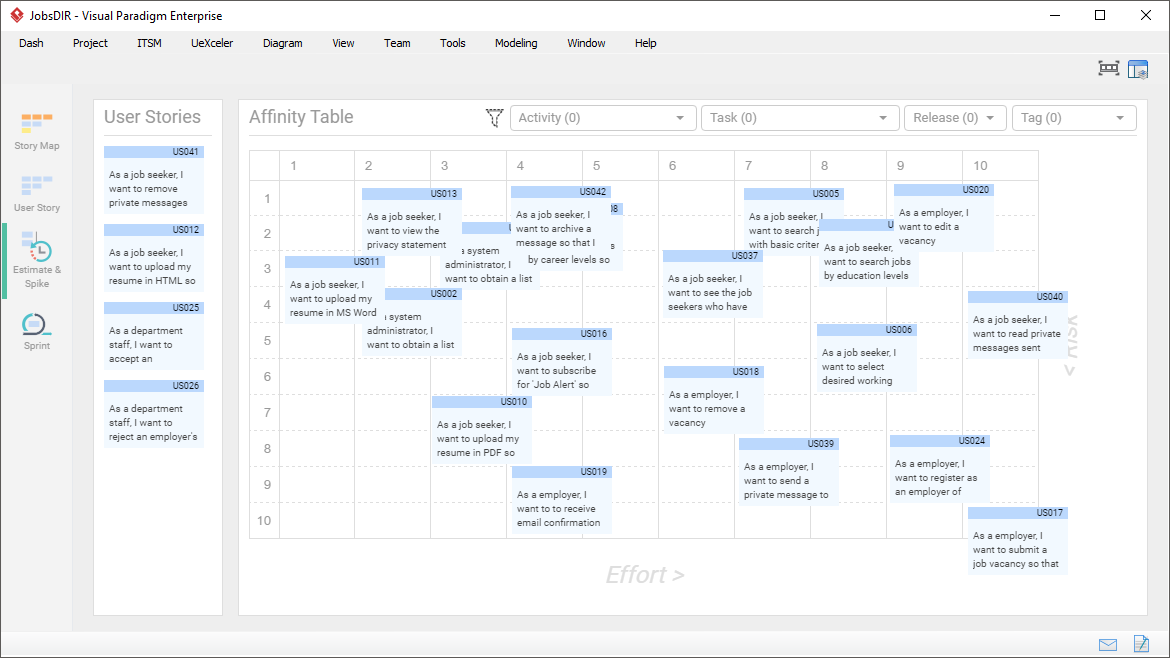
Figure 5: The Affinity Table interface showing effort vs. risk matrix for automatic story point assignment
Step 5: Execute via Sprints
-
Click Sprint Planning inside the Scrum Canvas.
-
Drag prioritized stories directly from your Story Map release slices into the active Sprint Backlog.
-
Move tasks across the interactive Scrum Board as work progresses. Use the built-in forms during Daily Scrums to document progress and blockers directly onto the workspace dashboard.
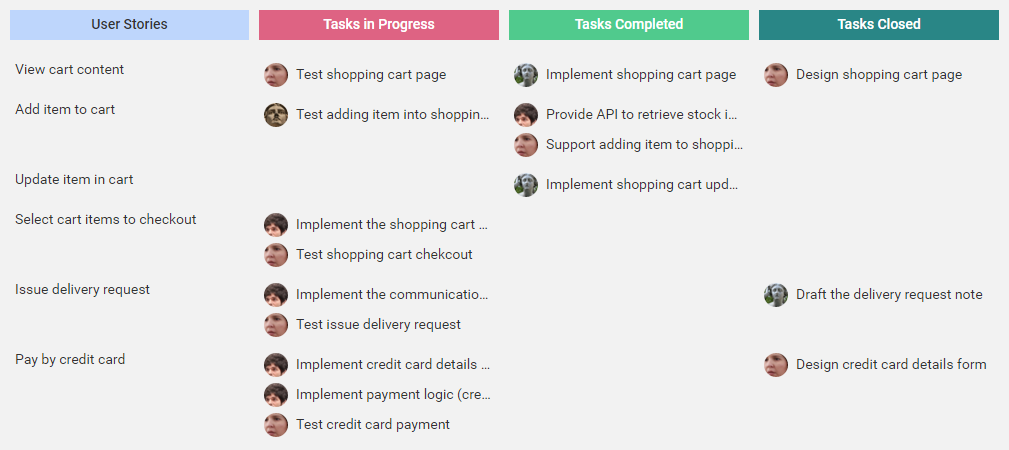
Figure 6: Interactive Scrum Board within the Canvas showing task movement from To Do to Done
3. Key Usage Cases
Use Case A: Scoping a Minimum Viable Product (MVP)
-
Why: Teams often struggle to see what features are critical to complete a user loop versus what can wait.
-
How: Use the User Story Map to lay out the full workflow. Draw an MVP release line right under the bare minimum steps required to achieve the loop (the “walking skeleton”). All advanced iterations (e.g., adding automated filters or multi-currency support) are pushed below the line into later releases.
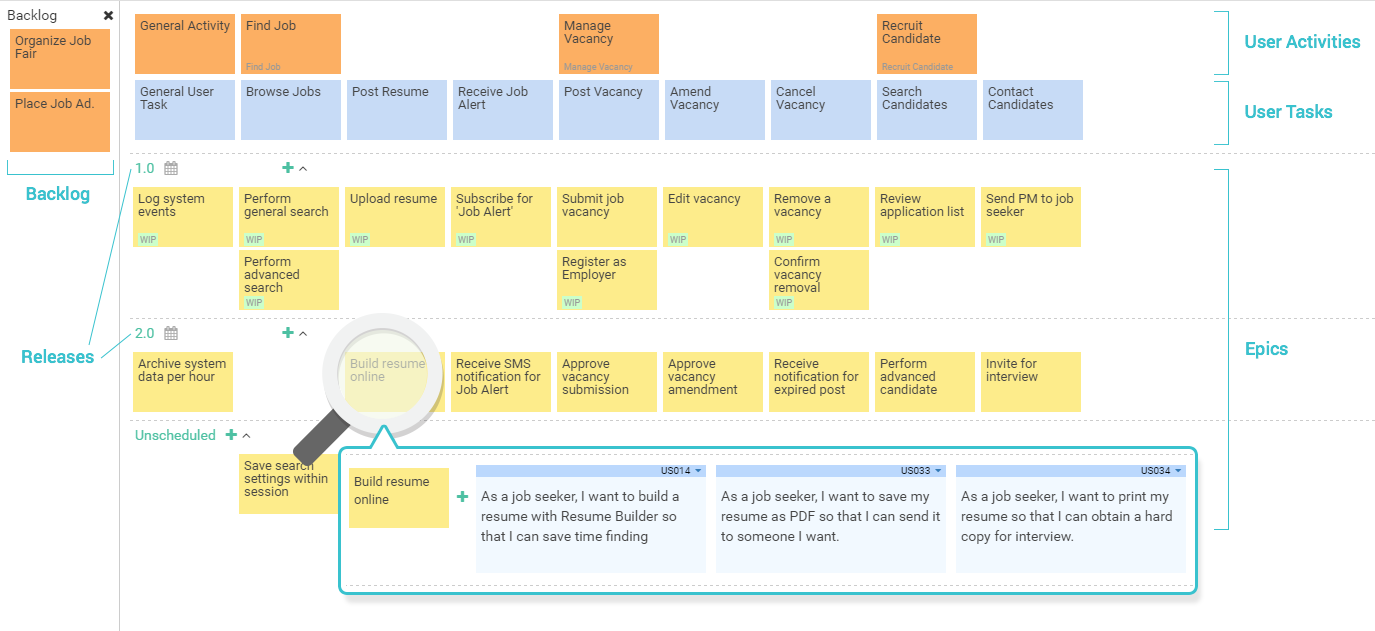
Figure 7: User Story Map with a clear MVP release slice separating core features from future enhancements
Use Case B: Transitioning Enterprise Models into Agile Workflows
-
Why: Large organizations often struggle to translate traditional business processes or technical system architectures into clean agile sprint items.
-
How: Create a BPMN business process diagram representing user workflows. Use Visual Paradigm’s layer mapping to tie individual steps directly to user story cards. This keeps your development items contextualized within the broader enterprise architecture.
Use Case C: Automated Compliance and Audit Reporting
-
Why: Regulated industries require rigorous documentation tracking product goals, user approvals, and testing metrics.
-
How: Conduct your events naturally inside the Scrum Process Canvas. Once a release concludes, click the Document Generation tool. Visual Paradigm instantly compiles your vision statement, refined story maps, velocity burndown charts, and retrospective meeting minutes into structured PDF/Word compliance artifacts.
Summary Matrix
| Capability | User Story Map | Scrum Process Canvas |
|---|---|---|
| Primary Goal | Visual planning and product discovery. | End-to-end framework execution. |
| Perspective | User-centric (arranged by user journey). | Team-centric (arranged by sprint health). |
| Core View | 2D board of activities, tasks, and slices. | Interconnected interactive lifecycle dashboard. |
| Best For | Breaking down epics & release management. | Tracking stand-ups, boards, and velocity charts. |
Conclusion
The integration of the User Story Map and the Scrum Process Canvas in Visual Paradigm represents a significant evolution in agile tooling. By moving beyond disjointed spreadsheets and isolated tracking systems, teams can achieve a seamless flow from strategic vision to tactical execution. The User Story Map ensures that every development effort is tied to a tangible user value, while the Scrum Process Canvas provides the rigorous structure needed to deliver that value consistently and transparently.
For organizations looking to enhance their agile maturity, adopting this unified workbench offers more than just efficiency; it provides clarity. Whether scoping an MVP, translating complex enterprise processes, or meeting strict compliance requirements, the synergy between these two modules empowers teams to build the right product, the right way. As agile practices continue to mature, the ability to maintain end-to-end traceability will remain a key differentiator for successful product development.
References
- Scrum Process Canvas Features: Overview of the Scrum Process Canvas capabilities and features in Visual Paradigm.
- Comprehensive Guide to Visual Paradigm’s Scrum Process Canvas: The Ultimate Agile Workbench: Detailed guide on using the Scrum Process Canvas as an agile workbench.
- Comprehensive Guide to Visual Paradigm’s Scrum Process Canvas: In-depth analysis of the Scrum Process Canvas functionalities.
- Comprehensive Guide to Agile User Story Mapping with Visual Paradigm: Guide focused on user story mapping techniques within Visual Paradigm.
- Absolute Beginners Guide: Product Review Visual Paradigm Scrum Process Canvas: Beginner-friendly review and guide for the Scrum Process Canvas.
- Agile User Story Mapping Tool Features: Features and benefits of the Agile User Story Mapping tool.
- Complete Guide: Visual Paradigm Scrum Process Canvas: Complete guide covering all aspects of the Scrum Process Canvas.
- Visual Paradigm Scrum Process Canvas Tutorial: Video tutorial demonstrating the Scrum Process Canvas.
- How to Manage User Stories with Story Map: Instructions on managing user stories using the story map feature.
- User Story Map Tour: Interactive tour of the User Story Map tool.
- How to Manage User Stories with Story Map: Guide on managing user stories effectively with story maps.
- Mastering Agile Product Development with User Story Mapping: Comprehensive guide on mastering user story mapping for product development.
- User Story Mapping Tutorial: Video tutorial on user story mapping techniques.
- Tips and Tricks for Writing Good User Stories: Complete guide on writing effective user stories.
- Conducting Daily Scrum: Guide on conducting daily scrums within the Scrum Process Canvas.
- How to Start a Sprint: Documentation on starting a sprint in the Scrum Process Canvas.
- How to Open Scrum Process Canvas: Instructions on opening and initializing the Scrum Process Canvas.
- What is User Story Mapping?: Explanation of user story mapping concepts.
- User Story Documentation: User guide documentation for user stories.
- Scrum Process Canvas Features: Additional details on Scrum Process Canvas features.
- What is User Story Mapping?: Further explanation of user story mapping principles.
- Agile User Story Mapping Tool: Details on the agile user story mapping tool.
- Business Process to User Stories Mapping: Tutorial on mapping business processes to user stories.
- Agile Handbook: User Story: Handbook section on user stories in agile development.
Related posts:
 Comprehensive Guide to the Agile User Story Mapping Tool
 From Backlog to Breakthrough: My Journey with Visual Paradigm’s Agile Toolkit in Standard Edition
 From Diagrams to Delivery: Orchestrating an End-to-End Agile Lifecycle with Visual Paradigm
 How AI is Streamlining Agile System Analysis & Requirement Gathering