


Introduction
In the fast-paced world of product development, it is easy to get lost in features, roadmaps, and KPIs. But amidst the data and deadlines, one question remains paramount: How does our user actually feel?
User Journey Mapping is not just a design artifact; it is a strategic tool that bridges the gap between business goals and human needs. It transforms abstract user data into a tangible narrative, allowing teams to step out of their silos and walk in their customers’ shoes.
Why Journey Maps Matter More Than Ever
As digital experiences become increasingly complex, users have less patience for friction. A single confusing checkout step or an unclear error message can lead to churn. Journey maps help organizations anticipate these moments before they happen, turning potential frustrations into opportunities for delight.
Bridging the Gap Between Business Goals and User Needs
Businesses often focus on conversion rates, while users focus on solving problems. Journey mapping aligns these perspectives by showing how improving the user experience directly drives business metrics like retention, lifetime value, and brand advocacy.
What You Will Learn in This Guide
This guide will take you from the theoretical foundations of journey mapping to a practical, step-by-step framework. We will deconstruct the anatomy of a map, explore the psychology behind user behavior, and walk through a real-world example of “Sarah” buying her first smartphone. By the end, you will have the tools to create actionable maps that drive real change.
Part I: The Foundations of User Journey Mapping
1. What is a User Journey Map?
Definition and Core Purpose
A User Journey Map is a visual representation of the process a person goes through to accomplish a goal. It captures not just what the user does, but how they think and feel at each stage. Its core purpose is to build empathy and identify opportunities for improvement.
The Difference Between a Journey Map, a User Flow, and a Service Blueprint
-
User Flow: A linear diagram showing the steps a user takes through a interface (e.g., Click Button A -> Go to Page B). It is tactical and focused on functionality.
-
Service Blueprint: A detailed map that includes front-stage user actions and back-stage employee processes, systems, and policies. It is operational and focused on service delivery.
-
Journey Map: A holistic view that includes emotions, motivations, and pain points across multiple channels and timeframes. It is strategic and focused on experience.
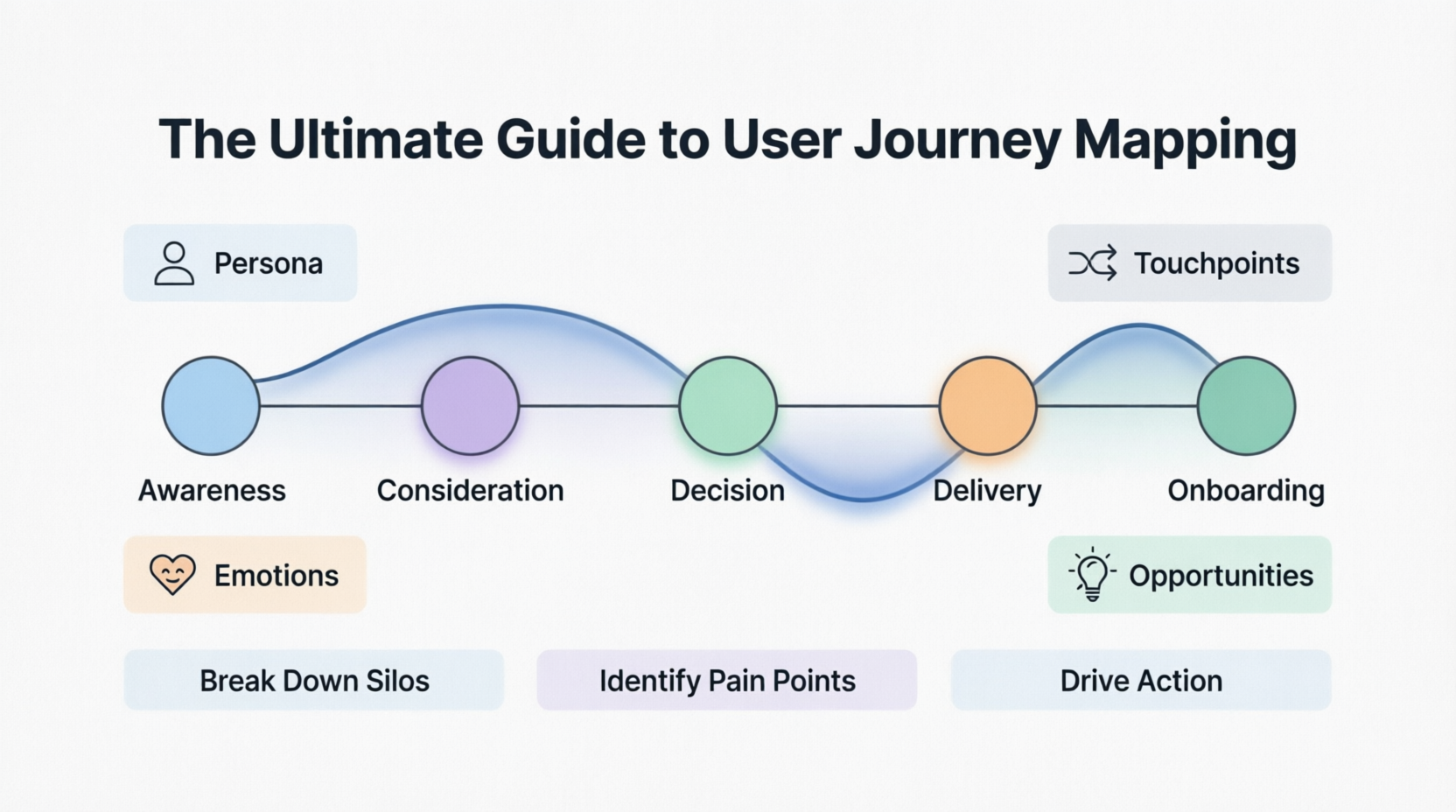
The 4 Key Components: Persona, Timeline, Touchpoints, and Emotions
Every effective map rests on four pillars:
-
Persona: Who is taking this journey?
-
Timeline: When does the journey start and end?
-
Touchpoints: Where does the user interact with the brand?
-
Emotions: How does the user feel during these interactions?
2. Why Create a Journey Map? (The Strategic Value)
Breaking Down Silos Across Departments
Marketing, Sales, Product, and Support often see different parts of the customer. A journey map brings these teams together, creating a shared understanding of the entire lifecycle.
Identifying Pain Points and Friction
By visualizing the journey, hidden frustrations become obvious. Is the support team overwhelmed because the onboarding guide is unclear? A journey map reveals these root causes.
Uncovering Opportunities for Innovation
When you see where users are struggling, you also see where they are delighted. These “peak” moments can be amplified, and gaps in the market can be identified for new features or services.
Aligning Stakeholders on a Single Source of Truth
Instead of debating opinions, teams can debate evidence. A well-researched journey map serves as a reference point for decision-making, ensuring everyone is working toward the same user-centric goals.
3. The Psychology Behind the Journey
The Emotional Arc (Peak-End Rule)
Psychological research shows that people judge an experience largely based on how they felt at its peak (most intense point) and at its end, rather than the total sum or average of every moment. Journey maps help you design for these critical moments.
Cognitive Load and Decision Fatigue
Every choice a user makes requires mental energy. A journey map highlights stages where users are overwhelmed by too many options or complex information, allowing you to simplify the experience.
The “Jobs to Be Done” (JTBD) Framework Integration
Users don’t just buy products; they “hire” them to do a job. Integrating JTBD into your journey map helps you understand the underlying motivation. For example, Sarah isn’t just buying a phone; she’s hiring it to stay connected with friends and capture memories efficiently.
Part II: Key Concepts and Terminology
4. The Anatomy of a Journey Map (Deconstructed)
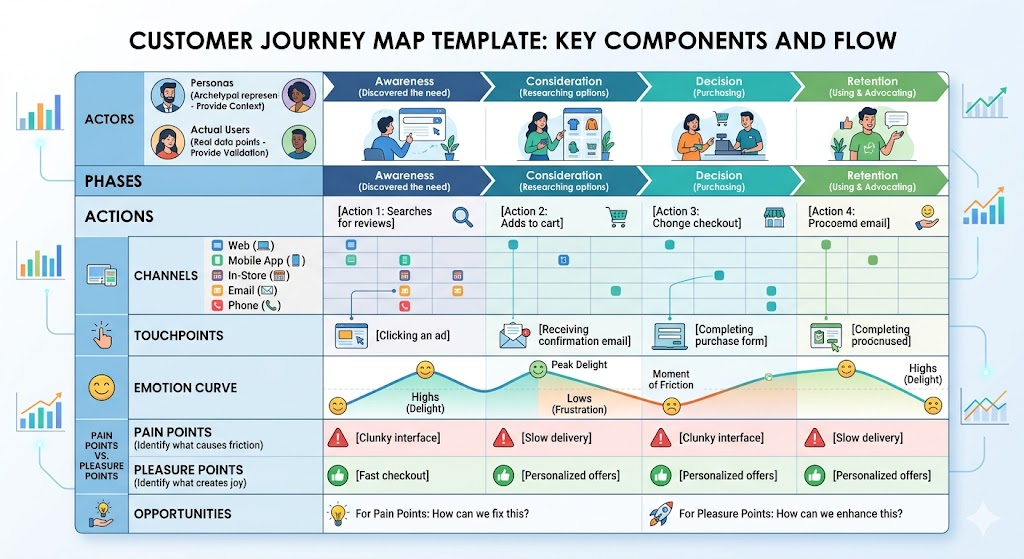
To build a map, you need to understand its building blocks:
-
Actors: Distinguish between your Personas (archetypal representations) and Actual Users (real data points). Personas provide context; actual users provide validation.
-
Phases: Break the journey into high-level stages. Common phases include Awareness (discovering the need), Consideration (researching options), Decision (purchasing), and Retention (using and advocating).
-
Actions: The specific steps the user takes (e.g., “Searches for reviews,” “Adds to cart”).
-
Channels: The medium where the interaction happens (Web, Mobile App, In-Store, Email, Phone).
-
Touchpoints: The specific moments of contact within those channels (e.g., clicking an ad, receiving a confirmation email).
-
Emotion Curve: A line graph that visualizes the user’s sentiment over time, highlighting highs (delight) and lows (frustration).
-
Pain Points vs. Pleasure Points: Identify what causes friction (pain) and what creates joy (pleasure).
-
Opportunities: The most critical column. For every pain point, ask: “How can we fix this?” For every pleasure point, ask: “How can we enhance this?”
5. The “Front-Stage” vs. “Back-Stage” Perspective
What the User Sees (Front-Stage)
This is the visible part of the iceberg: the website interface, the packaging, the customer service call. It’s what the user directly interacts with.
What the Organization Does (Back-Stage/Internal Processes)
This is the underwater part of the iceberg: the database queries, the warehouse logistics, the internal approval workflows. While users don’t see this, failures here directly impact the front-stage experience. Advanced journey maps (or service blueprints) connect these two layers to show cause and effect.
Part III: The Step-by-Step Process (How-To)
6. Phase 0: Preparation and Discovery
Defining the Scope
Don’t try to map everything. Decide if you are mapping an End-to-End journey (e.g., becoming a customer) or a Specific Feature journey (e.g., resetting a password). Start small if you are new to this.
Gathering Existing Data
Before talking to users, look at what you already know:
-
Analytics: Where do users drop off?
-
Support Tickets: What are the most common complaints?
-
CRM Data: How long does the sales cycle take?
Conducting User Research
Fill in the gaps with qualitative data:
-
Interviews: Ask users to walk you through their last experience.
-
Surveys: Quantify sentiments at different stages.
-
Diary Studies: Have users log their feelings and actions in real-time over a few days.
7. Phase 1: Building the Persona
Defining the “Who”
Create a persona that represents your primary user for this journey. Include demographics, but focus more on psychographics: goals, frustrations, and technical comfort level.
Setting the Context
Define the scenario. Why are they starting this journey now? What is their motivation? A persona without a scenario is just a character sketch; a persona with a scenario is a user.
8. Phase 2: Mapping the Timeline and Phases
Breaking Down the User’s Mental Model
Don’t map your internal process; map the user’s mental model. They don’t care about your “Q3 Launch Phase”; they care about “Finding a Solution.”
Listing the Stages
Draft the high-level phases. For a purchase journey, this might be: Need Recognition -> Research -> Comparison -> Purchase -> Delivery -> Setup.
9. Phase 3: Filling in the Details
Mapping Actions, Mindsets, and Emotions
For each phase, list the specific actions. Then, ask: “What is the user thinking here?” and “How are they feeling?” Use emojis or a scale (1-5) to quantify emotion.
Identifying the Touchpoints and Channels
Note exactly where these actions happen. Is the user switching from mobile to desktop? From email to phone? These handoffs are often where friction occurs.
Documenting Pain Points and Moments of Truth
Highlight the critical moments. A “Moment of Truth” is any interaction where the user forms a lasting impression of your brand.
10. Phase 4: Analysis and Visualization
Choosing the Right Format
-
Spreadsheet: Great for collaboration and detail.
-
Diagram/Infographic: Better for storytelling and stakeholder presentations.
-
Digital Whiteboard: Ideal for remote teams and iterative workshops.
Creating a “Story” Narrative
Your map should tell a story. Use quotes from user interviews to bring the persona to life. Make it readable and engaging.
The “So What?” Test
Review every insight. If you identify a pain point, ask “So what?” until you reach a business implication. If you can’t answer it, the insight may not be actionable.
11. Phase 5: Action and Ownership
Translating Insights into Actionable Roadmaps
Turn opportunities into Jira tickets, design sprints, or marketing campaigns. Assign owners to each opportunity.
Handing Off to Product, Design, and Marketing Teams
Share the map widely. Host a workshop to walk teams through the journey. Ensure everyone understands their role in improving the experience.
Iterating and Updating the Map Over Time
A journey map is a living document. As your product changes and new data comes in, update the map. Schedule quarterly reviews to keep it relevant.
Part IV: Real-World Example
12. Example: The Journey of “Sarah” Buying Her First Smartphone
To illustrate these concepts, let’s look at a concrete example.
Background:
-
Persona: Sarah, 22, College Student.
-
Traits: Budget-conscious, tech-savvy but not an expert, values social connectivity and camera quality.
-
Goal: Buy a reliable mid-range smartphone without overspending.
Scope: End-to-End process from seeing an ad to unboxing the device.
Phase 1: Awareness & Discovery
-
Action: Sarah scrolls Instagram and sees an ad for the “Nova X” phone, highlighting its camera.
-
Touchpoint: Social Media Ad.
-
Emotion: Curious, Slightly Skeptical (“Is it really that good?”).
-
Pain Point: The ad links to a homepage, not the specific product page. She has to search for it.
Phase 2: Research & Consideration
-
Action: She searches “Nova X review” on YouTube and checks price-tracking sites.
-
Touchpoint: YouTube, Third-Party Review Sites, Price Aggregators.
-
Emotion: Overwhelmed. Too many conflicting opinions.
-
Opportunity: The brand’s website lacks a clear comparison chart with competitors. Solution: Add a “Why Nova X?” comparison module.
Phase 3: Decision & Purchase
-
Action: She finds a student discount code, adds the phone to her cart, and proceeds to checkout.
-
Touchpoint: E-Commerce Website, Payment Gateway.
-
Emotion: Nervous. Worried about entering credit card info on a new site.
-
Pain Point: The checkout form asks for unnecessary details (like fax number) and doesn’t show security badges prominently.
Phase 4: Order & Delivery
-
Action: She receives a confirmation email but no tracking link for 48 hours.
-
Touchpoint: Email, SMS.
-
Emotion: Impatient, Anxious. “Did my order go through?”
-
Pain Point: Lack of proactive communication. Solution: Automated SMS updates at key shipping milestones.
Phase 5: Unboxing & Onboarding
-
Action: The package arrives. She opens it and turns on the phone.
-
Touchpoint: Physical Packaging, Device UI.
-
Emotion: Delight! The packaging is premium and easy to open. However, she feels frustration when the setup wizard asks her to create an account before letting her use the camera.
-
Opportunity: Allow “Guest Mode” setup to let users explore the device first. Solution: Revise onboarding flow to prioritize immediate value.
The Example Journey Map
| Phase | Awareness | Research | Decision/Purchase | Delivery | Unboxing/Setup |
| User Action | Sees IG ad | YouTube reviews | Adds to cart | Awaits delivery | Opens, configures |
| Touchpoint | IG Ad | YouTube / Blogs | E-comm site | Email / SMS | Packaging / App |
| Mindset | “Looks cool.” | “Is it worth it?” | “Is this site safe?” | “Where is it?” | “Finally! Wait—why?” |
| Emotion | 🙂 (Curious) | 😐 (Overwhelmed) | 😟 (Nervous) | 🙁 (Anxious) | 🤩 → 😡 (Mixed) |
| Pain Point | No direct link | Info overload | Unnecessary fields | Lack of tracking | Forced account |
| Opportunity | Deep link ads | Compare module | Security badges | Proactive SMS | Skip sign-up |
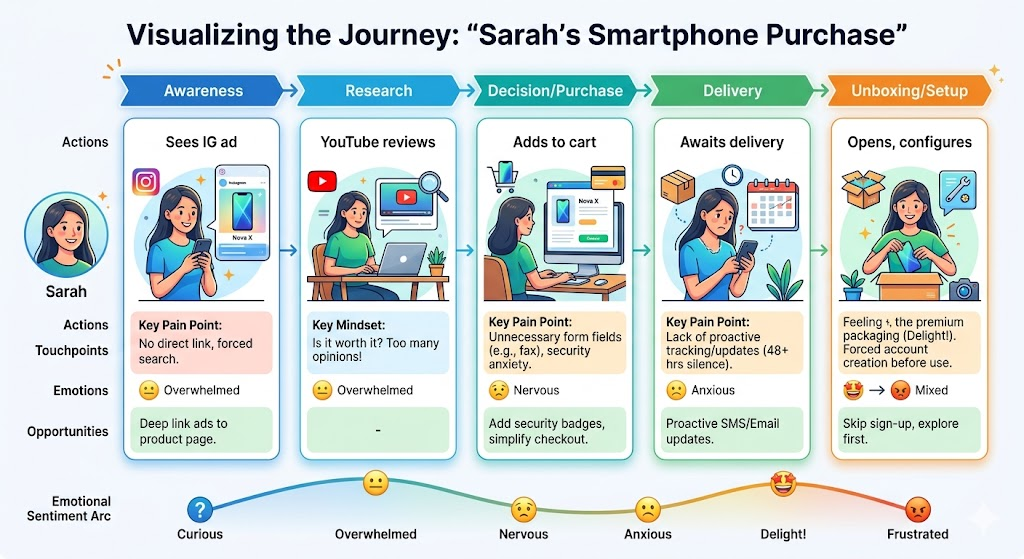
Summary of the Visual Map (Mockup Description)
Imagine a horizontal timeline with five columns (the phases). Below each column are rows for Actions, Thinking, Feeling (with a line graph dipping in Phase 2 and 4, spiking in Phase 5), and Opportunities. The “Feeling” line visually highlights the anxiety during checkout and the delight at unboxing.
Key Insights Drawn from Sarah’s Journey
-
Trust is fragile: Security concerns at checkout are a major barrier.
-
Communication gaps cause anxiety: Silence after purchase leads to support tickets.
-
Onboarding friction kills delight: Forcing account creation before usage undermines the positive unboxing experience.
Proposed Solutions Derived from the Insights
-
Add trust badges and simplify checkout fields.
-
Implement proactive SMS tracking updates.
-
Redesign onboarding to allow immediate access to core features (like the camera) before account creation.
Part V: Pitfalls to Avoid
13. Common Mistakes in Journey Mapping
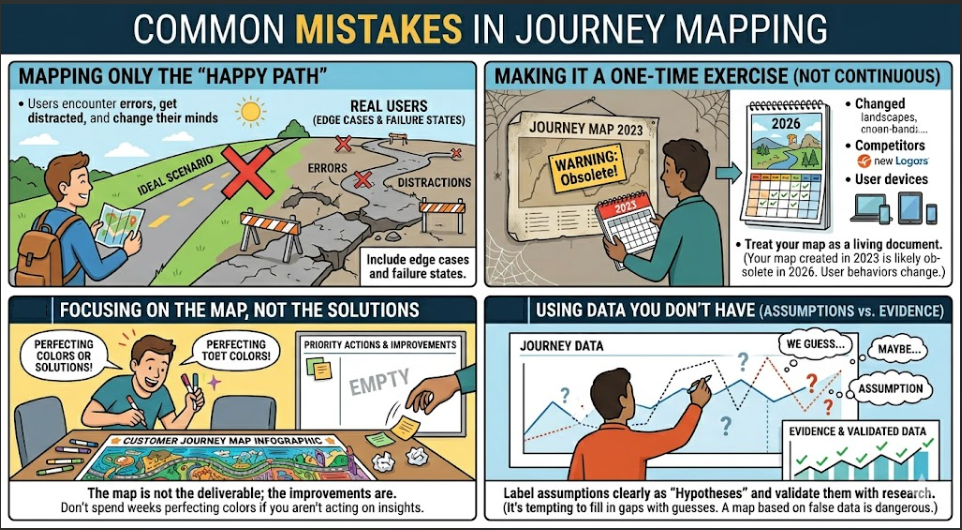
Mapping Only the “Happy Path”
Real users encounter errors, get distracted, and change their minds. If your map only shows the ideal scenario, it won’t help you solve real problems. Include edge cases and failure states.
Making It a One-Time Exercise (Not Continuous)
A journey map created in 2023 is likely obsolete in 2026. User behaviors change, new competitors emerge, and your product evolves. Treat your map as a living document.
Focusing on the Map, Not the Solutions
The map is not the deliverable; the improvements are. Don’t spend weeks perfecting the colors of your infographic if you aren’t acting on the insights.
Using Data You Don’t Have (Assumptions vs. Evidence)
It’s tempting to fill in gaps with guesses. Resist this. Label assumptions clearly as “Hypotheses” and validate them with research. A map based on false data is dangerous.
Conclusion
User Journey Mapping is more than a diagram; it is a mindset shift. It forces organizations to stop looking at users as metrics and start seeing them as humans with emotions, frustrations, and goals.
The Ultimate Goal: Empathy and Action
The best journey maps are those that lead to change. They spark conversations, break down silos, and result in products that truly serve the user.
A Final Checklist for Your Next Journey Map
-
Did I define a clear scope and persona?
-
Did I use real user data, not just assumptions?
-
Did I include emotions and pain points?
-
Did I identify actionable opportunities?
-
Did I share it with cross-functional teams?
Invitation for Feedback and Sharing
We’d love to hear about your journey mapping experiences. What challenges did you face? What insights surprised you? Share your stories and continue the conversation.
Appendix
Glossary of Terms
-
Touchpoint: Any interaction between a user and a brand.
-
Pain Point: A specific problem that prospective customers are experiencing.
-
Persona: A fictional character created to represent a user type.
-
Service Blueprint: A map that details both customer and employee actions.
Further Reading and Resources
-
This Is Service Design Doing by Marc Stickdorn
-
Nielsen Norman Group: Journey Mapping 101
-
IDEO Human-Centered Design Toolkit
Interview Question Bank for User Research
-
“Walk me through the last time you [performed action].”
-
“What was the most frustrating part of that process?”
-
“What were you hoping to achieve at that stage?”
-
“What other options did you consider, and why did you choose this one?”
