Introduction
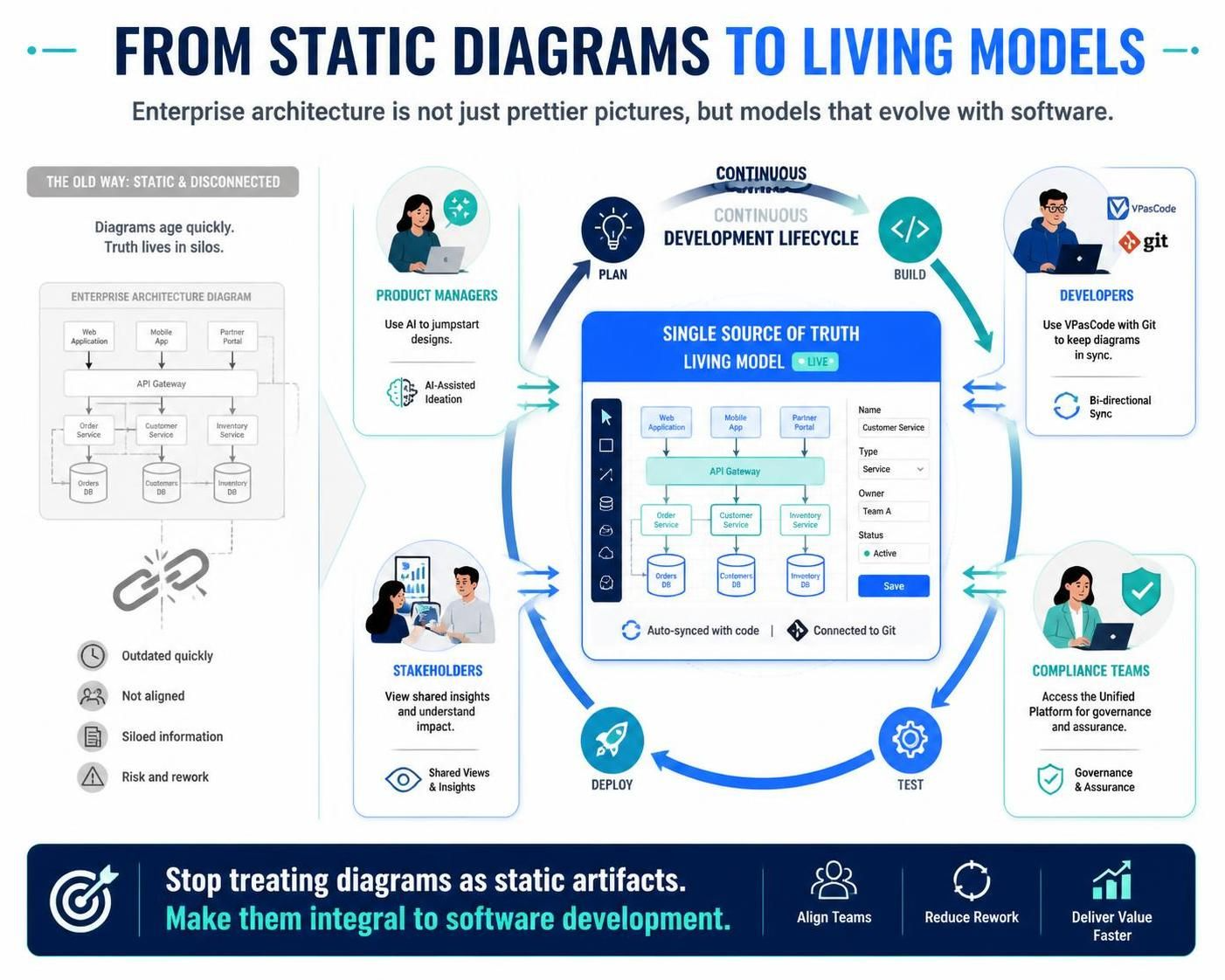
For decades, enterprise architecture and software design have suffered from a “documentation debt” problem. Diagrams were created in isolation, exported as static images (PNG or JPG), and pasted into Word documents or wikis. The moment the code changed, the diagram became obsolete. This disconnect between engineering reality and architectural documentation creates risk, slows down onboarding, and frustrates teams.
Visual Paradigm (VP) has evolved beyond a traditional desktop modeling tool into a Hybrid Ecosystem. By integrating VP Desktop, the Unified Platform (Cloud), VPasCode (Text-to-Diagram), AI Visual Modeling, and OpenDocs, organizations can create a live, bi-directional loop between text-based code, generative AI, desktop engineering, and dynamic documentation.
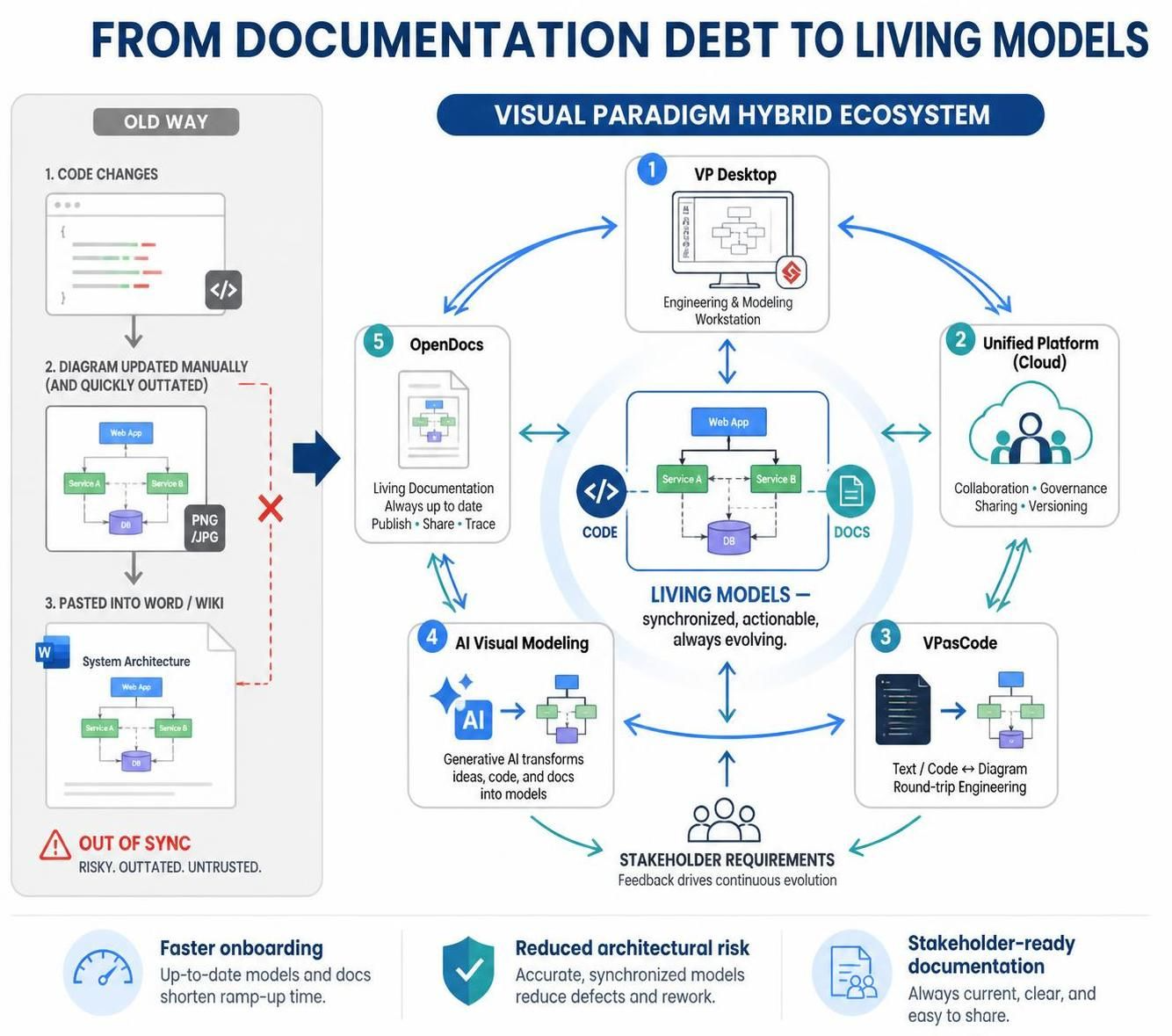
This guide explores how to leverage this ecosystem to move away from static images and toward Living Models—assets that stay synchronized with your codebase, your AI prompts, and your stakeholder requirements.
Key Concepts: The Pillars of the Hybrid Ecosystem
Before diving into workflows, it is essential to understand the core components that make this integration possible:
-
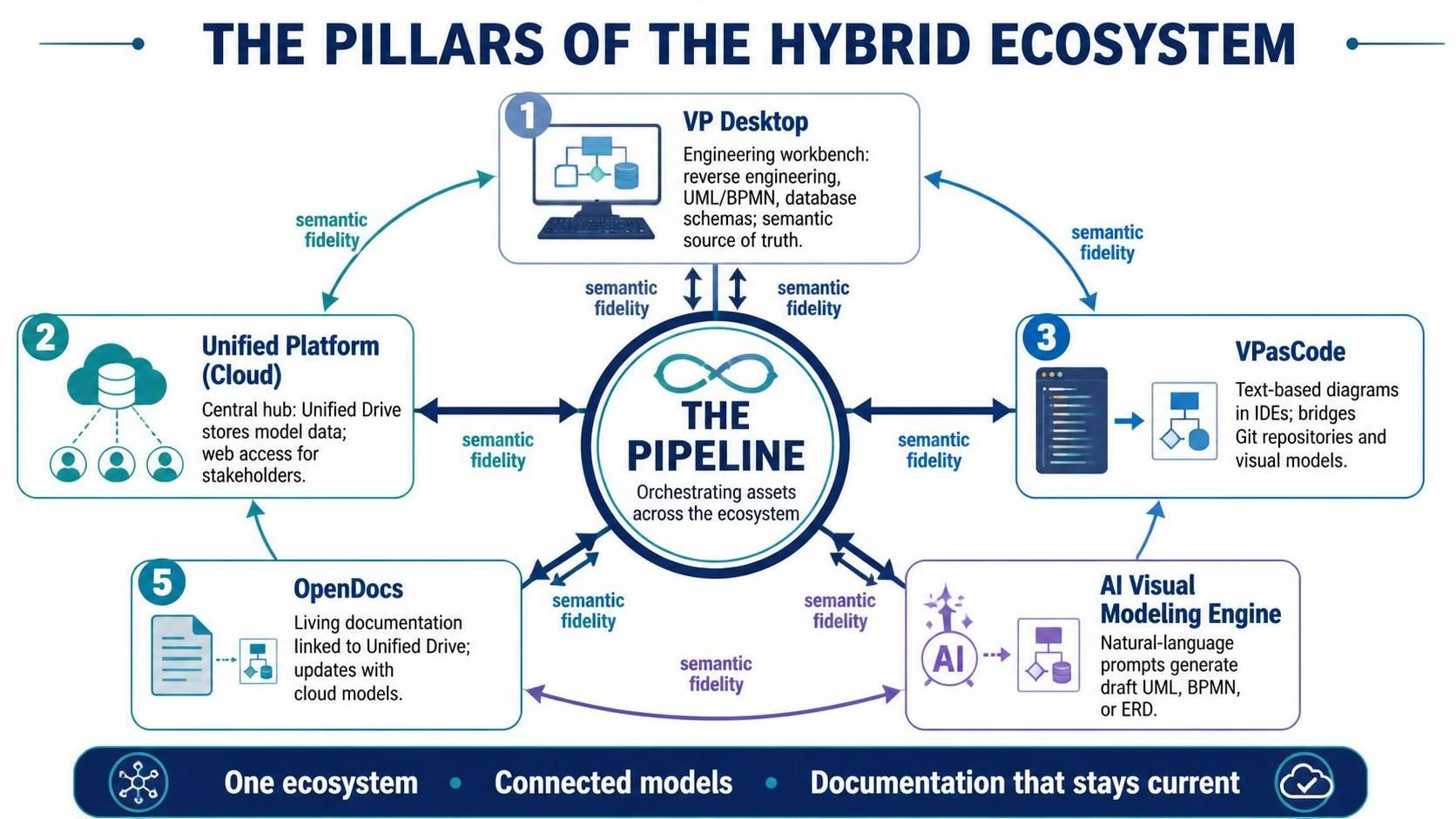
VP Desktop: The heavy-lifting engineering workbench. Used for complex reverse engineering, detailed UML/BPMN modeling, and database schema design. It is the source of truth for semantic models.
-
The Unified Platform (Cloud): The central hub. It hosts the Unified Drive (where model data lives, not just files) and provides web-based access for stakeholders who don’t need the full desktop client.
-
VPasCode: A developer-first tool that allows you to define diagrams using text-based scripts (similar to PlantUML or Mermaid) within your IDE (VS Code, IntelliJ). It bridges the gap between Git repositories and visual models.
-
AI Visual Modeling Engine: A generative AI interface that translates natural language prompts into draft UML, BPMN, or ERD structures, accelerating the initial scoping phase.
-
OpenDocs: A living documentation platform that pulls directly from the Unified Drive. When a model updates in the cloud, the documentation page updates automatically—no manual re-exporting required.
-
The Pipeline: The orchestration layer that moves assets between AI, Desktop, Cloud, and Documentation without losing semantic fidelity.
Enterprise-Grade Integration Use Cases
Below are three distinct workflows demonstrating how these components work together in practice.
Use Case 1: The Agile Product Launch (AI to Desktop Architecture)
Scenario: A startup needs to quickly scope, design, and document a microservices-based E-Commerce checkout funnel. Speed is critical, but accuracy cannot be sacrificed.
Workflow:
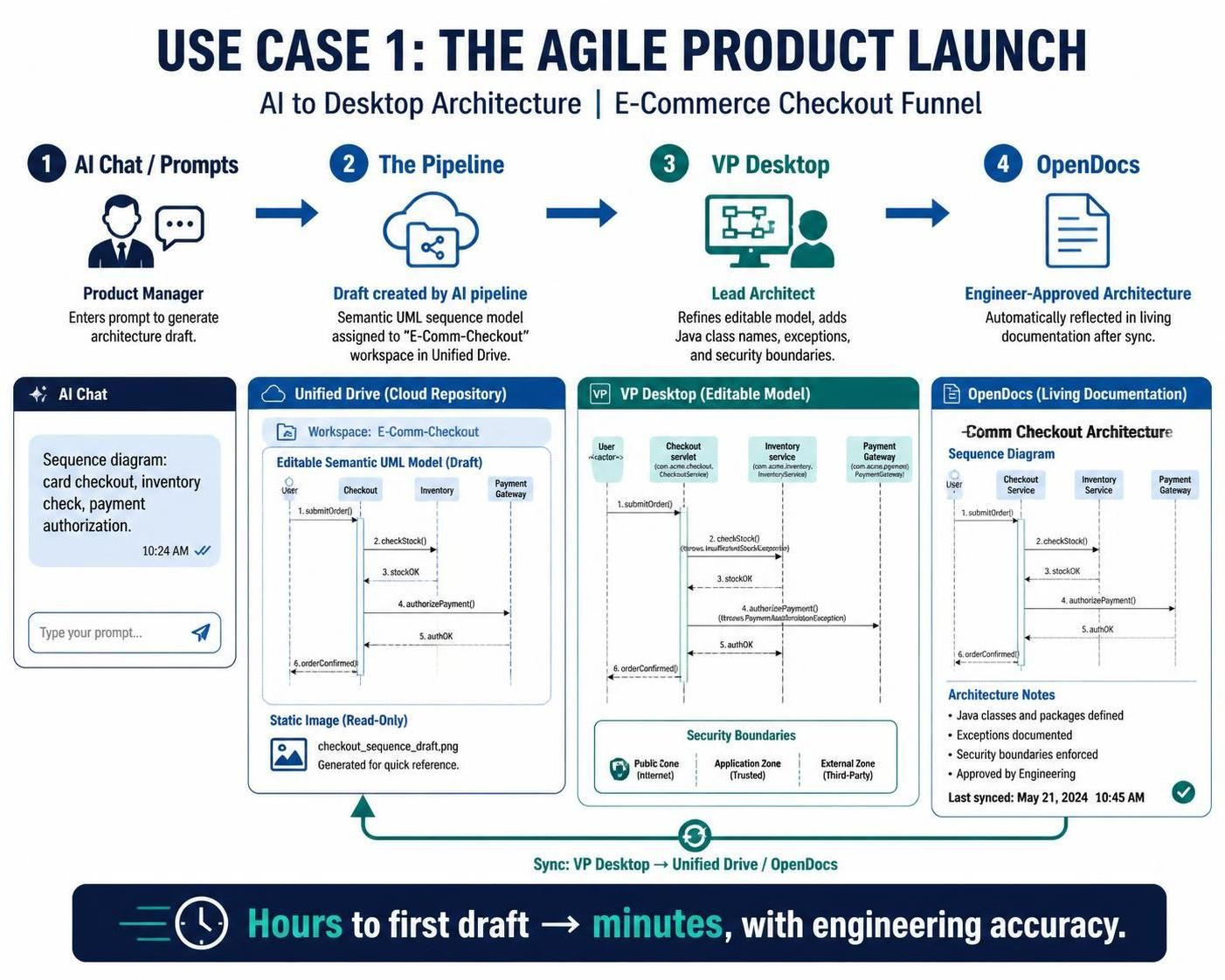
[ AI Chat / Prompts ] ──(Generates Draft)──> [ The Pipeline ] ──> [ VP Desktop ] ──> [ OpenDocs ]
-
AI Prompting: The Product Manager inputs a natural language prompt into the AI Visual Modeling Engine: “Generate a UML Sequence Diagram for a user checking out with a credit card, including inventory checks and payment gateway authorization.”
-
The Pipeline Delivery: The engine renders the diagram. Instead of saving it as an image, the PM hits “Send to Pipeline,” assigning it to the
E-Comm-Checkoutworkspace in the Unified Drive. -
Desktop Refinement: The Lead Architect opens VP Desktop, connects to the Unified Platform, and pulls the diagram from the Pipeline. Because it was sent via the pipeline, it imports as a fully editable, semantic model—not a flat vector. The architect maps exact Java class names, exceptions, and security boundaries.
-
Continuous Sync: The architect clicks “Sync” to publish the refined model back to the Unified Drive. The OpenDocs page linked to this model instantly reflects the final, engineer-approved architecture.
Key Benefit: Reduces time-to-first-draft from hours to minutes while ensuring the final artifact is technically accurate.
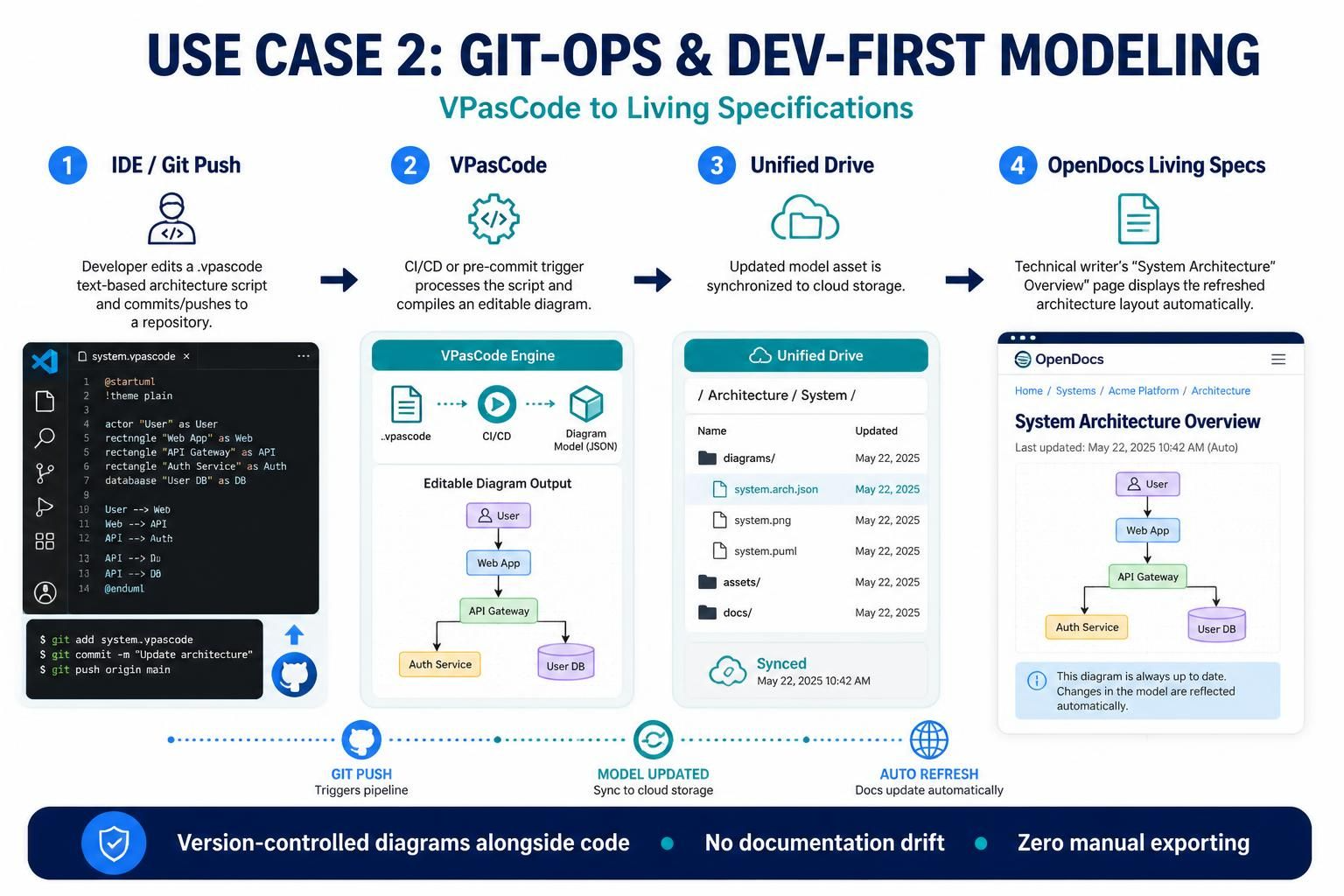
Use Case 2: Git-Ops & Dev-First Modeling (VPasCode to Specifications)
Scenario: A software engineering team wants to maintain system architecture diagrams inside their repository without leaving their IDE, while ensuring technical writers have access to the latest layouts.
Workflow:
[ IDE / Git Push ] ──> [ VPasCode (Text-to-Diagram) ] ──> [ Unified Drive ] ──> [ OpenDocs Living Specs ]
-
Writing Code-as-Diagram: A developer updates a system architecture layout using text-based scripts (like PlantUML structures) inside a
.vpascodefile within their VS Code editor. -
Commit and Trigger: The developer pushes the code to the company’s GitHub repository. A pre-commit hook or CI/CD pipeline triggers the VPasCode utility.
-
Ecosystem Sync: VPasCode processes the script, automatically compiles the latest diagram layout, and updates the asset hosted inside the Unified Drive.
-
Real-Time Documentation: The Technical Writer has an OpenDocs spec page open titled System Architecture Overview. Because the page references the live component asset from the Unified Drive, the webpage instantly refreshes to show the developer’s new architecture layout—zero manual exporting required.
Key Benefit: Keeps architecture diagrams version-controlled alongside code, eliminating “drift” between what is built and what is documented.
Use Case 3: Enterprise Database Migration (Desktop ERD to Web Portfolio)
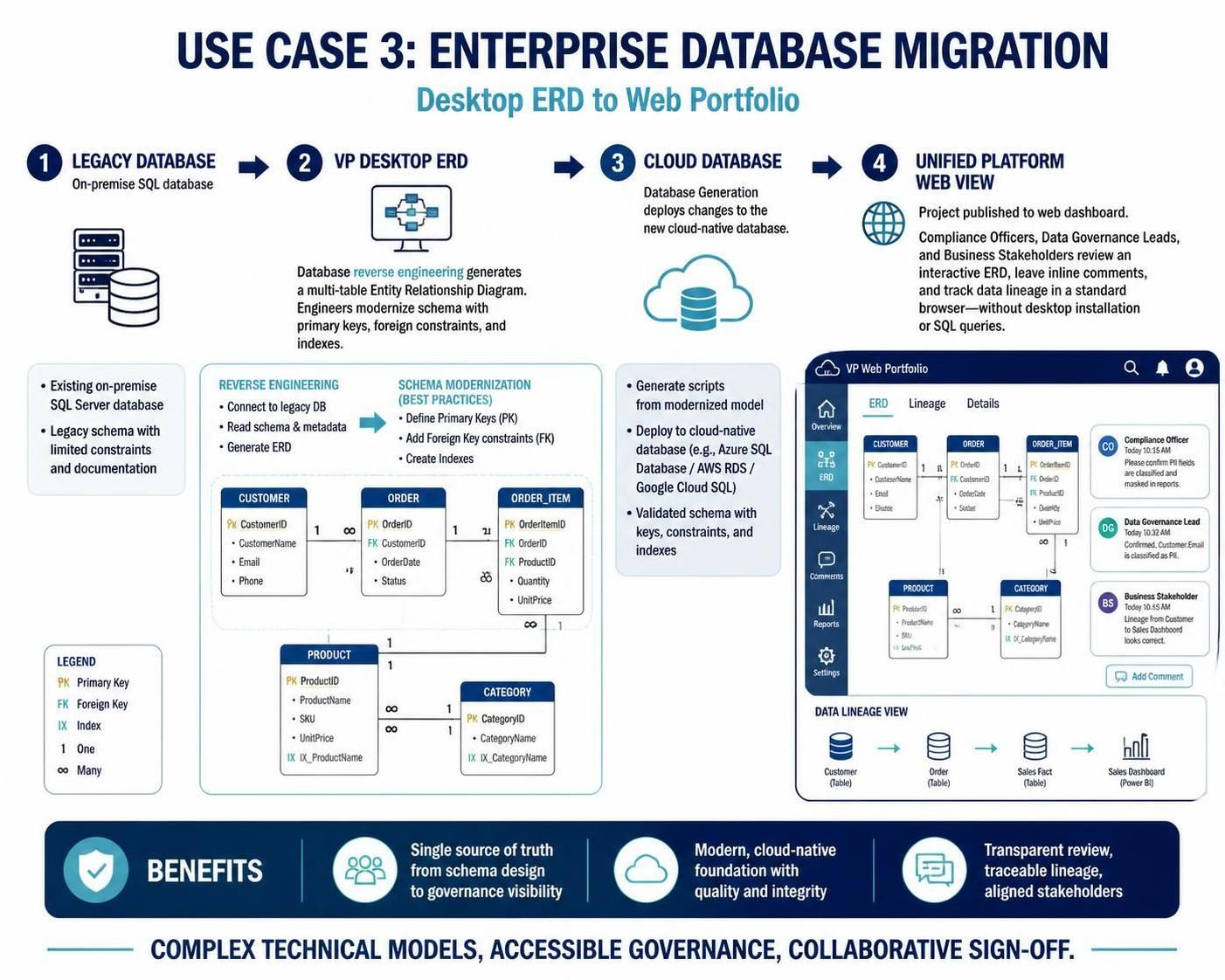
Scenario: A legacy physical database needs to be overhauled, migrated to a cloud-native schema, and audited by compliance officers who do not have local software installations.
Workflow:
[ Legacy Database ] ──(Reverse Engineer)──> [ VP Desktop ERD ] ──> [ Unified Platform (Web View) ]
-
Reverse Engineering: Database Engineers open VP Desktop and use the Database Reverse Engineering wizard to connect directly to an on-premise SQL database. VP Desktop instantly generates a complex, multi-table Entity Relationship Diagram (ERD).
-
Schema Modification: The engineers modernize the schema inside VP Desktop, defining new primary keys, foreign constraints, and indexing.
-
Cloud Deployment: They use VP Desktop’s Database Generation tool to execute the changes directly against the new cloud database.
-
Stakeholder Sign-Off: The engineering team publishes the project file to the Unified Platform. Compliance Officers, Data Governance Leads, and Business Stakeholders log into the web dashboard using a standard browser. They review the interactive ERD, leave inline comments, and track data lineage without ever needing to download VP Desktop or write SQL queries.
Key Benefit: Democratizes access to complex technical artifacts, allowing non-technical stakeholders to participate in governance and approval workflows.
🛠️ Execution Checklist: Connecting Your Workflow
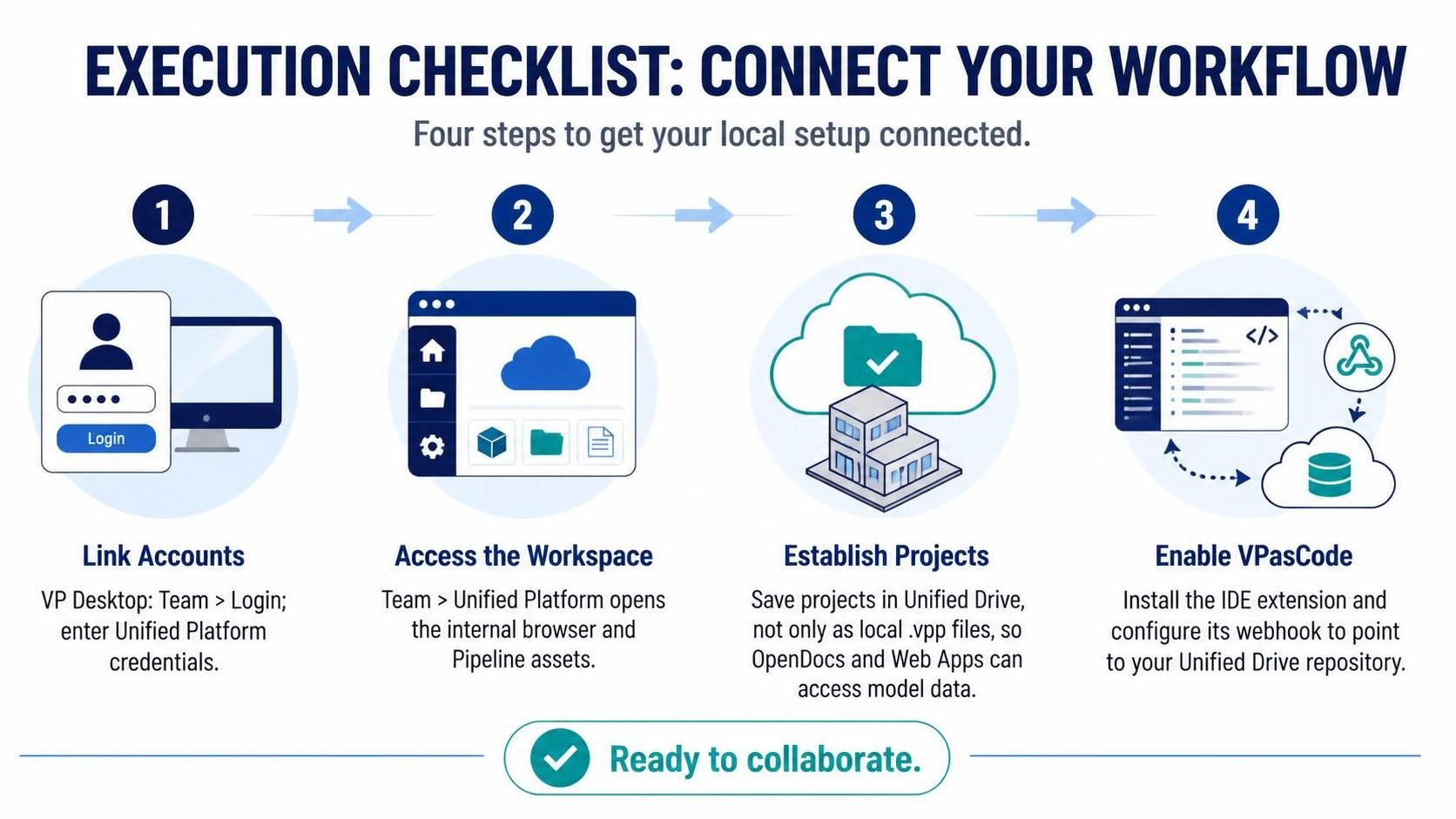
To implement any of these workflows tomorrow, ensure your local desktop setup is connected to the ecosystem:
-
Link Accounts: In VP Desktop, navigate to
Team > Loginand input your Unified Platform credentials. -
Access the Workspace: Open the
Team > Unified Platformpanel inside the desktop application to view the internal browser and manage your incoming Pipeline assets. -
Establish Projects: Save your desktop projects into the Unified Drive rather than local
.vppfiles. This allows OpenDocs and Web Apps to read the model data directly. -
Enable VPasCode: Install the VPasCode extension in your IDE and configure the webhook to point to your Unified Drive repository.
Conclusion
The future of enterprise architecture is not about drawing prettier pictures; it is about creating living, breathing models that evolve with your software. By leveraging Visual Paradigm’s hybrid ecosystem, organizations can break down the silos between Product Managers, Developers, and Stakeholders.
Whether you are using AI to jumpstart your design, VPasCode to keep diagrams in sync with Git, or the Unified Platform to share insights with compliance teams, the goal remains the same: Single Source of Truth. Stop treating diagrams as static artifacts. Start treating them as dynamic, integral parts of your development lifecycle.