
Mastering System Architecture: A Step-by-Step Guide to the PayQuick Container Diagram
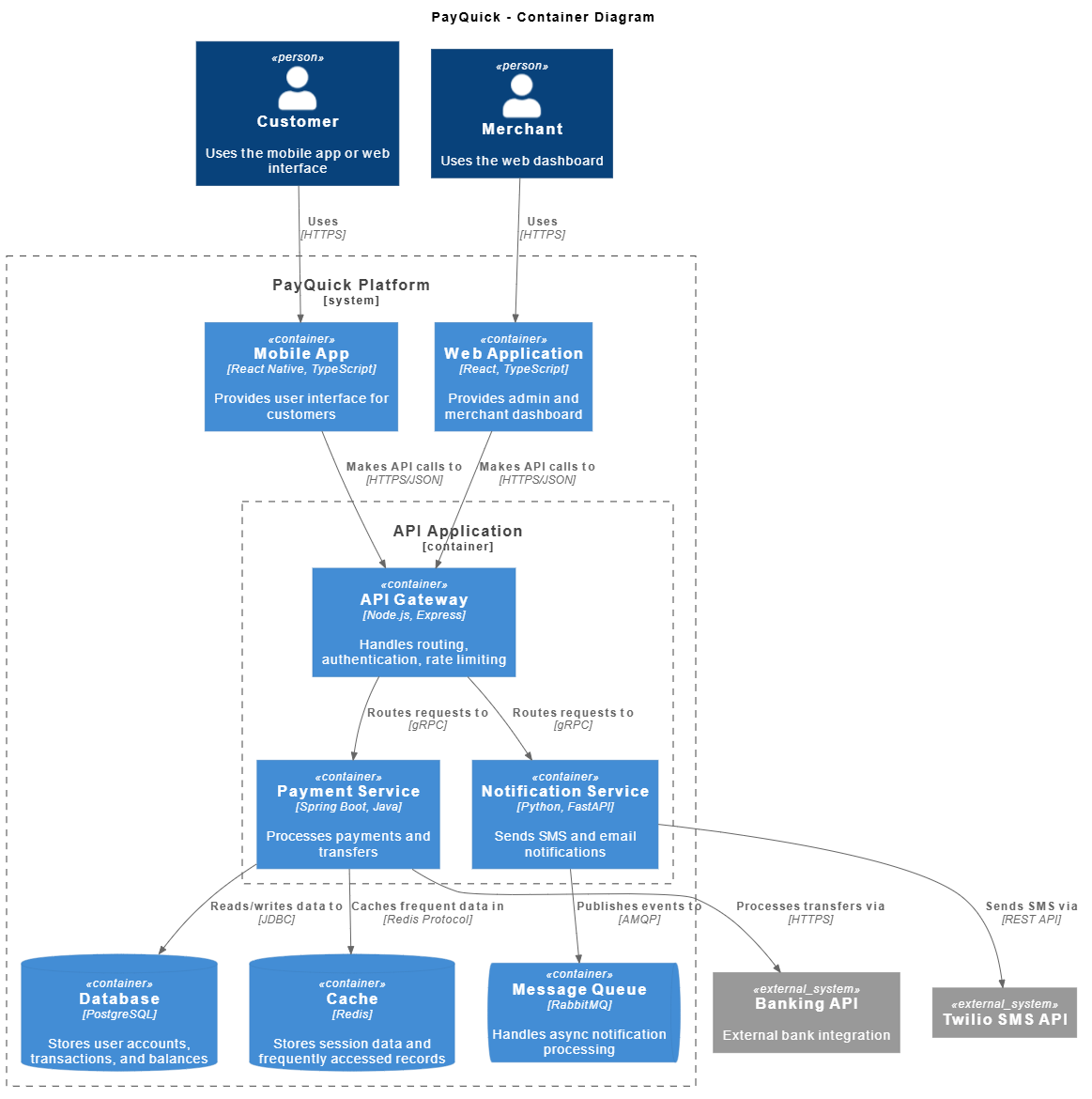
In the world of software engineering, visualization is not just about drawing pictures; it is about communicating complex system logic clearly. The Container Diagram, a core component of the C4 model, serves as the bridge between high-level requirements and detailed code. It provides a “Level 2” view of the system, answering the question: What are the major technology choices and how do they interact?
In this tutorial, we will deconstruct the PayQuick architecture. We will analyze how a modern fintech platform is structured, moving from user interfaces to backend services, and finally to external integrations.
Understanding the Scope: What is a Container?
Before diving into the code, it is essential to understand what a “Container” represents in the C4 model. A container is a standalone, deployable unit of software. This typically includes:
- Web Applications: Front-end code running in a browser.
- Mobile Apps: Native or cross-platform applications installed on devices.
- API Services: Microservices or monolithic backend applications.
- Database Systems: Persistent storage solutions.
Unlike a Component Diagram (which shows classes and functions), a Container Diagram focuses on the technologies used (e.g., React, Spring Boot, PostgreSQL) and the protocols connecting them.
Deconstructing the PayQuick Architecture
The PayQuick system is designed to handle payments for both customers and merchants. Let’s break down the diagram into its logical layers.
1. The Actors (People)
The diagram begins with the Person elements. These are the humans interacting with the system:
- Customer: The end-user who wants to make payments.
- Merchant: The business owner managing their dashboard.
Key Observation: Notice that the Merchant uses a specific Web Application, while the Customer is abstracted as using the “mobile app or web interface.” This distinction helps us understand the different user journeys.
2. The System Boundary
The dashed line labeled PayQuick Platform acts as a System Boundary. Everything inside this box belongs to your organization. Everything outside (like the Banking API or Twilio) is a SystemExt (External System).
3. The Frontend Layer
At the top of the platform boundary, we see two distinct interfaces:
- Mobile App: Built with
React NativeandTypeScript. This provides the customer-facing interface. - Web Application: Built with
ReactandTypeScript. This serves the merchant dashboard.
4. The Backend Services (The API)
Inside the API Application container boundary, the architecture splits into specific microservices:
- API Gateway: Built with
Node.js. This is the “doorway” to the system. It handles authentication, rate limiting, and routing. It shields the internal services from direct public access. - Payment Service: Built with
Spring Boot(Java). This is the core business logic that processes money. It requires high reliability and data consistency. - Notification Service: Built with
Python(FastAPI). This service handles side effects, like sending emails or SMS, allowing the main payment process to remain fast.
5. Data and Infrastructure
The diagram highlights three critical infrastructure components:
- Database (PostgreSQL): A relational database used for storing sensitive transaction data.
- Cache (Redis): Used for session data to speed up performance.
- Message Queue (RabbitMQ): Used for asynchronous processing, decoupling the Notification Service from the rest of the system.
Visualizing the Data Flow
The arrows in the diagram represent data flows. Understanding the protocol labels is crucial for system architects.
- User to App (HTTPS): The mobile and web apps communicate with the API Gateway using standard HTTPS/JSON.
- Gateway to Services (gRPC): The API Gateway routes requests to the Payment and Notification services using gRPC. This is a high-performance, internal protocol often used for microservice communication.
- Service to Data (JDBC/Redis): The Payment Service talks to the database using JDBC.
- Async Processing (AMQP): The Notification Service publishes events to RabbitMQ using AMQP, ensuring that if the SMS provider is down, the user’s payment isn’t blocked.
Defining the Architecture in Code
To create this diagram, we use C4-PlantUML. The code below demonstrates how to define the hierarchy, the specific technologies (e.g., Spring Boot, React), and the relationships between them.
@startuml
!include https://raw.githubusercontent.com/plantuml-stdlib/C4-PlantUML/master/C4_Container.puml

title PayQuick - Container Diagram

Person(customer, "Customer", "Uses the mobile app or web interface")
Person(merchant, "Merchant", "Uses the web dashboard")

System_Boundary(payquick, "PayQuick Platform") {
    Container(mobile_app, "Mobile App", "React Native, TypeScript", "Provides user interface for customers")
    Container(web_app, "Web Application", "React, TypeScript", "Provides admin and merchant dashboard")

    Container_Boundary(api, "API Application") {
        Container(api_gateway, "API Gateway", "Node.js, Express", "Handles routing, authentication, rate limiting")
        Container(payment_service, "Payment Service", "Spring Boot, Java", "Processes payments and transfers")
        Container(notification_service, "Notification Service", "Python, FastAPI", "Sends SMS and email notifications")
    }

    ContainerDb(database, "Database", "PostgreSQL", "Stores user accounts, transactions, and balances")
    ContainerDb(cache, "Cache", "Redis", "Stores session data and frequently accessed records")
    ContainerQueue(queue, "Message Queue", "RabbitMQ", "Handles async notification processing")
}

System_Ext(bank_api, "Banking API", "External bank integration")
System_Ext(sms_provider, "Twilio SMS API")

Rel(customer, mobile_app, "Uses", "HTTPS")
Rel(merchant, web_app, "Uses", "HTTPS")
Rel(mobile_app, api_gateway, "Makes API calls to", "HTTPS/JSON")
Rel(web_app, api_gateway, "Makes API calls to", "HTTPS/JSON")
Rel(api_gateway, payment_service, "Routes requests to", "gRPC")
Rel(api_gateway, notification_service, "Routes requests to", "gRPC")
Rel(payment_service, database, "Reads/writes data to", "JDBC")
Rel(payment_service, cache, "Caches frequent data in", "Redis Protocol")
Rel(notification_service, queue, "Publishes events to", "AMQP")
Rel(notification_service, sms_provider, "Sends SMS via", "REST API")
Rel(payment_service, bank_api, "Processes transfers via", "HTTPS")
@endumlConclusion
The PayQuick Container Diagram is a powerful artifact for technical communication. It abstracts away the messy details of code implementation while retaining the critical information about technology choices and data flow. By mastering this level of modeling, you can effectively onboard new developers, plan infrastructure upgrades, and identify potential bottlenecks in your system.