
Mastering Enterprise Architecture Modeling with VPasCode and ArchiMate
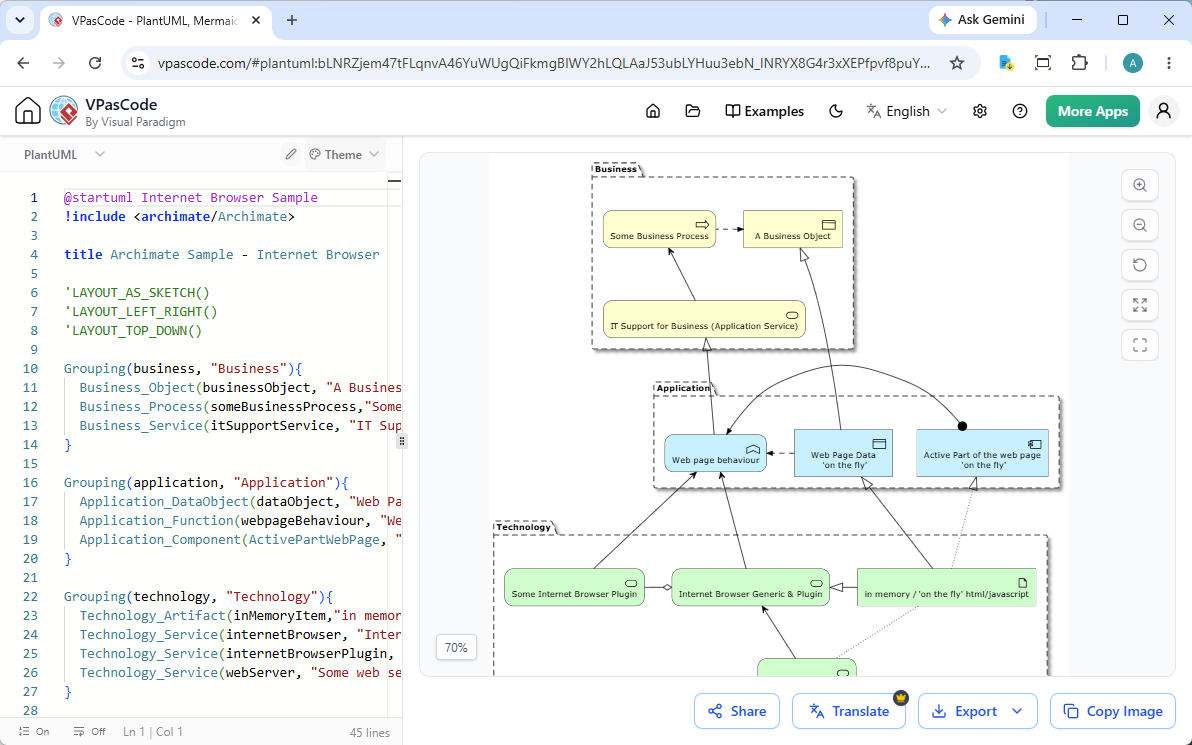
In the complex landscape of modern software development, bridging the gap between business strategy and technical implementation is a critical challenge. VPasCode by Visual Paradigm addresses this by offering a “Diagram as Code” environment that supports industry-standard frameworks like the C4 Model and ArchiMate. This tutorial will guide you through understanding the architecture shown in the provided screenshot, explaining how to define business, application, and technology layers using plaintext syntax.
Understanding the ArchiMate Framework
The screenshot displays an ArchiMate diagram, a standard for enterprise architecture. Unlike simple flowcharts, ArchiMate allows you to model relationships across three distinct layers:
- Business Layer: Focuses on business strategy, governance, organization, and business processes. In the example, this includes “Some Business Process” and “A Business Object.”
- Application Layer: Represents the software systems and services that support the business. The diagram illustrates “Web page behaviour” and “Web Page Data.”
- Technology Layer: Describes the hardware and infrastructure that executes the software. Here, we see “Some Internet Browser Plugin” and “Internet Browser Generic & Plugin.”
VPasCode allows you to define these layers and the connections between them using a specific syntax, enabling version control and collaborative editing of your architecture.
Step-by-Step: Writing Your ArchiMate Model
To replicate the architecture shown in the image, you write code that defines the elements and the groupings (layers). Let’s break down the specific syntax used in the screenshot.
1. Initialization and Layout
First, you initialize the model using the @startuml directive and include the ArchiMate language library. The title sets the diagram name, while LAYOUTASSKETCH() gives the nodes a hand-drawn aesthetic. Crucially, the layout directions control the flow:
LAYOUTLEFTRIGHT(): Aligns elements horizontally.LAYOUTTOPDOWN(): Aligns elements vertically (often used for layer separation).
2. Defining Groups (Layers)
ArchiMate diagrams are structured using Grouping blocks. Each block represents a layer (Business, Application, Technology). Inside these blocks, you define your specific elements.
The code snippet below demonstrates how to define the Business Layer, including a Business Process, a Business Object, and a Business Service:
Grouping(business, "Business"){
    Business_Object(businessObject, "A Business Object")
    Business_Process(someBusinessProcess, "Some Business Process")
    Business_Service(itSupportService, "IT Support for Business")
}
3. Defining Application and Technology Elements
Similarly, you define the lower layers. Notice how the syntax changes slightly to reflect the specific ArchiMate stereotype (e.g., ApplicationDataObject vs. TechnologyService). This distinction is vital for maintaining the semantic integrity of your model.
Grouping(application, "Application"){
    Application_DataObject(dataObject, "Web Page Data 'on the fly'")
    Application_Function(webpageBehaviour, "Web page behaviour")
    Application_Component(ActivePartWebPage, "Active Part of the web page 'on the fly'")
}

Grouping(technology, "Technology"){
    Technology_Artifact(inMemoryItem, "in memory / 'on the fly' html/javascript")
    Technology_Service(internetBrowser, "Internet Browser Generic & Plugin")
    Technology_Service(internetBrowserPlugin, "Some Internet Browser Plugin")
}
4. Establishing Relationships
While the code defines the nodes, the visual connections (relationships) are often implied by the layout in simple sketches or explicitly defined in more complex models. In VPasCode, you can define these relationships using standard PlantUML arrow syntax or specific ArchiMate relationship keywords. The image shows arrows connecting the layers, indicating how business processes are supported by applications, which in turn run on technology.
The Advantage of the Visual Paradigm AI Ecosystem
Writing complex schemas from scratch can be time-consuming. Because VPasCode is a core pillar of the Visual Paradigm AI Ecosystem, you don’t have to start with a blank page.
You can leverage the Visual Paradigm AI Diagramming Chatbot to generate these architectures. By simply asking the chatbot to “Create an ArchiMate diagram for an Internet Browser Sample,” the AI generates the code. You can then click “Edit in VPasCode” to pull the code into your workspace and begin editing instantly. If you make a syntax error, use AI Code Error Fixing to correct it, or use AI Code Content Translation to quickly adapt labels for international deployments.
Streamline Your Documentation Flow
Whether you are mapping system behavior or software blueprints, VPasCode provides a robust editing canvas. When your edits are complete, push them immediately to Visual Paradigm OpenDocs to publish collaborative, up-to-date documentation for your team.
No matter what standard your architecture team uses, VPasCode has the engine to support it. Stop wrestling with layout tools. Try Visual Paradigm VPasCode today and bring developer-friendly speeds to your system design.