


Desktop Community Edition vs. VP Online Free Edition

Executive Summary: Visual Paradigm offers two distinct free tools for UML work. The critical distinction? Desktop is a modeling tool; Online is a diagramming tool. Understanding this difference is essential for choosing the right tool for your project, team, or learning journey.
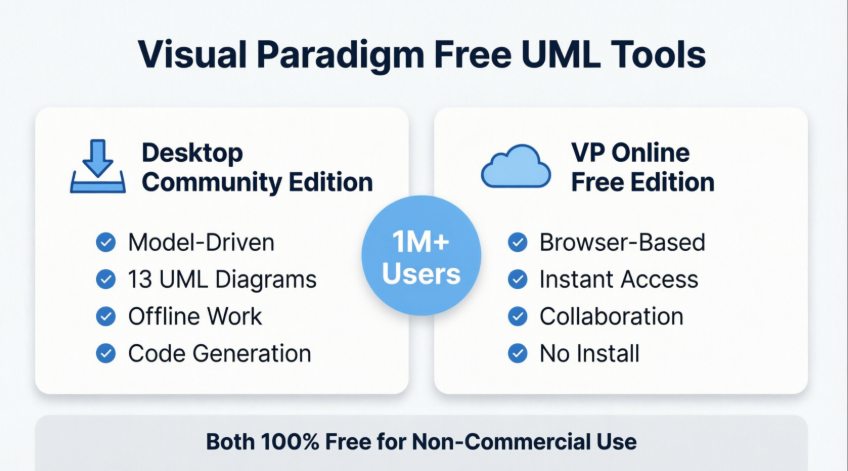
🎯 Core Philosophy: Visual Models vs. Diagrams
Before diving into features, it’s essential to understand the foundational difference that shapes every aspect of these two tools [1, 2]:
🔷 Visual Models (Desktop Community Edition)
In Visual Paradigm Desktop, a “model” and a “diagram” are fundamentally different concepts [1]:
- A model element is the underlying data or “truth” of your project (e.g., a specific Class named
Customer) - Multiple diagrams can reference the same model element
- Change once, update everywhere: Modify a class name in one diagram, and it automatically updates across all diagrams where that element appears
- This is “True Modeling” — enabling advanced engineering capabilities like:
- Code generation (Java, C#, Python, etc.)
- Database reverse engineering & ORM
- Requirement traceability matrices
- Model-driven architecture transformations
🔷 Diagramming (VP Online Free Edition)
The online edition focuses primarily on visual representation [1, 3, 4]:
- Shapes are often just visual elements on a canvas
- Excellent for quick communication, brainstorming, and “casual drawing”
- Lacks the deep data-linking, syntax validation, and model intelligence of the desktop version
- Prioritizes speed, accessibility, and collaborative ease over engineering rigor
💡 Analogy: Think of Desktop as a database-backed application and Online as a powerful whiteboard. Both create visuals, but only one maintains structured, reusable data underneath.
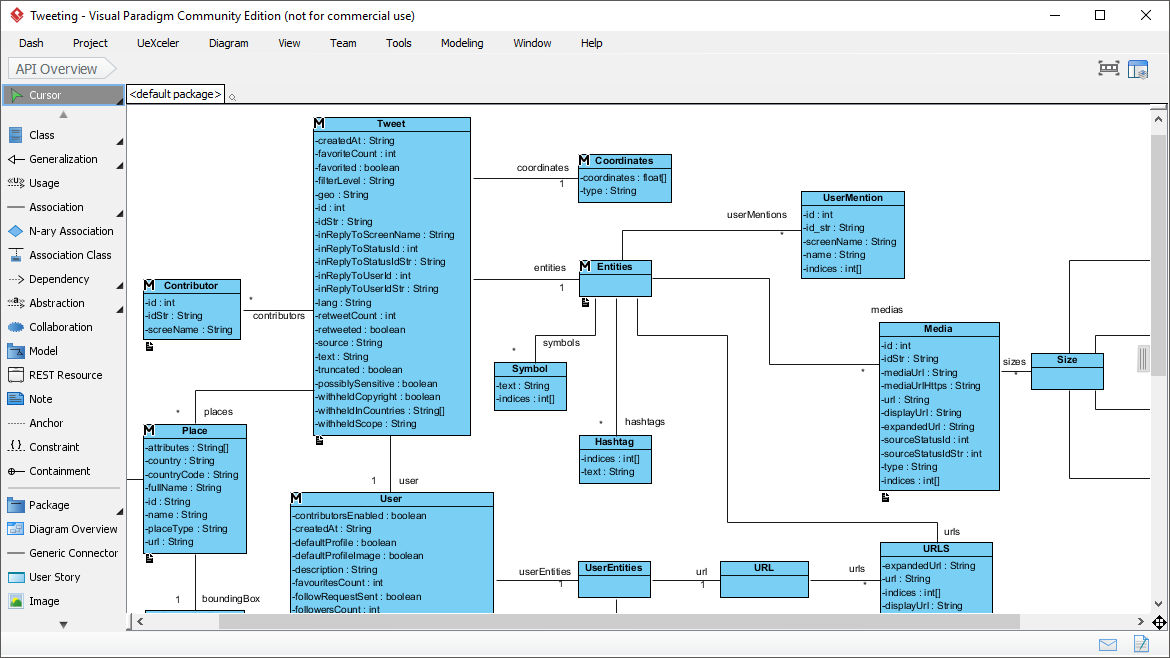
🖥️ Deep Dive: Visual Paradigm Community Edition (Desktop)

Overview
Launched in 2004, the Community Edition provides professional-grade UML modeling software completely free for non-commercial use. It’s designed for students, educators, researchers, and hobbyists who need serious modeling capabilities without budget constraints.
Key Strengths
✅ True Model-Driven Architecture

- Model Explorer: Centralized repository for all model elements, organized hierarchically [8, 9]
- Element Reusability: Define a
Userclass once; reference it in Class, Sequence, and Deployment diagrams simultaneously - Syntax Checking: Real-time validation ensures your diagrams comply with UML 2.x specifications
- Sub-diagrams & Abstraction: Break complex systems into manageable, linked views
✅ Engineering-Grade Capabilities
- Code generation from UML models (forward engineering)
- Reverse engineering: Import existing code to generate UML diagrams
- Database design with ERD support and SQL script generation
- Requirement traceability: Link use cases to test cases and implementation artifacts
✅ Comprehensive UML 2.x Support

Draw any of the 13 official UML 2.x diagram types:
- Class Diagram
- Use Case Diagram
- Sequence Diagram
- Activity Diagram
- State Machine Diagram
- Component Diagram
- Deployment Diagram
- Package Diagram
- Communication Diagram
- Timing Diagram
- Interaction Overview Diagram
- Object Diagram
- Composite Structure Diagram
Plus ERD, SysML, and BPMN (in paid editions).
✅ Cross-Platform & Offline Ready

- Native applications for Windows, macOS, and Linux
- Works fully offline after installation
- Local file storage with optional cloud sync
Limitations (Free Edition)
- Output images include a subtle watermark
- Advanced features like team collaboration, BPMN, and report generation require paid upgrade
- Steeper learning curve due to professional-grade feature set
🌐 Deep Dive: VP Online Free Edition

Overview
VP Online is a browser-based diagramming platform designed for speed, accessibility, and zero-configuration use. Perfect for quick sketches, collaborative brainstorming, and presentation-ready visuals.
Key Strengths
✅ Instant Access & Zero Setup
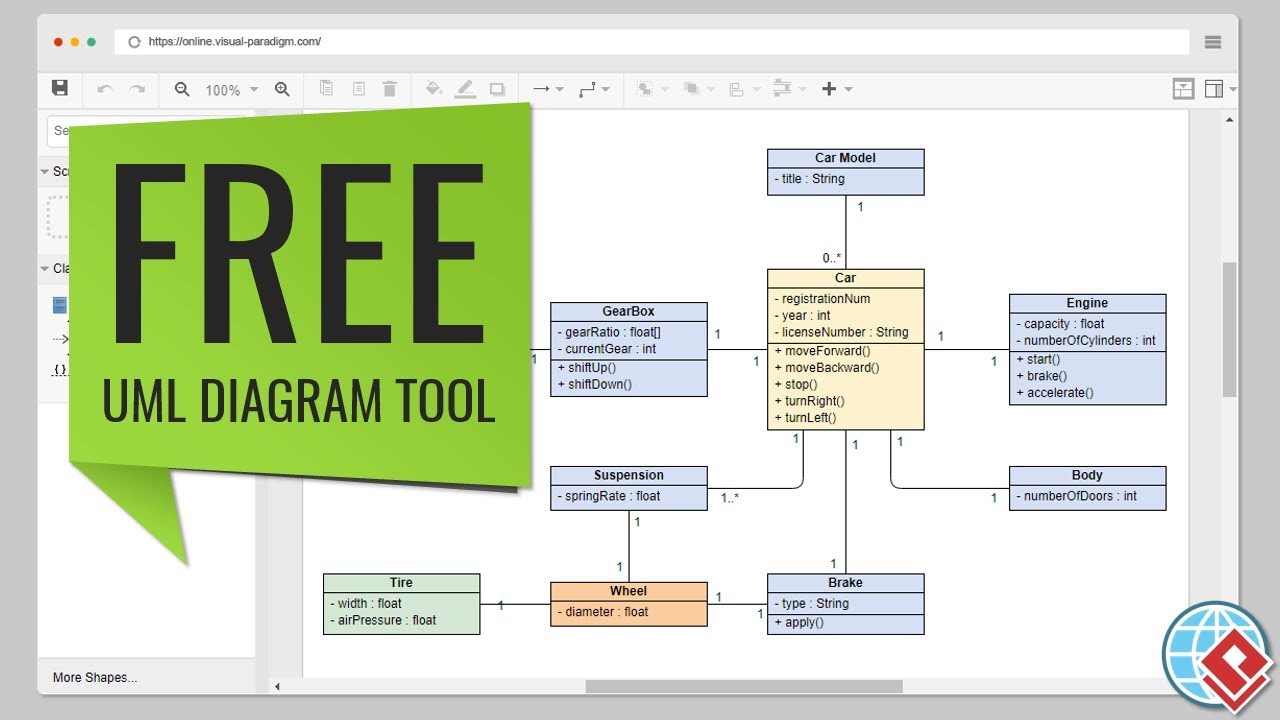
- No download or installation required
- Runs in any modern web browser
- Start diagramming in seconds — ideal for workshops, meetings, or impromptu design sessions
✅ Intuitive Drag-and-Drop Interface
- Resource Catalog: Smart shape suggestions based on context
- Auto-attached connectors that never “float away”
- Alignment guides and distribution tools for pixel-perfect layouts
- Hundreds of pre-built templates and examples
✅ Flexible Output & Sharing
- Export diagrams as PNG, JPG, SVG, GIF, or PDF
- Google Drive integration for cloud storage and team sharing
- Embed diagrams in wikis, documentation, or presentations with simple links
- No watermarks on exported files (for free edition)
✅ Broad Diagram Support
While focused on UML, VP Online also supports:
- Entity Relationship Diagrams (ERD)
- Organization Charts
- Floor Plans
- Business Concept Diagrams
- ITIL Process Maps
- Mind Maps and Flowcharts
Limitations
- Requires active internet connection
- Shapes are primarily visual — limited model intelligence or cross-diagram consistency
- No code generation, reverse engineering, or advanced validation
- Diagram Navigator manages files visually, not as interconnected model data [3]
📊 Feature Comparison: Desktop vs. Online
| Feature [3, 4, 5, 6, 7, 8, 9, 10, 11, 12] | Desktop (Visual Modeling) | Online (Diagramming) |
|---|---|---|
| Core Paradigm | Model-driven: elements are reusable data objects | Canvas-driven: shapes are visual representations |
| Project Structure | Model Explorer manages hierarchical, reusable data [8, 9] | Diagram Navigator manages separate visual files [3] |
| Consistency | Change an element once → updates everywhere automatically | Changes are manual; no cross-diagram synchronization |
| Syntax Validation | Real-time UML 2.x compliance checking | Basic shape connection rules only |
| Engineering Features | Code generation, DB reverse engineering, ORM [4, 5] | Visual communication only; no engineering output |
| Complexity Handling | Ideal for large systems with traceability needs | Best for quick flowcharts, mind maps, basic UML |
| Collaboration | File-based sharing; team features in paid editions | Real-time co-editing, comments, Google Drive sync |
| Offline Access | ✅ Full functionality after install | ❌ Requires internet connection |
| Learning Curve | Moderate to steep (professional toolset) | Gentle (intuitive, beginner-friendly) |
| Best For | System architecture, software design, academic research | Brainstorming, documentation, presentations, teaching |
🎯 Use Case Recommendations
Choose Desktop Community Edition when you need:
- 🎓 Academic projects requiring formal UML compliance
- 🔧 Software design with code generation or reverse engineering
- 🗃️ Complex systems needing requirement traceability
- 🔄 Multiple diagrams sharing the same model elements
- 💾 Offline work or local file management
Choose VP Online Free Edition when you need:
- ⚡ Quick diagrams for meetings or documentation
- 👥 Collaborative brainstorming with remote teams
- 🌍 Access from any device without installation
- 🎨 Presentation-ready visuals with minimal effort
- 🧭 Simple flowcharts, org charts, or basic UML sketches
Pro Workflow: Use Both Together
For teams or individuals who need both rigor and agility [11, 12]:
- Brainstorm in VP Online: Rapidly sketch ideas with stakeholders using the intuitive online editor
- Refine in Desktop: Import or recreate key diagrams in Community Edition to add model intelligence
- Engineer & Document: Leverage desktop features for code generation, validation, and formal documentation
- Share Outputs: Export polished visuals from either tool for presentations or reports

Desktop’s element referencing enables traceability across artifacts — a capability absent in pure diagramming tools.
✅ Pros and Cons Summary
Visual Paradigm Community Edition (Desktop)
| Pros | Cons |
|---|---|
| ✅ True model-driven architecture with element reuse | ❌ Watermarked exports in free edition |
| ✅ Full UML 2.x specification support + syntax checking | ❌ Steeper learning curve for beginners |
| ✅ Code generation & reverse engineering capabilities | ❌ Requires download and Java runtime |
| ✅ Works offline; local file control | ❌ Advanced collaboration requires paid upgrade |
| ✅ Trusted by academia and enterprise (paid editions) | ❌ Interface can feel dense for simple tasks |
VP Online Free Edition
| Pros | Cons |
|---|---|
| ✅ Zero installation; instant browser access | ❌ Requires active internet connection |
| ✅ Intuitive drag-and-drop; beginner-friendly | ❌ No model intelligence or cross-diagram consistency |
| ✅ Real-time collaboration & Google Drive sync | ❌ Limited to visual diagramming (no engineering) |
| ✅ Clean exports without watermarks | ❌ Fewer advanced UML diagram types |
| ✅ Excellent for teaching, brainstorming, docs | ❌ Less suitable for complex system modeling |
🏆 Final Verdict

Visual Paradigm delivers exceptional value with both free offerings — but they serve fundamentally different purposes.
🔹 For serious modeling work — system design, academic research, or projects requiring traceability and engineering output — the Community Edition (Desktop) is unmatched in the free tool category. Its model-driven approach, syntax validation, and code generation capabilities place it in professional territory.
🔹 For quick visuals, collaboration, or learning basics — meeting notes, documentation sketches, or introductory UML exercises — VP Online offers unparalleled convenience and accessibility.
🎯 Bottom Line: If you’re asking “Which should I use?”, start with this question: “Do I need this diagram to be part of a larger, interconnected model — or is it a standalone visual?”
• Model → Desktop Community Edition
• Diagram → VP Online Free Edition
Both tools reflect Visual Paradigm’s commitment to democratizing professional modeling capabilities. With over 1 million installations worldwide and adoption by leading universities and enterprises [6, 10], the platform’s quality and reliability are well-established.

📚 Reference List
- Online Diagram Editor Features: Official documentation detailing VP Online’s diagramming capabilities, interface design, and use cases for visual communication.
- VP Online Desktop Accessibility: Guide to cross-platform browser compatibility, performance considerations, and accessibility features for the web-based editor.
- Model Explorer vs. Diagram Navigator: Community forum discussion clarifying the structural differences between desktop’s model-centric and online’s diagram-centric project organization.
- Visual Modeling Tool Overview: Comprehensive feature list for Visual Paradigm’s model-driven approach, including element reuse, syntax checking, and engineering integrations.
- Visual Paradigm User Guide: Model Elements: Official documentation explaining how model elements function as reusable data objects across multiple diagrams in the desktop application.
- UML Tool Solution Page: Chinese-language resource detailing UML modeling capabilities, use cases, and enterprise adoption of Visual Paradigm tools.
- Visio Alternative: Why VP Online?: Independent review comparing VP Online to Microsoft Visio, highlighting ease of use, collaboration features, and UML support.
- User Guide: Organizing Work with Model Explorer: Step-by-step instructions for using the Model Explorer to structure, navigate, and manage complex modeling projects in the desktop edition.
- User Guide: Model Element Reference: Technical documentation defining model elements, their properties, and how they enable consistency across diagrams in Visual Paradigm Desktop.
- Visual Paradigm Online: Ultimate Cloud-Based Platform: Detailed user review covering VP Online’s strengths for remote collaboration, education, and lightweight diagramming workflows.
- Cloud-Based Diagramming Tool Solution: Official page describing VP Online’s architecture, security, integration options, and hybrid workflows with desktop tools.
- Diagramming Tool on the Cloud – Features: Feature breakdown of VP Online’s collaboration tools, export options, template library, and upgrade paths to commercial editions.
💡 Getting Started Tips
• Desktop: Download from visual-paradigm.com/download/community.jsp — ensure Java 8+ is installed.
• Online: Visit online.visual-paradigm.com — no account required to start diagramming.
• Learning: Explore hundreds of free templates at circle.visual-paradigm.com for instant project starters.
Review compiled March 2026 | Based on Visual Paradigm v14.1+ and VP Online current release

