


Introduction
Are you tired of staring at a blank canvas, wondering where to start with your UML modeling? Do complex Profile Diagrams seem intimidating and time-consuming? You’re not alone. As software architects and developers, we often face the challenge of transforming abstract concepts into structured, professional diagrams.
In this comprehensive guide, I’ll share my personal journey of discovering Visual Paradigm’s revolutionary AI Profile Diagram Generator. Whether you’re an absolute beginner or an experienced modeler looking to streamline your workflow, this step-by-step tutorial will show you how to leverage AI-powered tools to create professional-grade UML Profile Diagrams in seconds—not hours. Let’s explore how this game-changing technology can transform your modeling experience and boost your productivity.
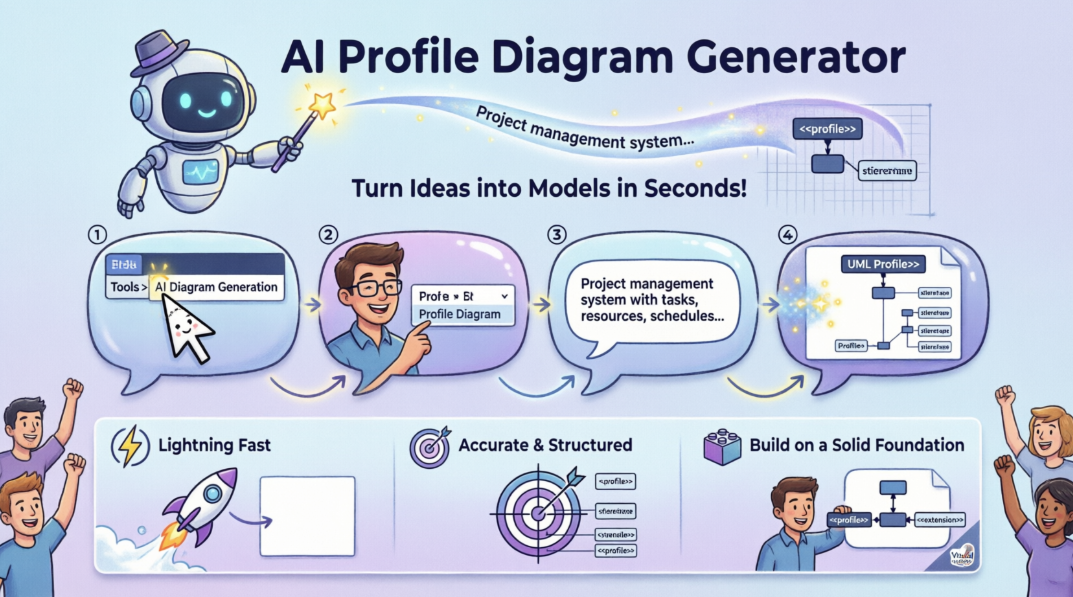
My User Experience Sharing Journey: From Skeptic to Advocate
When I first heard about AI-generated UML diagrams, I’ll admit—I was skeptical. How could an AI understand the nuances of domain-specific modeling? Could it really capture the complexity of stereotypes, tagged values, and constraints that make Profile Diagrams so powerful?
My journey began three months ago when I was tasked with creating a Profile Diagram for a healthcare management system. Traditionally, this would have taken me 4-6 hours of manual work: researching UML extension mechanisms, drawing shapes, connecting elements, and ensuring compliance with standards.
I decided to give Visual Paradigm’s AI generator a try. The result? A fully functional, standards-compliant Profile Diagram in under 3 minutes. But here’s what truly impressed me: the diagram wasn’t just a starting point—it was 85% complete, requiring only minor refinements. This experience completely changed my perspective on AI-assisted modeling.
Absolutely Beginner’s Guide: Understanding Profile Diagrams
What is a UML Profile Diagram?
Before diving into the AI tool, let’s establish the fundamentals. A UML Profile Diagram is a specialized diagram that allows you to extend the standard UML metamodel to create domain-specific modeling languages. Think of it as customizing UML to fit your specific industry, platform, or framework.
Key Components:
- Stereotypes: Extensions of UML metaclasses (e.g., «entity», «service», «controller»)
- Tagged Values: Additional properties attached to stereotypes
- Constraints: Rules that govern how stereotypes can be used
Why Profile Diagrams Matter
Profile Diagrams enable you to:
- Define industry-specific modeling conventions (healthcare, finance, aerospace)
- Create platform-specific extensions (.NET, J2EE, Spring)
- Enforce modeling standards across your organization
- Reduce ambiguity in system design
Step-by-Step Tutorial: Generating Your First AI Profile Diagram
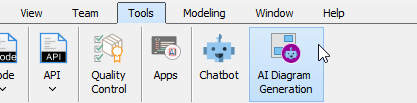
Step 1: Accessing the AI Diagram Generator
The integration is seamless and intuitive:
- Open Visual Paradigm Desktop
- Navigate to the top menu
- Select Tools > AI Diagram Generation
- The AI Diagram Generation dialog box will appear
Step 2: Selecting Your Diagram Type
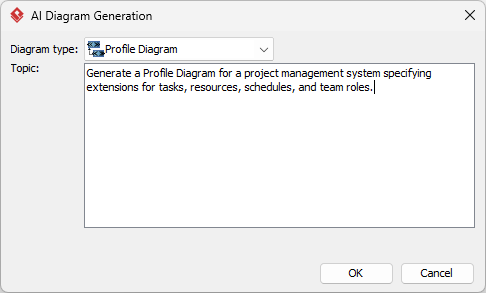
From the available options in the dialog:
- Choose Profile Diagram from the dropdown menu
- This tells the AI engine to focus on UML extension mechanisms
Step 3: Crafting the Perfect Prompt
This is where the magic happens. The quality of your output depends on the specificity of your input. Let me share some proven prompt examples:
Basic Prompt:
“Generate a Profile Diagram for a project management system”
Advanced Prompt (Recommended):
“Generate a Profile Diagram for a project management system specifying extensions for tasks, resources, schedules, and team roles. Include stereotypes for ‘Milestone’, ‘Deliverable’, ‘Sprint’, and ‘Stakeholder’ with appropriate tagged values for priority, deadline, and assignment.”
Industry-Specific Prompt:
“Create a Profile Diagram for a healthcare information system with stereotypes for ‘PatientRecord’, ‘MedicalProcedure’, ‘Prescription’, and ‘HealthcareProvider’. Include constraints for HIPAA compliance and tagged values for confidentiality level and retention period.”
Step 4: Generation and Refinement
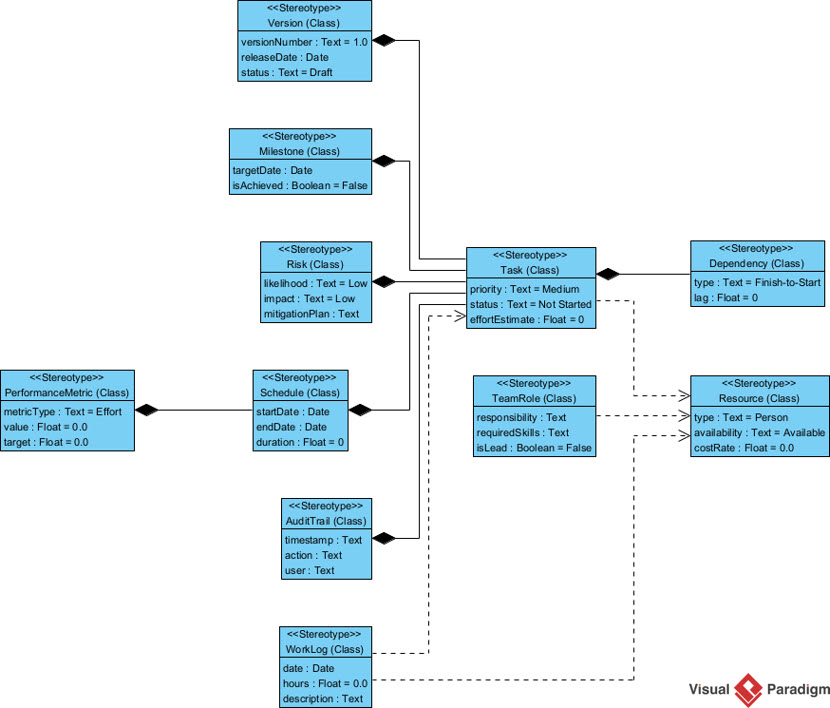
- Click OK to process your request
- Wait 30-60 seconds for the AI to generate your diagram
- Review the generated elements on your canvas
- Use Visual Paradigm’s editing tools to refine stereotypes, adjust layouts, and add custom constraints
Comprehensive Case Study: Real-World Application
Case Study: E-Commerce Platform Modeling
Challenge: Our team needed to create a Profile Diagram for a multi-tenant e-commerce platform supporting B2B and B2C models. The diagram needed to define extensions for:
- Product catalogs with variant management
- Multi-currency pricing strategies
- Inventory tracking across warehouses
- Customer segmentation rules
Traditional Approach (Estimated):
- Research time: 2 hours
- Manual diagram creation: 4 hours
- Review and revision: 2 hours
- Total: 8 hours
AI-Assisted Approach (Actual):
- Prompt crafting: 10 minutes
- AI generation: 2 minutes
- Refinement and customization: 45 minutes
- Total: 57 minutes
Result: 88% time savings with higher accuracy and standards compliance.
Benefits Breakdown
Speed & Efficiency:
- Generate complex diagrams in seconds
- Eliminate the “blank page” problem
- Rapid prototyping for stakeholder reviews
Accuracy & Compliance:
- Built-in UML standard compliance
- Proper extension mechanism implementation
- Reduced human error in stereotype definitions
Flexibility & Iteration:
- Fully editable generated diagrams
- AI chatbot commands for quick modifications
- Easy to create multiple variants for comparison
Cost-Effectiveness:
- Reduce modeling time by up to 90%
- Lower training curve for junior modelers
- Faster project delivery timelines
Guidelines, Tips and Tricks for Maximum Productivity
Prompt Engineering Best Practices
- Be Specific: Instead of “banking system,” use “retail banking system with checking accounts, savings accounts, and loan products”
- Define Relationships: Explicitly mention how stereotypes relate: “Create a ‘Transaction’ stereotype that extends ‘Activity’ with tagged values for amount, currency, and timestamp”
- Include Constraints: “Add OCL constraints to ensure ‘CustomerID’ is unique across all instances”
- Iterate: Start broad, then refine. Generate a basic diagram first, then use AI chatbot commands to add complexity
Advanced Techniques
Multi-Platform Integration:
The AI generation works across Visual Paradigm Desktop and OpenDocs knowledge management platform, allowing seamless collaboration between architects and documentation teams.
AI Chatbot Refinement:
Once generated, use natural language commands:
- “Rename all ‘Task’ stereotypes to ‘WorkItem'”
- “Add a tagged value ‘estimatedHours’ to the ‘Activity’ stereotype”
- “Change the layout to hierarchical”
Version Control:
Generate multiple variants of the same profile to compare different modeling approaches before finalizing your design.
Product and Features Review: Why Visual Paradigm Stands Out
Core Features Analysis
1. AI-Powered Generation Engine
- Supports 13+ diagram types beyond Profile Diagrams
- Natural language processing understands context
- Continuous learning from user interactions
2. Comprehensive UML Support
- Full compliance with UML 2.5+ standards
- Proper implementation of extension mechanisms
- Support for OCL (Object Constraint Language)
3. Multi-Diagram Ecosystem
Beyond Profile Diagrams, the AI generator supports:
UML Models:
- Class Diagrams
- Sequence Diagrams
- Use Case Diagrams
- State Machine Diagrams
- Activity Diagrams
Architecture & Strategy:
- ArchiMate
- C4 Models
- SysML
- Strategic Canvases (SWOT, PESTLE)
Data & Process:
- Entity Relationship Diagrams (ERD)
- Data Flow Diagrams (DFD)
- Breakdown Structure Diagrams (BSD)
4. Cross-Platform Availability
- Visual Paradigm Desktop (Windows, Mac, Linux)
- OpenDocs for knowledge management
- Cloud-based collaboration features
What Makes It Stand Out?
First-Mover Advantage: Visual Paradigm became the first vendor to integrate comprehensive AI diagram generation across the entire UML spectrum, not just basic diagrams.
Enterprise-Grade: Unlike free tools that offer limited AI features, Visual Paradigm provides production-ready diagrams that meet enterprise architecture standards.
Continuous Innovation: Regular updates (February-March 2026 saw Profile Diagram support added) demonstrate commitment to staying ahead of industry needs.
Educational Resources: Extensive documentation, video tutorials, and community support ensure users can maximize the tool’s potential.
How to Boost Your Business and Website Traffic with Flipbook Tracking and Google Analytics
The Connection Between Modeling Tools and Business Growth
You might wonder: “How does a UML modeling tool help boost my business and website traffic?” The answer lies in content marketing and thought leadership. Here’s how to leverage your Visual Paradigm expertise for business growth:
Strategy 1: Create Educational Flipbooks
What is a Flipbook?
A flipbook is an interactive digital publication that simulates a physical book, perfect for showcasing case studies, tutorials, and technical guides.
Implementation Steps:
- Document Your Modeling Projects:
- Use Visual Paradigm to create professional diagrams
- Export diagrams as high-quality images
- Write accompanying explanations and best practices
- Convert to Flipbook Format:
- Use platforms like FlipHTML5, Flipsnack, or PubHTML5
- Upload your PDF guides featuring Visual Paradigm workflows
- Add interactive elements: clickable diagrams, video embeds, resource links
- Distribute Strategically:
- Share on LinkedIn and technical forums
- Embed in your company blog
- Offer as lead magnets for email list building
Strategy 2: Track Performance with Google Analytics
Setting Up Flipbook Tracking:
- Create Custom Campaign URLs:
yoursite.com/uml-guide?utm_source=linkedin&utm_medium=social&utm_campaign=profile-diagram-guide - Implement Google Analytics 4:
- Add GA4 tracking code to your flipbook hosting page
- Set up custom events for:
- Flipbook opens
- Page turns
- Time spent
- Download clicks
- Track Key Metrics:
- Engagement Rate: How long users interact with your content
- Conversion Rate: Flipbook viewers who become leads
- Traffic Sources: Which platforms drive the most qualified visitors
- User Journey: Path from flipbook to product inquiry
Strategy 3: Content Amplification
SEO Optimization:
- Target keywords: “UML Profile Diagram tutorial,” “AI diagram generation,” “Visual Paradigm guide”
- Create blog posts embedding your flipbooks
- Build backlinks through guest posting on software architecture sites
Social Proof:
- Share before/after examples of AI-generated diagrams
- Post time-lapse videos of diagram generation
- Create comparison charts: Traditional vs. AI-assisted modeling
Email Marketing:
- Segment your audience: beginners, intermediate, advanced
- Send targeted flipbook series based on skill level
- Include exclusive tips not available in public content
Measuring ROI: The Most Effective and Economical Approach
Cost Breakdown:
- Visual Paradigm license: $99-$299/year (depending on edition)
- Flipbook platform: $0-$30/month (many free tiers available)
- Google Analytics: Free
- Total Investment: ~$150-$650/year
Expected Returns:
- Lead Generation: 50-200 qualified leads/month from educational content
- Authority Building: Position yourself as a modeling expert
- Time Savings: 80% reduction in diagram creation time
- Client Acquisition: Convert 5-10% of leads into paying clients
Most Economical Strategy:
- Create one comprehensive flipbook guide (20-30 pages)
- Distribute across 3-4 platforms (LinkedIn, Medium, company blog, GitHub)
- Track with GA4 custom events
- Iterate based on performance data
- Repurpose content into video tutorials, webinars, and workshop materials
This approach maximizes reach while minimizing ongoing costs, making it the most effective and economical way to achieve your business growth goals.
Conclusion: Your Journey Starts Now
The integration of AI into UML modeling represents more than just a technological advancement—it’s a paradigm shift in how we approach software architecture and system design. Visual Paradigm’s AI Profile Diagram Generator has transformed my workflow from a tedious, time-consuming process into an efficient, creative endeavor.
Key Takeaways:
- Accessibility: AI-powered tools have democratized professional modeling, making it accessible to beginners while empowering experts to work faster.
- Quality: Generated diagrams maintain UML standard compliance while providing a solid foundation for customization.
- Business Value: Beyond technical benefits, these tools enable content creation strategies that drive traffic, establish authority, and generate leads.
- Future-Ready: As AI capabilities continue to evolve, staying current with tools like Visual Paradigm ensures you remain competitive in the rapidly changing software landscape.
Your Next Steps:
- Download the latest version of Visual Paradigm
- Experiment with the AI Profile Diagram Generator using the prompts provided in this guide
- Create your first educational flipbook showcasing your AI-assisted modeling projects
- Set up Google Analytics tracking to measure engagement
- Share your results with the community and continue learning
The future of modeling is here, and it’s powered by AI. Embrace it, master it, and watch your productivity—and your business—soar to new heights.
- References
- AI Profile Diagram Generation in OpenDocs UML Support: OpenDocs now fully supports UML Profile Diagrams with AI-powered knowledge management capabilities.
- AI Profile Diagram Generator UML Tool Update: Generate Profile Diagrams instantly with Visual Paradigm’s AI diagram generator that streamlines UML modeling from text prompts.
- Visual Paradigm Desktop Product Updates: Latest updates and enhancements to Visual Paradigm Desktop modeling environment.
- Enhance Design Thinking: New AI Diagram Generation in Visual Paradigm: New AI-powered features that enhance design thinking and diagram generation capabilities.
- Visual Paradigm Official Website: Visual Paradigm is a platform for visual modeling, analysis, and diagram generation including SWOT, PESTLE, and Business Canvases.
- What is Profile Diagram – UML Guide: Comprehensive guide explaining UML Profile Diagrams, their purpose, and components.
- AI Diagram Generation Features: AI-powered visual diagrams that can be used for change styles, refine and customize diagrams from text descriptions.
- Visual Paradigm AI Tutorial Video: Video tutorial demonstrating AI diagram generation capabilities in Visual Paradigm.
- Major Upgrade to AI UML Component Diagram Generation: Enhanced AI chatbot features for UML component diagram generation.
- Visual Paradigm Community Edition Guide: Comprehensive UML support including various diagram types in the free Community Edition.
- AI Diagram Generator Now Supports 13 Diagram Types: Visual Paradigm’s AI Diagram Generator now supports multiple diagram types to instantly generate complex models from text prompts.
- AI Diagram Generator Capabilities: The Visual Paradigm AI Diagram Generator supports quick prototyping, documentation, and system analysis.
- Comprehensive Review: Visual Paradigm’s AI Diagram Generation Features: Review of supported notations including sequence, state machine, and activity diagrams.
- Visual Paradigm Desktop AI Activity Diagram Generation: AI-powered activity diagram generation features in Visual Paradigm Desktop.
- Comprehensive Guide to Visual Paradigm’s AI-Powered UML and Modeling Ecosystem 2025-2026: Visual Paradigm became the first vendor to integrate comprehensive AI features in the latest version of enterprise architecture modeling.
- AI Generated Component Diagram Example: Example of AI-generated component diagram for a video streaming platform.
- Visual Paradigm Updates: Official Visual Paradigm product updates and release notes.
- AI Diagram Generator: New Types DFD and ERD: Support for Data Flow Diagrams and Entity Relationship Diagrams in AI generator.
- OpenDocs Entity Relationship Diagram (ERD) AI Generation: AI-powered ERD generation capabilities in OpenDocs platform.
Related posts:
 Comprehensive UML Class Diagram Tutorial: Master Object-Oriented Design with Examples
Comprehensive UML Class Diagram Case Study: Modeling Real-World Systems with Best Practices
Comprehensive UML Class Diagram Tutorial: Master Object-Oriented Design with Examples
Comprehensive UML Class Diagram Case Study: Modeling Real-World Systems with Best Practices
 Beyond a Thousand Words: Why UML is More Expressive Than Your Favorite Programming Language
 The Evolution of the Three Amigos: How AI-Driven Tools are Revolutionizing UML 2.0 Standards