Designing complex software systems requires more than just writing code; it demands thoughtful organization. In the world of Unified Modeling Language (UML), the Package Diagram serves as a map for your architecture. It helps visualize how different parts of a system relate to one another. However, a common challenge arises when students and junior architects face the question of when to use subpackages. Creating a flat structure can lead to clutter, while an overly nested hierarchy can confuse stakeholders.
This guide provides a structured approach to understanding package diagrams. We will explore the logic behind modular design, the visual syntax of subpackages, and the practical criteria for making decisions. By the end, you will have a clear framework for organizing your system without unnecessary complexity.
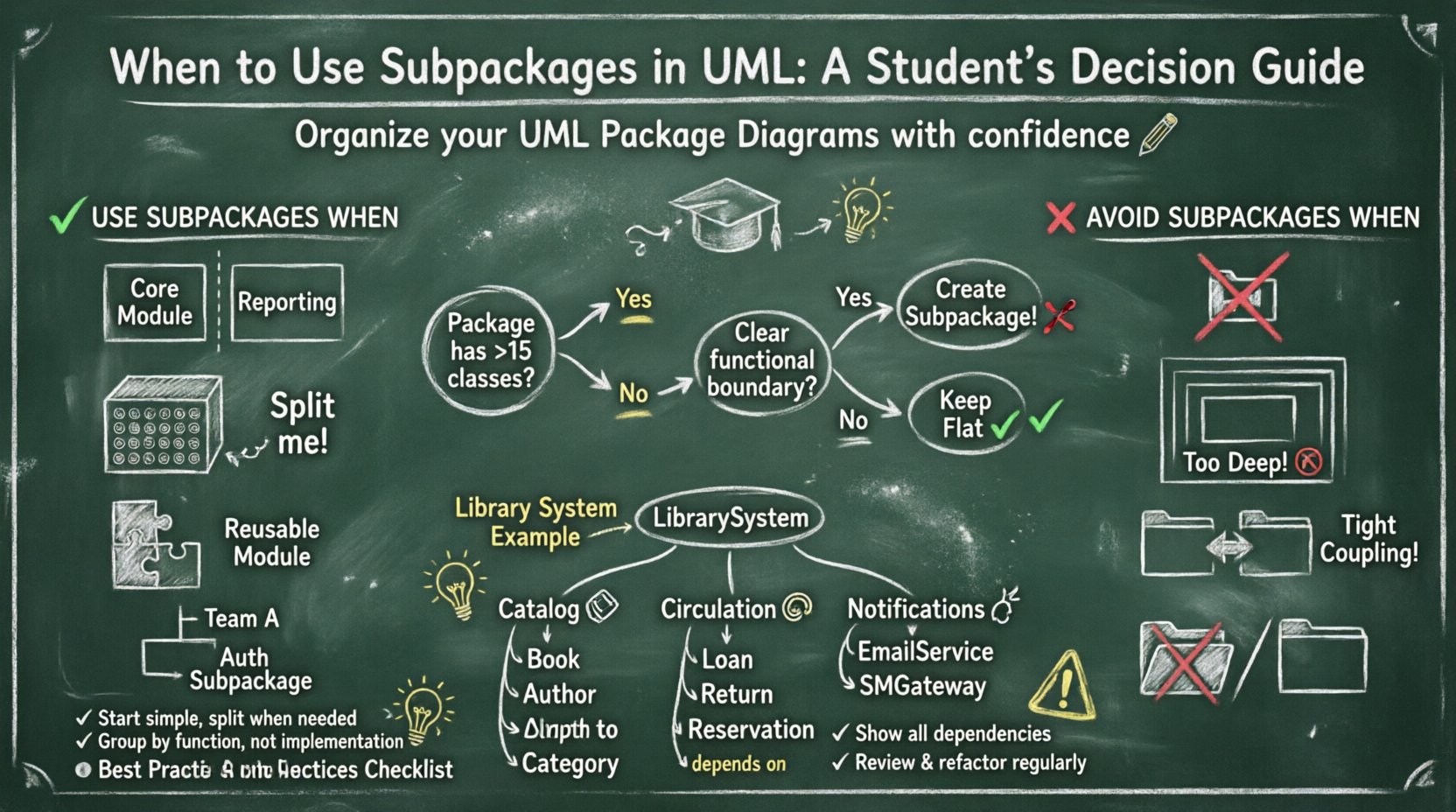
Understanding Packages in UML 🏗️
A package is a general-purpose mechanism for organizing elements. Think of it as a folder in a file system, but with semantic meaning. It groups related model elements together. This grouping helps manage complexity by hiding internal details and exposing only necessary interfaces.
- Logical Grouping: Packages allow you to group classes, interfaces, and other packages by functionality.
- Namespace Management: They prevent naming conflicts. Two classes can share the same name if they reside in different packages.
- Abstraction: They provide a high-level view of the system, abstracting away the low-level implementation details.
When you start a project, it is tempting to place every class into a single package. As the system grows, this becomes unmanageable. This is where the concept of a subpackage becomes relevant.
Defining Subpackages 📂
A subpackage is a package contained within another package. It creates a hierarchy. The parent package acts as a container, while the subpackage acts as a specialized container for specific functionality. Visually, in a UML diagram, a subpackage is often represented by a smaller package symbol nested inside a larger one.
Consider a scenario where you are designing an e-commerce system. You might have a top-level package called CommerceSystem. Inside this, you might find subpackages like OrderManagement, Inventory, and PaymentProcessing. This hierarchy clarifies the boundaries of responsibility.
Criteria for Subpackage Usage ✅
Deciding to create a subpackage should not be arbitrary. It must serve a specific purpose. Below are the primary criteria to consider before introducing a new level of nesting.
1. Logical Separation of Concerns
If a group of classes performs a distinct function that is logically separate from the rest of the system, a subpackage is appropriate. For example, if your system has a Reporting Module that is rarely used by the Core Module, separating them into a subpackage makes sense.
- High Cohesion: The classes within the subpackage should be tightly related to each other.
- Low Coupling: The subpackage should have minimal dependencies on other subpackages.
2. Scale and Complexity
As the number of classes increases, the cognitive load on the reader increases. If a parent package contains more than 15 to 20 classes, it is often a signal that it needs subdivision. A flat list of 50 classes is difficult to scan and maintain.
3. Reusability
If a specific set of components is intended to be used in multiple different projects or contexts, isolating them in a subpackage highlights their potential for reuse. It signals to other developers that this is a distinct module.
4. Team Structure Alignment
In larger projects, different teams often work on different parts of the system. Aligning your package structure with team boundaries can improve workflow. If Team A owns the User Authentication logic, placing that logic in a specific subpackage helps manage access and responsibility.
When NOT to Use Subpackages ❌
While subpackages are useful, they introduce their own overhead. Overuse leads to a deep hierarchy that is hard to navigate. Here are scenarios where you should avoid creating a subpackage.
- Trivial Grouping: Do not create a subpackage just to organize two or three classes. Keep them in the parent package if the distinction is minor.
- Deep Nesting: Avoid nesting more than three levels deep. A structure like
System > Module > SubModule > Componentis often too granular and confusing. - Hidden Dependencies: Do not use subpackages to hide tight coupling. If two subpackages depend heavily on each other, they should probably be merged or redesigned.
- Physical vs. Logical: Do not confuse logical packages with physical deployment folders. A package diagram represents design intent, not file system structure.
Decision Matrix for Students 🧠
To help visualize the decision process, consider the following table. It compares common scenarios against the recommendation for using a subpackage.
| Scenario | Classes Involved | Relationship Strength | Recommendation |
|---|---|---|---|
| Core System Logic | 50+ | Mixed | Create Subpackages by Feature |
| Utility Helpers | 5 | High Cohesion | Single Subpackage (Utils) |
| One-off Classes | 2 | Low Cohesion | No Subpackage |
| External API Integration | 10 | Low Coupling | Create Subpackage for Isolation |
| Database Entities | 30 | High Cohesion | Create Subpackage (Persistence) |
Visualizing Relationships and Dependencies 🔗
Once you decide to use subpackages, you must clearly define how they interact. UML provides specific stereotypes and arrows to depict these relationships. Understanding these is crucial for accurate documentation.
Import vs. Access
There is a distinct difference between importing a package and accessing a class within it.
- Import: This makes the entire namespace available. It is like
import *in Java or C#. Use this sparingly to avoid namespace pollution. - Access: This refers to a specific class using another specific class. It is more precise.
Dependency Arrows
Dependencies are shown as dashed arrows. When a subpackage depends on another, the arrow typically originates from the source package and points to the target package. This indicates that changes in the target may affect the source.
- Circular Dependencies: Avoid creating cycles between subpackages. If Subpackage A depends on Subpackage B, and Subpackage B depends on Subpackage A, you have a circular dependency. This creates tight coupling and makes testing difficult.
- Layering: Aim for a layered architecture. Higher-level subpackages should depend on lower-level subpackages, but never the reverse.
Cohesion and Coupling Considerations 🔄
The ultimate goal of using subpackages is to improve software quality metrics. Two key metrics are cohesion and coupling.
High Cohesion
Cohesion measures how closely related the responsibilities of a package are. A subpackage with high cohesion contains elements that work together to achieve a single purpose. For example, a Notification subpackage might contain EmailSender, SMSGateway, and LogWriter. These all serve the purpose of delivering information.
Low Coupling
Coupling measures how much one subpackage relies on another. You want to minimize this. If Subpackage A changes frequently, it should not force Subpackage B to change. Use interfaces to define the contract between subpackages. This way, Subpackage B only cares about the interface, not the implementation details inside Subpackage A.
Common Student Mistakes 🚫
Students often struggle with package diagrams because they focus on the visual aspect rather than the architectural intent. Here are common pitfalls to avoid.
- Over-Engineering: Creating subpackages for every small feature before the code is written. Wait until you see a pattern of grouping before splitting.
- Ignoring Dependencies: Drawing the hierarchy without drawing the dependency arrows. The diagram is useless if you do not know how the parts connect.
- Inconsistent Naming: Using
pkg1,pkg2, orPackageAinstead of descriptive names likeUserAuthorDataLayer. Names should explain the purpose. - Flat Hierarchy Only: Conversely, some students refuse to use subpackages even when the system is massive. This leads to unreadable diagrams.
- Mixing Concerns: Placing UI classes and Database classes in the same subpackage. Separate concerns by layer.
Naming Conventions and Standards 📝
Consistency is key for readability. Establish a naming convention early in the project.
- LowerCamelCase: Use this for package names to distinguish them from class names if your language uses UpperCamelCase for classes.
- Descriptive Suffixes: Use suffixes like
Manager,Service, orModelonly if they denote a specific architectural pattern within the package name. - Domain Driven: Name packages after the domain concepts they represent. Instead of
Backend, useOrderProcessing.
For example, a valid structure might look like this:
com.company.project(Root)com.company.project.domain(Subpackage: Business Entities)com.company.project.domain.user(Sub-subpackage: User specific logic)com.company.project.infrastructure(Subpackage: External Services)
Maintenance and Future Proofing 🛠️
A package diagram is not a one-time task. It evolves as the software evolves. When you refactor code, you must update the diagram. This ensures the documentation remains accurate.
Refactoring Packages
Over time, you may find that a subpackage is no longer useful. You might merge it back into the parent. Or, you might need to split it further. This is normal. The diagram should reflect the current state of the system, not the historical state.
Versioning
If you are working on a project with multiple versions, consider how packages change. Sometimes, a subpackage exists only in a specific version. In this case, annotate the diagram or create separate diagrams for different releases.
Practical Example: A Library System 📚
Let us apply these concepts to a Library Management System. The root package is LibrarySystem.
- Subpackage: Catalog
ContainsBook,Author,Categoryclasses. This handles the data structure of the inventory. - Subpackage: Circulation
ContainsLoan,Return,Reservationclasses. This handles the transaction logic. - Subpackage: Notifications
ContainsEmailService,SMSGateway. This handles alerts for overdue books.
Notice how each subpackage has a clear boundary. The Catalog subpackage might depend on Circulation to check if a book is available. However, Circulation does not need to know the internal details of Category, only that a book exists.
Summary of Best Practices 🏆
To ensure your package diagrams are effective, adhere to these core principles:
- Start Simple: Begin with a flat structure and split only when necessary.
- Focus on Function: Group by what the code does, not how it is implemented.
- Limit Depth: Keep the hierarchy shallow to maintain clarity.
- Document Dependencies: Always show how subpackages interact.
- Review Regularly: Treat the diagram as a living document.
By following these guidelines, you create a design that is not only functional but also understandable by others. This reduces the cognitive load for anyone reading your architecture. It allows students and professionals to communicate complex systems with clarity and precision.
Final Thoughts on Architecture 🎓
Learning to design packages is a skill that develops over time. It requires experience and feedback. Do not be afraid to make mistakes. If a structure becomes confusing, refactor it. The goal is clarity. Whether you are a student or a professional, the ability to organize code logically is a fundamental skill. It sets the foundation for maintainable, scalable, and robust software systems.
Remember that a package diagram is a tool for communication. If your team can look at the diagram and immediately understand the system’s structure, you have succeeded in your design. Use subpackages as a means to achieve that understanding, not as a decorative element.