Software architecture relies heavily on visual representations to communicate structure, dependencies, and boundaries. Among the most critical tools in this arsenal is the package diagram. It provides a high-level view of the system, organizing code into manageable units. However, maintaining the integrity of these diagrams is often a struggle. Over time, they can become outdated, ambiguous, or outright incorrect. When a package diagram gets confusing or wrong, it creates friction for developers, introduces risk during onboarding, and obscures technical debt.
This guide addresses the common pitfalls associated with package diagrams. It offers a systematic approach to identifying errors, understanding root causes, and implementing fixes. The goal is to restore clarity and ensure the diagram remains a reliable source of truth for the system architecture.
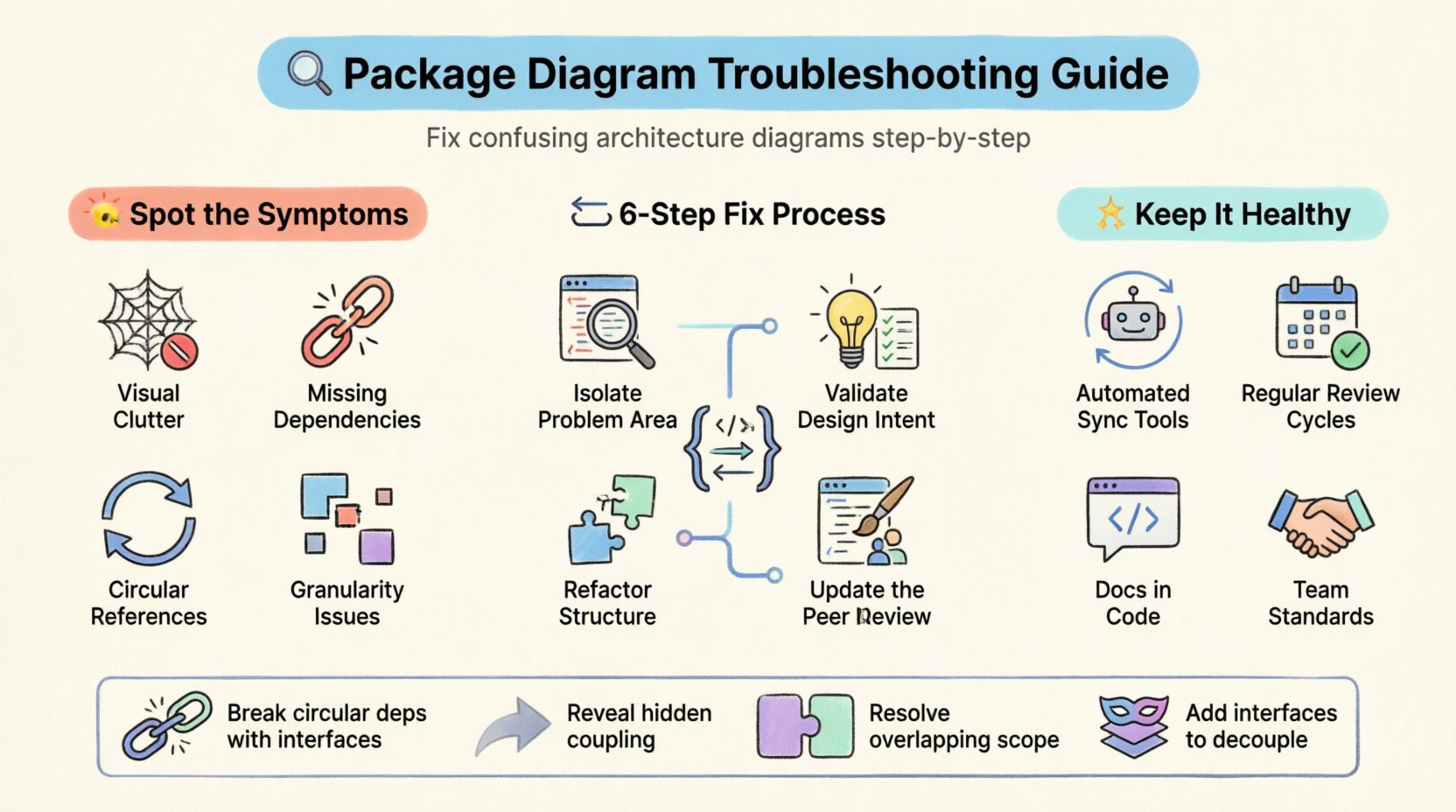
Identifying the Symptoms of a Broken Diagram 🔍
Before attempting a repair, one must accurately diagnose the problem. A confusing or wrong diagram often manifests in specific ways. Recognizing these symptoms early prevents wasted effort on symptoms rather than causes.
- Visual Clutter: Lines cross excessively, making the flow impossible to follow. The diagram looks like a spider web rather than a structured hierarchy.
- Missing Dependencies: Components clearly interact in code, but no connection exists in the model. This suggests the diagram is outdated.
- Circular References: Package A depends on B, B depends on C, and C depends back on A. This indicates a logical error in the design.
- Naming Inconsistencies: Packages are named differently in the diagram versus the actual file structure. This creates cognitive dissonance for the reader.
- Granularity Issues: Packages are either too large (containing unrelated logic) or too small (fragmenting related functionality).
Root Causes: Why Diagrams Degrade 📉
Understanding why a diagram fails is just as important as fixing it. The degradation usually stems from a lack of synchronization between the model and the implementation.
1. The Drift Between Code and Model
Software evolves rapidly. Developers add features, refactor modules, and introduce new libraries. If the package diagram is not updated alongside these changes, it becomes a relic. This is the most common cause of “wrong” diagrams. The code executes correctly, but the documentation does not reflect reality.
2. Ambiguous Responsibility Boundaries
When defining packages, the scope of responsibility is sometimes unclear. If a package is tasked with too many unrelated concerns, it becomes a dumping ground. This leads to high coupling, where changes in one area ripple unpredictably to others. The diagram then fails to show clear boundaries.
3. Lack of Standardization
Without a strict convention for naming, grouping, or drawing dependencies, different contributors create diagrams in their own styles. One developer might use a thick line for inheritance, while another uses a dotted line. This inconsistency makes the diagram difficult to interpret collectively.
4. Over-Engineering the Visuals
Sometimes, the effort to make a diagram look “perfect” outweighs the value of the information. Excessive use of colors, icons, or complex layout algorithms can distract from the actual structure. The goal of a package diagram is communication, not aesthetics.
Common Dependency Issues and Fixes 🔄
Dependencies are the backbone of package diagrams. When they are flawed, the entire system structure is compromised. Below is a breakdown of common dependency errors and how to resolve them.
| Issue Type | Description | Impact | Resolution Strategy |
|---|---|---|---|
| Circular Dependency | Two packages depend on each other directly or indirectly. | Compilation errors, tight coupling, testing difficulties. | Extract a shared interface or utility package to break the cycle. |
| Hidden Coupling | Dependencies exist but are not explicitly modeled. | Unpredictable behavior during refactoring. | Run dependency analysis tools to detect and model hidden links. |
| Overlapping Scope | Logic exists in multiple packages simultaneously. | Duplication, maintenance overhead. | Merge packages or define clear ownership rules. |
| Missing Interface | Dependencies are direct implementation references. | High brittleness, hard to swap implementations. | Introduce abstract interfaces to decouple the packages. |
Step-by-Step Resolution Process 🔧
Fixing a problematic package diagram requires a methodical approach. Rushing into changes can introduce new errors. Follow this structured process to ensure stability.
Step 1: Isolate the Problem Area
Do not attempt to fix the entire diagram at once. Identify the specific section causing confusion. Is it a specific subsystem? A particular set of dependencies? Zoom in on the problematic cluster. This prevents overwhelm and allows for focused analysis.
Step 2: Trace the Actual Dependencies
Ignore the diagram for a moment. Look at the source code. Trace the imports and references manually. Verify which packages actually interact. Compare this reality against the visual representation. Highlight the discrepancies.
Step 3: Validate the Design Intent
Ask why the current structure exists. Was it designed this way intentionally? Sometimes, a diagram looks “wrong” because the underlying architecture was always flawed. If the code works but the design is poor, the diagram is merely documenting a bad design. In this case, the fix involves architectural refactoring, not just drawing.
Step 4: Refactor the Structure
Once the discrepancies and design flaws are clear, apply structural changes. This might involve:
- Splitting large packages into smaller, focused units.
- Merging packages that serve a single purpose.
- Introducing interfaces to reduce direct coupling.
- Reorganizing namespaces to match the logical domain.
Step 5: Update the Model
With the code refactored, update the package diagram to reflect the new reality. Ensure that all dependencies are correctly drawn. Use consistent line styles and arrowheads. Avoid adding unnecessary decorative elements.
Step 6: Peer Review
Before finalizing, have another architect or senior developer review the changes. They can spot issues you might have missed, such as unintended side effects of the refactoring or remaining circular dependencies.
Establishing Naming Conventions 📝
Consistency is the key to readability. A package diagram becomes confusing when the naming scheme is arbitrary. Establishing and enforcing a naming convention is essential for long-term maintainability.
- Domain-Driven Names: Use names that reflect the business domain rather than technical implementation. Instead of
ServiceLayer, useOrderProcessing. - Consistent Prefixes: If multiple modules handle similar functions, use a shared prefix. For example,
auth,billing,user. - Case Sensitivity: Decide on a standard (camelCase, snake_case, kebab-case) and apply it strictly across all packages.
- No Abbreviations: Avoid shortening names unless they are universally understood. Ambiguity kills clarity.
- Vertical Alignment: Group related packages vertically in the diagram to show hierarchy.
Maintaining Diagram Integrity Over Time 🔄
Even with a perfect diagram today, it will degrade tomorrow. Maintenance is an ongoing process, not a one-time fix. Implementing a maintenance strategy ensures the diagram remains useful.
Automated Synchronization
Whenever possible, use tools that can generate diagrams from the source code. This ensures the diagram is always in sync with the implementation. While manual diagrams offer more design intent, they require strict discipline to maintain.
Regular Review Cycles
Schedule periodic reviews of the architecture documentation. During sprint planning or technical design reviews, include a check of the package structure. This keeps the team aware of the current state and highlights drift early.
Documentation in the Code
Embed architectural decisions in the code itself. Use comments or README files within packages to explain why they exist and how they relate to others. This provides context that the diagram alone cannot convey.
Handling Legacy Systems 🏛️
Refactoring an existing package diagram in a legacy system is more complex than creating a new one. The code may be tightly coupled, and changing dependencies could break functionality.
- Reverse Engineering: Start by analyzing the existing codebase to map the current dependencies. Do not rely on old diagrams.
- Strangler Fig Pattern: Gradually migrate functionality into new, well-structured packages. Update the diagram incrementally as you move code.
- Acceptance of Imperfection: In some legacy contexts, a perfect diagram may not be feasible. Focus on documenting the critical paths and high-risk areas first.
Collaboration and Team Standards 🤝
A package diagram is a communication tool for the team. If the team does not agree on the standards, the diagram will remain confusing. Establish a team charter for architecture documentation.
- Define Symbols: Agree on what different line types mean (e.g., aggregation vs. composition vs. association).
- Review Process: Require diagram updates as part of the pull request process for significant architectural changes.
- Training: Ensure all team members understand how to read and contribute to the diagrams. Ambiguity often stems from a lack of shared vocabulary.
Final Considerations for Clarity 👁️
When troubleshooting package diagrams, the objective is clarity. A diagram that requires a legend to explain its own symbols is a failure. Every line should have a purpose. Every package should have a clear role.
By following these troubleshooting steps, teams can transform confusing diagrams into clear blueprints. The process requires patience and discipline, but the payoff is a system that is easier to understand, maintain, and evolve. Focus on the structure, respect the code, and keep the documentation aligned.
Remember that the diagram is a living artifact. It should evolve with the software. Regular attention prevents the accumulation of technical debt in the documentation itself.