Software architecture relies heavily on visual documentation to convey structure and relationships. Package diagrams are a cornerstone of this documentation, offering a high-level view of how modules interact within a system. However, even experienced architects frequently fall into traps that render these diagrams misleading or useless. A poorly constructed package diagram can obscure dependencies, hide circular references, and create confusion during refactoring efforts. This guide explores the most frequent errors found in package diagrams and provides actionable strategies to correct them.
Understanding the Purpose of Package Diagrams 🧭
Before addressing errors, it is essential to understand what a package diagram should achieve. These diagrams represent the organization of a system by grouping related elements into packages. They are not meant to show every single class or method. Instead, they focus on the boundaries between different areas of functionality. When done correctly, they serve as a map for navigation. They help developers understand where code belongs and what they are allowed to access.
When these diagrams fail, the consequences extend beyond simple confusion. They impact the speed of development, the stability of the codebase, and the ability to onboard new team members. A clear diagram reduces cognitive load. It allows engineers to predict the impact of changes without tracing through hundreds of lines of code. Conversely, a messy diagram forces developers to rely on trial and error, increasing the risk of introducing bugs.
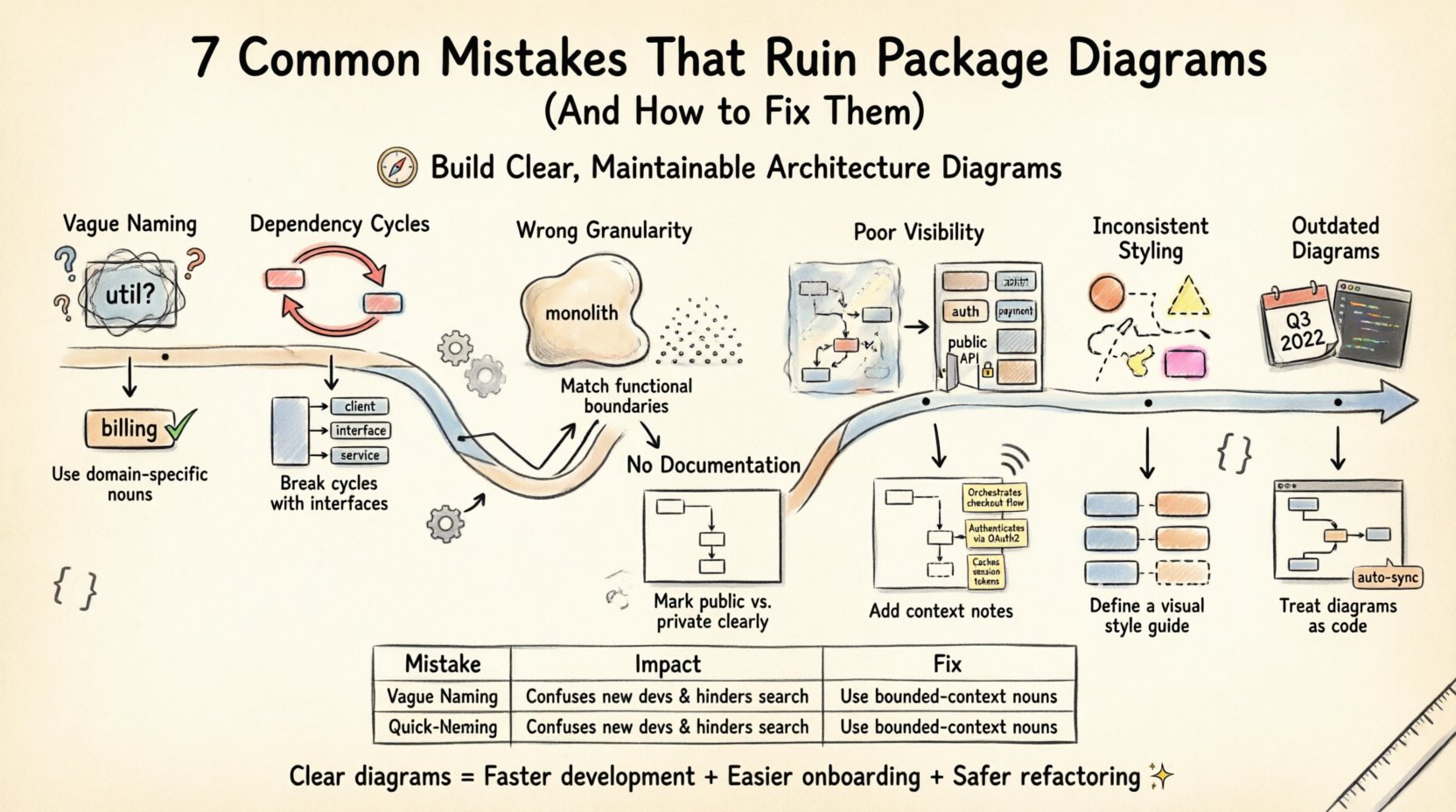
Mistake 1: Vague and Non-Semantic Naming 🏷️
One of the most common issues in package diagrams is the use of generic names. Developers often create packages labeled “util”, “common”, “stuff”, or “temp”. These names provide zero information about the content or responsibility of the package. When a new engineer joins the project, they have to explore the file structure to understand what these packages contain.
- The Problem: Names like “util” imply a collection of helper functions, but they often become dumping grounds for any code that does not fit elsewhere. This leads to the “God Package” anti-pattern where a single package holds unrelated responsibilities.
- The Impact: High coupling. If many packages depend on “util”, changing one function inside it risks breaking unrelated parts of the system. It becomes a centralized point of failure.
- The Fix: Adopt a strict naming convention. Use nouns that describe the domain or functionality. Examples include “billing”, “user-authentication”, “report-generation”, or “inventory-management”.
Consistency is key. If you use the “-ing” suffix for one package, do not switch to noun-based names for another without a clear reason. Document the naming strategy in the project’s architecture guide. This ensures that future additions align with the existing structure.
Mistake 2: Ignoring Dependency Cycles 🔁
Dependencies define the flow of information and control between packages. A healthy system minimizes these connections. However, circular dependencies occur when Package A depends on Package B, and Package B depends on Package A. This creates a loop that is difficult to resolve.
- The Problem: Circular dependencies prevent independent deployment. You cannot test Package A without compiling Package B. It also makes the system rigid. Refactoring one side requires changes to the other.
- The Impact: Increased build times. The build process must resolve the entire cycle before compilation can proceed. This slows down the development feedback loop. It also complicates unit testing because mocks become necessary to break the cycle.
- The Fix: Identify the cycle using static analysis tools. Introduce an interface layer. Move the shared logic into a new, neutral package that both original packages depend on. Alternatively, use dependency injection to decouple the implementation details.
Visualizing these cycles is easier when they are explicitly marked on the diagram. Do not hide the arrows that create loops. Highlight them in red to draw immediate attention. This forces the team to address the architectural debt before it becomes unmanageable.
Mistake 3: Incorrect Granularity ⚖️
Granularity refers to the size and scope of the packages. A diagram can fail if the packages are too large or too small. Both extremes create maintenance challenges.
Too Large Packages
When a package contains too many classes or sub-packages, it loses its purpose as an abstraction. It becomes a monolithic block. Developers cannot quickly identify which specific module handles a task. This leads to a lack of cohesion.
Too Small Packages
Conversely, creating a package for every single class results in a fragmented diagram. The overhead of managing dependencies between hundreds of small packages outweighs the benefits. It creates “spaghetti architecture” where the diagram is too complex to read.
- The Fix: Aim for a balance based on functional boundaries. A package should represent a logical unit of work. If a package grows larger than a single team’s scope, consider splitting it. If it shrinks to the point where it only holds two or three classes, consider merging it with a related package.
Mistake 4: Poor Visibility Management 👁️
Visibility modifiers (public, private, protected) control access to elements within a package. Package diagrams often ignore these distinctions, treating all internal elements as accessible. This creates a false sense of security regarding encapsulation.
- The Problem: External packages might rely on internal implementation details that are supposed to be hidden. If the diagram does not reflect the actual visibility rules, developers may assume they can access anything.
- The Impact: Leaky abstractions. Internal changes break external code unexpectedly. This violates the principle of encapsulation and makes the system fragile.
- The Fix: Clearly distinguish between internal and external interfaces. Use specific notations to show which elements are exported. If a package is meant to be a library, ensure the diagram highlights the public API. Internal classes should be marked as private to the package scope.
Mistake 5: Lack of Documentation Within Packages 📝
A package diagram is a static representation. It does not explain why certain decisions were made. Without annotations, the diagram is just a map without a legend. Developers may not understand the rationale behind a specific dependency or grouping.
- The Problem: New team members have no context for the architecture. They might change a dependency structure without understanding the downstream effects.
- The Impact: Knowledge silos. Only the original architects understand the design. If they leave, the maintenance burden increases significantly.
- The Fix: Add notes to the diagram. Explain the purpose of the package. Document critical dependencies. For example, add a note stating, “This package handles external API calls and is designed to be swapped for testing purposes.”
Comparison of Common Errors and Solutions 📊
The following table summarizes the critical errors and their corresponding solutions. Reviewing this list can help audit existing diagrams.
| Category | Common Mistake | Recommended Fix |
|---|---|---|
| Naming | Generic names like “util” or “lib” | Use domain-specific nouns (e.g., “payment-gateway”) |
| Dependencies | Circular references between packages | Introduce interfaces or extract shared logic |
| Granularity | Packages are too small or too large | Align with team boundaries and functional units |
| Visibility | Ignoring access modifiers | Mark internal vs. external interfaces clearly |
| Documentation | No context provided for structure | Include notes on purpose and constraints |
Mistake 6: Inconsistent Styling and Presentation 🎨
Consistency in visual representation aids readability. If some packages are drawn as boxes and others as cylinders, the diagram becomes confusing. Inconsistent line styles for dependencies (solid vs. dashed) also create ambiguity.
- The Problem: Readers waste time decoding the visual language instead of understanding the architecture. Different styles might imply different meanings that are not defined.
- The Impact: Misinterpretation of relationships. A dashed line might imply an optional dependency in one section and an interface implementation in another.
- The Fix: Establish a style guide. Define what colors, shapes, and line types represent. Use the same shape for all packages. Use solid lines for direct dependencies and dashed lines for interfaces or optional connections. Ensure this guide is accessible to the entire team.
Mistake 7: Outdated Diagrams 📅
Software evolves rapidly. Code changes, features are added, and old features are removed. If the diagram is not updated alongside the code, it becomes a lie. An outdated diagram is worse than no diagram because it creates false trust.
- The Problem: Developers rely on the diagram to plan changes. When the diagram does not match reality, they introduce errors based on incorrect assumptions.
- The Impact: Technical debt. The team spends time reconciling the diagram with the code instead of building new features. Debugging becomes harder when the map does not match the terrain.
- The Fix: Automate the generation of diagrams where possible. If manual updates are required, make diagram updates part of the definition of done for pull requests. Treat the diagram as code that needs version control and review.
Impact on Refactoring and Testing 🛠️
The quality of your package diagram directly influences the refactoring process. Refactoring involves changing the internal structure of code without changing its external behavior. A clear package diagram acts as a contract.
- Testability: If dependencies are well-defined, you can mock them easily. If the diagram shows clear boundaries, you know exactly what to isolate for unit tests.
- Refactoring Safety: When you move a class to a new package, the diagram shows which other packages will be affected. You can check the dependency list before making the change.
- Onboarding: New hires can read the diagram to understand the system topology. This reduces the time they spend asking questions about where specific logic resides.
Strategies for Maintenance 🔄
Maintaining a package diagram is an ongoing effort. It requires discipline and integration into the workflow. Here are steps to ensure long-term viability.
- Regular Audits: Schedule a quarterly review of the architecture. Check if the diagrams match the current codebase. Identify any drift.
- Automated Checks: Use tools that analyze the code and flag potential dependency violations. These tools can generate warnings if a package violates its defined boundaries.
- Training: Ensure all developers understand the value of the diagram. Explain that a messy diagram is a sign of a messy system. Encourage them to update the diagram when they modify the structure.
- Version Control: Store the diagram files in the same repository as the source code. This ensures that the diagram evolves with the project history.
Final Thoughts on Architectural Clarity ✨
Package diagrams are more than just drawings. They are communication tools that bridge the gap between design and implementation. When they are accurate and clear, they empower teams to build robust systems. When they are flawed, they introduce hidden risks and slow down progress.
By avoiding vague naming, managing dependencies carefully, and maintaining consistency, you can create diagrams that serve as reliable guides. The effort spent on creating and updating these diagrams pays off in reduced maintenance costs and higher code quality. Treat the architecture documentation with the same respect as the application code itself.