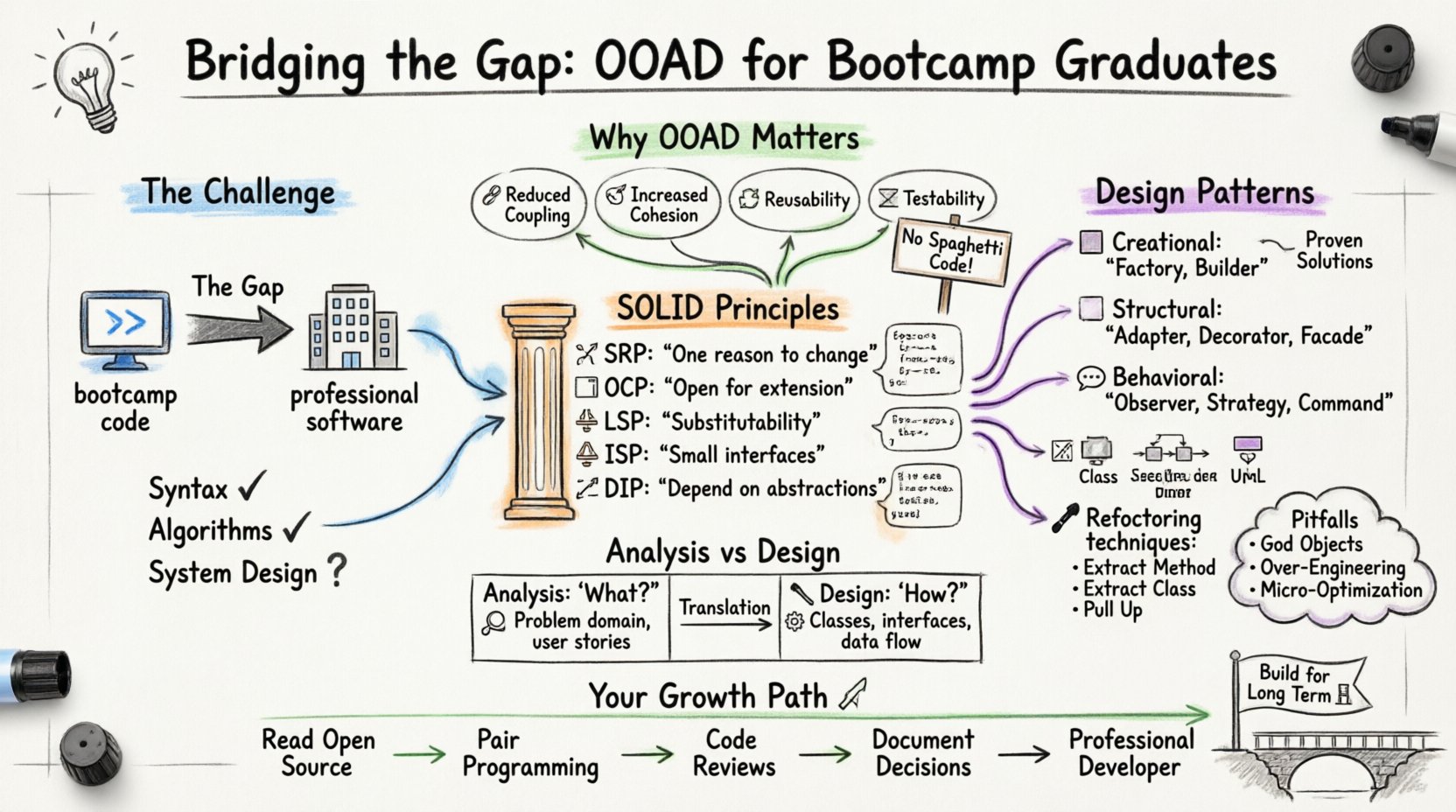
Welcome to the next phase of your development journey. Many bootcamp graduates possess strong skills in writing syntax and solving algorithmic problems. However, the professional software industry demands something more: the ability to structure complex systems that are maintainable, scalable, and adaptable. This guide focuses on Object-Oriented Analysis and Design (OOAD), a critical discipline for transitioning from writing code to building software.
Understanding OOAD is not about memorizing rules; it is about cultivating a mindset. It shifts the focus from how to write a function to how to organize logic. This document explores the core pillars of this discipline without relying on specific tools or platforms. Instead, we focus on universal concepts applicable to any object-oriented language.
1. Why OOAD Matters for Modern Developers 🏗️
Bootcamps often prioritize rapid prototyping. While this is excellent for building portfolios, production software requires stability over time. As a team grows, code becomes harder to navigate without a solid design foundation. OOAD provides the blueprint needed to manage complexity.
Key benefits include:
- Reduced Coupling: Changes in one module do not break unrelated parts of the system.
- Increased Cohesion: Related responsibilities are grouped logically within specific classes.
- Reusability: Components designed correctly can be utilized across different projects.
- Testability: Well-structured code is easier to isolate and verify through testing.
Without these principles, codebases often evolve into “spaghetti code,” where dependencies become tangled and modifications become risky. OOAD offers a structured approach to prevent this technical debt.
2. Analysis vs. Design: Understanding the Distinction 🧐
A common point of confusion for beginners is the difference between Analysis and Design. While they are closely linked, they serve different purposes in the software development lifecycle.
| Phase | Focus | Key Question |
|---|---|---|
| Analysis | Understanding the problem domain | What does the system need to do? |
| Design | Planning the solution structure | How will the system do it? |
During Analysis, you identify entities, relationships, and behaviors. You look at user stories and requirements to understand the business logic. You are not thinking about code yet; you are thinking about the world the software operates in.
During Design, you translate those concepts into technical structures. You decide on classes, interfaces, and data flow. You determine how objects interact to fulfill the requirements identified in the analysis phase.
3. The SOLID Principles: The Foundation of Good Design 🧱
The SOLID acronym represents five design principles intended to make software designs more understandable, flexible, and maintainable. These are not suggestions; they are the bedrock of professional OOAD.
3.1 Single Responsibility Principle (SRP) 🎯
A class should have one, and only one, reason to change. This does not mean a class should do only one thing; it means it should encapsulate one line of reasoning. If a class handles both data retrieval and data formatting, modifying the formatting logic might accidentally break the retrieval logic.
- Bad Practice: A
Userclass that saves itself to the database and sends an email. - Good Practice: A
Userclass representing data, aUserRepositoryfor storage, and anEmailServicefor communication.
3.2 Open/Closed Principle (OCP) 🚪
Software entities should be open for extension but closed for modification. You should be able to add new functionality without changing existing source code. This is typically achieved through abstraction and polymorphism.
- Implementation: Use interfaces or abstract classes to define behavior. Create new classes that implement these interfaces to add new features.
- Benefit: Existing tests remain valid because the core logic has not changed.
3.3 Liskov Substitution Principle (LSP) ⚖️
Objects of a superclass should be replaceable with objects of its subclasses without breaking the application. If a class B extends class A, code using A must work correctly when B is substituted.
- Warning: Avoid overriding methods to throw exceptions or behave unpredictably compared to the parent.
- Example: If a
Rectangleclass has asetHeightmethod, aSquaresubclass cannot override it to break the width-height relationship without violating this principle.
3.4 Interface Segregation Principle (ISP) ✂️
Clients should not be forced to depend on interfaces they do not use. Large, monolithic interfaces are a sign of poor design. It is better to have many small, specific interfaces than one large general interface.
- Scenario: A
Workerinterface that requireswork()andeat(). - Refinement: Split into
WorkableandEatableinterfaces. Robots can implementWorkablebut notEatable.
3.5 Dependency Inversion Principle (DIP) 🔄
High-level modules should not depend on low-level modules. Both should depend on abstractions. Furthermore, abstractions should not depend on details; details should depend on abstractions.
- Goal: Decouple the business logic from the implementation details.
- Application: Inject dependencies rather than creating them inside the class. This allows for easier testing and swapping of implementations (e.g., swapping a file storage for cloud storage).
4. Essential Design Patterns for Bootcamp Grads 🧩
Design patterns are proven solutions to recurring problems. They are not code to copy-paste, but templates for how to organize your logic. Here are three categories with common examples.
4.1 Creational Patterns
These deal with object creation mechanisms. They increase flexibility and reuse of existing code.
- Factory Method: Defines an interface for creating an object, but lets subclasses alter the type of objects that will be created. This decouples the creation logic from the usage logic.
- Builder: Constructs complex objects step by step. Useful when an object requires many optional parameters or a specific construction sequence.
4.2 Structural Patterns
These deal with class and object composition. They ensure that if one part of a system changes, the whole system does not break.
- Adapter: Allows incompatible interfaces to work together. It acts as a wrapper between two different systems.
- Decorator: Attaches additional responsibilities to an object dynamically. This is an alternative to static subclassing for extending functionality.
- Facade: Provides a simplified interface to a complex subsystem. It makes the system easier to use without hiding its internal complexity.
4.3 Behavioral Patterns
These deal with communication between objects and how algorithms are distributed.
- Observer: Defines a dependency where one object (the subject) maintains a list of others (observers) and notifies them automatically of state changes. This is common in event-driven systems.
- Strategy: Defines a family of algorithms, encapsulates each one, and makes them interchangeable. The client selects the algorithm at runtime.
- Command: Encapsulates a request as an object, thereby letting you parameterize clients with different requests, queue requests, or log requests.
5. Visualizing Architecture with UML 📐
While you do not need to draw diagrams for every project, Unified Modeling Language (UML) provides a standardized way to communicate design intent. It bridges the gap between technical and non-technical stakeholders.
- Class Diagrams: Show the static structure of the system. They map out classes, attributes, operations, and relationships.
- Sequence Diagrams: Illustrate how objects interact over time. They are excellent for understanding the flow of a specific use case.
- Use Case Diagrams: Capture functional requirements from the perspective of actors (users or external systems).
Using these diagrams during the design phase helps identify logical errors before a single line of code is written. It forces you to think about relationships and data flow explicitly.
6. The Art of Refactoring 🛠️
Refactoring is the process of restructuring existing code without changing its external behavior. It is an essential skill for maintaining a healthy codebase over time.
Common refactoring techniques include:
- Extract Method: Moving code into a new method to improve readability and reduce duplication.
- Extract Class: Moving a set of fields and methods into a new class to improve cohesion.
- Pull Up Method: Moving a method from a subclass to its superclass to eliminate duplication.
- Replace Conditional Logic: Using polymorphism or strategy patterns instead of long
if-elsechains.
Refactoring should be done incrementally. Small steps with frequent testing ensure that the behavior remains consistent. It is better to refactor a small piece of code daily than to attempt a massive rewrite once a year.
7. Common Pitfalls to Avoid 🚫
Even experienced developers fall into traps when applying OOAD. Being aware of these common mistakes can save significant time and effort.
- God Objects: A single class that knows too much and does too much. This violates the Single Responsibility Principle.
- Micro-Optimization: Spending time optimizing performance before ensuring the architecture is sound. Design should come before optimization.
- Over-Engineering: Creating complex abstractions for problems that do not need them. Simple code is often better than clever code.
- Ignoring Domain Logic: Focusing too much on technical patterns and forgetting the actual business rules the software must enforce.
8. Transitioning from Student to Professional 🚀
The jump from a learning environment to a professional team is significant. In a bootcamp, you often work in isolation. In a job, your code is read by others, and your designs impact the entire team.
Here are actionable steps to improve your OOAD skills:
- Read Open Source Code: Look at how established projects structure their modules. Analyze their directory structures and class relationships.
- Pair Programming: Work with a senior developer to see how they approach design decisions in real-time.
- Code Reviews: Treat pull requests as learning opportunities. Ask why a certain pattern was chosen over another.
- Document Decisions: When you make a design choice, write down the rationale. This helps future maintainers understand the context.
9. Conclusion: Building for the Long Term 🏛️
Object-Oriented Analysis and Design is not a one-time task. It is a continuous practice. As requirements change, your design must evolve. The goal is not to create a perfect system on the first day, but to create a system that can handle change gracefully.
By applying SOLID principles, understanding design patterns, and prioritizing clear communication, you position yourself as a developer who builds value, not just code. This approach ensures longevity in your career and the stability of the software you create.
Start small. Pick one principle, like Single Responsibility, and apply it to your next project. Review your code with a critical eye. Over time, these habits become second nature. The gap between bootcamp and professional is bridged by consistent, deliberate practice in design.