In the landscape of software architecture, maintaining compatibility between new development and existing infrastructure is a persistent challenge. Legacy System Integration often presents a scenario where modern components must communicate with older systems that operate on different protocols, data structures, or interfaces. The Adapter Pattern serves as a critical bridge in Object-Oriented Analysis and Design, allowing disparate systems to work together without modification to their core logic.
This guide explores the structural and behavioral nuances of the Adapter Pattern. We will examine how it facilitates interoperability, reduces coupling, and extends the lifecycle of older systems. By understanding the mechanics of this pattern, architects can design flexible systems that adapt to change without requiring a complete rewrite.
🧩 Understanding the Core Problem
When organizations evolve their technology stack, they rarely discard all previous assets. Older databases, business logic modules, and communication protocols often remain in use due to stability, cost, or regulatory requirements. However, these legacy components frequently lack the interfaces required by modern applications.
Consider a scenario where a modern web service needs to retrieve customer data. The existing database system uses a proprietary query method that does not accept standard object-oriented calls. Without an intermediary mechanism, developers would need to rewrite the legacy code or hardcode specific logic into the new service, leading to tight coupling and maintenance nightmares.
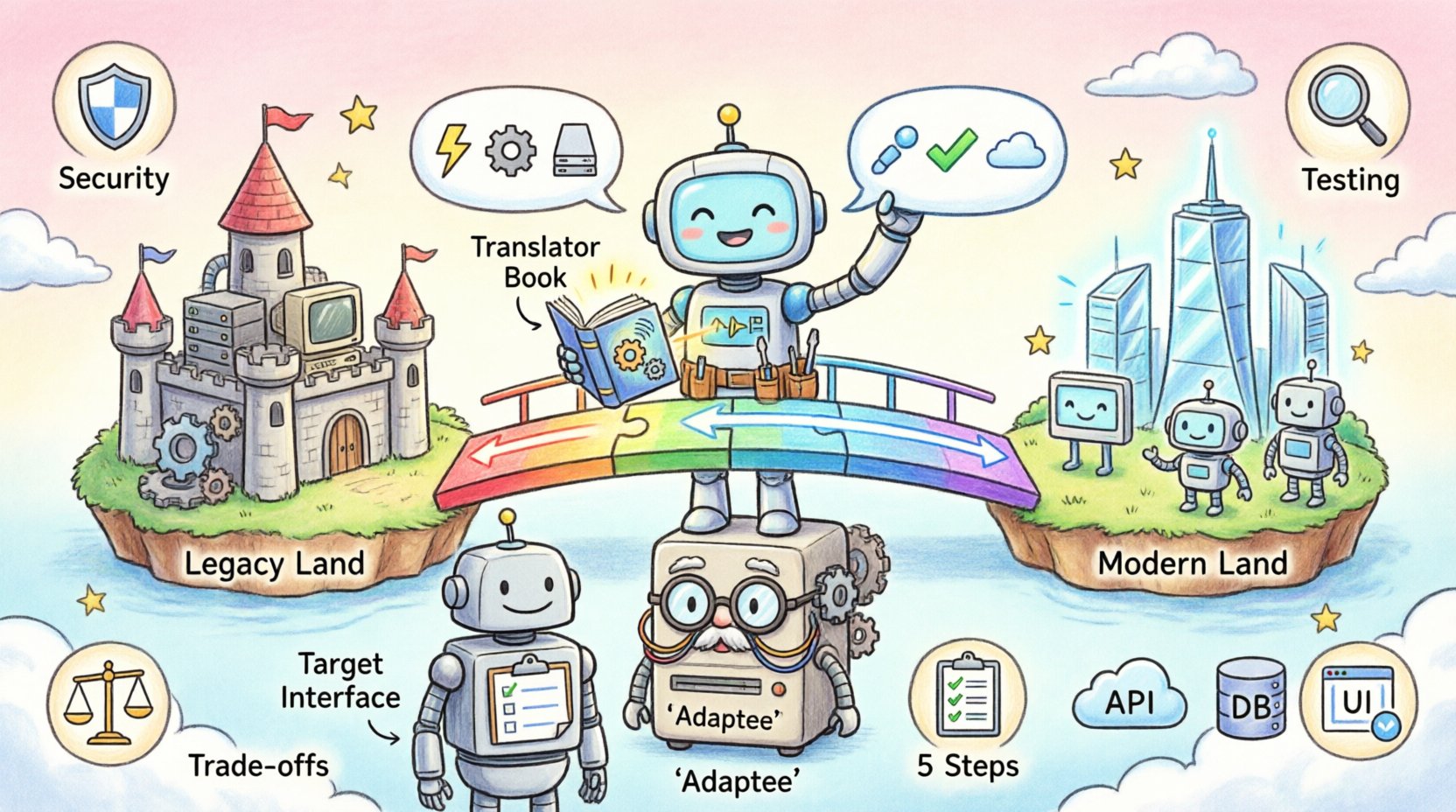
The Adapter Pattern solves this by introducing a wrapper. This wrapper translates requests from the new system into a format the legacy system understands. It acts as a translator, ensuring that both parties believe they are communicating with a compatible peer.
🏗️ What is the Adapter Pattern?
The Adapter Pattern is a structural design pattern that allows objects with incompatible interfaces to collaborate. It functions by creating an intermediate layer that conforms to a specific interface while delegating the actual work to the existing object.
In the context of Object-Oriented Analysis and Design, the pattern involves three primary components:
- The Target Interface: This defines the interface that the client expects to use. It represents the contract that the new system adheres to.
- The Adaptee: This is the existing legacy component that contains the incompatible logic. It has its own interface that does not match the Target.
- The Adapter: This is the class that implements the Target interface but internally uses the Adaptee. It translates the Target’s method calls into calls the Adaptee can understand.
This separation of concerns ensures that the client code remains unaware of the legacy system’s specific constraints. The client interacts solely with the Target, while the Adapter handles the translation behind the scenes.
🔄 Structural vs. Behavioral Approaches
While the core concept remains the same, the implementation can vary based on the language features and architectural constraints available. In object-oriented design, there are two primary ways to implement this pattern:
1. Class Adapter
This approach relies on inheritance. The Adapter class inherits from the Adaptee and implements the Target interface. This allows the Adapter to reuse the Adaptee’s code directly.
- Pros: Can reuse existing code without modification; allows the Adapter to access protected members of the Adaptee.
- Cons: In many object-oriented languages, multiple inheritance is restricted or discouraged. This can limit flexibility if the Adaptee is already part of another hierarchy.
2. Object Adapter
This approach relies on composition. The Adapter class holds a reference to an instance of the Adaptee. It implements the Target interface and delegates calls to the internal Adaptee instance.
- Pros: More flexible; avoids inheritance constraints. It can work with any class that implements the necessary methods, regardless of the inheritance tree.
- Cons: Requires the creation of a new instance of the Adaptee, which may impact memory usage slightly in high-frequency scenarios.
For most modern integration tasks involving legacy systems, the Object Adapter is preferred. It decouples the adapter from the legacy class hierarchy, making it easier to swap out implementations or mock them for testing.
📋 Implementation Steps for Legacy Integration
Implementing the Adapter Pattern requires a methodical approach to ensure stability and maintainability. Follow these steps to integrate legacy systems effectively.
Step 1: Identify the Target Interface
Define what the new system needs. What methods must be called? What parameters are required? What data structure should be returned? Document this interface clearly. This becomes the contract for your adapter.
Step 2: Analyze the Adaptee
Examine the legacy system’s existing methods. Identify which methods can fulfill the requirements of the Target Interface. Note any differences in parameter types, return values, or execution logic.
Step 3: Design the Translation Logic
Create the Adapter class. Implement the Target Interface methods. Inside each method, map the new parameters to the legacy parameters. Handle any necessary data transformations, such as converting a list of objects into a specific legacy format.
Step 4: Handle Error States
Legacy systems may not throw exceptions in the same way modern systems do. Ensure that the Adapter normalizes error handling. If the legacy system returns a specific error code, the Adapter should translate this into a standard exception that the new system can catch and process.
Step 5: Testing and Validation
Write tests that verify the Adapter behaves correctly. Use unit tests to verify that the translation logic works. Use integration tests to ensure the Adapter can successfully communicate with the actual legacy system without causing side effects.
📊 Trade-offs and Considerations
While the Adapter Pattern is powerful, it introduces specific complexities. The table below outlines the key trade-offs involved in using this pattern for legacy integration.
| Aspect | Benefit | Potential Drawback |
|---|---|---|
| Coupling | Reduces coupling between new and legacy code. | Creates a new dependency on the Adapter class. |
| Maintainability | Changes in legacy logic are isolated. | Translation logic must be updated if legacy changes. |
| Performance | Minimal overhead in simple translations. | Data transformation can introduce latency. |
| Clarity | Interfaces remain consistent for clients. | Debugging may require tracing through multiple layers. |
| Flexibility | Allows multiple adapters for one legacy system. | Increases the total number of classes in the system. |
🛡️ Security and Data Integrity
When bridging legacy systems, security is paramount. Legacy code often predates modern security standards. The Adapter becomes a gatekeeper.
- Input Validation: Never pass unvalidated data from the new system directly to the legacy system. The Adapter should sanitize inputs before translation.
- Authentication: If the legacy system requires credentials, manage these securely within the Adapter. Do not hardcode credentials.
- Data Sanitization: Ensure that the Adapter prevents injection attacks, especially if the legacy system uses string-based queries.
By treating the Adapter as a security boundary, you protect the legacy system from vulnerabilities introduced by newer, less rigid components.
🧪 Testing the Adapter
Testing an Adapter requires a strategy that covers both the interface and the implementation.
Unit Testing
Mock the legacy system (the Adaptee). Verify that the Adapter calls the legacy methods with the correct arguments. This isolates the Adapter logic from external dependencies.
Integration Testing
Connect to the actual legacy system. Verify that the data returned matches the expectations of the new system. Check for data loss during transformation.
Regression Testing
Ensure that updates to the legacy system do not break the Adapter. If the legacy system changes its API, the Adapter must be updated to reflect those changes. Automated tests should catch these regressions early.
🚫 Common Pitfalls to Avoid
Even with a clear understanding of the pattern, developers often make mistakes that undermine the benefits. Be aware of the following issues.
- God Adapter: Do not put all translation logic into a single Adapter class. If the Adapter grows too large, it becomes difficult to maintain. Split responsibilities into smaller, focused adapters.
- Over-Engineering: Do not use the Adapter Pattern if the systems are already compatible. It adds unnecessary complexity when direct calls would suffice.
- Ignoring Performance: If the legacy system is slow, adding an Adapter does not fix it. Be mindful of the performance impact of data transformation in high-throughput environments.
- Hidden Dependencies: Ensure that the Adapter does not leak legacy implementation details into the new system. The client should not know that a legacy system exists behind the Target interface.
🤝 Comparison with Related Patterns
The Adapter Pattern is often confused with other structural patterns. Understanding the distinction is crucial for proper application.
- Bridge Pattern: The Bridge Pattern separates an abstraction from its implementation so that the two can vary independently. The Adapter Pattern focuses on compatibility between existing interfaces.
- Proxy Pattern: A Proxy controls access to an object. It adds a layer of control (like lazy loading or access checks). An Adapter focuses on interface translation.
- Facade Pattern: A Facade provides a simplified interface to a complex subsystem. An Adapter translates a specific interface to another specific interface.
Choosing the right pattern depends on the specific goal. If the goal is to make two incompatible interfaces work together, the Adapter is the correct choice.
🔧 Maintenance and Evolution
Once the Adapter is deployed, the work is not finished. Legacy systems often evolve, albeit slowly. The Adapter must evolve with them.
- Version Control: Maintain version history of the Adapter. This helps in identifying when a change was introduced.
- Documentation: Document the translation logic. Future developers need to understand why specific transformations are happening.
- Deprecation Strategy: Plan for the eventual removal of the Adapter. If the legacy system is replaced, the Adapter should be removable without breaking the new system.
🌐 Real-World Integration Scenarios
To illustrate the practical application, consider these scenarios where the Adapter Pattern is essential.
Database Migration
When migrating from a legacy relational database to a new NoSQL store, the application logic expects SQL queries. An Adapter can translate NoSQL operations into SQL queries for the legacy database during the transition period.
API Wrapping
Older systems may expose data via XML or SOAP. Modern applications prefer JSON and REST. An Adapter can receive JSON requests, convert them to SOAP, send them to the legacy system, and convert the SOAP response back to JSON.
UI Component Integration
In some cases, a new frontend framework needs to interact with an old UI component. The Adapter can translate events from the new framework into events the old component understands, allowing both to coexist in the same view.
📈 Metrics for Success
How do you know if the Adapter implementation is successful? Look for these indicators.
- Reduced Coupling: The new system should not reference the legacy system directly.
- Test Coverage: The Adapter should have high test coverage, especially for translation logic.
- Performance: Latency introduced by the Adapter should be within acceptable thresholds.
- Stability: The legacy system should not experience crashes due to unexpected input from the Adapter.
🛠️ Best Practices for Implementation
To ensure long-term success, adhere to these best practices.
- Interface Segregation: Do not force the Adapter to implement a massive interface if only a few methods are needed. Create a specific interface for the legacy integration.
- Single Responsibility: The Adapter should only handle translation. It should not contain business logic.
- Logging: Log all interactions between the Adapter and the legacy system. This aids in debugging and monitoring.
- Configuration: Allow configuration of the Adapter. Different environments may require different legacy endpoints or credentials.
🔮 Future-Proofing the Design
Technology changes rapidly. The Adapter Pattern provides a buffer against these changes. By isolating the legacy logic, you ensure that when the legacy system is eventually retired, the new system remains intact.
Design the Adapter to be replaceable. If a better integration method becomes available, you should be able to swap the Adapter out without rewriting the client code. This modularity is the essence of robust software architecture.
📝 Summary of Key Takeaways
- The Adapter Pattern bridges incompatible interfaces in Object-Oriented Analysis and Design.
- It enables Legacy System Integration without modifying existing code.
- Object Adapters are generally preferred over Class Adapters for flexibility.
- Security and data integrity must be maintained at the Adapter layer.
- Comprehensive testing is required to ensure the translation logic works correctly.
- The pattern reduces coupling but introduces a layer of indirection.
- Documentation and maintenance plans are crucial for long-term success.
Implementing the Adapter Pattern is a strategic decision. It balances the need for modernization with the reality of existing infrastructure. By following the guidelines in this guide, you can create stable, maintainable integrations that support the evolution of your software ecosystem.