


Introduction: Why PERT Charts Matter in IT Projects
In the world of Information Technology (IT) project management, timelines matter. Delays in one phase can cascade through the entire project lifecycle, impacting delivery dates, budgets, and stakeholder trust. To manage these complexities effectively, project managers rely on tools that provide clarity on dependencies, durations, and critical paths.
One such powerful tool is the Program Evaluation and Review Technique (PERT) chart — a project scheduling method used to determine how long a project will take and identify which activities are most critical to its success.
This article introduces the key concepts of PERT charts, uses a real-world IT development project example, and walks through how to generate a PERT chart using PlantUML, a lightweight, text-based diagramming language — all within the context of Visual Paradigm’s AI-powered diagramming capabilities.
What Is a PERT Chart?
A PERT chart is a project management tool that visually represents a project’s sequence of tasks, their durations, and the dependencies between them. Unlike Gantt charts, which focus on time and milestones, PERT charts emphasize the logical flow of work, highlighting:
-
Tasks (activities)
-
Task durations
-
Dependencies (which tasks must be completed before others begin)
-
The critical path (the longest sequence of dependent tasks that determines the project’s minimum completion time)
PERT charts are especially useful in complex, uncertain environments like software development, where task durations may vary due to unforeseen issues.
🔍 Key Concept:
The Critical Path is the chain of tasks with no float (slack time). Any delay in a task on the critical path will delay the entire project.
Example: IT Development Project – A Step-by-Step Breakdown
Let’s walk through an actual IT project: Developing a Cloud-Based Student Portal.
📋 Project Phases
| Phase | Tasks |
|---|---|
| 1. Requirements | Scope Definition, Stakeholder Interviews |
| 2. System Design | Architecture Design, Database Design |
| 3. Development | Frontend, Backend, API Integration |
| 4. Testing | Unit, System, User Acceptance Testing |
| 5. Deployment | Staging Setup, Production Deployment |
We will now build a PERT chart that shows the timeline, dependencies, and critical path for this project.
How to Create a PERT Chart Using PlantUML (via Visual Paradigm AI)
PlantUML is a text-based diagramming language that allows users to generate diagrams using plain text. While not natively supported in all diagramming tools, Visual Paradigm integrates PlantUML via its AI-powered diagram generation engine, enabling users to create complex diagrams — including PERT charts — with just a few lines of code.
✅ Key Advantage: You can generate a fully functional PERT chart from a simple code block — no manual drawing required.
📝 PlantUML Code for the IT Development Project PERT Chart
@startuml
!include https://static.visual-paradigm.com/plantuml-stdlib/pert-chart.puml
title IT Development Project Example
$tasksInLane('Requirements', '[{"name":"Scope Definition","alias":"task01","id":"001","startDate":"1 Jan 2024","finishDate":"10 Jan 2024","durationInDays":"10","responsible":"Alice"},{"name":"Stakeholder Interviews","alias":"task02","id":"002","startDate":"10 Jan 2024","finishDate":"20 Jan 2024","durationInDays":"10","responsible":"Bob"}]')
$tasksInLane('System Design', '[{"name":"Architecture Design","alias":"task03","id":"003","startDate":"20 Jan 2024","finishDate":"30 Jan 2024","durationInDays":"10","responsible":"Charlie"},{"name":"Database Design","alias":"task04","id":"004","startDate":"30 Jan 2024","finishDate":"5 Feb 2024","durationInDays":"15","responsible":"Diana"}]')
$tasksInLane('Development', '[{"name":"Frontend Implementation","alias":"task05","id":"005","startDate":"5 Feb 2024","finishDate":"20 Feb 2024","durationInDays":"15","responsible":"Eve"},{"name":"Backend Implementation","alias":"task06","id":"006","startDate":"20 Feb 2024","finishDate":"10 Mar 2024","durationInDays":"20","responsible":"Frank"},{"name":"API Integration","alias":"task07","id":"007","startDate":"10 Mar 2024","finishDate":"20 Mar 2024","durationInDays":"10","responsible":"Grace"}]')
$tasksInLane('Testing', '[{"name":"Unit Testing","alias":"task08","id":"008","startDate":"20 Mar 2024","finishDate":"30 Mar 2024","durationInDays":"10","responsible":"Henry"},{"name":"System Testing","alias":"task09","id":"009","startDate":"30 Mar 2024","finishDate":"10 Apr 2024","durationInDays":"10","responsible":"Ivy"},{"name":"User Acceptance Testing","alias":"task10","id":"010","startDate":"10 Apr 2024","finishDate":"20 Apr 2024","durationInDays":"10","responsible":"Jack"}]')
$tasksInLane('Deployment', '[{"name":"Staging Environment Setup","alias":"task11","id":"011","startDate":"20 Apr 2024","finishDate":"30 Apr 2024","durationInDays":"10","responsible":"Kate"},{"name":"Production Deployment","alias":"task12","id":"012","startDate":"30 Apr 2024","finishDate":"5 May 2024","durationInDays":"5","responsible":"Leo"}]')
$dependency(task01, task02)
$dependency(task02, task03)
$dependency(task03, task04)
$dependency(task04, task05)
$dependency(task05, task06)
$dependency(task06, task07)
$dependency(task07, task08)
$dependency(task08, task09)
$dependency(task09, task10)
$dependency(task10, task11)
$dependency(task11, task12)
$finalize()
@enduml How Does This Code Work?
Let’s break down the syntax:
1. !include https://static.visual-paradigm.com/plantuml-stdlib/pert-chart.puml
-
This loads a custom PERT chart library from Visual Paradigm (Note: it does not work in external public PlantUML Editor)
-
It enables the use of special functions like
$tasksInLane()and$dependency().
2. title IT Development Project Example
-
Sets the diagram title.
3. $tasksInLane(...)
-
Groups tasks by phase (e.g., Requirements, Development).
-
Each task includes:
-
name: Task label -
alias: Unique identifier (used in dependencies) -
startDateandfinishDate: Timeframe -
durationInDays: Duration -
responsible: Assignee
-
4. $dependency(...)
-
Defines task dependencies (e.g., task02 must finish before task03 starts).
5. $finalize()
-
Finalizes the diagram and ensures correct layout.
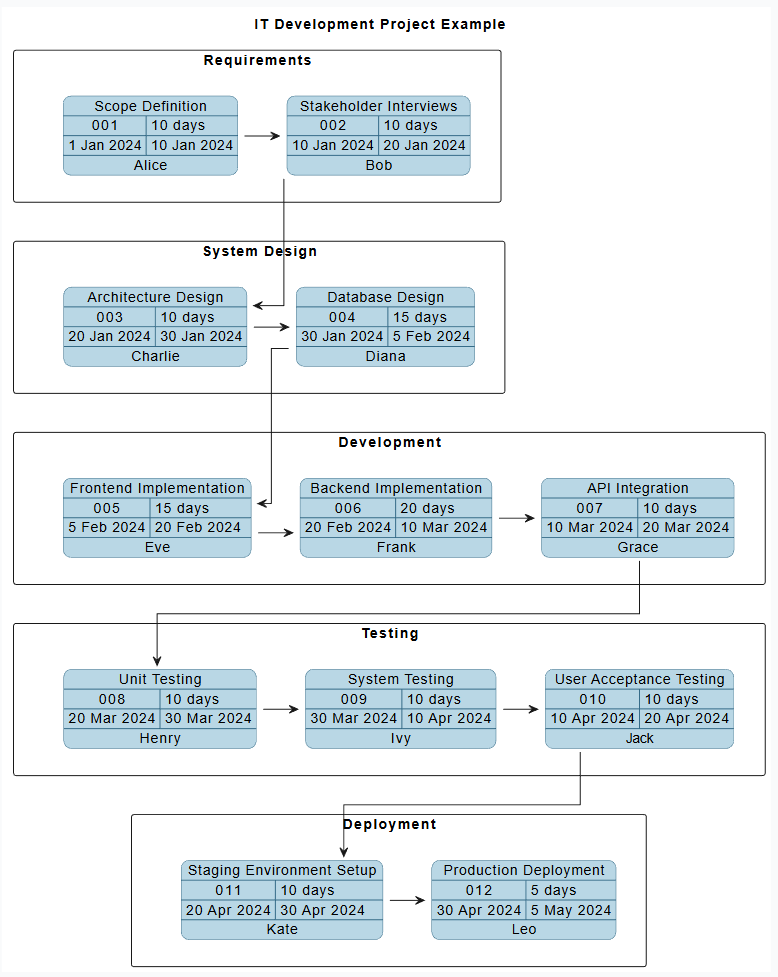
Visual Output: What the Diagram Shows
When rendered, the PERT chart displays:
✅ A horizontal timeline with labeled phases
✅ Each task as a box with start/end dates
✅ Arrows showing dependency flow
✅ The critical path highlighted in red (or clearly identifiable)
In our example:
-
Critical Path:
Scope → Interviews → Design → DB → Frontend → Backend → API → Unit → System → UAT → Staging → Production -
Total Duration: ~75 days
-
Critical Path Duration: ~65 days (from Jan 1 to May 5)
🚨 Key Insight:
If any task on this path is delayed (e.g., Backend takes longer than expected), the whole project is delayed.
Practical Benefits of Using PERT Charts in IT Projects
| Benefit | Description |
|---|---|
| Clear Dependencies | Understands what must happen before what else. Prevents “working in parallel” without coordination. |
| Critical Path Visibility | Identifies bottlenecks. Managers can focus resources on high-impact tasks. |
| Risk Management | Uncertainties in task duration (e.g., API integration) can be modeled and buffered. |
| Communication Tool | Stakeholders can easily understand project timelines and risks. |
| AI Integration | Visual Paradigm’s AI can auto-generate this from a brief, making it accessible even to non-technical users. |
How to Use This in Your Project
Step-by-Step Guide:
-
Define the Project Phases
Break your IT project into logical phases (e.g., Planning, Design, Dev, Test, Deploy). -
List All Tasks
For each phase, list the specific activities, assign a name and duration. -
Identify Dependencies
Determine which tasks must be completed before others start. -
Write the PlantUML Code
Use the template above, replacing task names and dates as needed. -
Paste into Visual Paradigm
In the AI-powered diagram editor, paste the code block. -
Generate and Review the PERT Chart
Visual Paradigm renders the chart instantly. Highlight the critical path and analyze risks. -
Iterate and Adjust
As timelines shift, update the code and regenerate the chart.
💡 Pro Tip: Use comments in the PlantUML to explain decisions, e.g.
PlantUML Edit PlantUML in VPasCode' Task06 delayed due to third-party API issues
Limitations and Considerations
While powerful, PERT charts have limitations:
-
❌ Not for long-term planning (use with Gantt charts for full visibility)
-
❌ Assumes linear progression — real-world projects have parallel work
-
❌ Fixed durations — PERT assumes known durations, but in IT, estimates often vary
-
⚠️ Over-reliance on dependencies — may miss parallel efforts or cross-team work
👉 Best Practice: Combine PERT with Gantt charts and risk registers for a complete view.
Conclusion: PERT Charts Are Essential for Smart IT Project Management
The PERT chart is more than a diagram — it’s a decision-support tool that turns abstract project plans into actionable, visual timelines. With the power of PlantUML and Visual Paradigm’s AI, even non-technical team members can generate and understand these charts quickly.
By leveraging the example of an IT development project, we’ve shown how:
-
PERT charts model dependencies and critical paths
-
PlantUML enables rapid, code-based creation
-
Visual Paradigm AI simplifies diagram generation without manual drawing
✅ Final Takeaway
“A well-built PERT chart turns a project from a vague timeline into a clear roadmap — showing not just when things happen, but when they must happen.”
Use this guide to build your own PERT chart for any IT project — from app development to cloud migrations — and empower your team with clarity, transparency, and control.
📚 Want to Try It Yourself?
-
Open Visual Paradigm
-
Go to New Chat > PERT Chart for IT Project
-
Paste the code above or modify it for your project
-
Click Generate Diagram
-
Analyze the critical path and adjust timelines as needed
🎯 You now have a smart, automated, and scalable way to represent your IT project timelines — powered by AI and PlantUML.
- AI Chatbot Feature – Intelligent Assistance for Visual Paradigm Users: This resource introduces the AI-powered chatbot functionality designed to provide users with instant guidance, task automation, and enhanced productivity.
- Pert Chart Tool – Visual Paradigm Online: An overview of a powerful tool that helps project managers visualize task dependencies, estimate timelines, and manage project schedules effectively in a cloud environment.
- AI Chatbot for Diagramming: How It Works with Visual Paradigm: This article explains how the chatbot acts as an AI-powered modeling assistant that turns natural language directly into diagrams without requiring knowledge of specific syntax.
- Complete PERT Chart Tutorial – Visual Paradigm: A step-by-step tutorial designed to guide users through the process of creating and utilizing PERT charts to plan and manage complex projects.
- Visual Paradigm AI Chatbot: Turn Your Ideas into Diagrams Instantly: This guide highlights the advanced assistant’s ability to visualize concepts through conversational prompts, allowing diagrams to grow from raw text into full system designs.
- Pert Chart for Project Management – Cybermedian: This resource provides practical insights and real-world online examples for using PERT charts to schedule tasks and plan project workflows.
- Visual Paradigm AI Chatbot: The World’s First Purpose-Built AI Assistant for Visual Modeling: An article celebrating the launch of a groundbreaking assistant specifically engineered to handle visual modeling tasks through intelligent natural language interactions.
- Integrating PERT Charts with RACI Roles in Task Management: A practical guide on how to combine PERT charts with RACI roles to enhance planning accuracy, timeline estimation, and team accountability.
- Case Study: Enhancing System Modeling Efficiency with Visual Paradigm’s AI-Powered Chatbot: This detailed case study proves how the chatbot improves modeling productivity and accuracy by enabling conversational diagram creation.
- Enhanced PERT Chart Features – Visual Paradigm: Explore advanced capabilities within the tool, including dynamic scheduling, critical path analysis, and seamless integration with broader project timelines.


