


Introduction
ArchiMate NEXT represents a significant evolution of the enterprise architecture modeling language, designed to simplify, standardize, and modernize how organizations model their architecture. At the heart of this evolution lies the Viewpoint mechanism—a core enabler that allows architects to create focused, stakeholder-relevant views of complex systems.
While the fundamental philosophy of using viewpoints to address specific stakeholder concerns remains unchanged, ArchiMate NEXT (Specification Snapshot 1) introduces meaningful enhancements in structure, usability, and strategic alignment. This article provides a clear, well-structured, and practical guide to understanding and applying Viewpoints in ArchiMate NEXT, highlighting key updates, classifications, and best practices.
What Are Viewpoints in ArchiMate NEXT?
In ArchiMate NEXT, Viewpoints are purpose-driven, tailored subsets of the language’s concepts. They enable architects to:
-
Focus on specific stakeholder needs
-
Present information at appropriate levels of detail
-
Align architectural views with business strategy and operational realities
Unlike full models that capture every element, a Viewpoint selects relevant elements and relationships to produce a focused, meaningful representation—ideal for communication, decision-making, or design.
🔍 Think of a Viewpoint as a “lens” through which you see your architecture—each lens is designed for a specific audience and purpose.
Key Enhancements in ArchiMate NEXT Viewpoints
1. Enhanced Predefined Templates
To accelerate adoption and reduce modeling effort, ArchiMate NEXT now includes new and refined viewpoint templates that address common enterprise challenges:
| Viewpoint | Purpose |
|---|---|
| Stakeholder Communication View | Enables clear, visual engagement with non-technical stakeholders using simplified, intuitive diagrams. |
| Migration Path View | Illustrates transitions, roadmaps, and implementation planning—ideal for IT transformation or digitalization initiatives. |
These templates serve as ready-to-use starting points, allowing teams to produce high-value architecture views without starting from scratch.
2. Reorganization for Maintainability
To improve clarity and focus, example viewpoints have been moved to Appendix C of the specification. The core document is now leaner and more focused, while still retaining comprehensive guidance in dedicated sections.
✅ Appendix C now contains:
-
A categorized collection of example viewpoints
-
Organized by perspective (e.g., business, technology, strategy)
-
Grouped by scope and abstraction level
-
Fully cross-referenced for easy navigation
This change ensures the specification remains accessible and maintainable, without sacrificing depth or usability.
3. Standardized Visuals & Color Coding
For the first time in ArchiMate’s history, RGB color codes are standardized across architectural domains to promote visual consistency in diagrams, presentations, and tools.
| Domain | Color Code | Hex Code |
|---|---|---|
| Business | Soft Blue | #4A90E2 |
| Technology | Emerald Green | #50C878 |
| Strategy | Deep Blue | #2E6B8B |
| People | Warm Orange | #FF7300 |
| Process | Navy Blue | #1E4A7B |
📌 Benefits of Standardization:
-
Reduces ambiguity in cross-team discussions
-
Improves clarity in tool-based modeling (e.g., Visio, ArchiMate tools, Power BI)
-
Supports better alignment in presentations and stakeholder workshops
💡 Tip: Use these colors consistently in your diagrams to enhance readability and professional presentation.
4. Comprehensive Documentation per Viewpoint
Each example viewpoint now includes detailed documentation that helps users apply them effectively, including:
-
✅ Required elements and relationships
-
✅ Usage guidelines and context
-
✅ Goals and intended outcomes
-
✅ Target stakeholder groups
This rich metadata ensures that viewpoints are not just templates, but actionable tools grounded in real-world application.
Classifying Viewpoints: Two Key Dimensions
To select the right viewpoint, architects should consider two foundational dimensions:
🔹 1. Purpose Dimension
What is the viewpoint used for?
| Purpose | Description |
|---|---|
| Designing | Used during the design phase—supports architects in sketching, refining, and elaborating architecture solutions. Ideal for technical teams. |
| Deciding | Supports managers and decision-makers via analytical views, cross-reference tables, or maps. Used for evaluating options and making strategic choices. |
| Informing | Communicates complex concepts to non-technical stakeholders through simplified, engaging formats (e.g., cartoons, animations, flowcharts). |
🎯 Match the purpose to your audience: Designing for engineers, Deciding for executives, Informing for board members.
🔹 2. Content (Abstraction) Dimension
What level of detail and scope does it cover?
| Level | Description |
|---|---|
| Details | Focused on one domain and one aspect (e.g., application structure). Best for domain specialists (e.g., software engineers). |
| Coherence | Spans multiple domains, showing dependencies and interactions (e.g., how processes use systems). Useful for integration teams. |
| Overview | High-level view across domains, offering strategic insights. Suited for executives (CEOs, CIOs, CTOs). |
📊 Use the content dimension to control depth: Start with Overview → move to Coherence → refine with Details as needed.
Four Functional Categories of Viewpoints
Viewpoints are grouped into four functional categories based on the type of information they present:
| Category | Focus | Examples |
|---|---|---|
| Composition | Internal structure of elements | Organization Structure, Application Structure |
| Support | How one set of elements enables another | Application Usage, Technology Usage |
| Cooperation | Peer-level collaboration across domains | Process Cooperation, Application Cooperation |
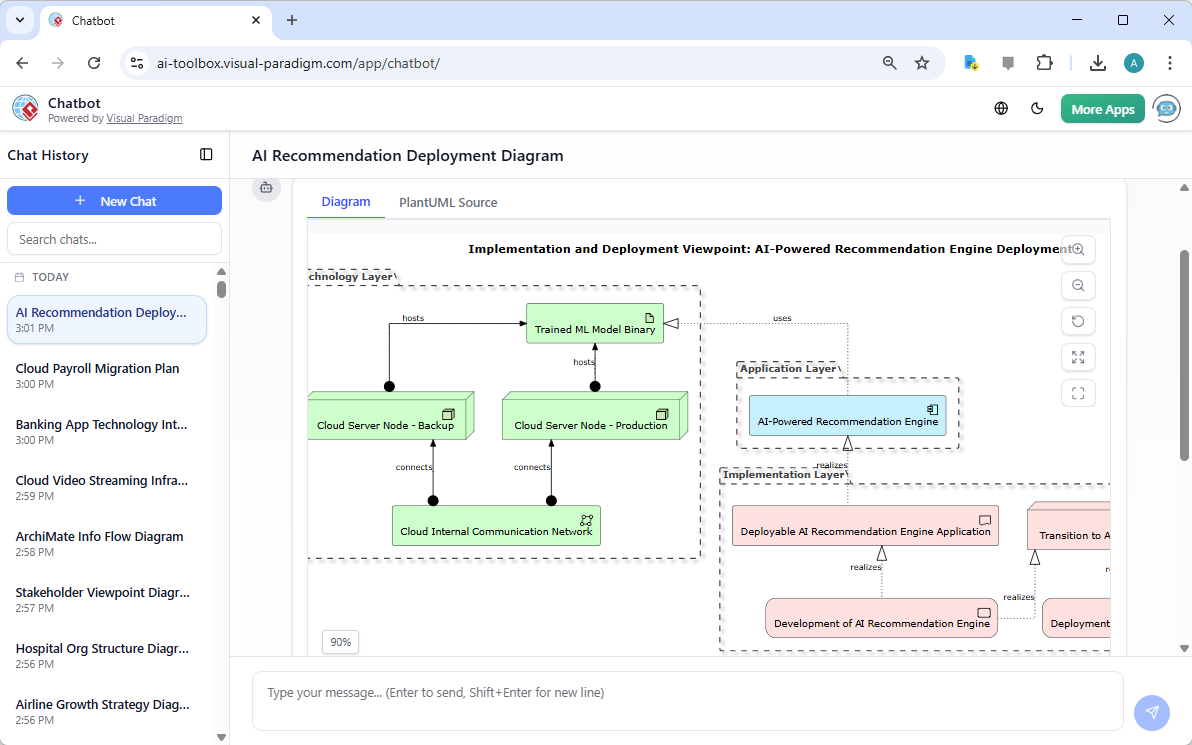
| Realization | How higher-level concepts are realized by lower-level structures | Service Realization, Implementation & Deployment |
🔄 These categories reflect real-world interactions and dependencies, enabling rich, dynamic modeling of enterprise systems.
New Strategic Viewpoints (Emphasizing the Strategy Domain)
With a stronger focus on strategic alignment, ArchiMate NEXT introduces or strengthens three key strategic viewpoints:
| Viewpoint | Description |
|---|---|
| Capability Map Viewpoint | Visualizes organizational capabilities and their maturity or gaps—helps identify capabilities to develop or improve. |
| Value Stream Viewpoint | Maps end-to-end value creation flows—from customer need to delivery and revenue generation. |
| Resource Map Viewpoint | Depicts human, financial, informational, and operational resources supporting strategic objectives. |
These viewpoints enable organizations to:
-
Align architecture with business strategy
-
Identify capability gaps
-
Optimize resource allocation
-
Improve value delivery
🚀 These tools are essential for modern enterprises navigating digital transformation, market disruption, or new business models.
Practical Guidance for Using Viewpoints in ArchiMate NEXT
Here’s a step-by-step guide to help you apply viewpoints effectively:
✅ Step 1: Identify the Stakeholder Concern
Start by asking:
“Who needs to see this, and what do they need to understand?”
Examples:
-
CEO: Strategic direction and ROI
-
CTO: Technology roadmap and implementation
-
Project Manager: Migration path and dependencies
✅ Step 2: Match to Purpose and Content
Use the Purpose and Content dimensions to select the right viewpoint:
| Audience | Purpose | Content |
|---|---|---|
| Executives | Informing | Overview |
| Managers | Deciding | Coherence |
| Engineers | Designing | Details |
✅ Step 3: Apply Standardization
Use the standard RGB color codes to ensure visual consistency in all diagrams and presentations.
Example: Use
#4A90E2for business elements and#50C878for technology elements in your slide deck or model.
✅ Step 4: Customize with Context
While viewpoints are templates, customize them to fit your organization’s context—add domain-specific nuances, remove irrelevant elements, or adjust relationships.
✅ Remember: Viewpoints are not rigid—they are flexible frameworks.
✅ Step 5: Leverage Enhanced Documentation
Refer to the detailed per-viewpoint documentation (in Appendix C) to ensure:
-
You include all required elements
-
You model relationships correctly
-
You meet stakeholder expectations
Why This Matters: The Value of Viewpoints in ArchiMate NEXT
| Benefit | Description |
|---|---|
| 🔍 Stakeholder Relevance | Tailored views build trust and understanding across teams. |
| 📈 Improved Decision-Making | Deciding views support data-driven choices with clarity. |
| 🚀 Faster Time to Value | Predefined templates accelerate delivery of insights. |
| 🌐 Cross-Team Collaboration | Standardized visuals and clear documentation reduce friction. |
| 🏁 Strategic Alignment | New strategic viewpoints bridge architecture with business goals. |
Conclusion: A Smarter, Simpler Future for Enterprise Architecture
ArchiMate NEXT’s enhancements to Viewpoints represent a significant leap forward in making enterprise architecture more accessible, actionable, and strategically grounded.
With:
-
Clear classification systems
-
Standardized visuals
-
Rich documentation
-
Strategic focus and real-world templates
…architects are now better equipped than ever to create focused, stakeholder-centered views that drive understanding, alignment, and innovation.
Whether you’re a seasoned architect or just beginning your journey in enterprise modeling, ArchiMate NEXT Viewpoints provide a powerful, modern toolkit for translating complex architecture into meaningful insights.
Next Steps
✅ Explore the Official Specification
Visit the The Open Group – ArchiMate NEXT (Snapshot 1) to access the full specification, especially Appendix C, which provides the complete set of example viewpoints.
✅ Start with a Template
Choose a predefined viewpoint (e.g., Stakeholder Communication View or Migration Path View) and build your first view.
✅ Apply the Colors
Use the standardized RGB codes to ensure visual consistency in your next presentation or model.
✅ Share & Iterate
Present your viewpoint to stakeholders and refine it based on feedback.
📚 For the most accurate and up-to-date information, always refer to the official ArchiMate NEXT Specification (Snapshot 1) from The Open Group. This guide is intended to support practical application, not replace the full specification.
ArchiMate NEXT – Where Architecture Meets Clarity.
Empower your team. Simplify your models. Inform your strategy. 🚀
-
Introducing AI-Powered ArchiMate Viewpoints Generator in Visual Paradigm: This release features an AI-driven generator that automates the creation of enterprise architecture views to enhance modeling efficiency and accuracy.
-
Comprehensive Tutorial: Generating ArchiMate Diagrams with AI: This in-depth tutorial demonstrates how to use Visual Paradigm’s AI diagram generator to create ArchiMate diagrams and viewpoints efficiently.
-
Visual Paradigm: The Premier Tool for ArchiMate EA Modeling: This overview highlights Visual Paradigm as a leading tool for creating and managing ArchiMate models to support business and IT alignment.
-
The Essential Guide to ArchiMate: How It Works, Strengths, and Overcoming Challenges with AI: This guide explains how AI-powered generation addresses traditional modeling disadvantages and provides best practices for effective ArchiMate usage.
-
Visual Paradigm AI Platform: A Comprehensive ArchiMate Guide: This guide explores the platform’s standardized intelligence and context-aware tools that outperform generic large language models for ArchiMate modeling.
-
Best ArchiMate Software – Visual Paradigm: Certified by The Open Group, this tool supports all official vocabulary, notation, syntax, and semantics of the ArchiMate 3.2 standard.
-
Why Visual Paradigm Is the Best ArchiMate Tool for EA Development Teams: This article examines why Visual Paradigm stands out as a leading ArchiMate-compliant solution for enterprise architecture development teams.
-
Full ArchiMate Viewpoints Guide (Examples Included): This comprehensive guide includes 23 official ArchiMate example viewpoints with clear diagram explanations.
-
ArchiMate Tutorial: Guide to Enterprise Architecture Modeling: A beginner-friendly resource providing step-by-step instructions on creating and using ArchiMate diagrams.
-
How to Use AI for ArchiMate Modeling in TOGAF ADM: This guide explains how Natural Language Processing (NLP) is used to convert simple text inputs into standard-compliant ArchiMate diagrams across all official viewpoints.
Related posts:
 Navigating Enterprise Architecture in Mergers and Digital Transformation: A Comprehensive Guide with TOGAF and ArchiMate
Comprehensive Guide: ArchiMate vs. BPMN – Choosing the Right Modeling Language for Business Processes
Navigating Enterprise Architecture in Mergers and Digital Transformation: A Comprehensive Guide with TOGAF and ArchiMate
Comprehensive Guide: ArchiMate vs. BPMN – Choosing the Right Modeling Language for Business Processes
 Comprehensive Guide: AI-Powered TOGAF ADM Guide-Through
 A Practical Case Study of TOGAF ADM Implementation with Visual Paradigm and ArchiMate at Tech-Innovate Solutions