


Digital publishing has undergone a significant transformation with the introduction of artificial intelligence. Visual Paradigm has launched a revolutionary enhancement to its popular Flipbook Maker: the AI Flipbook Generator. This cutting-edge tool changes the landscape of content creation, allowing users to effortlessly produce professional-grade flipbooks from scratch.
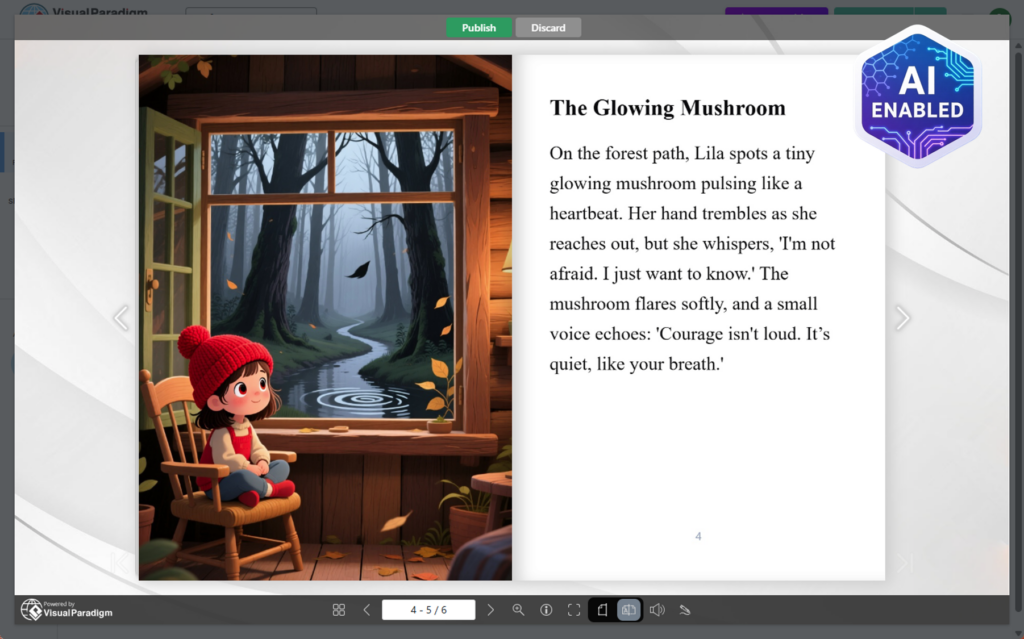
Whether you are crafting educational materials, marketing brochures, or captivating children’s stories, this tool serves as a comprehensive AI storybook creator. In this tutorial, we will explore how to leverage this technology to generate complete books automatically—including text, structure, and images—streamlining your workflow from concept to publication.
Key Concepts
Before diving into the creation process, it is essential to understand the core components of this tool and how they function to enhance your digital publications.
- AI Flipbook Tool: A feature within Visual Paradigm Online that uses artificial intelligence to generate content (text and images) based on user prompts, rather than requiring the user to upload an existing PDF.
- AI Storybook Creator: A specific application of the tool optimized for narrative content. It allows for target audience customization (e.g., specific age groups) and tone selection (e.g., whimsical, adventurous), making it ideal for illustrated children’s books.
- Visual Editor Integration: The unique ability to bridge AI-generated content with manual design tools. Once the AI generates the base flipbook, users can add animations, videos, and interactive props using the standard editor.
Guidelines: How to Create Your AI Flipbook
Follow this step-by-step workflow to utilize the AI flipbook maker effectively. The process is designed to be intuitive, guiding you from a simple idea to a fully realized digital publication.
Step 1: Access the AI Tool
Begin by logging into the Visual Paradigm Online workspace. Locate the “Create with AI” button and select “AI Flipbook Generator“ from the menu. This will open the initial setup screen where you will define the parameters of your project.
Step 2: Customize Project Settings
The quality of the output depends heavily on the inputs provided. Configure the following settings to tailor the flipbook to your needs:
- Title: Enter a compelling name for your flipbook.
- Topic / Idea: Input your core concept. If you are struggling for inspiration, click the dice icon to receive random suggestions powered by the AI storybook tool.
- Audience: critical for tone matching. Select from specific demographics such as:
- Children (3-5 years old)
- Children (5-8 years old)
- Teens
- Young Adults
- General Audience
- Tone: Choose a narrative style that fits your message, such as whimsical, educational, or adventurous.
- Page Count: You can set a limit of up to 20 pages to ensure focused and engaging content.
- Paper Size: Select an orientation and size. Smaller sizes are often ideal for storybooks with concise text, while larger sizes work well for brochures.
- Orientation: Choose between Portrait or Landscape based on your design preference.
- Generate Images: This is a powerful feature for the AI storybook creator. Select “Per Page” to have the AI automatically create stunning visuals for every page, or choose “None” if you intend to upload your own.
Step 3: Review and Edit the Outline
Once your settings are finalized, click “Next: Create Outline”. The AI will generate a structural skeleton of your book. Review the page titles and flow. You can manually edit the outline at this stage to add or remove sections, ensuring the narrative flows exactly how you want it before the full content is written.
Step 4: Generate Full Content
Click “Write Full Book”. The AI flipbook maker will now compose the entire content body and generate illustrations (if selected). This process combines the structure you approved with the tone and audience settings you defined earlier.
Step 5: Preview, Edit, and Publish
After generation, preview your newly created flipbook. You have two choices:
- Publish Immediately: If satisfied, hit “Publish” to share your work.
- Advanced Editing: For a professional polish, enter the visual editor. Here, you can add animations, charts, videos, and props. This allows you to transform a static story into a truly interactive experience.
Why Choose Visual Paradigm’s AI Flipbook Generator?
This tool stands out in the market for several reasons:
- Speed and Ease: Generate full flipbooks in minutes rather than days.
- Creative Flexibility: The ability to tailor content for distinct audiences (like specific child age groups) makes it a versatile AI storybook tool.
- Stunning Visuals: Automatic image generation solves the biggest hurdle for authors—finding custom illustrations.
- Professional Polish: Unlike standalone AI text generators, this tool integrates with a robust visual editor for post-generation refinement.
Tips and Tricks
To get the most out of the AI flipbook generator, consider these expert tips:
- Leverage the Dice icon: If you are facing writer’s block, the random suggestion feature (the dice icon) is excellent for sparking unique ideas for children’s stories or marketing angles.
- Optimize for Storybooks: When acting as an AI storybook creator, choose “Landscape” orientation and “Per Page” image generation. This mimics the classic feel of a physical children’s book.
- Don’t Skip the Outline: The outline stage is your control point. Spending an extra minute refining the chapter headers here saves time on editing the full text later.
- Enhance Post-Generation: AI is the starting point, not the finish line. Use the visual editor to add background music or interactive links to make your flipbook stand out on a virtual bookshelf.
By following this guide, you can unlock endless creativity and produce breathtaking digital publications with ease. Start building your AI flipbook today and experience the future of digital storytelling.
Resources
- AI Flipbook Maker | Create Stories & Covers with AI – Visual Paradigm
- Introducing the Ultimate AI Flipbook Maker: Launch Professional Content …
- AI -Powered Flipbook Maker | Create Illustrated eBooks Instantly
- Unleash the Power of AI : Create Stunning Flipbooks Instantly!
- Online Flipbook Maker
- AI Flipbook Maker | Create Stunning Digital Flipbooks
- AI Flipbook Generator: Create Stunning Books and Articles with AI …
- AI Flipbook Generator: Create & Publish Digital Books Instantly …
- AI Flipbook Generator: Create Stunning Flipbooks & Storybooks with AI …
- AI-Powered Flipbook Maker
- Tools Archive – Visual Paradigm AI
- AI Flipbook Maker
- AI Chatbot | Diagramming & Modeling with Visual Paradigm
- Customize Health Supplements Guide Created with Visual …
- UML Activity Diagram: A Definitive Guide to Visualizing Workflows with AI – AI Chatbot
