


In the rapidly evolving landscape of digital business management, the ability to share complex strategies instantly is not just a luxury—it is a necessity. Visual Paradigm Online has addressed this critical need with a major update to its Model Canvas. By moving beyond static file exports to dynamic URL-based sharing, the platform has transformed from a personal strategy tool into a cohesive Intelligent Strategy Workspace.
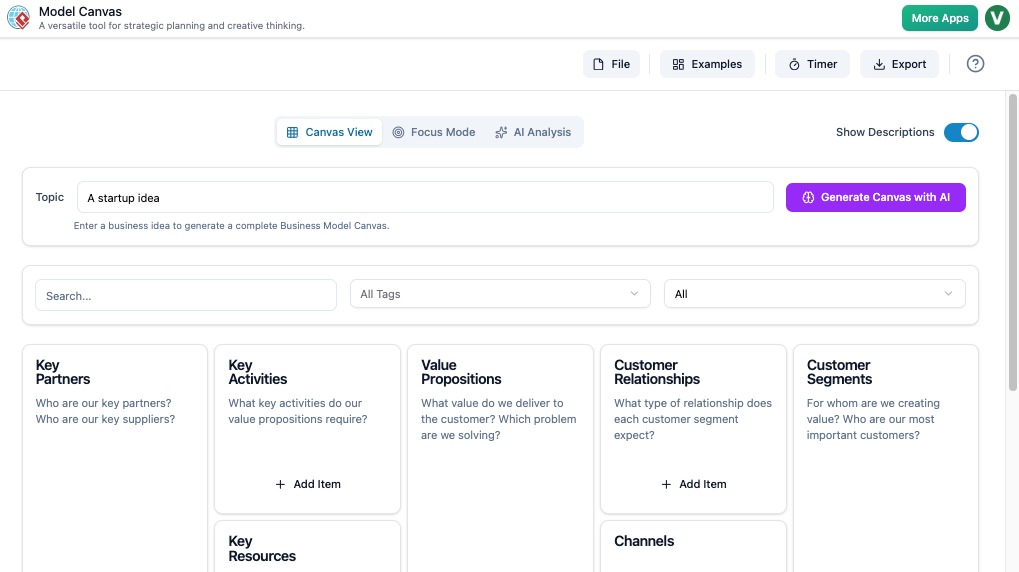
This case study explores the mechanics, implementation guidelines, and strategic benefits of this new feature, demonstrating how it bridges the gap between AI-generated insights and team-based execution.
Key Concepts
Before diving into the workflow, it is essential to understand the core components that make this update significant:
- Model Canvas: Visual Paradigm’s all-in-one workspace designed for creating and managing strategic frameworks. It supports tools like the Business Model Canvas, Lean Canvas, SWOT Analysis, and Customer Journey Maps. It integrates an Intelligent Analysis Engine and AI-Powered Generation to assist users in drafting strategies and content.
- Static Export vs. Dynamic Sharing: Previously, sharing a canvas involved exporting files (formatting as
.doc,.csv, ormarkdown). This is a static method, creating a snapshot in time. The new update introduces Dynamic Sharing, where a unique URL provides immediate, browser-based access to the live (saved) version of the document, eliminating version control chaos. - AI Article Editor Integration: A specific use case within the Model Canvas where users utilize AI to structure and draft content. Sharing via URL allows editors and stakeholders to review these AI-generated structures without needing specialized software.
The Evolution of Workflow: From Export to Access
Prior to this update, Visual Paradigm users praised the robust export options. Transforming an AI-generated strategy into a professional report was seamless. However, the feedback loop was often delayed. A user would generate a SWOT Analysis, export it to PDF, email it to a stakeholder, and wait for a reply. If changes were needed, the cycle repeated.
The introduction of Instant Collaboration via URL removes friction from this process. Whether you are a consultant presenting a Lean Canvas to a client or a product manager sharing a roadmap with remote developers, the barrier to entry has been lowered. No software installation is required; a web browser is all that is needed.
Guidelines: How to Implement URL Sharing
To ensure security and version stability, Visual Paradigm has structured the sharing process with a specific workflow. Follow these step-by-step guidelines to utilize the feature effectively:
- Step 1: Finalize and Save Your Work
The sharing feature is anchored to saved data to ensure the recipient views a stable version of your strategy. You cannot share an unsaved draft.
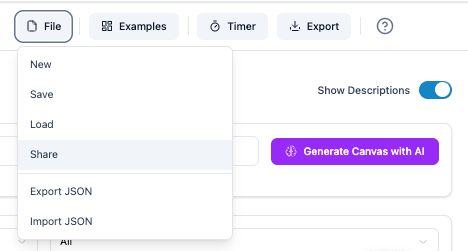 Action: Navigate to File > Save in the Model Canvas toolbar.
 - Step 2: Access the Sharing Interface
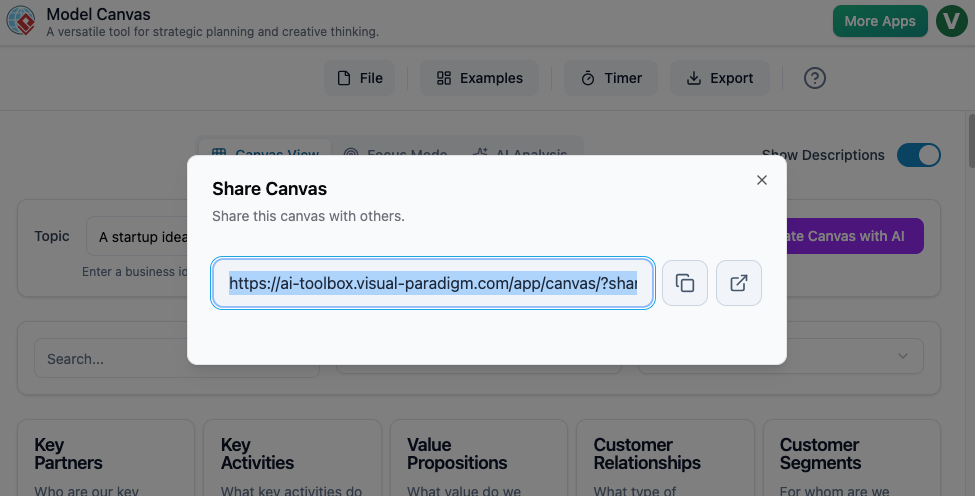 Once the document is saved, the sharing capabilities become active.
Action: Go to File > Share. This will trigger the new Share Canvas dialog box. - Step 3: Generate and Distribute the Link
The system will generate a unique URL specific to your current canvas.
Action: Click the copy button to retrieve the URL. You can now paste this link into Slack, Microsoft Teams, email, or any project management tool.
Strategic Benefits and Impact Analysis
Why does this update matter for your organization? The shift to URL sharing offers three distinct competitive advantages:
1. Accelerated Feedback Loops
Teams can provide instant input on AI-generated business models. By reducing the time between creation and feedback, decision-making becomes more agile.
2. Simplified Access for Stakeholders
External partners, clients, or executive stakeholders often do not have access to specific strategy software. The URL-based approach ensures that anyone with the link can view the canvas in their standard web browser, democratizing access to information.
3. Enhanced Remote Collaboration
For distributed teams, this feature acts as a bridge. It is particularly effective for users leveraging the AI article generator features. A writer can structure content using the AI tools and instantly share the draft with an editor via URL, streamlining the content production pipeline.
Tips and Tricks
Maximize the potential of the Model Canvas sharing feature with these expert tips:
- Version Control via Naming: Since the URL points to your saved canvas, create
Resources
- Unlock Seamless Team Collaboration with Visual Paradigm
- Visual Paradigm Team Collaboration Tools
- Collaborative Modeling in – Visual Paradigm
- Overview of Visual Paradigm Team Collaboration Support Real-Time Collaboration Tools
- Real-Time Collaboration Tools
- Team Collaboration Guide
- Visual Paradigm – Online Productivity Suite
- Home – Visual Paradigm Blog
- Unleashing Creativity and Collaboration with Visual Paradigm Online…
- Visual Paradigm Archives
- Case Study : Developing the Geometry Game Using the Business…
- Unleash Your Creativity with Visual Paradigm Online: The Ultimate Free Web-Based UML Software – Visual Paradigm Blog
- What Makes Visual Paradigm’s AI Chatbot Different from Other AI Diagram Tools?
- Unlocking Future Success: Visual Paradigm’s Academic Partner Program
