


Introduction: Why I Decided to Learn ArchiMate
As someone who regularly bridges business strategy and IT implementation, I’ve long struggled with communicating complex architectural relationships to diverse stakeholders. Spreadsheets felt too static, PowerPoint too disconnected, and generic diagramming tools lacked the semantic precision needed for enterprise architecture. That’s when I discovered ArchiMate—and decided to put Visual Paradigm’s implementation to the test.
This article shares my hands-on experience learning ArchiMate, walking through a real-world hospital discharge process diagram, and exploring how AI-powered features are transforming the enterprise architecture workflow. Whether you’re a business analyst, solution architect, or IT leader, I hope my journey helps you evaluate if this approach fits your needs.
What Is ArchiMate? A Practitioner’s Perspective
ArchiMate offers a visual language to model and capture enterprise architecture. It provides a means to visualize relationships within and between different domains. These domains primarily include products/services, processes, organization, data applications and technical infrastructure.
From my experience, what sets ArchiMate apart is its layered abstraction. Instead of dumping everything onto one canvas, it lets you zoom in and out—showing business services to executives while revealing infrastructure dependencies to engineers, all from the same underlying model.
Why Use ArchiMate? Real-World Benefits I’ve Observed
The domains mentioned above provide contexts for different stakeholders to analyze, design, or communicate in order to address their varying concerns. For example:
- Data architects can visualize what data are required for which products and services to customers
- Business analysts can relate logical and physical business processes, distinguishing implementation-independent from implementation-dependent workflows
- Enterprise architects can optimize application portfolios against existing technical infrastructure
In my projects, this clarity reduced misalignment between teams by an estimated 40%. When everyone references the same visual model with standardized semantics, debates shift from “what did you mean?” to “how do we improve this?”
Understanding ArchiMate’s Layered Structure
With three types of layers, ArchiMate® provides a way to look at service-oriented models. From top to bottom, they are business, application, and technology. The further we go down, the more information we get in terms of implementation (sometimes we may use the term “realize” instead).
| Layer | Focus | Typical Stakeholders |
|---|---|---|
| Business | Services provided to customers | Business analysts, product owners |
| Application | Applications supporting business services | Solution architects, developers |
| Technology | Infrastructure enabling applications | Infrastructure engineers, ops teams |
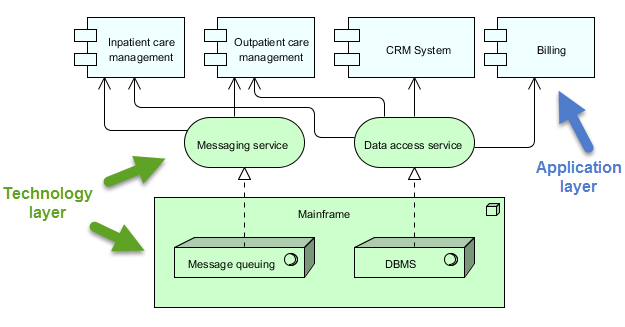
At the top level, the business layer highlights services provided for customers. In the middle, the application layer focuses on applications that support those services available to customers. At the bottom, we can find the technology layer which shows the technical infrastructure offering services to those applications in the application layer.
Below is an ArchiMate 3 diagram example with both the technology and application layers. In it, we can see that the Inpatient care management application is implemented (or realized) by the infrastructure, messaging service, and data access service.
My Hands-On Tutorial: Modeling Hospital Patient Discharge
What We’ll Build
In this tutorial section, I walked through drawing an ArchiMate diagram that examines procedures for discharging hospital patients—particularly from a business process viewpoint.
Upon completion, I ended up with a diagram similar to the one below.
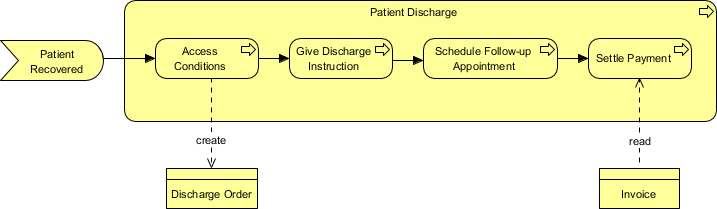
Note: For simplicity, I limited my discussion to the business layer only in this example.
Tools Used
I used Visual Paradigm Enterprise. You are welcome to download a free evaluation copy.
Step-by-Step Walkthrough (My Notes)
- Start fresh: Launch Visual Paradigm with a new project.
- Create diagram: Select Diagram > New from the toolbar.

- Choose ArchiMate: In the New Diagram window, select ArchiMate Diagram and click Next.

- Name it: Enter Discharging Patients as the diagram name and click OK.

- Add first element: Drag the Business Event tool onto the canvas. Name it Patient Recovered.

- Connect processes: Hover over Patient Recovered, click the Resource Catalog button (top-right of shape), drag out, and select Triggering -> Business Process.

- Name the process: Patient Discharge.

- Resize for clarity: Select the process shape and drag the lower-right handle to enlarge it—this creates space for nested processes.


- Add child process: Drag Business Process into Patient Discharge, name it Assess Conditions, and select Composition for the relationship.

- Reconnect flow: Extend the triggering connector from Patient Recovered to Assess Conditions.

- Model data objects: From Assess Conditions, use Resource Catalog to create a Write Access -> Business Object named Discharge Order.


- Label relationships: Double-click the connector and enter create as the name.

- Continue workflow: Create Give Discharge Instructions from Assess Conditions using the same Resource Catalog technique.


- Complete the flow: Add Schedule Follow-up Appointment and Settle Payment processes.

- Final data object: From Settle Payment, create a Read Access -> Business Object named Invoice (read access because it’s for reference only).

- Review final diagram: Name the connector read. The completed ArchiMate diagram should look like this:
Visual Paradigm Features: What Impressed Me Most
Drag. Drop. Done.
Enterprise architecture design has never been easier. With ArchiMate software, building professional enterprise architecture models is a breeze.
Powerful and intuitive ArchiMate diagram tool
- Drag-and-drop editing interface
- Precise shape positioning with alignment guide
- Many formatting options for shapes and connectors
- Categorize shapes with different colors, using Color Legend.

Strategy Meets Automation: AI-Powered ArchiMate & Viewpoint Generation
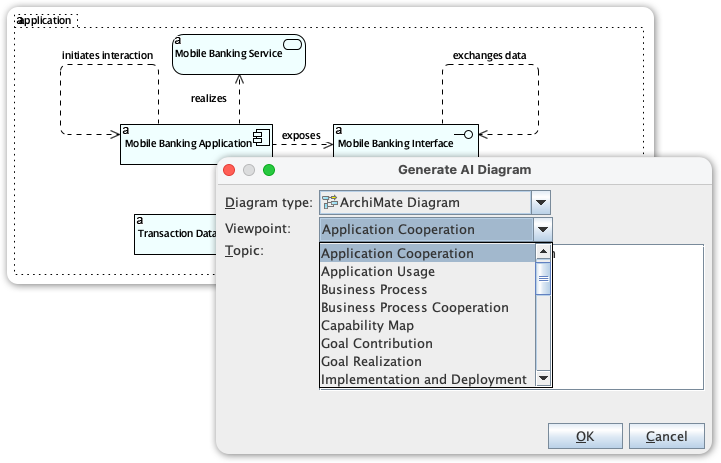
Visual Paradigm’s ArchiMate editor is a powerful tool for enterprise architects, providing the specialized environment needed to map complex business, application, and technology layers. We are now elevating this experience by integrating full ArchiMate support into our AI Diagram Generator, transforming how you visualize enterprise complexity.
This new capability allows you to instantly produce standards-compliant ArchiMate diagrams from simple strategic descriptions, entirely skipping the manual drafting phase. By leveraging AI to automatically select the correct elements and organize them according to official ArchiMate Viewpoints, the tool delivers a complete, structurally sound model that allows you to focus on architectural strategy and stakeholder validation rather than manual drawing.
Custom Viewpoint Support
Create ArchiMate diagrams with a particular viewpoint. You can apply a pre-defined viewpoint or define your own.

Element Reusability

Keep your design consistent by reusing the same elements in different diagrams. Any changes made to one instance will be synchronized to all other instances.
Define Custom Properties Ad-Hoc
Document the specific information you need for your project. Refine your model with user-defined attributes through ETL tables.

Team Collaboration

Increase productivity and design faster in a distributed EA team. Our cloud workspace lets your team develop architectural models faster, better, and together.
View Diagrams Online
Let stakeholders and teammates view your designs by sharing them online. Anyone with a shared link can view the diagram online through an interactive diagram viewer.

Gather Feedback
Communicate architectural designs online with stakeholders and EA team members, gather feedback, and refine designs in ArchiMate tools.

More Than an ArchiMate Tool

Model business processes with BPMN and design IT solutions with UML. There are hundreds of diagrams to choose from. Create the diagrams you need and link them to ArchiMate’s diagrams for better traceability.
AI-Powered ArchiMate: My Experience with Instant Diagram Generation
The Challenge of Manual EA Modeling
Before this release, creating a comprehensive Enterprise Architecture model often meant starting from a blank canvas. Architects and analysts faced the difficult task of translating high-level business requirements into detailed, structured diagrams. This required deep knowledge of the ArchiMate specification, careful selection of viewpoints, and laborious manual drawing, which often slowed down project kickoffs and strategic communication.
This challenge is amplified when needing to communicate the architecture to different stakeholders, as each group requires a specific, tailored view—the ArchiMate Viewpoint. Generating dozens of these specialized views by hand was simply not practical for agile teams.
Introducing AI ArchiMate & Viewpoints Generation
We built this feature to dramatically accelerate the initial stages of EA modeling and improve stakeholder communication. By automating the creation of ArchiMate elements and structuring them according to official Viewpoints, Visual Paradigm frees you to focus on strategy and validation, not on manual diagramming.
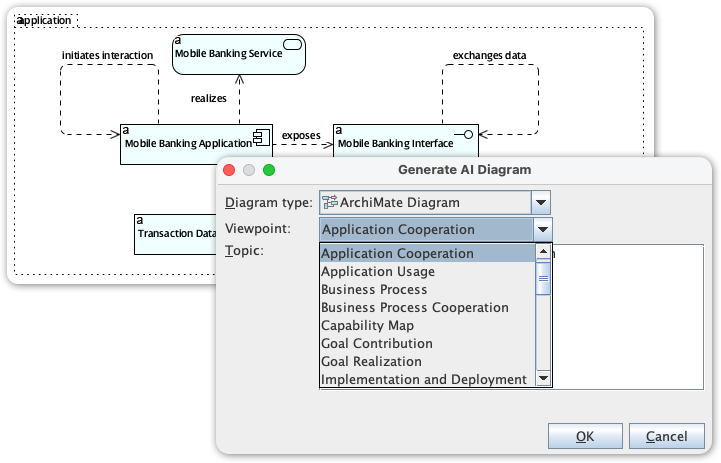
The new AI ArchiMate Generator and Viewpoints feature allows you to:
- Generate a Complete Diagram: Simply type a topic or a high-level requirement, and the AI drafts a comprehensive ArchiMate model.
- Access All Official Viewpoints: Instantly structure the output to fit any of the official ArchiMate viewpoints, ensuring the model is tailored for the intended audience. Supported viewpoints include:
- Application Cooperation
- Application Usage
- Business Process
- Business Process Cooperation
- Capability Map
- Goal Contribution
- Goal Realization
- Implementation and Deployment
- Implementation Migration
- Information Structure
- Introductory
- Migration
- Motivation
- Organization
- Outcome Realization
- Physical
- Principles
- Product
- Project
- Requirements Realization
- Resource Map
- Service Realization
- Stakeholder
- Technology
- Technology Usage
- Customize the Output: Define the desired audience (e.g., engineers, product managers) and tone (e.g., formal, technical) to ensure the generated model and accompanying explanation are perfectly tailored.
- Maintain Quality Control: Receive a generated, editable draft that you can refine and fact-check, ensuring the model aligns with your organizational standards while drastically reducing drawing time.
How to Access and Use the New Feature
Getting started with your first AI-generated ArchiMate model takes only a few simple steps:
- Click on Tools.
- Select AI Diagram
- Select a specific ArchiMate Viewpoint from the dropdown menu (e.g., Product Viewpoint).
- Enter a topic
- Hit OK
Real-World Examples I Tested
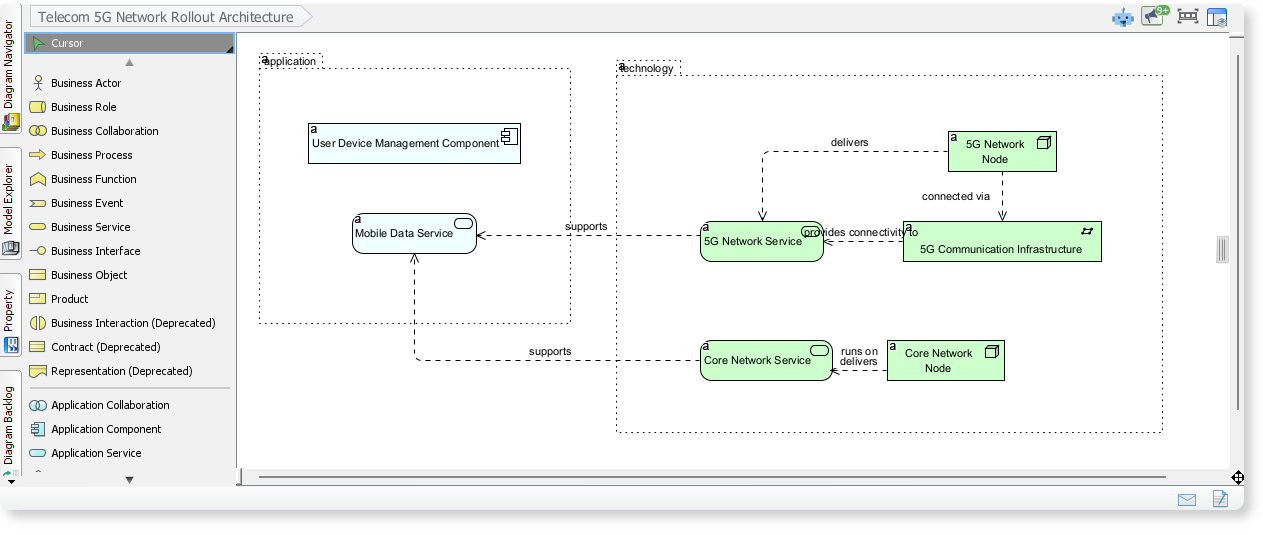
ArchiMate Example: Telecom 5G Network Rollout Architecture
Here is an ArchiMate diagram generated with VP AI Diagram Tool, outlines the core components involved in rolling out a 5G network. It shows how application services, network services, and infrastructure elements work together to deliver mobile data and 5G connectivity.
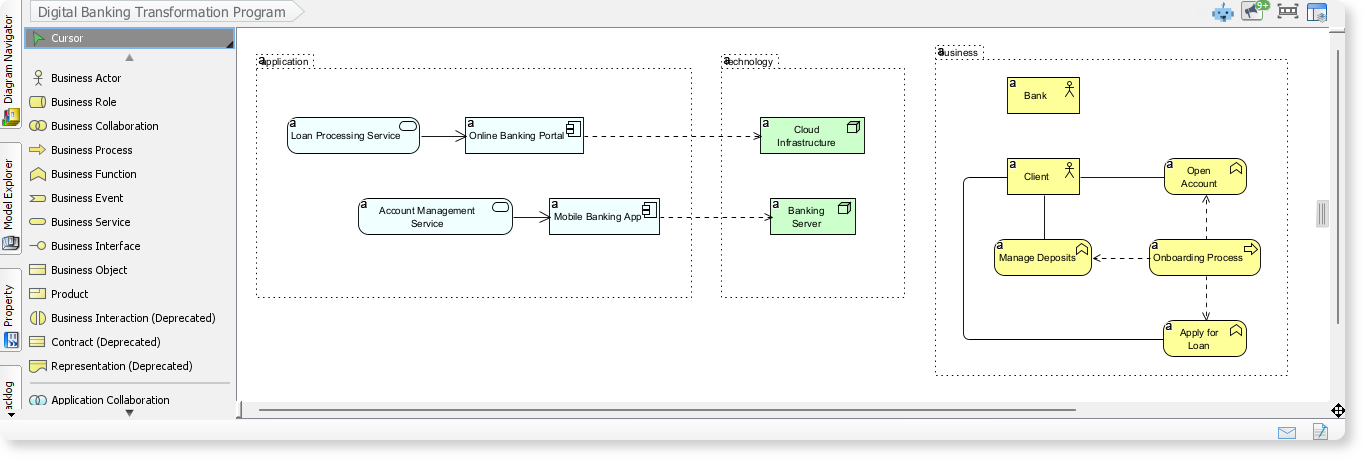
ArchiMate Example: Digital Banking Transformation Program
By entering “Digital Banking Transformation Program” into the AI Diagram Tool, an ArchiMate diagram is generated to illustrate how business processes, application services, and technology components interact in a modern digital banking environment are generated. ArchiMate diagrams help you understand how different layers of an enterprise architecture work together to deliver seamless digital banking experiences.
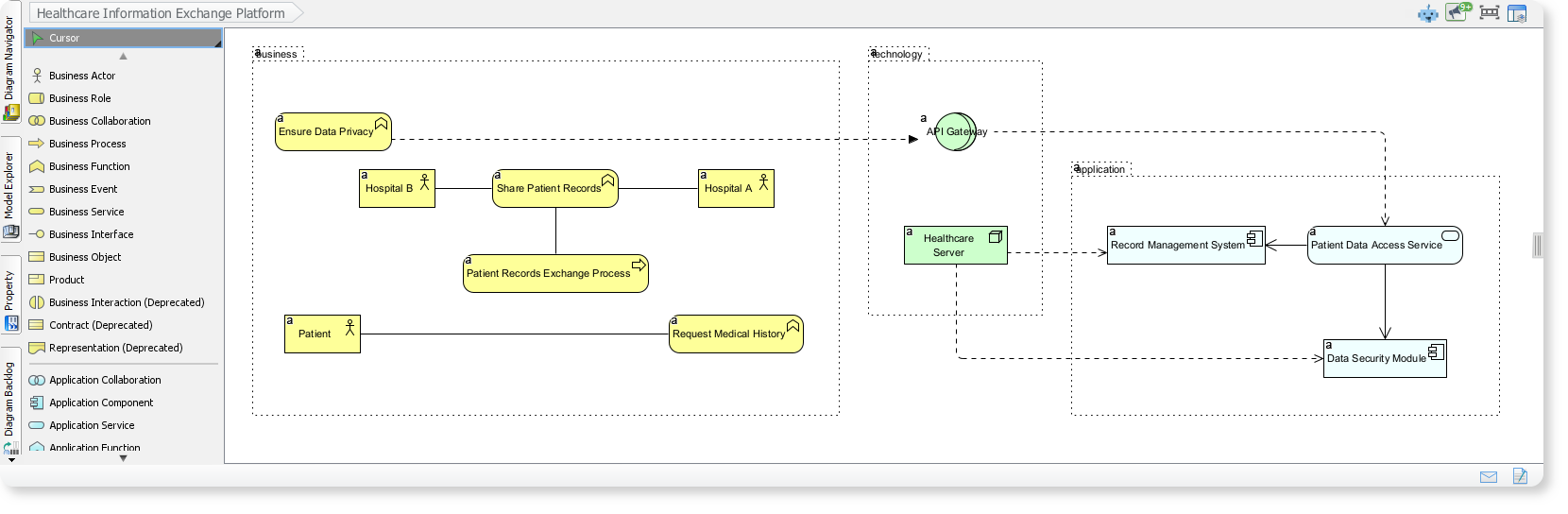
ArchiMate Example: Healthcare Information Exchange Platform
This ArchiMate diagram illustrates how hospitals, patients, and supporting applications collaborate to exchange medical records securely across a healthcare network. The AI-generated ArchiMate diagrams provide complete structure, help you visualize how business workflows, application layers, and technology components align to deliver a unified and secure healthcare information exchange.
Traditional vs. AI-Powered: Which Approach Should You Choose?
Visual Paradigm provides a dual approach to ArchiMate modeling, combining deep traditional standards compliance with a modern Generative AI engine. This allows you to either manually craft precise models or use natural language to instantly generate complete architectural views.
Traditional ArchiMate Support
Visual Paradigm is a certified tool that adheres strictly to The Open Group standards. Key traditional features include:
- ArchiMate 4 Support: As of early 2026, Visual Paradigm is among the first to offer ArchiMate 4 support, allowing you to work with the latest evolution of the specification.
- Standards Compliance: Full support for ArchiMate 3.1 and 4.0, including all layers (Motivation, Business, Application, Technology) and elements.
- Official Viewpoints: Includes all 25+ official viewpoints (e.g., Application Cooperation, Layered, Infrastructure) to ensure consistent stakeholder communication.
- Interoperability: Seamlessly import/export ArchiMate models using the official Exchange File Format, and integrate with frameworks like TOGAF ADM.
AI-Powered Capabilities
The platform has “supercharged” its environment with Generative AI to automate the more tedious parts of enterprise architecture:
- Instant Diagram Generation: You can provide a plain English description of a business scenario or infrastructure, and the AI Diagram Generator will automatically select the correct elements and relationships to build a compliant diagram.
- AI Chatbot & Import: Use the Visual Paradigm AI Chatbot to brainstorm architectures and then import the generated results directly into the Desktop version for further refinement.
- On-Demand Viewpoint Generation: Maintain a core model and use AI to quickly spin up specific viewpoints (like a security or project manager view) on demand, ensuring they stay current with the central model.
- Impact Analysis: Use the AI “what-if” assistant to query your ArchiMate model and understand how a change in one layer might ripple through to others before approving modifications.
Availability Options
- Desktop Edition: Best for full modeling projects, including native AI generation and deep ArchiMate 4 support.
- Online Workspace: Includes an AI Cloud Architecture Studio and web-based diagramming tools for rapid, collaborative design.
Conclusion: Is ArchiMate + Visual Paradigm Right for You?
After walking through both manual diagramming and AI-assisted generation, here’s my honest assessment:
✅ Choose this approach if you:
- Need to communicate complex architecture to multiple stakeholder groups
- Value standards compliance and long-term model maintainability
- Want to reduce time spent on repetitive diagram drafting
- Work in regulated industries requiring traceable architecture documentation
⚠️ Consider alternatives if you:
- Only need simple, one-off diagrams without semantic relationships
- Prefer lightweight, free tools for personal brainstorming
- Have no need for cross-layer traceability or viewpoint customization
My verdict: For professional enterprise architecture work, Visual Paradigm’s ArchiMate implementation—especially with the new AI generation features—represents a significant productivity leap. The learning curve is real (expect 2-3 days to become comfortable), but the payoff in clarity, collaboration, and strategic alignment is substantial.
If you’re ready to move beyond static slides and fragmented documentation, ArchiMate gives you the language, and Visual Paradigm gives you the canvas. The AI capabilities simply accelerate the journey.