


This guide provides a complete overview of the Agile User Story Mapping tool designed for Scrum teams. It covers the core philosophy, structural capabilities, advanced story features, estimation techniques, sprint management, and integration features designed to maximize productivity and efficiency in agile projects.
1. Product Backlog Management with Story Map
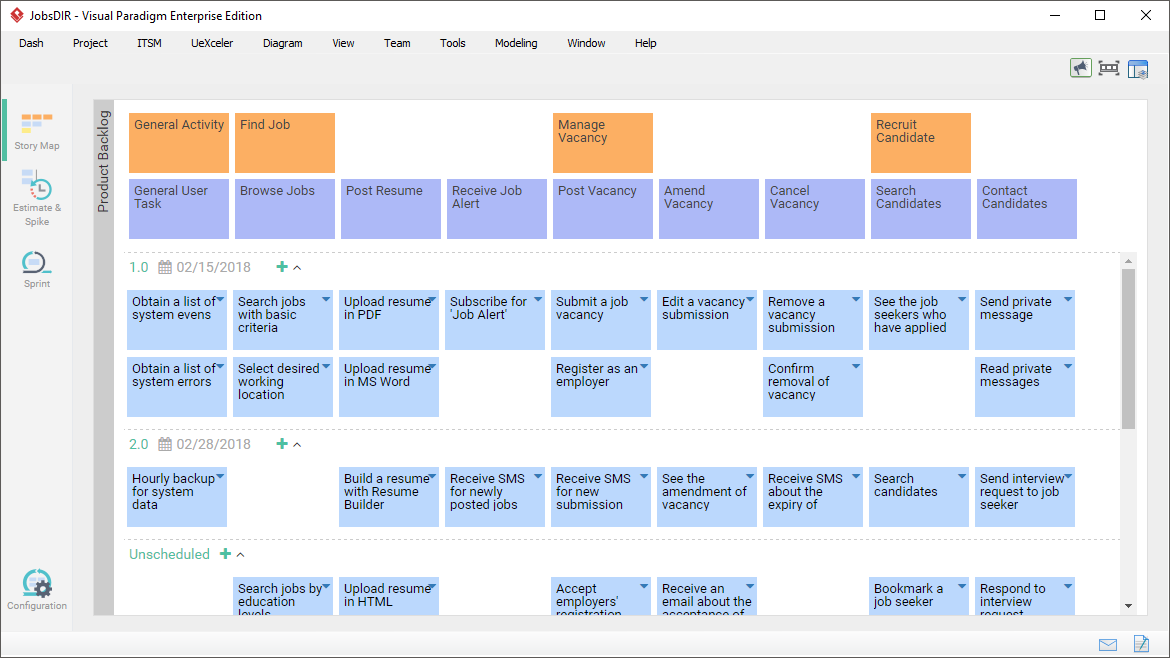
The foundation of this approach is managing the product backlog visually. The tool provides a structured, top-down arrangement of product items based on their nature, priority, and sophistication.
1.1 Structural Flexibility
The tool supports multiple map structures to accommodate projects of any scale:
- 3-Level Structure: Covers the standard user activities, user tasks, and user stories.
- 4-Level Structure: Introduces an Epic tier between user tasks and user stories, ideal for projects with higher complexity.
- Release Planning: User stories can be organized under release compartments, reflecting a delivery schedule agreed upon by the team and stakeholders.
1.2 Dynamic Interactivity
Designed for maximum productivity, the tool features intelligent rearrangement:
- Advanced Drag-and-Drop: Items can be re-arranged intuitively. When you drag an item, the entire branch follows automatically. Adding new items re-arranges existing parts to ensure layout correctness.
- Inline Editing: Rename elements directly within the map; no need to open separate windows or go through extra steps.
- Click-to-Add: Quickly add user stories under a task or siblings to activities with a single click via an ad-hoc hovering button.
2. Empowered User Stories: Beyond the 3C’s
While the “3C’s” (Card, Conversation, Confirmation) are critical for good user stories, this tool enriches them with additional artifacts to ensure clear understanding and alignment.
2.1 The 3C’s Framework
- Card: The basic idea of the story.
- Conversation: Facilitate discussions with stakeholders using Conversation Notes to record key findings, decisions, and needs that guide the implementation.
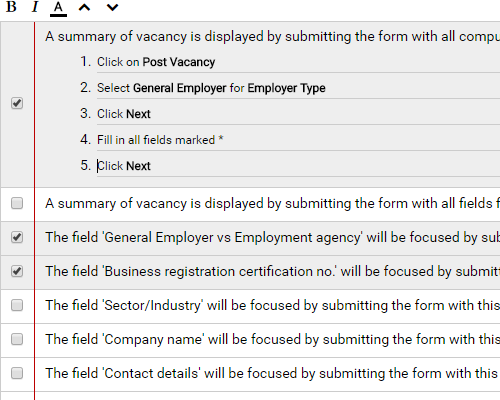
- Confirmation: Maintain a checklist of Confirmation Items (acceptance criteria). You can also define specific steps for acceptance testing to verify completion.
2.2 Extended Artifacts
You can further define user stories by incorporating:
- Written Scenario: List proposed user-to-system interactions as steps. These can be associated with wireframes.
- Storyboard: Create visual wireframes to visualize screen layouts and flows using the included slideshow player.
- Diagrams: Link stories to other design artifacts such as Entity Relationship Diagrams (ERD) for database design, UML for system design, or BPMN to show business integration.
- Metadata & Collaboration:
- Tags: Categorize stories for easy filtering.
- History: Keep a log of all changes.
- Configurable Status: Define statuses (e.g., Todo, Pending, Confirming) specific to your project.
- Assignee & Followers: Assign responsibility and receive notifications for changes.
- Description & References: Add detailed descriptions, URL references (e.g., for testing pages), and file references (e.g., supplementary documents).
- Share-able: Share specific stories with others via a generated URL.
2.3 Extract Requirements from Models
Requirements can be captured from any part of your model (e.g., Use Case models). Using the “Send to” feature, you can automatically derive backbone elements for your story map from existing models, maintaining full traceability between the source model and the target story map.
3. Estimate User Stories Based on Effort and Risks
To ensure the right amount of work is included in a sprint, stories must be assessed based on development effort and risk.
3.1 Affinity Table Assessment
The tool provides a configurable, two-dimensional Affinity Table to assess stories:
- Dimensioning: Place stories into table cells representing their specific Effort and Risk levels.
- Quantification: Obtain calculated Story Points and Hours for sprint planning purposes.
- Customization: Change the row/column captions and dimensions to fit any specific assessment factors the team prefers.
- Filtering: Filter the table to focus on stories within specific activities, tasks, releases, or tags.
4. Sprint Backlog Management
The tool facilitates efficient execution of Scrum sprints through intuitive planning and tracking.
4.1 Sprint Planning
- Visual Planning: Drag user stories directly into sprint boxes to plan iterations.
- Multiple Sprints: Supports Scrum Masters in managing multiple concurrent sprints.
4.2 Progress Tracking Tools
- Burndown Chart: Auto-generated based on the daily statuses of user stories and tasks. It tracks the remaining work, helping the team identify performance trends and determine if the sprint goal is achievable without manual data entry.
- Scrum Board: An overview view partitioning tasks into status columns (In Progress, Completed, Closed). The board updates automatically based on task statuses, allowing the team to see sprint activity at a glance.
- Sprint Story Board: A high-level view of user stories placed in columns representing progress. Use the drag-and-drop interface to update progress across staged columns.
4.3 Task Derivation
- Task Integration: Click-to-synchronize a sprint to Tasifier (built-in Task Management system) or external systems. This creates specific tasks from user stories to allow for granular development planning.
- BPMN Mapping: For systems supporting business processes, write user stories directly on BPMN business process diagrams and associate them with specific activities using connectors. This ensures workflow requirements are directly mapped to stories.
4.4 Story Statement Formulation
Use the defined format: “As a [role], I want to [action], so that [benefit]”. This helps identify the right stories, split them from Epics, and ensures they are written from the end-user’s perspective with a clear rationale.
Resource
- [1] What Is User Story Mapping? This article provides a comprehensive overview of User Story Mapping, explaining its purpose in agile software development and how it helps visualize a product backlog.
- [2] Mastering Agile Product Development with User Story Mapping A detailed guide on leveraging User Story Mapping techniques to optimize agile product development workflows, featuring insights and tools from Visual Paradigm.
- [3] What Is a User Story? This guide defines the concept of a user story, its components, and its role as the fundamental unit of work in agile software projects.
- [4] Comprehensive Guide to Agile Story Mapping in Visual Paradigm An in-depth tutorial demonstrating how to create and manage story maps effectively using Visual Paradigm tools for better project visualization.
- [5] Agile User Story Mapping Tool Features This page details the specific features of the Visual Paradigm Agile User Story Mapping tool, highlighting capabilities for visualizing requirements and planning.
- [6] Building an Agile Sprints Scrum Story Financial Planning Chart This blog post explores the intersection of agile story mapping and financial planning, often used in sprints and scrum methodologies to track value and budget.
- [7] Authoring Metaphors in Visual Paradigm A presentation focusing on creating metaphors within applications, discussing interface design principles such as menus, toolbars, and top-level interfaces.
- [8] How to Manage User Stories with Story Map Practical advice and a guide on utilizing the Story Map feature within Visual Paradigm to organize and manage user stories for your project.
- [9] Agile User Story Mapping Tool A showcase of the tool for mapping user stories, offering visual templates and drag-and-drop functionality for agile teams.
- [10] How to Manage User Stories with Story Map (Duplicate of #8) This article reiterates best practices for managing user stories by viewing them as a continuous river from discovery to deployment via the story map.
- [11] User Story Map Tour A guided tour of the User Story Map feature, walking users through the interface and functionality step-by-step.
- [12] Effective User Story Tool This page introduces comprehensive user story management modules designed to help product owners estimate and prioritize requirements effectively.
- [13] Agile Tool An overview of Visual Paradigm’s end-to-end agile tooling, providing solutions for managing the entire software development lifecycle from planning to execution.
- [14] Agile Tool (Duplicate of #13) Highlights key components of the visual modeling solution tailored for agile teams to enhance collaboration and efficiency.
- [15] Agileen AI-Powered Jira Backlog Planner This feature leverages AI to accelerate agile planning by analyzing user-backed artifacts and generating Jira-ready diagrams automatically.
- [16] What Is a User Story? (Chinese) The Chinese version of the guide on user stories, emphasizing the need for intuitive, easy-to-use, and truly agile software solutions.
- [17] Updates: AI User Story Backlog Tool A release update announcing the new AI capabilities in the user story backlog planner, focusing on efficiency and automated Jira integration.