
Mastering Object Creation in UML Sequence Diagrams with Visual Paradigm
In the complex world of software architecture, communication is key. UML Sequence Diagrams are the standard language we use to visualize how objects interact over time. While most developers are familiar with standard method calls, a critical and often misunderstood concept is Object Creation. This tutorial will guide you through the mechanics of creating objects dynamically during an interaction using Visual Paradigm, ensuring your system architecture models are both accurate and professional.
Understanding the Lifecycle of Objects
Objects do not always exist for the entire duration of a scenario. In many real-world systems, a new entity is spawned only when a specific condition is met or a request is received. For example, a shopping cart object might only be created when a user selects “Add to Cart,” not when they first log in.
In a sequence diagram, this lifecycle is represented visually. Existing lifelines are continuous, but a newly created object has a “birth” point. This point is where the interaction triggers the instantiation of the new object. Visual Paradigm handles this elegantly, allowing you to model the exact moment an object comes into existence without cluttering the diagram with unnecessary pre-existing states.
Visualizing the Creation Process
To model an object creation, we use a specific type of message known as a Constructor Message. Unlike a standard synchronous call (which often looks like a solid line with a filled arrowhead), a constructor message uses an open arrowhead to indicate that the target is being instantiated.
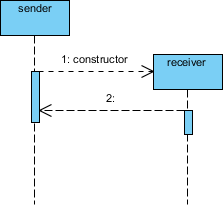
Let’s break down the components of the diagram shown below, which illustrates a sender creating a receiver:
- The Sender Lifeline: This represents the object initiating the interaction. It is active from the top of the diagram downwards.
- The Creation Message: This is the dashed arrow labeled “1: constructor”. It points from the sender’s activation bar to the future position of the receiver. The open arrowhead is the universal symbol for “create.”
- The New Lifeline: The lifeline for the receiver object does not start at the top of the page. Instead, it begins exactly at the point where the creation message arrow terminates. This visually signifies that the object did not exist prior to this moment.
- The Activation Bar: A vertical rectangle appears on the receiver’s lifeline immediately after the creation point. This indicates that the object is now active and ready to receive messages.
The diagram below demonstrates this concept effectively. Notice how the receiver’s vertical dashed line (the lifeline) is visually lower than the sender’s, reflecting the chronological delay required for the object to be born.
Step-by-Step: Modeling Object Creation
To implement this in Visual Paradigm, follow these steps to ensure your diagram is syntactically correct and visually clear:
1. Setup Your Actors
Begin by dragging two Actor or Class symbols onto your canvas. In our example, we will use a sender and a receiver. You do not need to draw the receiver’s lifeline manually; we will let the creation message define its start.
2. Initiate the Interaction
Select the Message tool. Draw a dashed line from the sender to the right. This represents the flow of control.
3. Specify the Constructor
Click on the message line to open its properties. Change the arrow type to Open Arrow to denote creation. In the text label, you can explicitly name it “constructor” or simply name the object being created (e.g., new Receiver()).
4. Define the Target
When you drag the message line, drop the end point on the canvas where you want the new object to appear. Visual Paradigm will automatically generate the new lifeline starting exactly at that drop point. The new object’s activation bar will appear immediately below the creation message.
5. Add Follow-up Interactions
Once the receiver is created, it is active. You can now send standard messages back and forth. In the example provided, message “2” is sent from the newly created receiver back to the sender, demonstrating that the receiver is fully functional.
Why This Matters for System Architecture
Accurately modeling object creation is vital for performance analysis and resource management. By showing that an object is created only when needed, you are documenting a design pattern that conserves memory. If you were to model the object as existing from the start, it would imply that the system is holding a reference to it unnecessarily.
Visual Paradigm’s support for these specific diagrammatic nuances allows architects to communicate not just what happens, but when and how resources are allocated. Whether you are designing a simple request handler or a complex distributed system, mastering the “Constructor Message” ensures your diagrams tell the complete story of your system’s life cycle.