


In today’s fast-paced software development landscape, clarity, speed, and precision are critical. Traditional UML modeling — while powerful — has long been hindered by manual diagramming, syntax complexity, and time-consuming iterations. Enter Visual Paradigm AI Chatbot, a revolutionary AI-powered co-pilot that redefines how developers and modelers create, refine, and collaborate on visual UML diagrams — especially use case diagrams.
Built into the Visual Paradigm ecosystem (accessible via chat.visual-paradigm.com or integrated within the desktop tool), the AI Chatbot leverages advanced natural language processing (NLP) to generate, enhance, and iterate on UML diagrams in seconds — all while ensuring full compliance with UML standards.
This article explores how the Visual Paradigm AI Chatbot is transforming the way IT developers approach system design, using a real-world case study: refining a Food Delivery App use case diagram from concept to professional-grade model — all through conversational prompts.
🚀 From Idea to Diagram: A Developer’s Journey with AI Chatbot Co-Pilot
Imagine a team building a food delivery platform — think Uber Eats meets DoorDash. The goal? To capture user interactions, system boundaries, and complex behavioral relationships using a clean, standardized UML use case diagram.
Traditionally, this would involve:
-
Opening a diagramming tool
-
Manually dragging actors and use cases
-
Drawing relationships («include», «extend») with correct syntax
-
Iterating through multiple versions to get it right
With Visual Paradigm AI Co-Pilot, this entire process is reduced to two conversational prompts.
✅ Step 1: Instant Generation – The Power of “Just Tell It”
The team starts with a simple instruction:
“Generate a use case diagram for a food delivery app with actors Customer (primary), Driver (secondary), and Restaurant Owner (secondary). Include use cases like Place Order, View Menu, Track Order, Receive Delivery, Rate Driver, and Manage Restaurant Profile.”
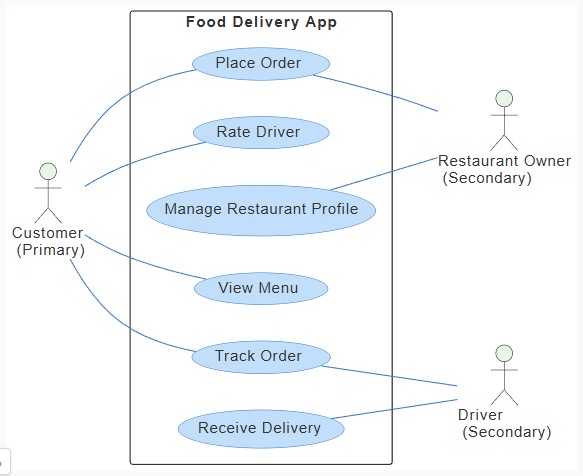
Result? Instantly, the AI generates a clean, structured diagram:
-
System Boundary: “Food Delivery App”
-
Primary Actor: Customer → connected to core flows: Place Order, View Menu, Track Order, Receive Delivery
-
Secondary Actors:
-
Driver → Receive Delivery
-
Restaurant Owner → Manage Restaurant Profile
-
-
Visual Clarity: Clean layout, logical grouping, no blank canvas anxiety.
Behind the scenes, the AI translates this into accurate PlantUML syntax, giving developers full transparency and control. They can:
-
View the underlying code
-
Export it for version control (Git, etc.)
-
Edit directly for custom styling or logic
💡 Why this matters: No more wrestling with drag-and-drop or memorizing UML syntax. Developers can focus on what they want to model — not how to draw it.
✅ Step 2: Smart Refinement – Adding Depth with Natural Language
The initial diagram is solid — but lacks the behavioral richness needed for robust system design. The team refines with a targeted prompt:
“Refine the food delivery app use case diagram to add appropriate <include> and <extend> relationships. “
For example: Place Order should include Authenticate User and Notify Order Status. Track Order should include Notify Order Status. Rate Driver should extend Place Order or Receive Delivery as optional. View Menu might be included in Place Order. Add Receive Delivery for Driver.
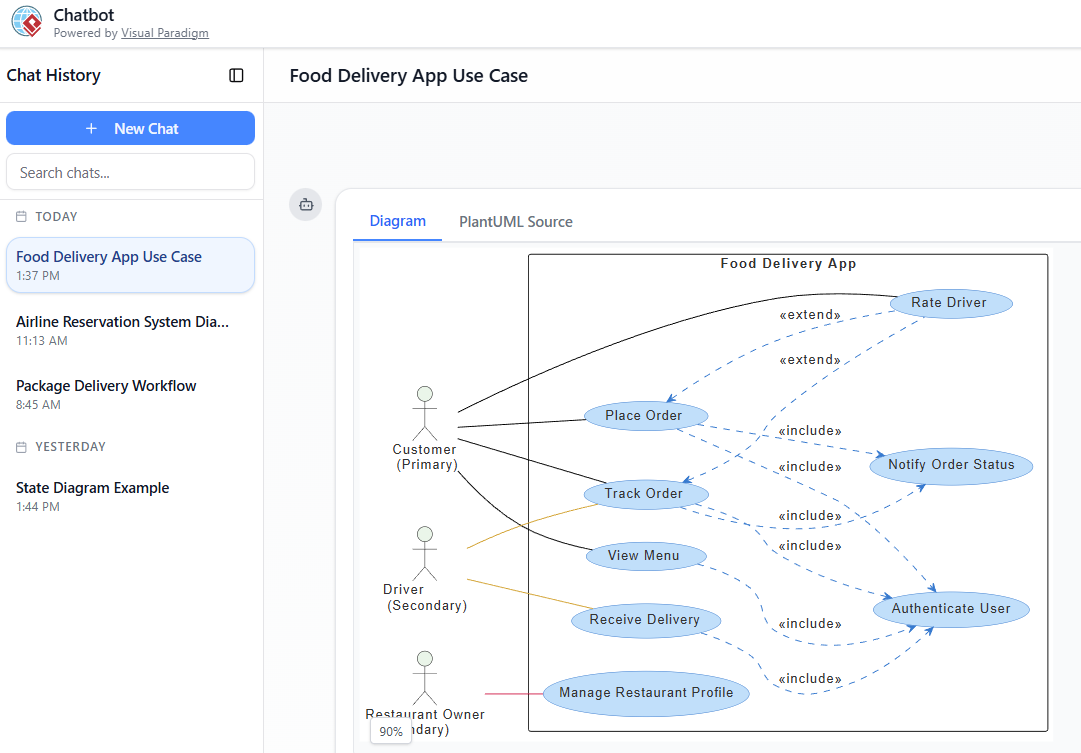
AI Co-Pilot responds instantly, enriching the diagram with intelligent UML semantics:
🔹 «include» Relationships (Mandatory, Reusable)
-
Place Order→Authenticate User(always required before ordering) -
Place Order→Notify Order Status(system sends updates during order lifecycle) -
Track Order→Notify Order Status(real-time tracking depends on status updates) -
Receive Delivery→Notify Order Status(delivery confirmation triggers status update)
✅ Best Practice Applied: Reduces duplication, promotes reuse, and ensures consistency across use cases.
🔹 «extend» Relationships (Optional, Conditional)
-
Rate Driver→Receive Delivery(optional: only after a successful delivery) -
(Implied)
Apply Promo Code→Place Order(if a promotion is used) -
(Implied)
Add Special Instructions→Place Order(conditional during order placement)
✅ Why it works: The AI understands domain logic — rating a driver only makes sense after delivery, so it correctly places the
extendrelationship.
🔹 Visual Enhancements
-
Curved, dashed lines for clarity
-
Clear extension points (e.g., “after successful delivery”)
-
Proper actor classification and flow hierarchy
The result? A professionally structured, semantically rich use case diagram in under 30 seconds — a task that once took hours.
🎯 Key UML Concepts Made Simple with AI Chatbot
The real power of the AI Co-Pilot lies in its ability to automatically apply UML best practices based on natural language input. Here’s how it demystifies core concepts:
| Concept | What It Means | How AI Chatbot C-oPilot Helps |
|---|---|---|
| «include» | Mandatory, reusable behavior (e.g., login, notification) | Automatically adds dashed arrows from base → included use case |
| «extend» | Optional, conditional behavior (e.g., rating, promo) | Adds dashed arrows from extending → base, with implied extension points |
| Primary vs Secondary Actors | Who initiates the main goal? | Preserves correct actor roles and relationships |
| Modular Design | Break complex flows into reusable components | Suggests and applies reusable fragments (e.g., Notify Order Status) |
🔍 Pro Tip: You don’t need to know UML syntax. Just say:
“Make ‘Rate Driver’ optional after delivery” → AI understands and applies«extend».
🛠️ Pro Tips: Maximizing Developer Productivity with AI Chatbot
Here’s how top engineering teams are leveraging the AI Co-Pilot to accelerate development cycles:
1. Start Broad, Refine Iteratively
Begin with: “Generate a use case diagram for a [system]”
Then refine: “Add authentication to all order-related use cases”
→ No need to repeat context — the chat history preserves context.
2. Leverage PlantUML Transparency
-
View, edit, and version control the underlying PlantUML code
-
Perfect for CI/CD pipelines, documentation, and collaboration
3. Use Natural Language for Complex Logic
Instead of:
“Draw a dashed arrow from Rate Driver to Receive Delivery with stereotype ‘extend’”
Say:
“Make ‘Rate Driver’ an optional action after successful delivery”
→ AI handles direction, stereotype, and semantics.
4. Chain Prompts for Rapid Prototyping
“Improve the previous diagram by adding ‘Cancel Order’ that extends ‘Place Order’ with guard condition ‘before preparation’.”
→ Instantly updated diagram with conditional logic.
5. Integrate with Full Visual Paradigm Ecosystem
-
Export diagrams to desktop for advanced UML modeling
-
Link use case diagrams to sequence diagrams, activity diagrams, and class diagrams
-
Generate code from models (Java, C#, Python, etc.)
6. Avoid Over-Modeling Early
Let the AI suggest standard patterns (e.g., authentication, notifications) based on domain norms — then override only when needed.
7. Accelerate Onboarding & Collaboration
-
New team members can quickly understand system behavior via visual, AI-generated diagrams
-
Stakeholders, product owners, and developers align faster with shared, evolving models
🌟 Why This Matters for IT Developers
In the modern software lifecycle, time-to-architecture is as important as time-to-code. The Visual Paradigm AI Co-Pilot delivers:
-
✅ Speed: Generate a complete use case diagram in seconds
-
✅ Accuracy: UML-compliant diagrams with correct relationships
-
✅ Clarity: Visual models that communicate intent clearly
-
✅ Collaboration: Shared, editable, version-controlled diagrams
-
✅ Focus: Shift from tool mechanics to architecture and business logic
🎯 For developers: No more “diagramming fatigue.” Spend less time drawing, more time thinking.
🎯 For teams: Align faster, onboard quicker, document better — all with AI-powered precision.
🏁 Conclusion: The Future of UML Modeling is Conversational
The Visual Paradigm AI Co-Pilot isn’t just a diagramming tool — it’s a co-pilot for software architects and developers. By turning natural language into professional-grade UML diagrams, it bridges the gap between idea and implementation.
The food delivery app case study proves that:
-
A simple sketch can become a sophisticated, relationship-rich model in minutes
-
UML best practices («include» vs «extend») are applied intelligently and correctly
-
Developers can iterate, collaborate, and document at unprecedented speed
🚀 Final Thought:
“The best UML diagrams aren’t drawn — they’re conversed into existence.”
With Visual Paradigm AI Chatbot, that future is here.
🔗 Ready to Transform Your Workflow?
Try the Visual Paradigm AI Co-Pilot today at:
👉 https://chat.visual-paradigm.com
And unlock the power of AI-driven UML modeling — where every conversation builds a better system.
Visual Paradigm – Empowering Developers to Design Smarter, Code Faster, and Deliver Better.
- AI Chatbot Feature – Intelligent Assistance for Visual Paradigm Users: This tool allows users to leverage AI-powered chatbot functionality for instant guidance and task automation within the software.
- Visual Paradigm Chat – AI-Powered Interactive Design Assistant: An interactive interface that helps users generate diagrams, write code, and solve design challenges in real time through a conversational assistant.
- AI-Powered Use Case Diagram Refinement Tool – Smart Diagram Enhancement: This resource explains how to use AI to automatically optimize and refine existing use case diagrams for better clarity and completeness.
- Mastering AI-Driven Use Case Diagrams with Visual Paradigm: A comprehensive tutorial on leveraging specialized AI features to create intelligent and dynamic use case diagrams for modern systems.
- AI Use Case Description Generator by Visual Paradigm: This application uses AI to automatically generate detailed use case descriptions from simple user inputs, accelerating documentation workflows.
- Visual Paradigm AI Chatbot: Turn Your Ideas into Diagrams Instantly: This article explores how the chatbot serves as an advanced assistant to visualize concepts using natural language prompts.
- How to Turn Requirements into Diagrams with an AI Chatbot: A guide describing the process of evolving project requirements from textual descriptions into complete system designs through AI interaction.
- Accelerating Scrum Kickoff with AI-Powered Use Case Refinement: A case study demonstrating how AI tools streamline use case refinement to speed up the initiation phase of Scrum projects.
- Revolutionizing Use Case Elaboration with Visual Paradigm AI: This guide details how the AI engine automates documentation and enhances the modeling clarity of software requirements.
- AI-Powered Use Case Diagram Example for Smart Home System: A community-shared example of a professional use case diagram generated by AI, illustrating complex user-system interactions.