


Business Process Model and Notation (BPMN) is a standardized graphical notation for modeling business processes. It provides a visual representation that is easy to understand and communicate, making it a valuable tool for business analysts, process designers, and stakeholders. This guide will cover the key elements of BPMN notation based on the provided image.

Events
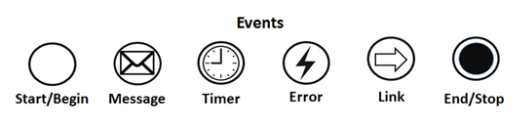
Events represent something that happens during a business process. They are depicted as circles with different icons inside to indicate the type of event.
-
Start/Begin Event:
- Icon: Empty circle
- Description: Indicates the start of a process.
-
Message Event:
- Icon: Circle with an envelope
- Description: Represents the receipt or sending of a message.
-
Timer Event:
- Icon: Circle with a clock
- Description: Represents an event that is triggered by a timer.
-
Error Event:
- Icon: Circle with a lightning bolt
- Description: Represents an error that occurs during the process.
-
Link Event:
- Icon: Circle with an arrow
- Description: Represents a link to another part of the process.
-
End/Stop Event:
- Icon: Circle with a thick border
- Description: Indicates the end of a process.
Activities
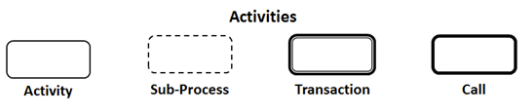
Activities represent work that is performed within a business process. They are depicted as rounded rectangles.
-
Activity:
- Icon: Rounded rectangle
- Description: Represents a single unit of work.
-
Sub-Process:
- Icon: Rounded rectangle with a dashed border
- Description: Represents a process within a process.
-
Transaction:
- Icon: Rounded rectangle with a double border
- Description: Represents a transaction that must be completed as a whole.
-
Call:
- Icon: Rounded rectangle with a bold border
- Description: Represents a call to another process.
Gateways
Gateways control the flow of a process by splitting or merging paths based on conditions. They are depicted as diamond shapes.

-
Exclusive Gateway:
- Icon: Diamond with an X
- Description: Only one path is taken based on a condition.
-
Event-based Gateway:
- Icon: Diamond with a circle
- Description: The path taken depends on an event.
-
Parallel Gateway:
- Icon: Diamond with a plus sign
- Description: All paths are taken simultaneously.
-
Inclusive Gateway:
- Icon: Diamond with a circle
- Description: One or more paths can be taken based on conditions.
-
Exclusive Event-based Gateway:
- Icon: Diamond with a circle and an X
- Description: Only one path is taken based on an event.
-
Parallel Event-based Gateway:
- Icon: Diamond with a circle and a plus sign
- Description: All paths are taken simultaneously based on events.
Connecting Elements

Connecting elements show the flow of activities, events, and gateways within a process.
-
Sequence Flow:
- Icon: Solid arrow
- Description: Represents the order of activities performed in a process.
-
Message Flow:
- Icon: Dashed arrow with a circle at the start
- Description: Shows the communication between a process and external participants.
-
Association:
- Icon: Dashed line with an arrow
- Description: Connects text or artifacts to flow objects.
Example BPMN Diagram
Let’s create a simple example of a BPMN diagram using the notation elements described above.
Example: Order Processing
- Start Event: “Customer Places Order”
- Activity: “Verify Payment”
- Exclusive Gateway: “Payment Verified?”
- Sequence Flow: “Yes” → Activity: “Prepare Order”
- Sequence Flow: “No” → End Event: “Order Canceled”
- Activity: “Ship Order”
- End Event: “Order Shipped”
Conclusion
BPMN provides a standardized and visual way to model business processes. By understanding and using the notation elements described in this guide, you can create clear and effective BPMN diagrams to represent and communicate your business processes. Whether you are a beginner or an experienced process modeler, mastering BPMN notation will enhance your ability to design and improve business processes.
