


Business Process Model and Notation (BPMN) gateways are essential elements used to control the flow of processes by splitting or merging paths based on conditions. This guide will cover the different types of gateways in BPMN, their purposes, and how to use them effectively with examples.
Types of BPMN Gateways
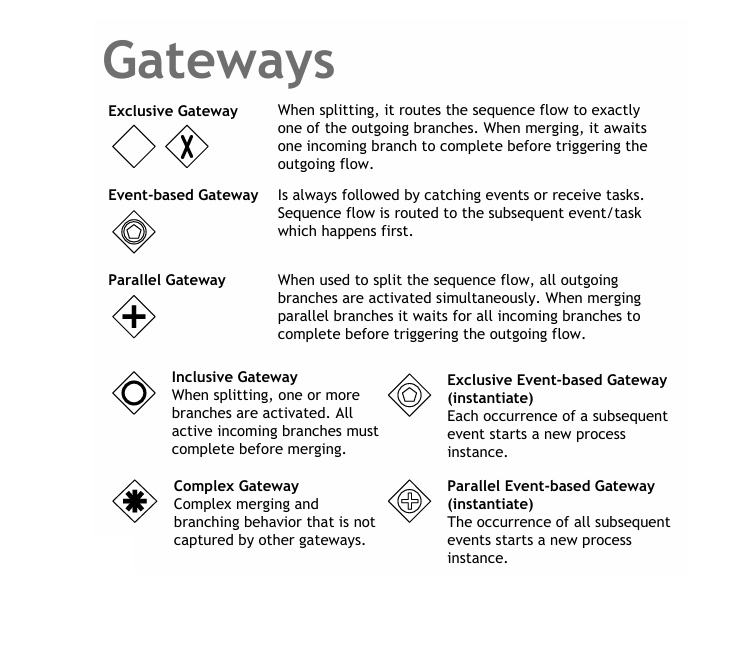
1. Exclusive Gateway
Icon: Diamond with an “X”
Description: When splitting, it routes the sequence flow to exactly one of the outgoing branches. When merging, it waits for one incoming branch to complete before triggering the outgoing flow.
Example:
- Scenario: Loan Approval Process
- Condition: Check Credit Score
- Outcome: Approve Loan or Reject Loan
2. Event-based Gateway
Icon: Diamond with a circle
Description: Always followed by catching events or receive tasks. Sequence flow is routed to the subsequent event/task which happens first.
Example:
- Scenario: Order Processing
- Condition: Wait for Payment or Cancellation
- Outcome: Process Order or Cancel Order
3. Parallel Gateway
Icon: Diamond with a “+”
Description: When used to split the sequence flow, all outgoing branches are activated simultaneously. When merging parallel branches, it waits for all incoming branches to complete before triggering the outgoing flow.
Example:
- Scenario: Product Assembly
- Condition: Assemble Components Simultaneously
- Outcome: Complete Product Assembly
4. Inclusive Gateway
Icon: Diamond with an “O”
Description: When splitting, one or more branches are activated. All active incoming branches must complete before merging.
Example:
- Scenario: Travel Planning
- Condition: Choose Activities
- Outcome: Book Hotel, Book Flight, Rent Car
5. Exclusive Event-based Gateway (Instantiate)
Icon: Diamond with a circle and an “X”
Description: Each occurrence of a subsequent event starts a new process instance.
Example:
- Scenario: Customer Support
- Condition: Receive Customer Complaint
- Outcome: Handle Complaint
6. Parallel Event-based Gateway (Instantiate)
Icon: Diamond with a circle and a “+”
Description: The occurrence of all subsequent events starts a new process instance.
Example:
- Scenario: Project Management
- Condition: Receive Multiple Tasks
- Outcome: Execute Tasks Simultaneously
7. Complex Gateway
Icon: Diamond with an asterisk (*)
Description: Complex merging and branching behavior that is not captured by other gateways.
Example:
- Scenario: Custom Workflow
- Condition: Custom Logic
- Outcome: Custom Branching
Best Practices for Using BPMN Gateways
- Clarify Conditions: Ensure that the conditions for splitting and merging are clearly defined and understood by all stakeholders.
- Use Appropriate Gateways: Choose the right type of gateway based on the process requirements to avoid confusion and ensure accurate process flow.
- Document Decisions: Document the decision-making process at each gateway to provide clarity and transparency.
- Validate the Model: Use BPMN validation tools to check for errors and inconsistencies in your diagrams.
- Collaborate: Share your diagrams with team members and stakeholders to gather feedback and make improvements.
Conclusion
BPMN gateways are powerful tools for controlling the flow of business processes. By understanding the different types of gateways and their uses, you can create clear and effective BPMN diagrams that accurately represent your business processes. Whether you are a beginner or an experienced process modeler, mastering BPMN gateways will enhance your ability to design and improve business processes.
BPMN References
- Comprehensive Guide to Visual Paradigm for Business Process Modeling
- Streamlining Business Processes with Visual Paradigm’s BPMN Business Process Modeling Software
- Visual Paradigm: Your Comprehensive Solution for Integrated Enterprise Modeling
- Demystifying BPMN: A Comprehensive Guide to Business Process Modeling
- Navigating Business Processes with BPMN: A Visual Odyssey
- Visual Paradigm: The Ultimate All-in-One Visual Modeling Platform for Enterprise Architecture and Software Design
- Top Visual Paradigm Tools for Business Process Modeling
- Visual Paradigm: The Premier Tool for ArchiMate EA Modeling
- Mastering Visual Paradigm’s BPMN Tool: A Step-by-Step Learning Guide
- Simplify Business Process Modeling with Visual Paradigm’s BPMN Tools
- BPMN — Quick Guide
- BPMN in a Nutshell — with Free Online BPMN Tool & Examples
- A Comprehensive Guide to BPMN
- Modeling As-Is and To-Be Processes
- How to Perform Gap Analysis with BPMN?
- Visual Paradigm: A Comprehensive Suite for IT Project Development and Digital Transformation
