


1. Business Context & Motivation
Modern web applications (e-commerce, SaaS platforms, admin panels, registration flows, survey tools, etc.) almost always contain one or more form submission workflows.
A seemingly simple action — “user clicks Submit” — actually hides a surprisingly rich decision tree:
-
missing or malformed fields
-
business rule violations (age < 18, duplicate email, stock not available, coupon expired…)
-
security checks (CSRF, rate limiting, honeypot)
-
external service calls (payment gateway, email delivery, PDF generation)
-
different success & failure communication channels (in-page message, toast, email, SMS)
Trying to express all these paths using only if-else chains quickly leads to spaghetti code, especially when the same form appears in multiple contexts (wizard, modal, mobile app, API endpoint…).
A finite state machine (FSM) offers a clean, visual, and testable way to model this lifecycle.
2. The State Diagram – Explained Line by Line
[*] --> WaitingForUserInput

WaitingForUserInput --> ProcessingRequest : user_submits_form()
ProcessingRequest --> ValidatingData : validate_inputs()

ValidatingData --> RequestRejected  : invalid_data
ValidatingData --> RequestAccepted  : data_valid

RequestAccepted --> GeneratingResponse : generate_response()
GeneratingResponse --> SendingResponse : send_to_user()

SendingResponse --> [*]

RequestRejected --> [*]
States – Meaning & Responsibilities
| State | Meaning / Phase | Typical Responsibilities / Concerns | Can user interact? |
|---|---|---|---|
| WaitingForUserInput | Idle – form is displayed, user is filling it | Render form, show validation hints, auto-fill, focus management | Yes |
| ProcessingRequest | Form just submitted – initial receipt | CSRF check, parse & sanitize input, start logging/audit trail | No (usually disabled UI) |
| ValidatingData | Business & format validation | Required fields, format (email, phone, date…), domain rules, uniqueness | No |
| RequestRejected | Validation failed – terminal failure state | Prepare user-friendly error message(s), log rejection reason | — (terminal) |
| RequestAccepted | All validations passed | Decision point before doing expensive/side-effect work | No |
| GeneratingResponse | Creating success payload | Create confirmation number, generate PDF/email template, prepare data | No |
| SendingResponse | Delivering result to user | Send email, push websocket message, render success page, analytics | No |
| [*] (final) | Workflow completed (success or failure) | — | — |
3. Key State Machine Concepts Demonstrated
| Concept | How it appears in this diagram | Why it matters |
|---|---|---|
| Initial / start state | [*] → WaitingForUserInput |
Clear entry point |
| Final state(s) | Two arrows to [*] |
Explicitly models both happy path & error path completion |
| Guards / conditions | invalid_data vs data_valid |
Branching logic is declarative and visible |
| Events / triggers | user_submits_form(), validate_inputs(), … |
Each transition has a clear cause |
| Sequential steps | RequestAccepted → GeneratingResponse → SendingResponse |
Enforces order of operations (important for side effects) |
| Terminal states | RequestRejected and end of success path |
Prevents accidental further processing after outcome is known |
| No self-loops / no cycles | Linear + one decision point | Simplifies reasoning & testing (acyclic in this simple case) |
4. Real-World Extensions (Common in Production)
Most real systems quickly outgrow the minimal diagram. Typical additions:
-
RateLimitExceeded state
-
ServerError / ExternalServiceFailed (payment declined, SMTP server down…)
-
PendingAsyncAction → AwaitingWebhook (Stripe, email delivery confirmation)
-
PartiallySubmitted / DraftSaved (multi-step wizards)
-
ReValidationNeeded (user pressed “Back” in wizard or token expired)
-
ConfirmationRequired (double opt-in, 2FA, approve order by admin)
5. Implementation Patterns (Language/Framework Agnostic)
| Architecture style | Typical state representation | Transition logic location |
|---|---|---|
| Object-oriented | Class FormSubmission with state enum field |
Methods like submit(), validate() |
| Redux / Zustand / Jotai | Single atom/store slice with status enum + data/errors |
Reducers / actions |
| XState (JS/TS) | Explicit state machine configuration object | Most faithful to the diagram |
| Server-side (Rails, Laravel, Spring…) | Model attribute status + state machine gem/library (AASM, Statesman, Workflow) |
Model callbacks / service objects |
| Functional / Elm style | Union type + pattern matching | Pure functions per transition |
6. Testing & Documentation Benefits
Because the diagram is small and explicit, it becomes an excellent source of truth:
-
Unit tests — one test suite per transition
-
Integration tests — happy path + each error branch
-
Property-based testing — generate random valid/invalid inputs
-
Living documentation — keep the PlantUML diagram in the repository
-
On-boarding — new developers understand the flow in < 60 seconds
-
Debugging — logs can simply record “transitioned from ValidatingData → RequestRejected because invalid_data”
Summary – Why This Pattern Wins
The simple form-submission state machine elegantly solves several classic problems:
-
Eliminates deeply nested if-else pyramids
-
Makes order of operations explicit and enforceable
-
Separates validation from business actions from delivery
-
Provides a single source of truth for success and failure paths
-
Scales reasonably well when adding new failure modes or async steps
-
Serves as both code blueprint and communication tool with non-developers
Even in 2025–2026, with AI-assisted coding and low-code platforms, explicit state machines for user-facing workflows remain one of the highest-leverage architecture decisions a team can make.
The Visual Paradigm AI Chatbot is a tool designed to accelerate the creation, visualization, and refinement of state machine diagrams (and other UML diagrams) through natural language conversation.
This chatbot — accessible at locations like chat.visual-paradigm.com or via the AI toolbox — acts as an intelligent co-pilot for modeling dynamic system behavior. Here’s how it helps users (developers, architects, analysts, students, product owners, etc.) based on the kind of workflow the UI image represents:
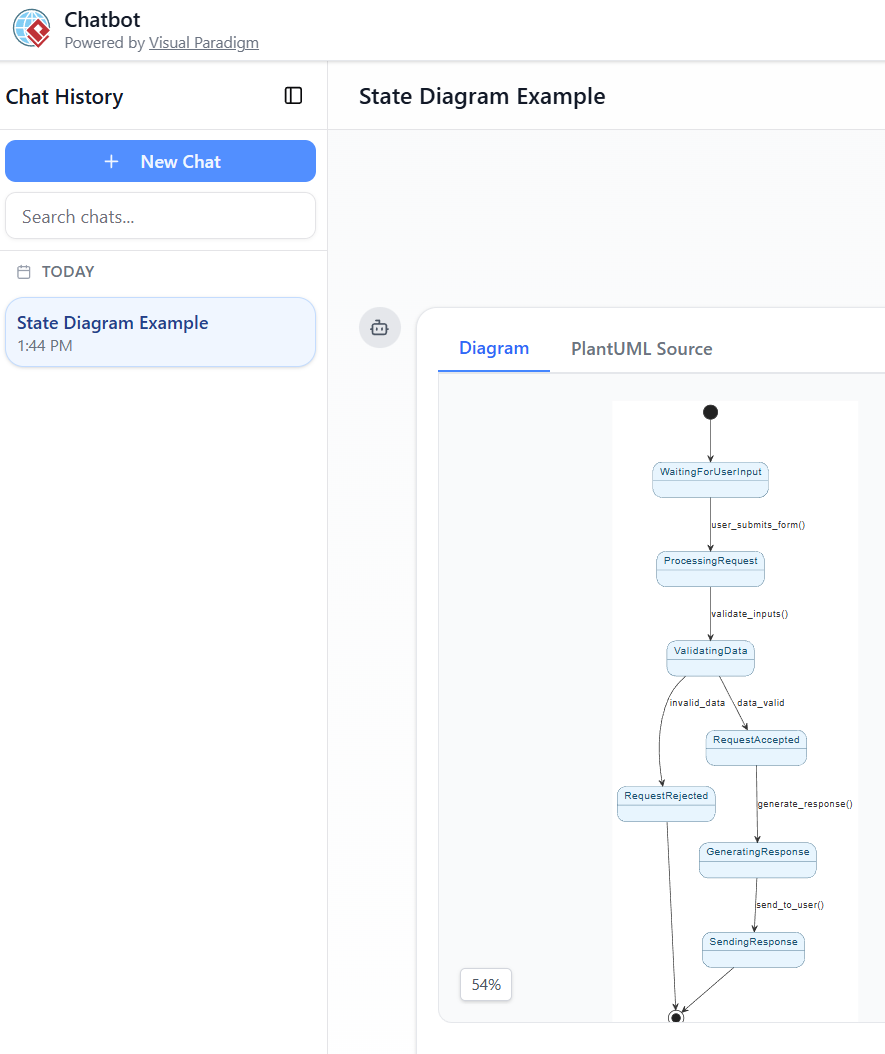
Core Ways the Visual Paradigm AI State Machine Diagram Chatbot Assists
-
Instant Diagram Generation from Plain English
-
You describe the desired behavior in normal sentences (e.g. “Create a state machine for a user form submission process with states: waiting for input, processing, validating, accepted, rejected, generating response, sending response”).
-
The AI instantly interprets the description and produces a complete, standards-compliant UML State Machine Diagram (with states, transitions, events/guards, start/end points, etc.).
-
No need to manually drag shapes, draw arrows, or remember exact UML notation — the chatbot handles layout, naming conventions, and correct syntax.
-
-
Conversational & Iterative Refinement
-
The chat-style interface lets you refine the diagram step by step without starting over:
-
“Add a timeout transition from ProcessingRequest back to WaitingForUserInput”
-
“Make RequestRejected show an error message action”
-
“Change the guard from invalid_data to [errors.length > 0]”
-
“Include orthogonal regions for logging and UI feedback”
-
-
The diagram updates live in the right-hand panel as you chat, making exploration fast and low-friction.
-
-
Side-by-Side View for Clarity
As visible in the screenshot:-
Left side — Chat history (your prompts + AI responses)
-
Right side — Real-time rendered diagram + PlantUML source code tab
This dual view lets you: -
See exactly how your words turned into visual elements
-
Inspect/edit the generated PlantUML code if desired
-
Quickly spot and correct misunderstandings
-
-
Learning & Explanation Aid
-
Ask the chatbot to explain parts of the diagram (“What does the guard data_valid mean here?” or “Why is there a transition from ValidatingData to both accepted and rejected?”).
-
Great for students learning state machines or teams onboarding new members to a system’s lifecycle.
-
-
Rapid Prototyping & Validation
-
Ideal for early-stage design: turn vague ideas (support ticket, order processing, login flow, vending machine, payment gateway, IoT device, etc.) into concrete visuals in seconds.
-
Quickly validate whether the modeled behavior matches requirements before investing time in code or detailed specs.
-
-
Export & Integration
-
Finished diagrams can typically be exported (PNG, SVG, PDF), saved to Visual Paradigm projects, or imported into the full Visual Paradigm desktop/online editor for further enhancement, teamwork, code generation, or simulation.
-
Practical Example Matching Your Previous PlantUML
If you paste or describe the form submission workflow we discussed earlier into this chatbot:
“Generate UML state machine diagram: starts at WaitingForUserInput → on user_submits_form() go to ProcessingRequest → validate_inputs() → ValidatingData. From there if invalid_data → RequestRejected, if data_valid → RequestAccepted → generate_response() → SendingResponse → end. Also show RequestRejected ends.”
The AI would produce a very similar (or even cleaner) version of the diagram shown in your screenshot — but rendered natively in UML style, with proper rounded rectangles, diamonds for decisions if needed, and professional auto-layout.
Who Benefits Most?
-
Software developers/architects modeling reactive systems
-
Students & educators teaching/learning state-based behavior
-
Business analysts/product owners wanting to visualize workflows without drawing tools
-
Anyone who finds manual diagramming slow or error-prone
In short, this AI chatbot removes most of the mechanical friction of creating state diagrams, letting you focus on thinking about behavior rather than pixels and arrows. It’s especially powerful for iterative, exploratory work — exactly the style the screenshot’s chat + diagram layout encourages.
If you’re actively using this tool (or considering it), feel free to share a specific system/behavior you’d like modeled — I can help craft good prompts for it.
-
Comprehensive Step-by-Step Guide to the 3D Printer State Machine: This guide applies state machine concepts to 3D printing systems, detailing their operational logic and automation pathways.
-
Interactive State Machine Diagram Tool: A specialized web-based tool for creating and editing state machine diagrams that leverages GenAI capabilities for real-time behavior modeling.
-
Understanding State Machine Diagrams in UML: This tutorial provides a comprehensive overview of modeling system behavior using state machine diagrams in UML.
-
Definitive Guide to UML State Machine Diagrams with AI: This resource provides a detailed look at using AI-powered tools to accurately model object behavior with UML state machine diagrams.
-
How to Draw a State Machine Diagram in UML?: This tutorial provides detailed instructions for creating diagrams and naming transitions to model entity history and events.
-
Mastering State Diagrams with Visual Paradigm AI: A Guide for Automated Toll Systems: This guide provides a walkthrough on using AI-enhanced state diagrams to model and automate the complex logic required for toll system software.
-
State Machine Diagram Tutorial: This tutorial explains the symbols and syntax required to model the dynamic behavior of individual class objects, use cases, and entire systems.
-
Visual Paradigm AI Suite: A Comprehensive Guide to Intelligent Modeling Tools: This overview details how the platform’s AI Chatbot supports technical modeling, including state machines and other behavioral diagrams.
-
Visual Paradigm – UML State Machine Diagram Tool: An overview of a feature-rich online tool designed for architects to build, edit, and export precision state machine models using a cloud-based interface.
-
State Diagram Quick Tutorial: Master UML State Machines in Minutes: A beginner-friendly tutorial for creating and understanding state diagrams, focusing on core concepts and practical modeling techniques.