


Introduction
In today’s highly competitive e-commerce landscape, the ability for customers to efficiently discover and evaluate products is a foundational element of user satisfaction, conversion rates, and long-term platform loyalty. The “Browse Products” use case represents one of the most frequently executed journeys in any online retail system — serving as the primary gateway through which users explore the catalog before progressing to core business goals such as adding items to the cart or completing a purchase.
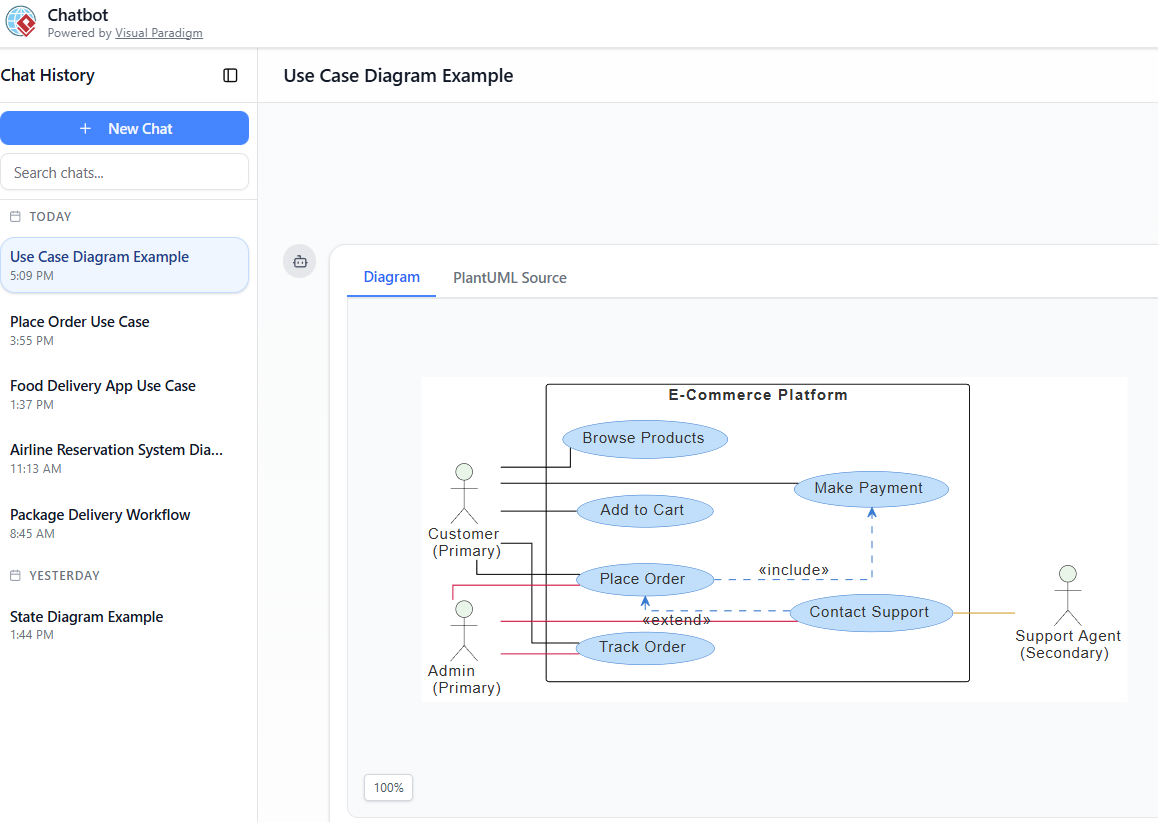
This case study demonstrates a structured requirements elaboration process starting from a high-level UML use case diagram, through a detailed textual use case specification (including actors, main success scenario, alternative and exception flows, pre- and postconditions), and culminating in a precise activity diagram that visualizes the dynamic decision points, user actions, and system responses. By applying this progressive refinement approach — supported by tools such as Visual Paradigm and PlantUML notation — we create clear, unambiguous, and implementable artifacts that bridge the gap between business stakeholders, UX designers, developers, and quality assurance teams.
The example focuses on a realistic modern e-commerce browsing experience, incorporating common features such as category navigation, keyword search, filtering, sorting, and product detail navigation, while explicitly handling edge cases like zero-result scenarios and graceful degradation. This elaboration not only supports accurate development and testing but also provides a reusable template for modeling similar discovery-oriented use cases across digital product platforms.
1. Context & Use Case Identification
System: Modern E-Commerce Platform (web & mobile) Use Case Name: Browse Products Use Case ID: UC-001 Actors:
- Primary: Customer (registered or guest)
- Secondary: System (Product Catalog Service)
Brief Description The customer explores the available product catalog to discover items of interest. This includes viewing categories, searching, filtering, sorting, and drilling down into product details — forming the entry point for most shopping journeys.
Priority: High (core user-facing capability) Frequency: Very high (most sessions begin here) Scope: User goal / business
2. Detailed Use Case Description
Use Case Name: Browse Products Primary Actor: Customer Secondary Actor: E-Commerce System (Catalog Service)
Description Allows customers to discover and evaluate products by navigating categories, performing keyword searches, applying filters (price, brand, rating, etc.), sorting results, and viewing detailed product pages. This use case does not include adding to cart or purchasing — those are separate (included or extended) use cases.
Preconditions
- The e-commerce platform is online and accessible
- The product catalog database is populated and up-to-date
- Customer has opened the website/app (logged in or as guest)
Postconditions
- Customer has viewed one or more product listings / detail pages
- System has recorded browsing events for analytics, recommendation engine & personalization
- Customer may proceed to Add to Cart, Place Order, or exit
Main Success Scenario (Happy Path)
- Customer navigates to the products/browse page (home, category landing, or search landing)
- System displays top-level categories and a prominent search bar
- Customer chooses one of the following actions (any order, repeatable):
- Selects a category → system shows products belonging to that category
- Enters a search keyword/phrase → system performs search
- If search is performed and results exist → system displays matching products (with pagination)
- If no results → system shows “No products found” message + suggested alternatives
- Customer optionally applies one or more filters (price range, brand, rating, color, size, etc.)
- System updates the product list according to active filters
- Customer optionally changes sort order (relevance, price low→high, price high→low, newest, popularity, rating)
- System re-sorts the displayed list
- Customer clicks/taps a product card → system opens the Product Detail Page
- Customer continues browsing (returns to list) or ends session
Alternative Flows
- 3a. Customer does nothing (just landed) → system shows featured/all products or personalized recommendations
- 6a. Filters produce zero results → system shows warning + option to clear filters
- 10a. Product is out of stock → detail page shows “Out of stock” + possibly “Notify me” option
Exception Flows
- 4a. Search service timeout / failure → system shows error message + fallback to category browsing
- Internet lost during browsing → client-side cache shows previously loaded items (progressive enhancement)
Special Requirements
- Responsive design (mobile + desktop)
- Lazy loading / infinite scroll support
- SEO-friendly URLs for categories & search results
- Accessibility (WCAG 2.1 AA): keyboard navigation, screen reader support for filters
3. Activity Diagram (PlantUML – ready to paste into Visual Paradigm Chatbot)
This activity diagram captures the main & alternative paths described above
@startuml

skinparam {
ArrowColor #424242
ArrowFontColor #424242
DefaultFontSize 14

Swimlane {
BorderColor #9FA8DA
BackgroundColor #E8EAF6
FontColor #303F9F
}

Activity {
BorderColor #FF8F00
BackgroundColor #FFECB3
FontColor #3E2723
}
}

start
:Open Browse Products Page;
:Display Categories & Search Bar;
if (Customer selects category?) then (yes)
:Show Products in Category;
else (no)
:Show All Products;
endif
if (Customer enters search term?) then (yes)
:Search Products;
if (Products Found?) then (yes)
:Display Search Results;
else (no)
:Show "No products found" message;
endif
else (no)
:No Search;
endif
if (Customer applies filters?) then (yes)
:Apply Filters;
:Update Product List;
endif
if (Customer sorts results?) then (yes)
:Sort Products;
endif
if (Customer selects product?) then (yes)
:Open Product Detail Page;
else (no)
:Continue Browsing;
endif
:End Browsing Session;
stop

@endumlSummary – Progression of Elaboration
- Use Case Diagram → high-level actors & goals (Browse Products, Add to Cart, Place Order, etc.)
- Use Case Description → structured narrative with flows, pre/postconditions, exceptions
- Activity Diagram → visualizes the dynamic behavior, decisions, loops, and user-system interactions
You can copy the PlantUML code above directly into Visual Paradigm Chatbot (or any PlantUML-compatible tool) to generate the diagram. Let me know if you’d like to extend this case study with:
- a Sequence Diagram (customer ↔ browser ↔ backend),
- a UI wireframe sketch description, or
- the next use case (Add to Cart or View Product Details).
Conclusion
The elaboration of the “Browse Products” use case illustrates how disciplined requirements engineering — moving methodically from high-level behavioral overview (use case diagram) → structured narrative specification → executable visual workflow (activity diagram) — produces artifacts that are simultaneously understandable to non-technical stakeholders and sufficiently detailed for engineering teams.
Key takeaways from this exercise include:
- The importance of capturing variability early through decision nodes (category vs. search, filters, sorting) and loops that reflect real user behavior rather than enforcing a rigid linear sequence.
- The value of explicitly documenting alternative, exception, and edge-case flows (zero results, service failure, out-of-stock indicators) to reduce downstream ambiguity and rework.
- The effectiveness of PlantUML + Visual Paradigm-style notation for rapidly prototyping and iterating on activity diagrams in collaborative environments.
- The recognition that “Browse Products” is rarely an isolated use case — it naturally feeds into downstream goals (View Product Details → Add to Cart → Place Order) and is influenced by cross-cutting concerns such as personalization, analytics, accessibility, and performance.
By investing in this level of upfront elaboration, product teams can deliver a more intuitive, resilient, and scalable browsing experience — ultimately driving higher engagement, reduced bounce rates, and increased revenue per session. The same rigorous yet pragmatic approach can (and should) be applied to other critical user journeys throughout the e-commerce lifecycle.
This case study therefore serves not only as documentation for the “Browse Products” functionality but also as a practical blueprint for effective use-case-driven analysis and design in modern software development.
Happy modeling!
- AI Chatbot for Diagramming: How It Works with Visual Paradigm: This resource explains how the AI-powered chatbot acts as a modeling assistant that transforms natural language prompts directly into diagrams. It removes the need for users to manually learn complex modeling standards or specific syntax.
- AI-Powered Use Case Diagram Refinement Tool – Smart Diagram Enhancement: This specialized tool leverages artificial intelligence to automatically optimize existing use case diagrams. It assists in improving the clarity, consistency, and completeness of requirements models.
- Convert Use Case to Activity Diagram – AI-Powered Transformation: This feature allows for the automated conversion of use case diagrams into detailed activity diagrams. It is designed to help teams visualize complex system workflows derived directly from established use cases.
- Mastering AI-Driven Use Case Diagrams with Visual Paradigm: A comprehensive tutorial focused on using specialized AI features to create intelligent and dynamic use case diagrams for modern software systems. It highlights how AI streamlines the modeling of complex user interactions.
- Generate Activity Diagrams from Use Cases Instantly with AI: This resource demonstrates how the platform’s AI engine enables the rapid creation of professional activity diagrams from simple use case inputs. This process significantly reduces manual effort in transition from requirements to behavioral modeling.
- AI-Powered Use Case to Activity Diagram Tutorial with Visual Paradigm: A step-by-step technical guide demonstrating how AI features automatically transform use case descriptions into detailed activity diagrams. It focuses on improving modeling speed and accuracy for system designers.
- AI-Powered Use Case Diagram Example for Smart Home System: This community-shared example showcases a professional use case diagram generated entirely by AI. It provides a real-world look at how AI handles user-system interactions for complex IoT environments.
- Mastering UML Activity Diagrams with AI | Visual Paradigm Blog: This article explores how AI-powered features enhance the optimization of activity diagrams for developers and business analysts. It emphasizes using AI to identify logical improvements in behavioral models.
- AI-Powered Chatbot Development Using Visual Paradigm: A video tutorial that demonstrates building an AI-driven chatbot using automated modeling techniques. It covers the integration of assisted diagramming tools to define chatbot logic and workflows.
- Case Study: Enhancing System Modeling Efficiency with AI-Powered Chatbot: A detailed study showing how the AI chatbot improves productivity by enabling conversational diagram creation. It proves that the tool can generate standards-compliant diagrams through simple interactive prompts.
Related posts:
 AI Generated Component Diagram: Airline Booking System Example
 UML Component Diagram vs. Deployment Diagram: Key Concepts
 Revolutionizing System Modeling: How the Visual Paradigm AI Chatbot Transforms Diagram Creation
 Empowering Developers: How Visual Paradigm AI Co-Pilot Transforms UML Modeling for IT Teams