


In the fast-evolving landscape of software architecture and business process design, the ability to rapidly visualize complex systems is no longer a luxury—it’s a necessity. Traditional diagramming tools often demand deep expertise in UML, BPMN, or ArchiMate, coupled with time-consuming manual layout and syntax precision. Enter the Visual Paradigm AI Chatbot—an intelligent, conversational modeling assistant that redefines how professionals create, refine, and understand system diagrams.
Available via Visual Paradigm Online and the dedicated interface at chat.visual-paradigm.com, this AI-powered tool transforms natural language into professional-grade, standards-compliant diagrams—without requiring users to master complex notation or coding syntax. Unlike basic text-to-diagram generators that produce static, non-editable outputs (e.g., raw Mermaid or PlantUML code), the Visual Paradigm AI Chatbot delivers native, fully editable diagrams directly within the Visual Paradigm ecosystem.
This article explores the transformative capabilities of the AI Chatbot, its core principles, real-world application through a detailed example, and the strategic advantages it offers over traditional and generic AI diagramming tools.
Core Capabilities: Beyond Text-to-Diagram Generation
The Visual Paradigm AI Chatbot is not just a generator—it’s a modeling copilot designed for iterative, intelligent collaboration. Its key features include:
1. Natural Language to Professional Diagrams
Users describe a system in plain English, and the AI instantly generates a standards-compliant diagram. Whether it’s a UML Component Diagram, Class Diagram, Sequence Diagram, Deployment Diagram, or BPMN Process Flow, the output adheres to industry best practices (UML, BPMN, ArchiMate, C4, etc.).
✅ Example Prompt:
“Visualize a component diagram for an airline reservation system highlighting booking interface, seat inventory, pricing engine, payment processing, and reservation database.”
✅ Result: A layered, structured diagram with clear separation between Presentation, Service, and Data Layers—complete with interfaces, dependencies, and provided/required ports.
2. Conversational, Iterative Modeling
Instead of a one-time generation, the chatbot supports a dynamic, back-and-forth dialogue. After generating a diagram, users can:
-
Ask for explanations of specific interactions
-
Request refinements (rename components, add new elements)
-
Generate related diagrams from existing ones
This enables continuous improvement and alignment with evolving requirements—ideal for agile teams, architects, and stakeholders.
3. PlantUML Integration with Full Editability
Under the hood, the AI leverages PlantUML syntax to generate diagrams. This means:
-
Access to editable source code for customization
-
Seamless export to SVG, PNG, PDF, and other formats
-
Compatibility with version control systems and documentation workflows
Users aren’t locked into a black box—they can tweak, extend, or integrate the diagrams into larger documentation sets.
4. Architectural Intelligence & Layered Design
The AI understands system architecture deeply. It naturally breaks down systems into logical layers:
-
Presentation Layer (e.g., Booking Interface)
-
Service Layer (e.g., Pricing Engine, Seat Inventory)
-
Data Layer (e.g., Reservation Database)
It also identifies interfaces, dependencies, and data flows—ensuring architectural coherence from the start.
5. Cross-Diagram Intelligence & Derivation
One of the most powerful features is the ability to derive one diagram type from another. For instance:
-
From a Component Diagram, generate a Class Diagram that reflects internal structure
-
From a Use Case Diagram, infer Sequence Diagrams for key scenarios
-
From a Deployment Diagram, extract Component Diagrams for runtime modules
This creates a holistic modeling experience, helping teams understand systems at multiple abstraction levels.
6. Explanatory & Analytical Mode
Beyond visuals, the chatbot excels at explaining behavior. When asked to clarify an interaction, it responds with:
-
Structured step-by-step flows
-
Tables comparing diagram types
-
Bullet-point summaries of logic and responsibilities
✅ Example Query:
“Can you explain how the ‘Check Seat Availability’ interface interacts with the ‘Seat Inventory’ component?”
✅ Response: A clear, numbered breakdown:
User requests seat availability via Booking Interface
Interface sends
checkAvailability()request to Seat InventoryInventory queries the seat map and applies rules (e.g., no overbooking)
Returns available seats and restrictions
Response rendered in UI
This bridges the gap between visual architecture and behavioral understanding—eliminating the need for separate sequence diagrams in early stages.
Real-World Application: Airline Reservation System Walkthrough
To illustrate the power of the Visual Paradigm AI Chatbot, consider the following real-world modeling journey:
Step 1: High-Level Component Diagram
Prompt:
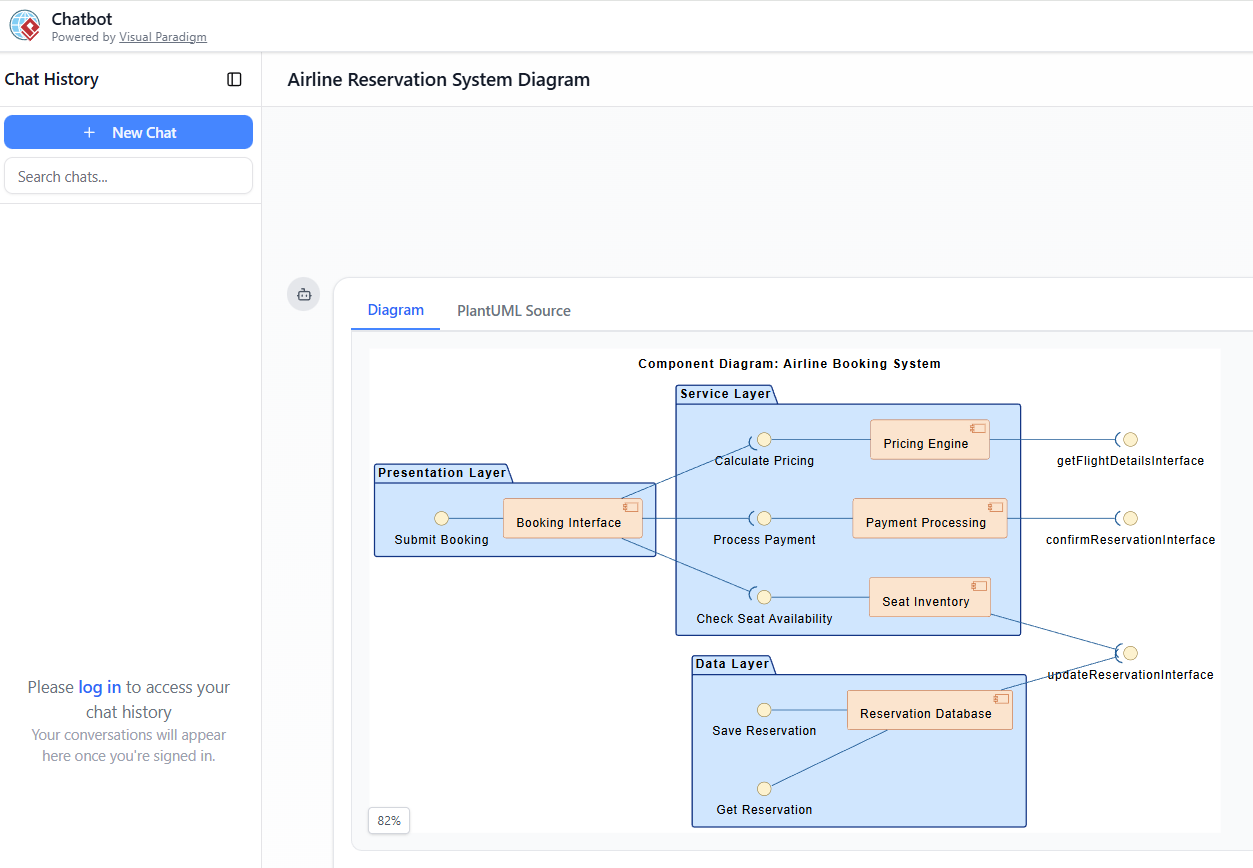
“Visualize a component diagram for an airline reservation system highlighting booking interface, seat inventory, pricing engine, payment processing, and reservation database.”
Output:
A clean, layered architecture with:
-
Presentation Layer: Booking Interface
-
Service Layer: Seat Inventory, Pricing Engine, Payment Processing
-
Data Layer: Reservation Database
Interfaces such asCheck Seat Availability,Process Payment, andupdateReservationInterfaceare clearly defined with dependency arrows.
📌 Purpose: Establishes a system-wide architectural overview, showing how modules collaborate.
Step 2: Behavioral Explanation & Interaction Analysis
Prompt:
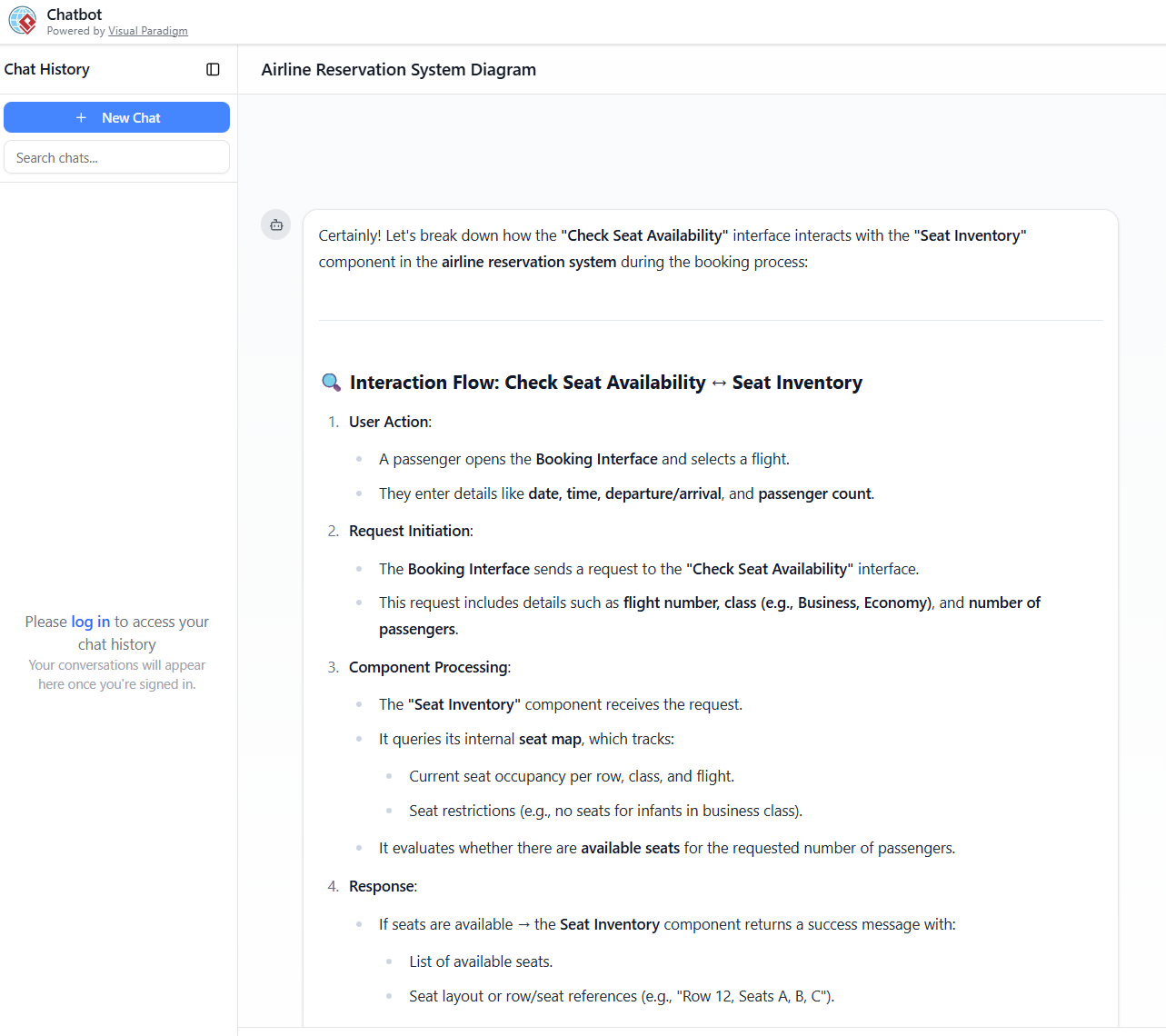
“Can you explain how the ‘Check Seat Availability’ interface interacts with the ‘Seat Inventory’ component in the booking process?”
Output:
A detailed, step-by-step explanation with logical flow and business rules (e.g., seat blocking, time limits, availability checks). This turns the diagram into a living specification—ideal for onboarding, documentation, or stakeholder reviews.
📌 Purpose: Transforms static visuals into executable knowledge, reducing ambiguity.
Step 3: Deriving a Class Diagram from Architecture
Prompt:
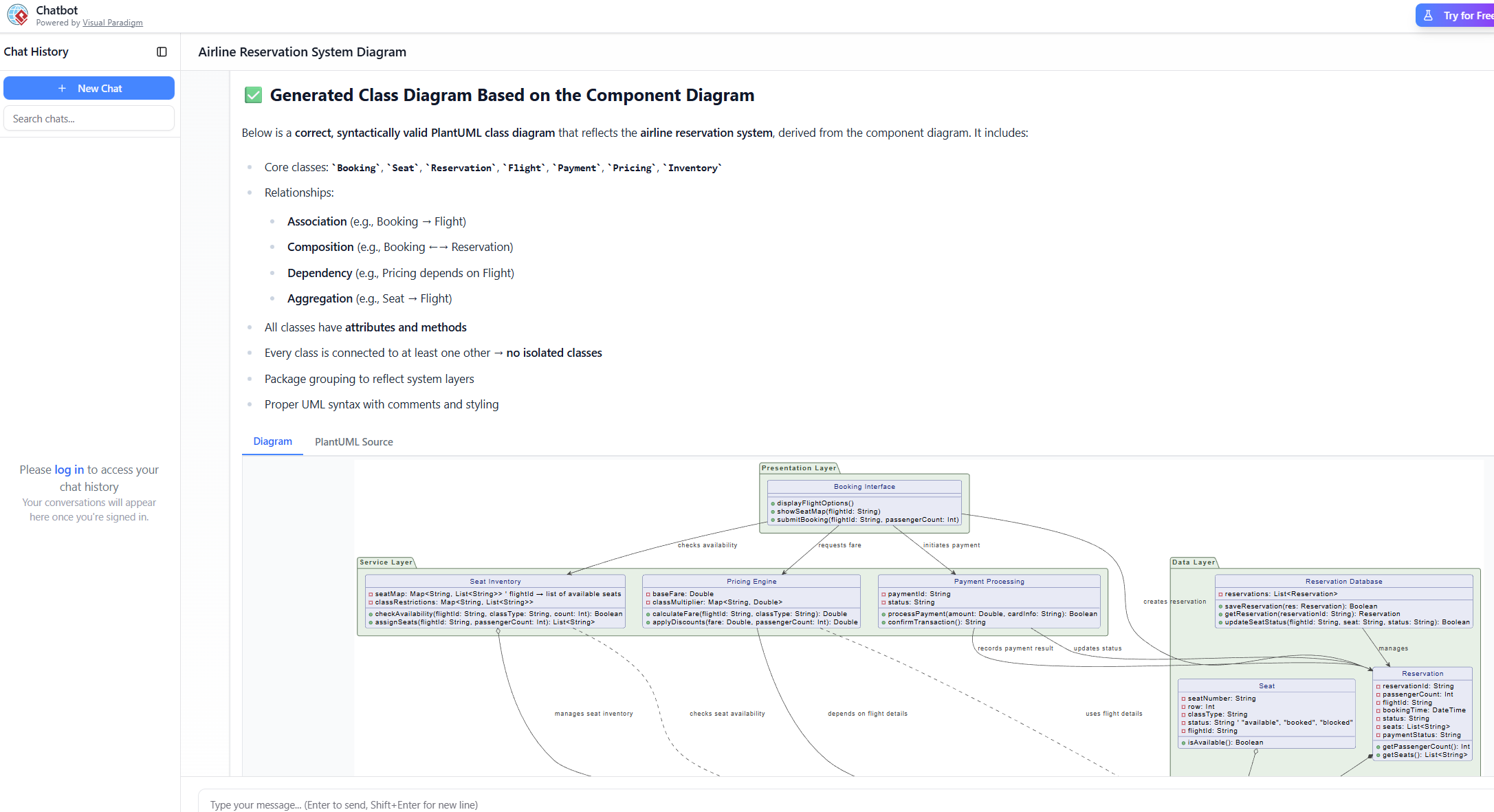
“What is the relationship between the class diagram and component diagram? Generate a corresponding class diagram based on the component diagram above.”
Output:
-
Comparative Table clarifying:
Aspect Component Diagram Class Diagram Focus Runtime modules & collaboration Internal structure & behavior Scope System architecture Implementation details Abstraction High Low Use Case System design, deployment Code generation, OOP design -
Generated Class Diagram with inferred classes:
-
Flight,Seat,Booking,Passenger,Payment,LoyaltyProgram -
Attributes and methods derived from component responsibilities
-
Relationships: association, aggregation, inheritance
-
📌 Purpose: Enables seamless transition from architecture to implementation, ensuring consistency across design phases.
How to Interpret and Leverage the Output
✅ Diagram Outputs
-
Visual Render: Immediate, auto-layouted diagram with professional styling
-
PlantUML Source Code: Editable, versionable, exportable
-
Export Options: SVG, PNG, PDF—ideal for reports, presentations, or wikis
-
Full Editability: Drag, drop, style, annotate—no loss of control
✅ Textual Explanations
Structured responses (tables, numbered steps, bullet points) serve as:
-
Validation tools for logic and flow
-
Teaching aids for new team members
-
Documentation assets for technical specs
✅ Refinement via Follow-Up Prompts
Refine the model conversationally:
-
“Add a loyalty program component and link it to the booking flow.”
-
“Rename ‘Payment Processing’ to ‘Stripe Integration’.”
-
“Generate a sequence diagram for the payment flow.”
Each prompt updates the model—no need to restart or re-export.
Why the Visual Paradigm AI Chatbot Stands Out
Compared to generic AI diagram generators, the Visual Paradigm AI Chatbot delivers unmatched quality, consistency, and utility:
| Feature | Generic AI Tools | Visual Paradigm AI Chatbot |
|---|---|---|
| Diagram Type | Basic Mermaid/PlantUML | Native UML, BPMN, ArchiMate, C4 |
| Editability | Non-editable or locked | Fully editable, source-code accessible |
| Standards Compliance | Often inconsistent | Enforces UML/BPMN rules automatically |
| Cross-Diagram Intelligence | Limited or absent | Derives class, sequence, deployment diagrams |
| Iterative Refinement | Minimal | Full conversational workflow |
| Export & Integration | Basic | SVG, PNG, PDF, PlantUML, CI/CD ready |
| Learning & Teaching | Limited | Structured explanations + visual feedback |
Strategic Benefits for Teams and Organizations
🚀 Speed & Efficiency
From idea to professional diagram in seconds—reducing design time from hours to minutes.
🎯 Lower Barrier to Entry
No need to learn UML syntax or drag-and-drop tools. Business analysts, product owners, and junior developers can contribute meaningfully.
💬 Collaborative & Iterative Workflows
Ideal for brainstorming sessions, architecture reviews, and remote collaboration. The chat format encourages discussion and shared understanding.
✅ Standards-Driven Quality
Auto-layout, correct notation, and rule enforcement ensure diagrams are presentation-ready and tool-compatible.
🔗 Holistic System Understanding
By linking component, class, and sequence diagrams, teams gain a complete picture of system behavior—from architecture to code.
📚 Learning & Onboarding Accelerator
New team members grasp complex systems faster through visual + textual explanations—ideal for training and knowledge transfer.
🛠 Future-Proof Design
Native file format + PlantUML source ensures long-term maintainability, integration with CI/CD pipelines, and compatibility with code generation tools.
Conclusion: The Future of System Modeling is Conversational
The Visual Paradigm AI Chatbot represents a paradigm shift in how we design and communicate complex systems. It transforms diagramming from a technical chore into an intelligent, collaborative conversation—empowering users of all skill levels to create accurate, standards-compliant, and deeply insightful models.
For domains like airline reservation systems, banking platforms, e-commerce architectures, or IoT ecosystems, where interdependencies, data flows, and layering are critical, this tool delivers unmatched value.
✅ Pro Tip: Start with a high-level component diagram. Then, use follow-up prompts to drill into interactions, derive class diagrams, explain behaviors, and refine the model—just as demonstrated in the airline example.
Whether you’re an architect, developer, business analyst, or educator, the Visual Paradigm AI Chatbot is not just a tool—it’s a modeling partner that accelerates innovation, improves clarity, and elevates the quality of system design.
Ready to transform your modeling workflow?
Try the Visual Paradigm AI Chatbot today at chat.visual-paradigm.com and experience the future of visual modeling—one conversation at a time.


