


Design Smarter, Not Harder — From Idea to Precision with AI-Powered Architecture Modeling
🔍 Why Use Visual Paradigm’s AI Chatbot for Component Diagrams?
Before diving into the steps, let’s understand why this tool is transformative:
✅ Accelerates Design Thinking – Turn vague ideas into structured diagrams in seconds.
✅ Enforces Best Practices – Automatically applies layered architecture (Presentation, Service, Data).
✅ Promotes Collaboration – Non-technical stakeholders and developers can co-design using natural language.
✅ Supports Multiple Standards – Seamlessly switch from Component Diagrams to Sequence, C4, ArchiMate, and more.
✅ Intelligent Conversations – Ask follow-ups and get technical depth, not just static images.
💡 Use Case: Building an airline booking system? You need clarity on how components like Seat Inventory, Pricing Engine, and Payment Processing interact — without writing code or UML syntax.
Let’s walk through the entire process, step by step.
🛠️ Step 1: Access the Visual Paradigm AI Chatbot
-
Click “Start New Chat” or use a shared session link (e.g., from a blog post).
-
You’ll see a clean interface with a chat window and a live diagram canvas.
✅ Pro Tip: Use the “Shared Session” link to collaborate in real time with your team.
🧠 Step 2: Start with a Clear Prompt (The First Step to Precision)
Type a natural language request like:
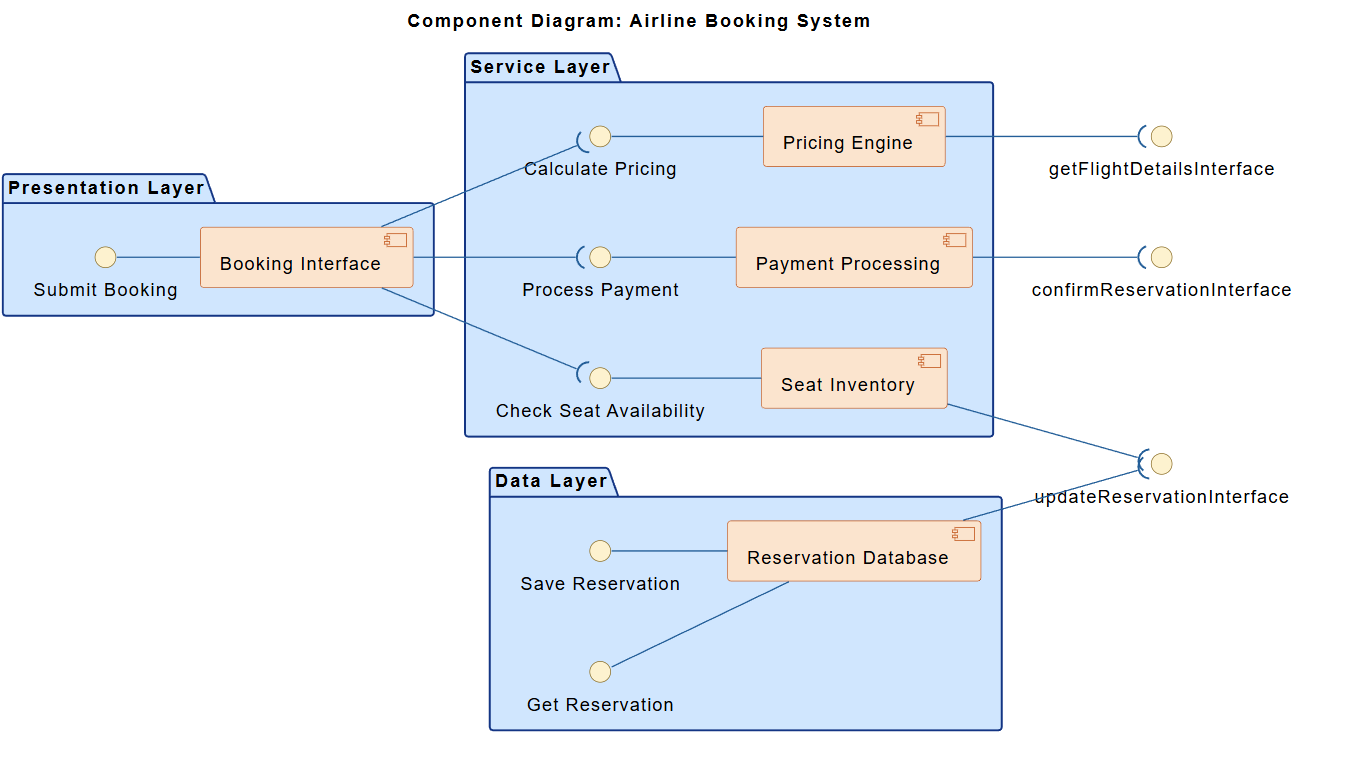
“Generate a component diagram for an airline booking system that includes: Booking Interface, Seat Inventory, Pricing Engine, Payment Processing, and Reservation Database.”
💡 Why this works:
-
No need to know UML syntax.
-
The AI understands domain-specific terms (e.g., “seat inventory” → a real-time availability component).
-
It automatically groups components into logical layers: Presentation, Service, Data.
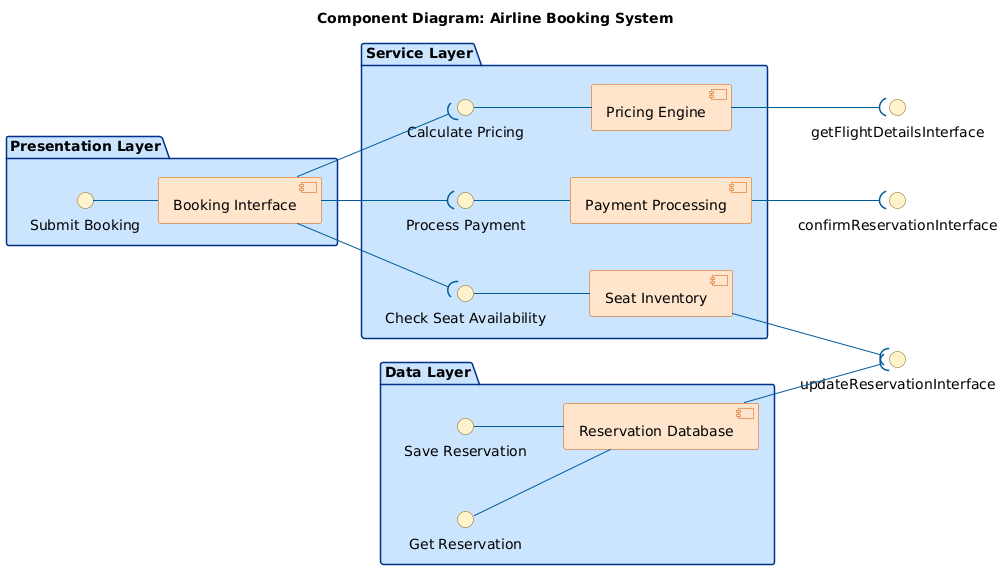
✅ Result: Within seconds, you’ll see a fully rendered PlantUML-based component diagram with:
-
Components as boxes
-
Interfaces (e.g.,
Check Seat Availability) -
Dependencies (dashed arrows)
-
Layered packages (Presentation, Service, Data)
🤔 Step 3: Engage in Conversational Design (Where AI Becomes a Consultant)
Now comes the real power — ask questions to deepen your understanding.
Example 1: Ask About Interface Interaction
“How does the ‘Check Seat Availability’ interface work with the Seat Inventory component?”
🧠 AI Response Includes:
-
Flow: User selects flight → Booking Interface calls
Check Seat Availability→ Seat Inventory checks real-time availability. -
Data returned: Available seats, seat layout, class restrictions, and time-limited locks.
-
Business impact: Prevents overbooking and ensures accuracy.
-
Technical insight: Uses optimistic locking or reservation timeouts to prevent race conditions.
✅ This isn’t just a diagram — it’s architectural guidance.
Example 2: Clarify Dependencies
“Why is the Pricing Engine connected to both the Booking Interface and the Payment Processing?”
🧠 AI Explains:
-
The Booking Interface sends fare details to the user before payment.
-
The Payment Processing component needs the final price to authorize the transaction.
-
This shows data flow across layers, not just UI-to-backend.
✅ Helps avoid tight coupling — you now understand why interfaces matter.
Example 3: Request a Sequence Diagram (Future-Proofing)
“Can you generate a sequence diagram showing the full booking flow?”
🧠 AI Generates:
-
A step-by-step interaction:
-
User submits booking request
-
Check seat availability
-
Calculate price
-
Process payment
-
Save reservation
-
Confirm booking
-
🔄 You can now switch between diagram types in the same conversation — all within one platform.
📦 Step 4: Refine the Diagram with Layered Architecture
The AI automatically structures your diagram using three key layers:
| Layer | Components | Purpose |
|---|---|---|
| Presentation | Booking Interface | User-facing entry point |
| Service | Seat Inventory, Pricing Engine, Payment Processing | Core business logic |
| Data | Reservation Database | Persistent storage |
🎯 Why this matters:
-
Reflects real-world deployment (e.g., microservices in Docker/Kubernetes).
-
Enables independent scaling: e.g., scale the Pricing Engine during peak travel seasons.
-
Supports DevOps: teams can deploy each layer separately.
🔄 Step 5: Iterate & Expand the Model
Don’t stop at one diagram. Use the AI to evolve your design:
➤ Add External Actors
“Show external systems like payment gateways and passenger databases.”
➡️ AI generates a System Context Diagram showing:
-
Passengers (actors)
-
Third-party payment providers (e.g., Stripe, PayPal)
-
External flight data APIs
➤ Model at a Higher Level
“Create an ArchiMate view showing business capabilities and application services.”
➡️ AI maps:
-
Business Layer: Customer Management, Booking Management
-
Application Layer: Reservation Service, Payment Service
-
Technology Layer: Cloud Database, API Gateway
🧩 This is the power of a unified modeling environment — one chat session, multiple standards.
📤 Step 6: Export & Share Your Diagram
Once satisfied, export your work:
-
Click “Export” → Choose format:
-
PNG (for reports)
-
PDF (for presentations)
-
PlantUML code (for version control)
-
SVG (for web integration)
-
-
Share the live session link with your team.
-
Collaborate in real time — everyone sees changes instantly.
🔗 Example: Shared Session Link
🎯 Why This Approach Is Better Than Traditional Tools
| Traditional Tools (e.g., Draw.io, Lucidchart) | Visual Paradigm AI Chatbot |
|---|---|
| Manual drag-and-drop; slow to build complex models | Instant diagram generation from natural language |
| No architectural guidance | Offers real-time design advice |
| Static diagrams; no conversation | Dynamic, iterative modeling |
| Limited to one diagram type | Supports UML, C4, ArchiMate, SysML, SWOT, etc. |
✅ You’re not just drawing — you’re designing with intelligence.
🧩 Bonus: Use Cases Beyond Airline Systems
This workflow isn’t limited to airlines. Try it for:
-
E-commerce: Product catalog, cart, checkout, inventory
-
Banking App: Account management, transaction processing, fraud detection
-
Healthcare Portal: Patient records, appointment scheduler, billing
-
IoT Platform: Sensor data ingestion, analytics engine, alerting service
The AI adapts to any domain — just describe your system in plain English.
✅ Final Checklist: Best Practices When Using AI for Component Diagrams
| Do | Don’t |
|---|---|
| ✅ Start with a clear, specific prompt | ❌ Use vague terms like “build a system” |
| ✅ Ask follow-up questions to clarify logic | ❌ Assume the diagram is perfect on first try |
| ✅ Use layered packages (Presentation/Service/Data) | ❌ Mix components without structure |
| ✅ Export and version control the PlantUML code | ❌ Rely only on visual output |
| ✅ Combine with other diagrams (sequence, context) | ❌ Work in isolation |
🚀 Conclusion: Design Smarter, Not Harder
Visual Paradigm’s AI Chatbot isn’t just a diagram generator — it’s your AI-powered modeling partner.
With just a few conversational steps, you can:
-
Go from idea → component diagram → sequence flow → enterprise architecture
-
Ensure consistency, scalability, and clarity
-
Empower teams across tech, business, and product to align
🌐 Ready to build your next system?
Try it now: https://ai-toolbox.visual-paradigm.com/app/chatbot
📚 Learn More: Resources to Level Up
- Component Diagram Software – Visual Paradigm Online: This powerful online tool allows developers to design detailed component diagrams that support UML standards and real-time team collaboration.
- UML Component Diagram Tutorial and Tool – Visual Paradigm: A comprehensive guide and interactive tool designed to help users model software architecture and define complex component relationships.
- Major Upgrade to AI UML Component Diagram Generation: This release details significant enhancements to the AI Chatbot, solidifying it as an essential tool for generating architectural diagrams through intelligent automation.
- AI-Powered Component Diagrams with Visual Paradigm Chatbot: This article explores how the chatbot facilitates the creation of component diagrams using natural language input, streamlining the design process.
- UML Component Diagram Tutorial: Designing Software Architecture: A technical video resource providing a step-by-step guide on creating diagrams to model the modular structure and dependencies of software systems.
- AI-Generated UML Component Diagrams: A Comprehensive Guide: This guide focuses on using AI assistance to produce accurate and standards-compliant UML component models for system architecture.
- Generating and Modifying C4 Component Diagrams with AI Chatbot: A specialized tutorial demonstrating how to use the AI-powered chatbot to create and iteratively refine C4 component-level diagrams.
- UML Component Diagram Tutorial: Building Modular Software Systems: An in-depth walkthrough for developers and architects on modeling system components to ensure a robust software structure.
- Why Teams Need AI Diagram Makers for Faster Project Kickoff: This article explains how automated diagram generation accelerates project starts by rapidly producing UML and component diagrams from text prompts.
- Understanding Structural UML Diagrams for System Architecture: An overview of structural diagrams that depict the static aspects of a system, specifically highlighting classes, objects, and components.
🎯 Pro Tip: Bookmark this tutorial and reuse it for every new project. The AI remembers context — the more you chat, the smarter it gets.
Design with precision. Model with purpose. Let AI do the heavy lifting.
✨ Visual Paradigm AI Chatbot – Where Ideas Become Architecture.
Related posts:
 UML Component Diagram vs. Deployment Diagram: Key Concepts
 Revolutionizing System Modeling: How the Visual Paradigm AI Chatbot Transforms Diagram Creation
 Empowering Developers: How Visual Paradigm AI Co-Pilot Transforms UML Modeling for IT Teams
 Case Study: Elaborating the “Browse Products” Use Case in an E-Commerce Platform